
You might also like...
Article
10min read


Article
7min read
 abtasty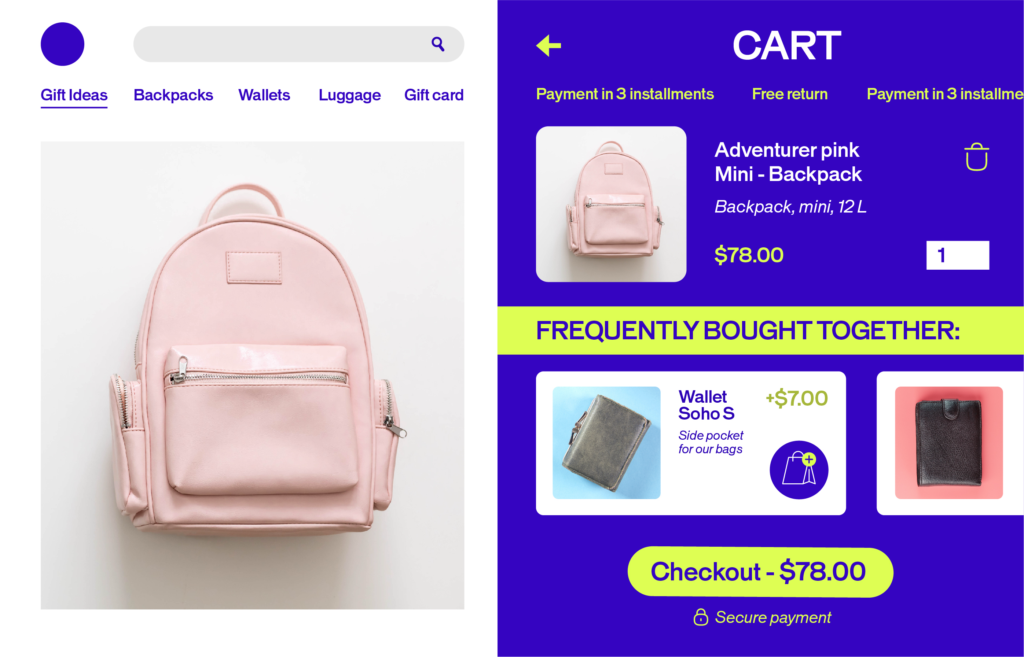
Product recommendations are personalized product suggestions shown to customers based on their behavior, preferences, and context. Think of them as a smart, always-on sales assistant — one that analyzes what your customers browse, click, and buy, then surfaces the right products at the right moment.
These assistants show up everywhere: on your homepage, product pages, cart, checkout, and even in your emails. And when done well, they don’t just drive sales, they make the shopping experience feel intuitive and personal.
Good recommendations make the whole shopping experience feel effortless, and that’s what drives real business results. It’s not a trick. It’s just good experience design.
When people discover the right product at the right moment, everything follows:
See e-merchandising in action →
At its core, a product recommendation engine is a system that collects data, finds patterns, and predicts what a customer is most likely to want next. Here’s how it works, step by step:
The engine gathers signals from across the customer journey:
Machine learning algorithms process all that data to identify what customers have in common — and what makes each one unique. The more data the engine has, the sharper its predictions become.
Based on those patterns, the engine selects and ranks products most likely to resonate with each individual shopper — in real time.
The engine doesn’t stop there. It adapts constantly, updating recommendations as customer behavior evolves. Every click, purchase, and scroll makes it smarter.
AB Tasty’s recommendation engine goes one step further with its Semantic Proximity Algorithm — a Natural Language Processing (NLP)-powered approach that analyzes your product catalog (names, descriptions, categories, prices) to surface semantically related products, even without historical purchase data. That means relevant recommendations from day one, even for new catalogs or seasonal campaigns.
Still curious? Go deeper with our product recommendation engine guide →
Different algorithms power different types of recommendations. Most modern engines use a combination of approaches to get the best results.
Collaborative Filtering
Looks at the behavior of many users to make predictions for one. User-based: “People like you also liked…” Item-based: “Customers who bought this also bought…” — finds patterns across co-purchase behavior.
Content-Based Filtering
Focuses on product attributes — category, color, price, style — and recommends items similar to what a customer has already shown interest in. Especially useful for new users with limited behavioral history.
Hybrid Systems
Combines collaborative and content-based filtering for more accurate, more relevant results across a wider range of customer scenarios. AB Tasty’s engine uses a hybrid approach — so you’re never relying on a single signal.
Deep Learning
For large catalogs and complex datasets, deep neural networks extract nuanced patterns from raw data — including visual similarity, natural language, and sequential behavior — to deliver highly precise suggestions.
Every recommendation has a purpose, therefore, understanding why you’re showing a product is just as important as which product you show.
The three core intents are:
Encourage customers to add complementary products to their purchase. A customer buying a camera? Suggest a memory card or a carrying case.
Cross-sell recommendations typically appear on product pages, in the cart, or at checkout.
Guide customers toward a higher-value version of what they’re already considering. A customer looking at a basic laptop? Show them the model with more storage and a better processor.
The key in upsell intent is highlighting the added value and not just the higher price.
Help customers explore alternatives. If the product they’re viewing isn’t quite right, similar item recommendations keep them on your site and moving toward a purchase. These are based on shared attributes like style, category, or visual similarity.
The where matters as much as the what. Here’s how to place recommendations strategically at every stage of the customer journey.
Your homepage is the first impression. Use it to:
This is where intent is highest. Recommendations here should:
The customer is close to buying — don’t let the momentum stop. Use the cart to:
Keep it focused here — you don’t want to distract from conversion. But a well-placed “Frequently Bought Together” or a time-sensitive offer can still add value without friction.
Email is one of the highest-ROI channels for recommendations:
AB Tasty’s recommendation widgets integrate natively with email platforms like Brevo and Adobe Campaign, as well as CMS platforms like Shopify, PrestaShop, and Salesforce Commerce Cloud — so your recommendations stay consistent across every channel.
Browse AB Tasty’s Integration Hub →
AI does a lot of the heavy lifting, but merchandising rules let your team stay in control. They’re manual conditions you layer on top of the recommendation engine to align suggestions with your business goals.
Restrict recommendations to a specific subset of products. Only items that meet your criteria get shown — like filtering to in-stock items only, a specific category, or a defined price range.
Hide products you don’t want surfaced. Remove out-of-season items, low-margin SKUs, already-purchased products, or anything already sitting in the customer’s cart.
Manually place specific products in prominent positions, regardless of what the algorithm ranks first. Perfect for pushing new launches, high-margin items, or overstocked SKUs that need visibility.
The real power comes when you combine merchandising rules with audience segmentation.
A few examples:
Advanced segmentation lets you go deeper by targeting audience behavior, engagement level, or emotional profile.
In this sense, EmotionsAI lets you go even further by classifying visitors into emotional segments — think “Competitive,” “Security-driven,” or “Pragmatic” — within just 30 seconds of landing on your site. So your recommendations don’t just match what customers want. They match how customers want to feel when they buy.
One tip: Let the algorithm learn first. Give it time to understand your customers’ behavior before layering in too many rules. Once it’s calibrated, rules become a precision tool — not a workaround.
Unlock Deeper Audience Insights with EmotionsAI →
Getting recommendations live is just the start. Here’s how to make sure they’re actually working.
Your recommendation engine is only as good as the data it learns from. Continuously collect and update behavioral signals across all channels — don’t let it run on stale inputs.
Every placement should have a clear goal: discovery, upsell, cross-sell, or retention. Don’t just add recommendation widgets everywhere — think about what you want the customer to do next.
Showing 20 recommendations isn’t better than showing 5 great ones. Quality beats quantity every time. Irrelevant suggestions erode trust fast.
There’s no universal formula. What works for one audience might not work for another. Run A/B tests on placement, algorithm type, number of items shown, and visual presentation — then let the data guide you. AB Tasty’s web experimentation capabilities let you test recommendation strategies directly, with statistical confidence, so you’re always moving forward on evidence — not guesswork.
Badges like “Recommended for you,” “Trending,” or “Customers also loved” draw attention and add context. They make recommendations feel curated, not automated.
Mobile shoppers behave differently. Optimize recommendation widgets for smaller screens, and consider location or time-of-day signals to add contextual relevance.
Use merchandising rules to promote high-margin products, clear seasonal inventory, or spotlight new launches — without overriding the personalization that makes recommendations valuable in the first place.
Ready to go further? Let’s build better experiences together →
Personalized product recommendations are suggestions tailored to each individual shopper — based on their browsing history, past purchases, search behavior, and real-time actions on your site. Unlike generic “Bestsellers” lists, they adapt to each visitor, making the shopping experience feel relevant, intuitive, and uniquely theirs.
A recommendation engine collects behavioral signals — clicks, views, purchases, time on page — and uses algorithms to identify patterns. From there, it predicts which products each customer is most likely to want next and surfaces them at the right moment. The more data it gathers, the sharper its suggestions become.
When done well, they’re one of the highest-impact tools in e-commerce. Relevant, well-placed recommendations shorten the path to purchase, increase basket size, and keep customers coming back. The key word is relevant — generic or poorly timed suggestions can do more harm than good. The best results come from combining strong algorithms with smart placement and continuous testing.
Recommendations are one of the most powerful forms of personalization — but they’re not the same thing. Personalization covers everything from tailored content and messaging to dynamic layouts and targeted offers. Product recommendations are a specific, high-impact application of that strategy, focused on surfacing the right products for the right person at the right time.
Match the recommendation to where the customer is in their journey. On a product page, lean into cross-sells and similar items. In the cart, last-minute add-ons work well. On the homepage, bestsellers and recently viewed items are a safe bet for returning visitors. The goal is always the same: make the next step feel obvious and helpful — not forced.
Start by auditing your placements, then your data quality.
A few things make a real difference:
Yes — with the right engine. When there’s no behavioral data to work with, catalog-based signals take over: product attributes, categories, descriptions, and semantic relationships between items. AB Tasty’s Semantic Proximity Algorithm is built exactly for this — it uses NLP to analyze your product catalog and surface relevant suggestions from day one, even for brand-new visitors or freshly launched product lines.
Yes — and you should. Most recommendation engines let you set merchandising rules to include, exclude, or pin specific products. Promote new launches, hide out-of-stock items, push high-margin SKUs — all without losing the personalization layer underneath. Think of it as AI doing the heavy lifting, with your team steering the direction.

Subscribe to our Newsletter