
Let’s be honest… Most KPI dashboards are where good intentions go to die. They’re meticulously built, packed with charts, and then they’re mostly ignored. Teams are drowning in data but starved for real insight. Why? Because the framework is broken. It’s either tracking metrics that don’t matter, it’s too slow to be useful, or it’s so complex that nobody knows what the numbers are actually telling them.
This creates a frustrating cycle. Marketing, product, and engineering teams work hard on new ideas, but they can’t prove their impact. The result is a culture of guesswork, not growth. But it doesn’t have to be this way. At AB Tasty, we see optimization as a journey of constant learning, where every experiment moves you forward. A great KPI framework is your guide on that journey. It’s not a static report; it’s a dynamic tool that turns raw data into a clear story of progress, aligns your teams around shared goals, and gives you the confidence to make the next move. It’s time to build a framework that your teams will not only use but will champion.
Step 1: Identify KPIs that are actually key
The biggest trap in measurement is vanity. We track clicks, pageviews, and time-on-page because they’re easy to see and feel like progress. But do they connect to the bottom line? Often, they don’t. A truly effective framework starts by asking the big questions first. What are the core outcomes that drive our business forward?
Forget the firehose of data for a moment and focus on your ultimate destination. Are you trying to:
- Increase customer lifetime value?
- Improve user retention and reduce churn?
- Boost average order value?
- Drive qualified leads for the sales team?
Once you have your high-level business objective, you can work backward to identify the Key Performance Indicators (KPIs) that directly influence it. These are your true north stars. If your goal is to grow revenue from your e-commerce platform, your key indicators aren’t just traffic numbers. They’re metrics like purchase rate, average order value (AOV), and overall revenue.
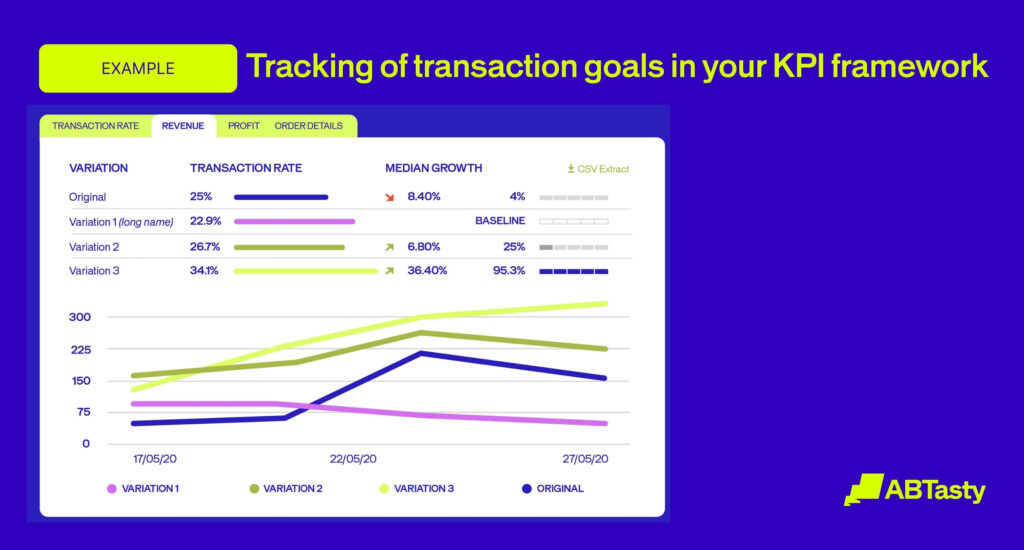
This is why we’ve built our platform with these meaningful goals in mind. Right out of the box, you can set up goals in AB Tasty that cut straight to business impact. These include:
- Transaction goals, such as AOV, purchase rate, and revenue.
- Action tracking, which measures critical user interactions like clicks, scroll depth, and element visibility.
- Browsing behavior, to understand revisits, bounces, and pageviews in a meaningful context.
By starting with KPIs that are directly tied to business outcomes, you create a shared language. Your product team’s experiments with the checkout flow, marketing’s new campaign, and the CRO team’s homepage tests all point toward the same measurable goal. You’re no longer just running tests; you’re driving tangible progress.
Step 2: Measure what makes you unique with custom metrics
Standard metrics are a great starting point, but your business isn’t standard. Your user journey has unique steps, critical interactions, and “aha!” moments that generic KPIs will never capture. Maybe it’s a customer using your product configurator, engaging with a new video series, or filling out a multi-step form. These are the interactions that define your unique customer experience, and you need to measure them.
This is where the grit comes in. It takes determination to go beyond the easy-to-track metrics and measure what truly matters. Custom metrics allow you to translate your unique business logic into trackable data points. They answer specific questions like:
- “Did users who interacted with our new sizing guide convert at a higher rate?”
- “How many people clicked on the ‘request a demo’ button after watching our new feature video?”
- “What percentage of users completed all three steps of our new onboarding flow?”
You shouldn’t have to change your user experience to fit your analytics tool. Your tool should adapt to you. That’s why in AB Tasty, you can create Custom Trackings that are directly linked to the DataLayer on your site. This lets you build metrics based on your specific data. You can also create custom trackers with JavaScript, giving your team the flexibility to measure virtually any interaction. It’s even possible to use these custom tracking events to replicate goals from other platforms, like GA4, ensuring consistency across your entire analytics stack.
When you measure what makes you unique, you get insights that your competitors can’t see. You start understanding the why behind the what, turning your data from a simple report into a competitive advantage.
Step 3: Leverage real-time reporting to act fast
The pace of digital is relentless. An insight that’s a week old is already history. For optimization to be effective, the feedback loop between action and insight needs to be as short as possible. If your team has to wait days or weeks for a report on their latest experiment, they’ve already lost momentum. The opportunity to pivot, iterate, or double down on a winner has passed.
A culture of improvement requires a flow of constant learning. This is where real-time reporting becomes essential. When you can see the impact of your changes as they happen, you empower your teams to be proactive, not reactive. They can spot a problem with a new release within minutes, not days. They can see a winning variation pull ahead and make a confident decision to roll it out to all users, capturing its value immediately.
We know that speed is critical. That’s why AB Tasty offers real-time reporting that automatically activates when you push a campaign live. During the initial, most critical phase of a test (up to 1,000 unique visitors or the first 12 hours), your data for every goal and variation is updated every five minutes. We also provide a Live Hits monitoring tool so you can track event data at any moment. This closes the gap between an idea and its outcome, allowing your teams to make smarter, faster decisions fueled by up-to-the-minute data.
Step 4: Understand confidence to make confident decisions
You’ve run a test, and variation B is outperforming the original by 5%. Is it time to celebrate and deploy it to everyone? This is where many teams get stuck. They see a positive lift but are paralyzed by uncertainty. What if it’s just random chance? How “sure” do we have to be?
This is the final, crucial piece of the framework: understanding the story your statistics are telling you. You don’t need to be a data scientist to make a good call, but you do need tools that present statistical confidence in a clear and actionable way.
At AB Tasty, we use Bayesian statistics, which provides direct and intuitive probability statements. Instead of just a confusing p-value, we give you two key things:
- The chance to win: This is a straightforward probability that tells you how likely it is that a variation is better than the original. A 98% chance to win means there’s a 98% probability that the variation is the true winner.
- A 95% confidence interval: Think of this as a “range of likely outcomes.” If the confidence interval for the gain is [+2%, +8%], we are 95% confident that the true, long-term uplift from this variation is somewhere between 2% and 8%. The remaining 5% represents the margin of error.
This approach removes the ambiguity. It equips your team with the conviction they need to make decisions. It’s not about being 100% certain; it’s about understanding the probability and the potential impact, allowing you to make a calculated business decision. It’s the insightfully sharp wisdom that turns a good idea into proven progress.
Conclusion: Find your better
A KPI framework is so much more than a dashboard. It’s a reflection of your strategy, a tool for alignment, and the engine of your experimentation culture. When you focus on what matters, measure your unique journey, act on insights in real-time, and make decisions with confidence, you create a powerful cycle of continuous improvement.
You stop guessing and start knowing. Your teams feel empowered because they can see the direct impact of their brave ideas. You build a culture that doesn’t just celebrate the wins but learns from every single test. You start your journey to “Find your better.” Your data is already telling this story. It’s time to build the framework that lets you read it.
Frequently Asked Questions (FAQ)
What’s the difference between a KPI and a metric?
Think of it this way: a metric measures a process, but a KPI measures performance against a key business objective. For example, “website traffic” is a metric. But “conversion rate from organic traffic,” when your goal is to increase online sales, is a KPI. All KPIs are metrics, but not all metrics are KPIs.
How many KPIs should we track?
Less is more. A framework with 25 KPIs is a list, not a focus. Aim to identify 3-5 primary KPIs for each major business objective. This forces you to prioritize what truly drives the business forward and keeps your teams from getting lost in the noise.
How do we get our teams to actually use the framework?
Adoption comes from ownership and accessibility. Involve marketing, product, and data teams in the creation process so the KPIs reflect their reality. Then, make the dashboard highly visible and easy to understand. Most importantly, celebrate the insights the framework generates, not just the successful tests. Frame it as a tool for learning, and your teams will embrace it.
What kinds of KPIs are available out of the box in AB Tasty?
You can set up goals at both an account and campaign level. The primary goal types include:
- Action Tracking: Clicks, dwell time, element visibility, scroll rate.
- Page Tracking: Visits to a specific page or group of pages.
- Browsing Behavior: Revisit rate, bounce rate, pageviews per session.
- Transaction: Average order value (AOV), purchase rate, total revenue.
- DataLayer Goals: Tracking based on variables in your site’s data layer.
Can we create custom metrics?
Yes. You can create Custom Trackings linked directly to your DataLayer, allowing you to build metrics from your unique business data. You can also create custom trackers using JavaScript, which can be used to track specific interactions or even replicate goals from other platforms like GA4.
Is reporting in real-time?
Yes. Real-time reporting activates automatically when a campaign goes live. During the initial phase (the first 1,000 unique visitors or 12 hours), data for each goal and variation are updated every five minutes. We also provide a Live Hits monitoring tool to track event data at any time.
How does AB Tasty report on statistical confidence?
We provide two key figures to make decisions easier. The first is a 95% confidence interval, which gives you a likely range for the true value of the gain. The second is the Chance to Win, which is a direct probability that one variation is better than the other. We use a Bayesian statistical model because it provides these intuitive, actionable results that are easier for teams to understand and act on.
What’s the difference between client-side and server-side testing?
Client-side testing happens in the user’s browser and is ideal for marketing and CRO teams to quickly test visual changes, copy, and layouts without needing developer support. Server-side testing happens on the web server, which is better for product and engineering teams to test more complex functionality, new features, and omnichannel experiences. AB Tasty’s unified platform supports both, allowing teams to work from a single place.
How do we measure the impact of personalization on KPIs?
The key is to always test your personalization efforts. Run an A/B test where Group A sees the standard experience and Group B sees the personalized experience. By comparing the KPIs for both groups—such as conversion rate, AOV, or engagement—you can directly attribute any uplift to your personalization strategy and prove its ROI.