Article

10min read

Measure your DevOps Performance: DORA Metrics

Nowadays, as software development processes become more decentralized and as the number of teams working on different projects (in different places too) increases, it becomes that much harder to set and track metrics to measure performance across these teams.

And yet data is now more important than ever. Data is a company’s most valuable asset in order to measure how efficiently teams are performing over time to deliver the best products and user experience to customers. 

This is especially relevant for DevOps teams where there’s a need for a clear framework to measure their performance.

This is where DORA metrics come in.

What are DORA metrics?

DORA metrics provide a standard framework to help leaders who are implementing a DevOps methodology in their organization to measure the performance of their teams.

This framework was the result of a six-year research program conducted by Google Cloud’s DevOps Research and Assessment (DORA) team after analyzing survey responses from over 32,000 professionals worldwide. Their goal was to determine the most effective ways to develop and deliver software.

Through the use of behavioral science, the research identified four key metrics that would indicate the performance of a software development team. 

With these metrics, teams can measure their software delivery performance, monitor it over a period of time and be able to easily identify areas of improvement to optimize performance. In that sense, they shed light on the capabilities that drive high performance in technology delivery.

Therefore, DORA metrics are especially relevant for DevOps teams as they provide them with concrete data to measure performance and improve the effectiveness of their DevOps operations. It also allows them to assess whether they are building and delivering software that meets customer requirements as well as gain insights on how to improve and provide more value for customers.

The four DORA metrics

In this section, we will list the four main metrics that the DORA team identified for DevOps teams to measure their performance. 

The following chart shows from the 2022 State of DevOps report, updated each year, shows the ranges of each metric according to the different categories of performers:
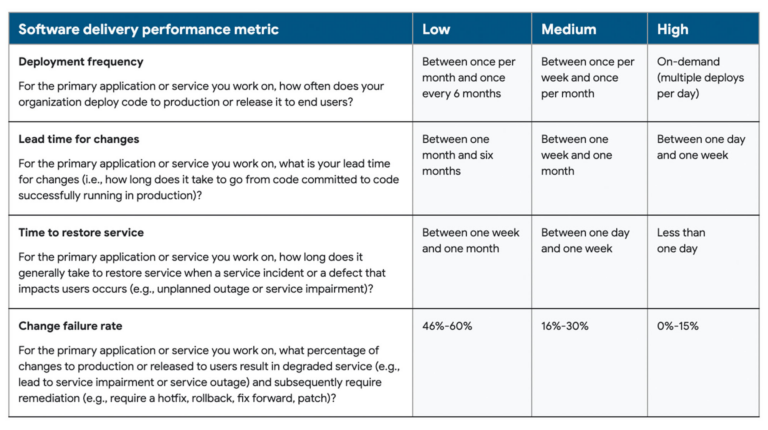
The four key metrics used are:

  1. Deployment frequency

Deployment frequency measures velocity. In this case, the goal is to measure how often an organization successfully deploys code to production or releases it to end users.

This is an important metric particularly for DevOps teams whose ultimate goal is to release software quickly and frequently. It helps teams to measure their productivity and agility as well as uncover issues and bottlenecks in their workflow that may be slowing things down.

High performing teams deploy on-demand, multiple times a day. Thus, this metric stresses the importance of continuous development and deployment, which is one of the principles of a DevOps methodology.

Each organization will need to consider what constitutes a “successful” deployment for its teams such as taking into account what level of traffic is sufficient to represent a successful deployment.

How to improve this metric:

To enhance this metric, it’s usually best to ship code in small batches on a frequent basis. This will allow you to reduce risk of deploying bugs and increase speed of delivery. Implementing an automated CI/CD pipeline will also enable you to increase deployment speed.

  1. Lead time for changes

Lead time for changes is the amount of time it takes a commit to get into production. Therefore, this metric also seeks to measure velocity and gives an indication of a team’s cycle time. The lower the lead time for changes, the more efficient the team is at deploying code.

This metric requires looking at two pieces of data: when the commit happened and when it was deployed. The goal is to keep track of the time development starts until the committed code is finished and deployed to uncover any inefficiencies in a team’s processes. The average time can then be used to analyze overall performance.

In other words, the purpose of this metric is to give an indication of the waiting time between the initial stages of implementing the change and deployment. A high lead time may suggest inefficiencies in the CI/CD pipeline and not enough automation, especially if every change has to go through manual testing instead which significantly slows things down.

How to improve this metric:

Again, here it’s best to work with smaller changes. This allows for faster feedback so developers can immediately fix any issues. Teams should also eliminate bottlenecks and integrate automated testing at every stage of the CI/CD pipeline to detect issues early on. 

Feature flags are also a great tool to lower lead time as any unfinished changes can be hidden behind a flag while other changes can be deployed.

  1. Change failure rate

This represents the number of deployments causing a failure in production. In other words, it measures any changes to code that resulted in incidents, rollbacks or any other failures. This depends on the number of deployments attempted and how many of those resulted in failures in production.

As a result, this metric is a measure of the stability and quality while the previous two focus mainly on speed of software delivery. 

This metric requires the number of deployments that resulted in failures divided by the total number of deployments. The percentage calculated will give insight into how much time is dedicated to fixing errors as opposed to delivering new code. 

The lower the rate the better. High performing teams have a change failure rate of 0-15%. 

Consequently, teams with a low change failure rate is a sign that these teams have an efficient deployment process in place, which can be mainly achieved through automating every step of the process to avoid common manual errors.

It’s important to note, however, that this metric can be hard to quantify as the definition of failure can vary widely. Therefore, it’s best for each organization to set goals for its teams according to their unique business objectives. 

How to improve this metric:

Automation is crucial to also help improve this metric. Automated tests can evaluate code at every stage in its development. This way, issues are caught and fixed early on so they’re less likely to make it to production. Creating critical feedback loops are necessary to get a low change failure rate to prevent incidents like this from happening again in the future.

  1. Time to restore service 

Also referred to as “mean time to recovery MTTR”, this indicates how long it takes for an organization to recover from a failure in production that impacts user experience.

This metric, like change failure rate, is meant to determine the stability of a system or application when unplanned outages occur. Thus, information about when the incident occurred and when it was resolved then deployed will be needed to measure the time to restore service.

Therefore, the “time to restore service” metric is important as it encourages teams to build more stable systems and create action plans to be able to respond immediately to any failures. High performing teams will resort to deploying in small batches to reduce risk while increasing speed of delivery.

This is particularly applicable to DevOps teams as they place high emphasis on the idea of continuous monitoring, which will in turn help them to improve their performance when it comes to this metric.

How to improve this metric: 

Consider using feature flags. Feature flags act as switches enabling you to turn a change on or off in production. This means that if any issue occurs, you can toggle the switch off if something goes wrong with a change in production with minimal disruption while it’s being resolved. This will then help reduce your MTTR. 

The DORA metrics can then be compiled into a dashboard. To do so, DORA created the Four Keys dashboard template to generate data based on the metrics and visualize the results. See example below of this dashboard:
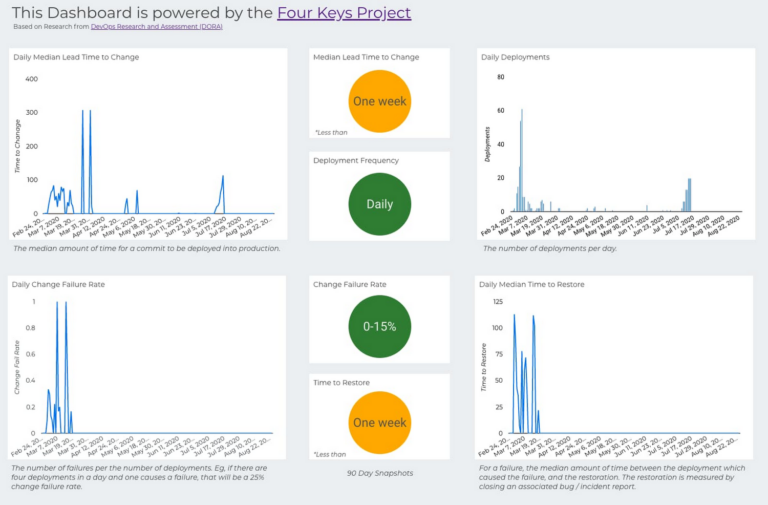
The dashboard gives a higher-level view for senior stakeholders of their organization’s DORA metrics to understand how their teams are performing and what corrections can be done to remedy any problems.

Why are DORA metrics important?

As we’ve already mentioned, DORA metrics are a great way to keep track of the performance of DevOps teams and identify areas of improvement.

It helps organizations assess their delivery process and encourage teams to streamline their processes and increase the speed of delivery while maintaining quality.

As a result, the main benefits of these metrics are:

  • More effective decision-making– with the data acquired from these metrics, teams know what aspects to focus on that need improvement. Teams can easily detect issues and bottlenecks within the software development process and devise an action plan to address them. Decisions will be based on data rather than opinions or gut feelings which may be misleading. 
  • Better value- DORA metrics will give teams an indication whether they’re delivering value to customers by evaluating the efficiency of your value stream and finding areas to improve within your delivery process to build higher quality products.
  • Continuous improvement- this is particularly important as it is one of the main pillars of a DevOps methodology. Using DORA metrics, the team gets insight on their performance and set goals to improve the quality and delivery of software.

Challenges of DORA metrics

DORA metrics have a lot of advantages, but they do come with their own challenges as well.

One of the main challenges when faced with these metrics is that they will vary across organizations and teams as, often, they have different definitions and processes in place. In other words, no products or teams are the same and may operate at their own level of complexity. As a result, it’s important to put this data into context before making decisions.

DORA metrics give a good overall picture of how teams are performing in certain categories. This means that it’s important to have a valid way to keep track of the data but don’t rely solely on them. 

Teams may be facing issues beyond what is accounted for in these metrics. DORA metrics are focused mainly on the bottom line instead of the inputs and processes that lead to the outputs being measured. Sometimes, there’s more to the story than what DORA metrics measure so tread carefully. 

Ultimately, enhancing performance will be unique to each organization. Work on shifting your attention to your team and goals to give context to the story all these metrics are telling. Focus on building the right culture for your team and providing them with the tools they need to enhance performance. This, in turn, will help them deliver business value faster. 

DORA metrics: The key to unlocking more value

DORA metrics are a great starting point, especially to help teams make informed decisions about what can be improved and the steps to take to achieve that. 

They give a good indication of a team’s progress along their DevOps journey and encourage the implementation of the key principles of DevOps including shipping in small batches more frequently.

In particular, it enables them to assess and analyze the efficiency of their development and delivery processes by offering a framework for measuring performance across two important variables in DevOps: speed (deployment frequency & lead time for changes) and stability (change failure rate & time to restore service). 

Teams will then be able to create more value for their customers faster. Above all, DORA metrics are a way for teams to shift their focus to maximizing velocity and stability.

It’s important to note that tracking these metrics should be in line with your organizational goals and customers’ needs to give context to these metrics, make sense of them and improve them.

Feature flags are also another effective way to improve performance across these metrics. They will allow you to ship new changes in small batches and hide any that are not yet ready to speed up deployment while reducing risk of big bang releases making problems easier to detect and resolve.

Get a demo of AB Tasty to unlock the value feature flags can bring to your teams today.

Article

8min read

Continuous Testing in DevOps

Nowadays, organizations cannot afford to make any errors. If something does go wrong, it will more often than not result in disgruntled customers turning to competitors for better satisfaction. Consumer frustration quickly results in losing any potential leads and conversions. 

This is why continuously testing software through the software development life cycle is the key to eliminate any errors and ultimately release better and higher quality products.

This is especially important if you’re looking to implement DevOps practices within your organization as DevOps often relies on the fast and frequent release of software.

Continuous testing is now needed to keep up with the demand for speed in the modern software development world and keep pace with DevOps and Agile practices that advocate for shorter delivery cycles to keep up with rapidly changing consumer demands.

In other words, continuous testing goes hand-in-hand with effectively adopting DevOps practices and workflows in your organization.

What is continuous testing?

The basic idea behind continuous testing is evaluating and verifying the quality of the software as frequently as possible starting from the early stages of development using automation.

This means that the software undergoes continuous, uninterrupted testing at every stage of the software development lifecycle from development until it’s eventually deployed to the end-user to assess the quality and performance of the software.

This is the idea behind ‘shifting left’ or ‘shift-left testing’, which entails testing early on the development cycle so that issues are discovered early on, largely through the use of automated tests.

Put simply, if we want to retain the momentum of continuous testing, it’s important to automate whenever and wherever possible.

Therefore, automated testing can be carried out on a frequent basis every time code changes are made enabling fast feedback loops to quickly fix any issues as they arise. With such quick feedback loops, developers can quickly and efficiently optimize and improve products to match customer requirements.

Continuous testing is an integral part of continuous integration and continuous delivery. 

This is because these processes require the software to go through a series of automated tests from unit tests early on in development in order to test single parts of a software to integration and functional tests to make sure that the individual parts work seamlessly together. 

Why is this so important for a DevOps methodology?

Think of it this way: traditionally, testing is typically completed after the software development process is done, at which point it’s sent to quality assurance to be tested. If bugs are found, then the software is sent back to developers so that they can fix these bugs.

The issue with this traditional form of testing is that it’s risky. When developers rush to fix any issues, they often fix these issues so late in the development process that things get complicated fast. In this sense, it can be time-consuming and could delay the release process, which defeats the entire purpose of a DevOps methodology. 

Moreover, DevOps embraces everything ‘continuous’, meaning it is dependent on continuous feedback and improvement through the implementation of continuous integration, continuous delivery and continuous testing.

Continuous testing enables teams to achieve the main goal of DevOps, which is to deliver high quality software quicker than ever before, hence reducing time-to-market and accelerating release cycles.

Benefits of continuous testing

As can be deduced from the above, continuous testing is a key element of DevOps and has a number of benefits including:

  • Accelerating software delivery and helps teams respond quickly and efficiently to rapidly-changing market demands
  • Improving code quality as software is assessed at each stage which, in turn, reduces risk and increases confidence
  • Helping discover bugs early on: this is important as the earlier bugs are discovered, the less costly it will be to fix and also allows for faster recovery
  • Ensuring immediate feedback and encourages better collaboration between testing and development teams as well as continuous improvement as teams can use the feedback to improve products’ reliability and quality
  • Reducing manual efforts, hence freeing developers to focus on more important tasks
  • Earning customer loyalty and satisfaction with products optimized for their needs
  • Facilitating the adoption of a culture of DevOps and fulfills its underlying goal which is delivering of quality software faster

Challenges of continuous testing 

While there are a number of benefits to continuous testing, there are a few challenges and points that teams need to take into consideration.

First, teams need to ensure that the test environments are exact replicas of the production environment to make sure that the software behaves as expected as it would in the production environment. 

Setting up these simultaneous environments will require careful coordination of the different test environments and consume considerable resources and investments that may not always be readily available.

Keep in mind that teams should not only focus on testing. Continuous testing is not just about automating tests but it also involves using the results of these tests to continuously improve and optimize products. Consequently, it represents an opportunity for team members to utilize the feedback from these tests to find areas for improvement in code quality.

Thus, teams need to successfully implement a system for fast feedback loops that helps them gather relevant feedback in real-time, which may require advanced tools.

Furthermore, continuous testing becomes more complex as the scope for the product grows and moves towards the production environment. The number of tests increases as does the complexity of these tests. This may result in delayed tests which could result in some serious bottlenecks delaying releases and defeating the whole purpose of continuous testing.

There’s also the issue of the tools being used not having enough scalability as more tests are run which could overwhelm the testing system

Best practices for continuous testing

  • Adopt automation wherever possible

Automate tests as much as possible to achieve faster releases and reduce the human error component that often comes with manual testing.

Automation is also a key enabler of DevOps implementation and by setting up an efficient CI/CD pipeline, this will help automate workflows to reduce manual tasks.

Moreover, your products will reach your customers faster helping you gain competitive advantage.

Keep in mind, however, that continuous testing and test automation are not the same concept even though they’re sometimes used interchangeably.

As we mentioned above, test automation is a vital part of continuous testing but that’s not all there is to it. Continuous testing evolves beyond the idea of test automation.

It instead encompasses all the tools, processes and teams that come with automation and which aims to verify software through feedback at every step of the development process.

  • Select the right tools

Automation isn’t the only key component of continuous testing. It also involves teams having the right tools at hand to make the continuous testing process more efficient and easier.

Teams need to select the right tools that will reduce manual operations so they can focus on more pressing things: building better software. Therefore, they will need to set in place a robust test automation framework that focuses on all aspects of testing-for each layer of the testing pyramid- from unit to UI tests.

Remember that whatever tools you opt for will largely depend on your organization’s and teams’ needs and overall objectives. 

Read more: our picks of the best DevOps tools

  • Track the relevant metrics

You will need to keep track of relevant metrics to measure the success of your tests. In other words, you will need to keep track of all the bugs that occur as well as the number of successful and failed tests.

For example, if you see the number of errors and bugs increasing, you know that you will need to look into your development process in order to rectify it and in the long run will help you improve the functionality of your products.

Keeping tracks of tests will also help create a more efficient continuous testing strategy.

  • Establish clear lines of communication 

One of the most essential contributing factors to successfully implementing continuous testing is getting teams to collaborate to avoid different teams working in silos. This will help prevent bottlenecks and conflicts from occurring which could disrupt the development process.

Therefore, constant and transparent communication will keep your pipeline moving seamlessly and will increase productivity among teams.

Feature flags: Continuous testing in production

So you’ve run all the necessary tests to verify that the software is working as expected before releasing it into production so users can access it.

However, continuous testing shouldn’t end in staging environments pre-production. It’s still imperative to test your releases even after they’ve been deployed to production and thus should be incorporated into your testing strategy and framework.

No matter how much you try to replicate your staging environments to match a production environment, it’s unlikely that it would end up being an exact replica. This means that errors and bugs may still end up in production even after thorough testing pre-deployment.

As a result, testing in production is essential to uncover these bugs that you may have missed in your previous tests.

But how do you implement a safe strategy to test in production to reduce major negative impact on your end-users?

Two words: feature flags.

Through progressive deployment, feature flags will allow you to control who sees (or who doesn’t see) the new feature allowing you to verify this feature before releasing it to everyone else. You can even choose to limit a release to internal users only, a type of targeting known as dogfooding so your team can verify the code in production before end-users have access to it.

Read more: How feature flags can bring efficiency to your CI/CD pipeline to deliver releases quickly and more frequently

Continuous testing: The magic ingredient for your CI/CD pipeline for better and faster releases

As we’ve seen, uncovering bugs early on in the software development lifecycle will make your life and development process much easier and more efficient, not to mention that nowadays having major bugs show up in production is a major business risk that organizations can no longer afford to make. 

To fulfil the goal of DevOps, which is releasing high quality software fast, continuous testing needs to be implemented.

Make sure you set in place a robust testing strategy that covers all the stages of the software lifecycle and above all, make sure that it fulfills your requirements and needs.

There are many tests you can run as part of an effective continuous testing strategy. However, keep in mind that continuous testing goes over and beyond test automation and is key to building and maintaining an efficient CI/CD pipeline as well as reducing risk while accelerating time-to-market.

Article

11min read

Best DevOps Tools: Our Top Picks

We have previously stressed the importance of automation in our ultimate guide to DevOps. In other words, it’s imperative to automate wherever possible to free teams from manual, repetitive processes so that they can instead focus on developing high quality products while automating more tedious tasks.

Automation is an important principle of DevOps as it helps accelerate time-to-market, uncover bugs quickly that developers may have overlooked. This will ultimately result in better products and hence reduces any failures and rollbacks of software.

There are many tools that can help teams to effectively collaborate together. These tools are implemented throughout the software development lifecycle from development to release.

Organizations that want to incorporate DevOps practices and build a culture of DevOps will need to use the right stack of tools according to their unique business needs in order to implement DevOps successfully.

What are DevOps tools?

We can look at DevOps tools as tools that help automate the software development process. They include all the platforms, tools and other applications that are used throughout the DevOps lifecycle.

Their purpose is to facilitate collaboration between various teams, namely development and operations teams. An organization will also need to consider the right tools to implement during the key stages of the DevOps lifecycle, which include planning, building, continuous integration and deployment, testing, monitoring and gathering feedback.

In other words, these tools help to automate the different stages within the software development lifecycle from build to deployment in order to improve the speed and frequency of software releases, which is the main goal of DevOps.

In this article, we will list some of our top picks of DevOps tools that make it easier to manage development and operations’ processes and to ensure transparency, collaboration and automation among teams.

We will be listing a non-exhaustive list of DevOps tools divided into different categories. It’s important to note that some of these tools may have an overlap in functionalities.

As a result, they can be used in other stages of the software development process as there are a wide variety of DevOp tools for every requirement. 

Below we will be listing some of these tools that can help you implement DevOps practices seamlessly:

Version control tools

The DevOps lifecycle starts with source code management, which includes tasks such as version control. Version control is the process of monitoring and managing changes to software code in order to maintain the code and to help development teams collaborate more effectively. 

Git

Git is a free and open source distributed version control system that is suitable for both small and larger projects. Using Git, each developer has a full backup of the main server and so in the event that the central server crashes, the copy of the repositories can be restored from the developers who have downloaded the latest snapshot of the project.

Features:

  • Easy to learn and can be used by beginners and experts alike
  • Supports non-linear workflows and development 
  • Distributed system meaning that every user essentially has a full backup of the main server
  • Git is fast compared to other centralized systems as nearly all operations are performed locally rather than having to constantly communicate with a remote server
  • It is released under the General Public’s License (GPL) to make sure it is free for all users

GitLab 

GitLab is an open-source, all-in-one DevOps tool to help teams build software fast for every stage of the DevOps lifecycle. 

This tool, in particular, helps simplify source code management by enabling clear code reviews, asset version control, feedback loops, and powerful branching patterns.

Features:

  • Ability to manage code from a single distributed version control system
  • Enables collaboration by allowing multiple contributors to work on a single project
  • Facilitates code reviews and feedback with Merge Request Reviewers
  • Provides security features to protect source code and project access

Container management tools

Containerization is when software code is packaged together with all its necessary components so that they are isolated in their own container, keeping it independent of its surroundings. This allows the software or application to be deployed to different environments without further configuration regardless of potential environmental differences, while also ensuring better security through container isolation.

This makes the application flexible and portable and allows for efficient application development and deployment, hence making DevOps easier to implement.

Docker

Docker is one of the most popular container platforms that was launched in 2013 for fast, easy and portable application development. It is an open-source (that also offers commercial options) centralized platform for packaging, deploying, and running applications.

It uses OS-level virtualization to deliver software in packages called containers. Its main purpose is to help developers easily develop applications and ship them into these containers so that they can be deployed anywhere. Each container is independent of another and has everything the software needs to run including libraries, system tools, code and runtime.

Features

  • Docker runs in Windows, macOS and Linux and is compatible with cloud services
  • Provides a standardized packaging format for diverse applications
  • Docker Hub with more than one million container images, including Certified and community-provided images
  • It is easily scalable due to its lightweight nature
  • Small, containerized applications to easily deploy and identify any issues then roll back if needed

Kubernetes 

Originally developed by Google in 2014, Kubernetes is another open source DevOps tool that allows you to deploy and manage containerized applications anywhere.

It essentially provides a framework to run distributed systems resiliently and allows you to automate the process of managing hundreds or thousands of containers.

Features:

  • Automated rollouts and rollbacks by monitoring application health
  • It gives Pods their own IP addresses and a single DNS name for a set of Pods, and can load-balance across them
  • Automatically mount the storage system of your choice
  • Self-healing capabilities by restarting containers that fail

CI/CD tools

Continuous integration (CI) and continuous delivery (CD) encompass a set of practices within DevOps that enable modern development teams to deliver code changes more frequently and quickly.

Jenkins

Jenkins is one of the most popular automation tools. It’s a self-contained, open source automation server to automate a number of tasks related to building, testing or deploying software. 

As an extensible automation server, Jenkins can be used as a simple CI server or turned into the continuous delivery hub for any project.

Features:

  • With its hundreds of plugins, Jenkins integrates with practically every tool in the continuous integration and continuous delivery toolchain
  • It can be easily set up and configured through its web interface with on-the-fly error checks and built-in help
  • It can easily distribute work across multiple machines to drive builds, tests and deployments across multiple platforms faster

GitLab CI/CD

GitLab CI/CD is the part of GitLab that facilitates continuous integration, delivery, and deployment enabling teams to build, test and deploy software through automation.

Features:

  • Automatically build, test, deploy and monitor your applications using Auto DevOps
  • Automated pipeline triggered with every change
  • Provides security scans and compliance checks to safeguard deployments
  • Built for multi-cloud 
  • Built-in templates to easily get started

Configuration management tools

Tools under this category help teams track changes to applications and their infrastructure to ensure that configurations are in a known and trusted state. 

Tools in this category basically help organizations configure, maintain, correct, and ensure that computer systems and hardware remain in a desired state — without needing to manually track every change made, ultimately speeding up deployment.

Ansible

Ansible is a configuration management tool that is used for deploying, configuring and managing servers. It’s an open source tool whose purpose is to eliminate repetitive tasks allowing teams to be more productive by making IT automation accessible.

Features

  • Ansible is a simple-to-use platform, easy to install and configure
  • Ansible uses no agents and works with your existing security infrastructure
  • It uses a very simple language (YAML, in the form of Ansible Playbooks)
  • Supports a wide variety of integrations across the DevOps toolchain 
  • Ansible has deep and broad capabilities across the cloud ecosystem

Terraform

Terraform is an open source, infrastructure as code tool by HashiCorp to help you provision and manage all of your infrastructure throughout its lifecycle.

Features:

  • Easily integrates with existing workflows 
  • Uses the declarative approach, meaning that the configuration files describe the end state of your infrastructure. You do not need to write step-by-step instructions to create resources
  • Deploy across multiple clouds, which means you can use it with any cloud service provider
  • Supports an immutable infrastructure which reduces the complexity of upgrading or modifying your services and infrastructure

Test automation tools

The purpose of test automation is to verify the functionality and/or non-functional requirements of an application by executing test cases and reporting any defects without human intervention to increase speed, efficiency and reliability.

Selenium

This tool is primarily used for automating web applications for testing purposes and can also be used to automate web-based administration tasks and uses techniques to remotely control browser instances and emulate a user’s interaction with the browser.

In other words, Selenium encompasses a range of tools and libraries that enable and support the automation of web browsers.

Features:

  • This tool supports all major browsers on the market such as Chrome/Chromium, Firefox, Edge, Opera, and Safari
  • Selenium Grid allows you to run test cases in different machines across different platforms
  • Includes an easy-to-use Chrome and Firefox extension to develop test cases by recording the users’ actions in the browser for you
  • Supports a wide range of programming languages and platforms

Monitoring tools

The last stage of the DevOps cycle is monitoring your software or application in real-time to track errors and fix issues immediately as they arise.

Grafana and Prometheus

Prometheus is an open source monitoring solution that allows you to power your metrics and alerting. It records metrics in real time by using a highly dimensional data model and powerful queries.

It’s especially popular within the Grafana community. Both Grafana and Prometheus allow users to store large amounts of metrics that they can easily slice and break down to understand how their system is behaving.

Features:

  • Provides a functional query language called PromQL that lets you select and aggregate time series data in real time
  • Ability to export data from third-party systems
  • Multiple modes for visualizing data, including a Grafana integration

Which DevOps tools are right for your organization?

It’s always important to keep in mind that having the right DevOps tool for your organization is essential for the automation of the software delivery lifecycle, which will ultimately help you deploy better software faster, thereby accelerating time-to-market.

To choose the right tools, you should consider factors such as the following:

  • Integration with other tools
  • Scaling capabilities 
  • Price 
  • Support options
  • Compatibility with cloud platforms

Most importantly, building a culture of DevOps serves as the foundation for your teams to successfully implement these tools as this will require a collaborative effort. 

Ultimately, the tools you choose will depend on your objectives and the resources and expertise you have at your disposal. Whatever tools you opt for, you’ll have the advantage of having a more efficient development workflow and improved productivity.

Article

10min read

Building a Culture of DevOps

In our guide to DevOps, we discussed the increasing importance of this concept within the modern software development world.

To recap, DevOps can be seen as a cultural shift and a tactical approach that enables teams to collaborate more effectively in order to deliver high quality software faster than ever before.

In that sense, the main objectives of a DevOps methodology are to:

  • Increase speed to market
  • Continuously optimize software through continuous feedback loops
  • Break down barriers and remove silos between development and operations

With that said, in order to adopt DevOps practices, it’s important to keep in mind that it all starts with the culture within an organization itself as well as the people who are implementing these practices.

What is a DevOps culture?

DevOps is not a specific term or set of processes but more so about people and culture.

When we talk about building a DevOps culture, we’re not just referring to continuous integration and continuous delivery practices and automated testing. While these practices fall under the concept of DevOps, that’s not all this concept encompasses.

A DevOps culture is basically adopting the values that reinforce DevOps principles and incorporating its best practices and tools. You can look at it as a set of values that places emphasis on building an environment of continuous learning and encouraging open communication and feedback through cross-team collaboration.

In other words, a DevOps culture at its core means enhancing collaboration between development and operations teams to increase shared responsibility and accountability when it comes to software releases. It’s about those teams adopting a shared culture and mindset that allows them to focus on quality of software and speed of delivery.

The concept of DevOps also stresses the idea of continuous improvement by instilling such a culture of collaborative efforts throughout the software development life cycle.

The foundation that makes up a DevOps culture, then, is increased collaboration, transparency and communication between these teams that previously worked more in isolation to foster productivity.

How can you successfully achieve a DevOps culture?

Many organizations assume that since they have technology and workflow processes in place, they are successfully implementing DevOps.

However, as we’ve stated above, DevOps is much more than that. Sure, adopting these practices may improve the development process and increase velocity but these practices will only be effective if your team is not just blindly following a set of instructions because they are told to. You will need to establish the right team culture and mind-set that involves unified workflows to build better software.

A DevOps culture requires an environment transformation that fosters collaboration, trust and respect between team members and different teams. It’s important to ensure that teams share equal responsibilities and accountability throughout the project lifecycle.

Building a strong cultural foundation first based on these principles will allow your team to apply them much more easily in their day-to-day workflows so that DevOps becomes embedded within the organization as a whole. 

Consequently, unless these organizations actually adopt the cultural changes that come with DevOps, teams will find great difficulty in realizing the true promise of DevOps.

What does it take to build this kind of culture?

There are a number of principles that make up a culture of DevOps and applying them will help ensure that the implementation of such a culture will be truly successful. 

Below, we will outline some of these principles:

  • Start at the top

As mentioned previously, one of the objectives of DevOps is to break down traditional barriers and friction between development and operations teams.

Thus, to build a solid DevOps culture, communication and collaboration are imperative. To improve and facilitate communication and collaborative efforts between different teams, these teams must have a shared vision and goals that they can work towards.

How exactly can this be achieved?

By getting leadership to lay the groundwork for such a culture to flourish within an organization. Cultural change will only happen with top-down motivation so the idea is to start from the top and gradually make your way to the bottom.

In other words, it is important that senior stakeholders and leaders are involved and in full support of building an effective DevOps culture as good leadership tends to set the example for open communication by encouraging cross-team cooperation.

Leaders need to be advocates for DevOps, spreading its values across the organization as well as its benefits so that teams understand why it needs to be implemented across all workflows. 

However, DevOps is not a one-size-fits-all solution and so it’s not necessarily implemented the same way across different organizations. Every organization will have its own unique DevOps journey.

Needless to say, one DevOps team will not look the same as another. DevOps will only succeed if it’s aligned with what makes sense for your team and organization. 

One common trait that all good leaders share, on the other hand, is providing the resources and the set of practices necessary for teams to perform their jobs effectively while allowing each team to flourish in its own right.

Good leaders will also provide the kind of environment that will stimulate experimentation and promote knowledge sharing in order to nourish your DevOps culture.

  • Invest in the right people for your team

Just as important as good leadership, it’s equally important to establish the right team who understand the value of DevOps and will also advocate for it.

A cultural shift to DevOps starts with people and processes foremost. Focus on getting people with a problem-solving approach who are willing to learn and embrace your company’s culture and ensure they fit in with organizational DevOps vision so that they, in turn, can confidently lead this cultural change.

Afterall, your DevOps team will serve as the foundation on which all your DevOps efforts are built. The better different teams and team members collaborate with each other, the higher the quality of the end-product will be.

Therefore, every single member of your team must be willing to open up the lines of communication and enhance their collaborative efforts that will allow them to work together towards common goals.

In other words, implementing a DevOps culture will be more about changing your team’s habits and communication habits than just what tools they use.

This means you will need to begin assembling a team with a diverse background and expertise. Team members that come from different backgrounds can open up new ways of thinking and problem solving paving the way for innovative thinking.

  • Work towards common goals

One of the first questions you should ask yourself early on in your DevOps journey is what exactly the primary goal is.

Once that’s determined, it’s imperative that all teams have a clear understanding of where the organization is headed and that they’re all aligned around common objectives to have the right mindset in place.

This will help better orient your DevOps culture shift and will also help make better decisions when developing and deploying software as they use these goals to determine the kind of projects they should prioritize and products they work on that best meet business objectives.

This will include not only goals at the organizational level but also at team and project levels. Which goals you set will depend on the needs of your team and project such as reducing time to market or increasing efficiency. It will depend on the pain points and problems that your teams are facing, which is why ongoing communication is imperative.  

Again, leadership will play a huge role in communicating goals at all levels of the organization and sharing the overall vision to make sure all teams are on the same page.

  • Provide appropriate training and education

So you’ve lined up a great team but it’s not enough to get people with the right mindset. They will also need to receive the training and education necessary to be a productive member of the team.

As previously mentioned, leaders will need to be advocates for DevOps to educate on how and where DevOps practices add value to each team member and the organization as a whole.

DevOps teams will need to be involved throughout the software development lifecycle all the way from planning and building the software to deploying it. This will require that each team member has a well-rounded set of skills. As a result, teams will need to be trained on DevOps processes as well as the tools that will be used to carry out these processes.

Nevertheless, honing in technical skills should not be the sole focus. It’s just as important for teams to receive training on how to improve soft skills, primarily improving communication skills to enable cross-functional collaboration.

Training and education should be an ongoing endeavor for all teams and team leaders should make it a priority to check in often with team members to help them improve whenever necessary and open up lines of communication to create a safe space where everyone can freely participate.

  • Embrace failure

An essential part of DevOps is to encourage open communication between teams while at the same time giving them the space to be more autonomous and take ownership of their projects.

This instills a sense of shared responsibility as previously-drawn barriers are broken down and there’s a realization among everyone that they’re all in this together as they work towards ensuring the best possible outcome.

However, just as important as successes are, teams should also be encouraged to experiment with new processes and technologies to allow for continuous and faster innovation.

Therefore, failure should serve as a learning opportunity instead of pointing fingers and playing the blame game. Instead of talking negatively about things that didn’t work, teams can look at them as lessons to constantly improve.

By embracing failure, organizations can foster a culture of continuous learning and improvement so that team members are always learning and improving their skills as well as working towards further improving collaborative and communication efforts.

They can also incorporate these learnings to increase customer satisfaction and accelerate innovation to better meet fast-changing customer and market demands.

  • Automate wherever possible

A key aspect of a DevOps culture is automation in order to develop and deploy software more efficiently and reliably.

By automating processes, teams are able to continuously improve products and respond quickly to customer feedback.

Without automation, teams will need to perform numerous manual and repetitive tasks which could result in more delays and errors. On the other hand, automation frees up teams to focus on continuous improvement and innovation without worrying about tedious tasks which leads to better satisfaction for both consumers and teams.

Consequently, within any DevOps culture, it’s essential to have the right tools and technology at hand to ensure teams can perform their tasks and contribute to the software development and release processes as efficiently as possible.

In the long run, automation will save you time, money and resources and includes automation of vital processes such as infrastructure maintenance, software deployment and continuous testing to validate your releases. 

These tools should also play a large part in helping facilitate communication between all teams and team members and enhance their productivity.  

However, as already stated, remember that DevOps is not just about what set of tools you adopt but also the mindset of your team. 

DevOps: A gradual cultural shift that should be implemented organization-wide

Implementing a DevOps culture is so important today as it paves the way for open communication, collaboration and transparency which all serve to help you deliver better, more optimized products.

Building the right DevOps culture for your organization is not a process that happens overnight.

There are many key steps to take before fully embracing such a culture including preparing your teams for this shift by providing them with the necessary training and tools as well as instilling the DevOps culture mindset that comes with it.

A DevOps culture will not truly thrive unless your teams can come together and work collaboratively across common goals to deploy reliable software faster. This will require the support and commitment of leadership to create the right environment that promotes a DevOps culture and allow teams to make a seamless transition to the DevOps mentality. 

In other words, a true DevOps culture cannot be achieved unless the entire organization comes together as a tight-knit unit. Only then can you and your team reap the benefits of a DevOps culture that will ultimately deliver business value and drive growth.