
Main Takeaways
› Wandz is Wingify’s embedded AI layer, not a standalone assistant bolted onto the suite.
› It’s built to support experimentation, personalization, feature management, customer insight, and broader optimization workflows.
› Unlike general-purpose AI tools, Wandz works with context that’s already inside the suite: experiments, audiences, metrics, and customer behavior rather than starting from a blank slate.
› The goal is to shorten the distance between noticing something in the data and acting on it, without leaving the suite to do so.
Wandz is Wingify’s embedded AI layer, the intelligence DNA built directly into experimentation, personalization, feature management, commerce, and customer insight workflows across VWO and AB Tasty. Because Wandz already has access to your experiments, audiences, metrics, and behavioral data, it can analyze, recommend, and help execute changes without anyone exporting data or re-explaining context to a general-purpose AI tool first.
Why digital experience teams need a different kind of AI
Many teams already have AI in their daily workflow. ChatGPT, Claude, and Gemini are genuinely useful for brainstorming, drafting copy, summarizing documents, or writing code. None of that is in question.
But optimization work has a different shape. A useful answer to “why did conversion drop on this page” or “which audience segment should see this next” depends on context that lives entirely inside a testing and personalization suite: which experiments are running, how traffic is being split, what a given audience segment actually contains, what a heatmap or session recording shows about user behavior, and what’s already been tried before.
A general-purpose AI assistant doesn’t have access to any of that by default. Getting useful output means exporting data, pasting it into a chat window, writing a prompt with enough context to make the answer usable, and then carrying the AI’s suggestion back into the suite to actually act on it. That round trip is where most of the friction lives, in the manual work of feeding it what it needs to know.
What Is Wandz?
Wandz is the embedded AI layer that runs inside the Wingify suite, present across experimentation, personalization, feature management, analytics, and customer insight workflows rather than existing as a separate destination. It’s built on what AB Tasty previously offered through its Evi assistant and what VWO offered through Copilot, now unified into a single AI layer as the two suites converge under Wingify.
The distinction that matters most: Wandz is built into the screens where the work actually happens, which means it already has the context a general AI tool would need you to provide manually.
Why Wandz lives inside Wingify
The typical workflow with an external AI tool looks like this: export data, copy it, paste it into a prompt, write enough context for the answer to make sense, interpret what comes back, go back to the suite, and then manually execute whatever the AI suggested.
Wandz is designed to shorten that into: analyze, recommend, build, validate, launch, all without leaving the suite. The data doesn’t need to be exported because Wandz is already looking at it. The recommendation doesn’t need to be manually translated into action because Wandz can help build the resulting experiment, segment, or rollout directly.
One intelligence layer across the entire Suite
Rather than being a feature attached to any single product area, Wandz is designed to sit underneath all of them, drawing on the same underlying data regardless of where in the suite a team is working.
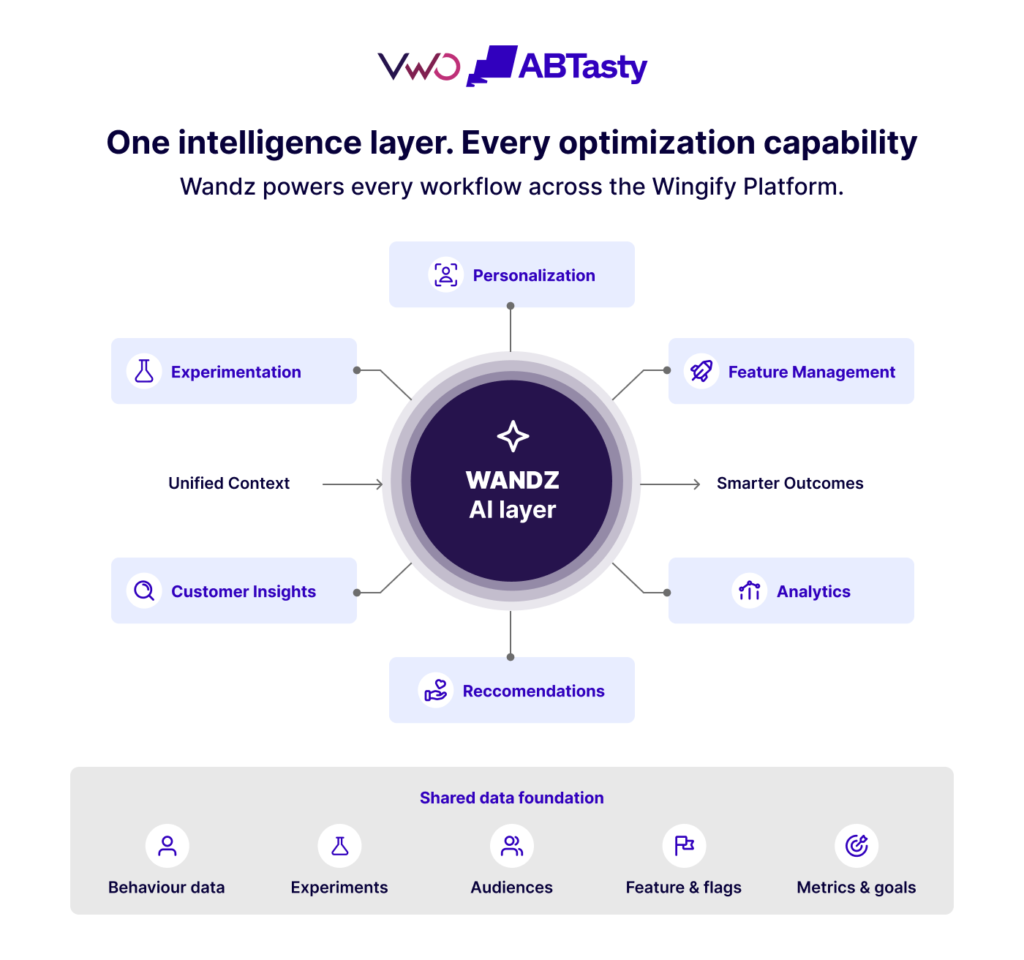
The practical effect of this shared layer is continuity: an insight surfaced while reviewing a heatmap can inform a hypothesis for a new experiment, which can inform an audience used for personalization, which can inform how a related feature gets rolled out, without re-explaining context at each handoff, because the underlying data carries through.
How Wandz supports every Wingify workflow
Most AI tools assist by surfacing a suggestion, and then a human carries it forward manually translating the recommendation into configuration, setup, or action inside the actual product. Wandz is built to go further than that.
Across every Wingify workflow, Wandz operates agentically: it doesn’t just recommend the next step; it can execute multi-step tasks end-to-end: drafting an experiment, building an audience, reviewing a configuration, interpreting a result, while keeping a human in the loop at the points where approval, judgment, or sign-off actually matters. The distinction is meaningful. An AI that tells you what to do still leaves the work to you. An AI agent that does the work and asks you to confirm before anything ships is where the real time savings come from.
Because Wandz operates inside the suite with live access to your experiments, audiences, metrics, behavioral data, and rollout history, it can act on that context directly, rather than describing what someone else should do with it.
Experimentation
In the experimentation workflow, Wandz generates hypotheses grounded in actual performance data rather than starting from a blank slate. It can draft an experiment end-to-end, defining variations, selecting metrics, and suggesting the right audience, and then review that configuration for likely issues before it goes live.
Once results come in, Wandz interprets them in plain language and identifies what to test next based on what the completed test revealed. The team reviews and approves at each stage; Wandz handles the mechanics in between.
Personalization
For personalization, Wandz moves from behavioral data to an actionable audience segment without requiring manual analysis at every step. It identifies patterns in visitor behavior worth targeting, builds a segment, and suggests experience variations suited to that segment, compressing what typically takes a full analytical cycle into something a team can act on in a single workflow.
A human confirms the segment logic and approves the experience before it runs; Wandz does the work of getting there.
Feature management
In feature management, Wandz reviews rollout configurations before launch, checking that metrics, targeting rules, and traffic allocations are set up correctly, and flags the issues a team might not catch until a test has already run for a week.
Beyond pre-launch review, Wandz can help reason through how aggressively to roll a feature out based on the risk profile of the change, and surface signals during a rollout that suggest it’s time to accelerate, pause, or trigger a kill switch.
Customer insights
For behavioral research, Wandz does the first pass across heatmaps, session recordings, and survey responses that would otherwise require hours of manual qualitative review.
It surfaces friction patterns, identifies which sessions are worth watching in full, and connects what it finds across multiple insight sources into a starting point for the next hypothesis — so teams spend their time on interpretation and decision-making rather than data triage.
Analytics
On the reporting and analytics side, Wandz answers questions about performance in plain language, explains what’s behind a notable shift in a metric, and surfaces comparisons across segments or campaigns without requiring anyone to build a custom report first.
For teams that need to communicate results upward, Wandz can pull together a summary that answers the business question rather than leaving that translation to the analyst.
What makes Wandz different from general-purpose AI?
The point isn’t that general-purpose AI is worse at reasoning, but that Wandz starts several steps ahead because it isn’t working from a blank slate.
| General-purpose AI | Wandz |
| Starts with generic knowledge | Starts with experimentation and optimization context |
| Needs data copied and pasted in | Already connected to your suite data |
| Doesn’t know your campaigns | Has access to your actual experiments |
| Doesn’t know your audiences | Has access to your actual segments |
| Mostly suggests ideas | Can help build and configure the resulting work |
| Lives in a separate workflow | Lives inside the workflow itself |
How different teams use Wandz
- Product managers use Wandz to help prioritize which experiments are worth running, understand feature adoption, and think through rollout pacing.
- Marketers use it to optimize campaigns, build out personalized journeys, and understand what’s actually driving (or blocking) conversion.
- Growth teams use it to generate hypotheses faster, identify which segments are responding well to a given test, and find the next opportunity once a test concludes.
- Engineers use it to review feature flag configurations, sanity-check a rollout plan, and reduce the risk of shipping something that breaks in production.
- E-commerce teams use it to personalize the shopping journey, identify friction in checkout, and connect behavioral insight to revenue-driving changes.
A day in the life of Wandz
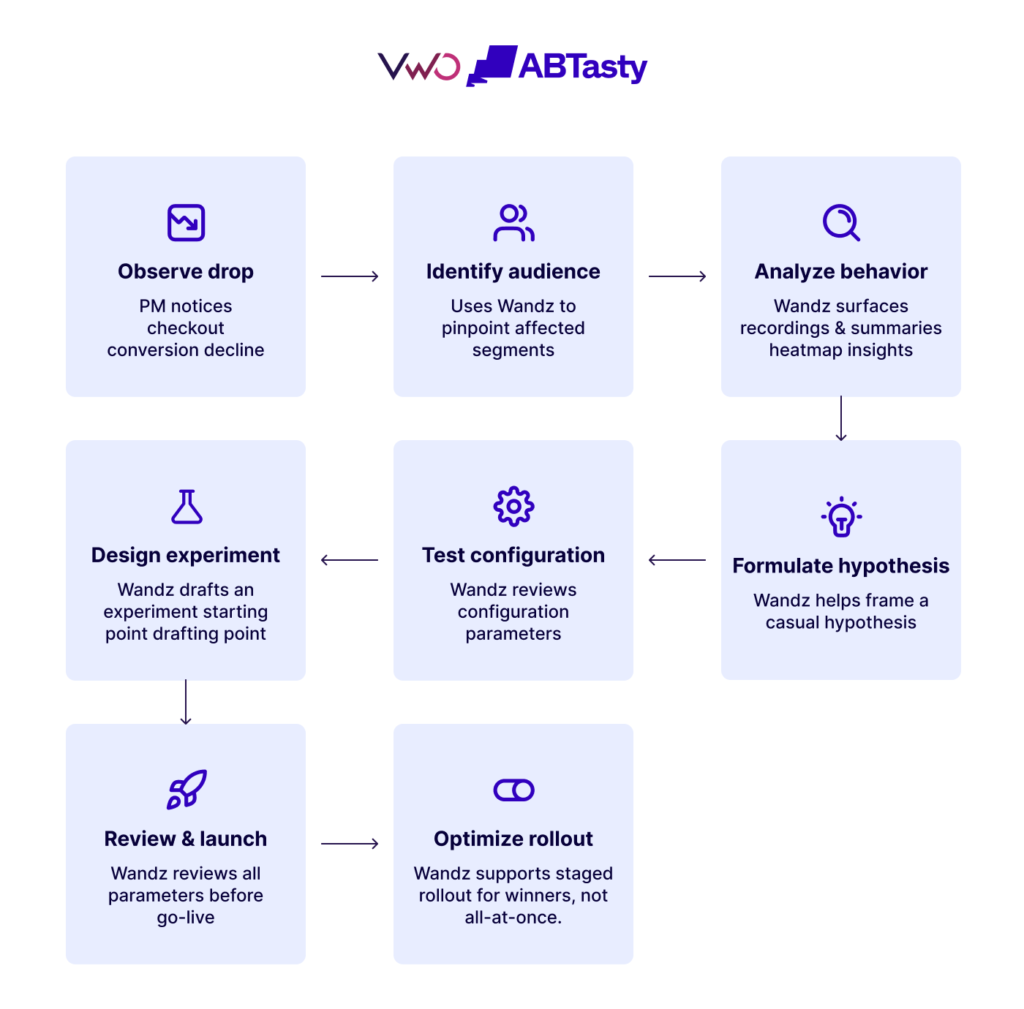
Here’s what that looks like end to end. A product manager notices that checkout conversion has dropped. Working inside the suite, they use Wandz to identify which audience segments are most affected. Wandz surfaces relevant session recordings showing where users are hesitating, and summarizes the heatmap patterns on the affected page.
From there, it helps frame a hypothesis for what might be causing the drop, drafts a starting point for an experiment to test that hypothesis, and reviews the experiment’s configuration, metrics, targeting, and traffic split before it goes live. If the new variation wins, Wandz can help think through a staged rollout rather than an all-at-once release.
No step in that sequence requires leaving the suite or re-explaining context to a separate tool. That continuity, more than any individual feature, is the actual value of an embedded AI layer.
An AI layer that sits this close to live experiments and production feature flags has to be built with guardrails, not just capability. That means recommendations are presented for human review rather than executed automatically, changes Wandz helps build remain visible and editable before anything ships, and the suite’s existing role-based permissions, audit logs, and security controls apply to AI-assisted actions the same way they apply to manual ones.
For enterprise teams in particular, the question isn’t just “Can the AI do this?” It’s “Can we see what it did, and who approved it?” and that accountability is treated as a requirement rather than an afterthought.
[Embed Wandz into your optimization ecosystem.] <CTA link>
FAQs
Still have questions about Wingify? Here are the answers you need.
Is Wandz a chatbot?
Not in the standalone sense. Wandz doesn’t live in a separate chat window disconnected from your work; it’s built into the experimentation, personalization, feature management, and analytics screens you’re already using, with a conversational interface as one way of interacting with it rather than the whole of it.
Is Wandz built into every Wingify product?
Wandz is designed to span the suite rather than being scoped to a single product. As VWO and AB Tasty continue integrating under Wingify, the pace at which Wandz reaches every individual feature will vary, but the direction is one AI layer across the combined suite rather than separate AI tools per product.
Can Wandz create experiments?
Wandz can help draft and configure experiments suggesting variations, metrics, and audiences, but the team reviews and approves the configuration before it launches.
Does Wandz replace analysts?
Wandz works with the experiment, audience, and behavioral data already collected within the suite in order to generate relevant recommendations, governed by the same data handling and security practices that apply to the rest of the suite.
Does Wandz use customer data?
Wandz works with the experiment, audience, and behavioral data already collected within the suite in order to generate relevant recommendations, governed by the same data handling and security practices that apply to the rest of the suite.
How is Wandz different from ChatGPT?
Your answer hereChatGPT and similar tools are general-purpose and start with no knowledge of your specific experiments, audiences, or campaigns unless you provide it manually. Wandz is purpose-built for experimentation and optimization workflows and already has that context because it operates inside the suite where the data lives.
Can Wandz recommend personalization strategies?
Yes. Wandz is designed to help identify behavioral patterns worth targeting and suggest segment-specific personalization based on data already in the suite.
Does Wandz support feature management?
Yes. Wandz is designed to assist with reviewing rollout configurations, flagging potential risks before launch, and helping teams think through how aggressively to release a given feature.
Is Wandz available across VWO and AB Tasty capabilities?
Wandz is intended to be the single AI layer spanning both VWO’s and AB Tasty’s capabilities as they converge under Wingify, unifying what each company previously offered separately through Copilot and Evi.
The future of AI is embedded
AI tends to deliver the most value when it’s part of the workflow a team is already in, rather than a separate application they have to context-switch into. By building intelligence directly into experimentation, personalization, feature management, customer insight, and analytics, Wandz is designed to help teams move more directly from noticing something in the data to actually doing something about it, without that work getting lost in translation between tools along the way.

About the Author
Stephanie Safdie
Stephanie Safdie holds a bachelor’s degree in English Language and Literature from the University of Maryland, specializing in multimedia studies. She has worked as a social media video creator, freelance copywriter, SEO copywriter at Greenly climate tech, and runs a travel blog Destination Dreamer Diaries.