
Our comprehensive guide is here to provide you with expert insights to help you optimize your website’s performance and enhance user experiences.
What is A/B Testing?
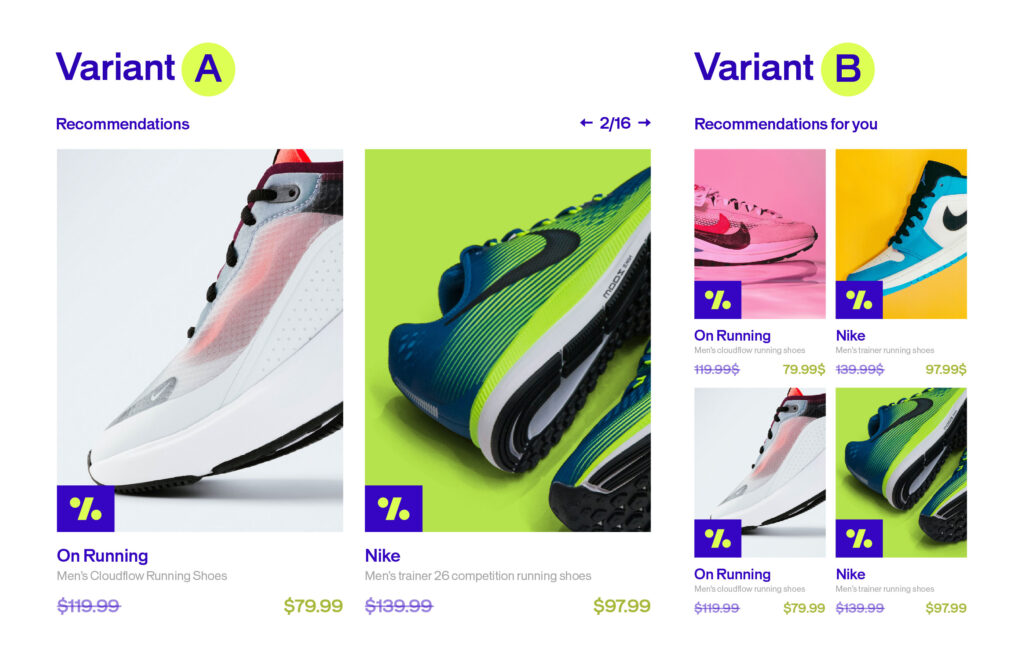
A/B testing, also known as split testing, is a process of testing and comparing two different versions of a website or feature to see which one performs better.
Here’s how it works: Versions A and B are randomly presented to users—a portion sees the first version while the rest sees the second. You gather statistical analysis of the results from each variation to see which one performs better in terms of clicks, conversion rates, and other key metrics.
This lets you check the hypothesis you constructed at the beginning of the experiment. The results of your A/B test will enable you to accept or reject this hypothesis.
A/B testing can be done over two quite similar versions with only a small change, but that change could end up making a huge difference in user engagement and conversion rates.
Types of A/B Tests
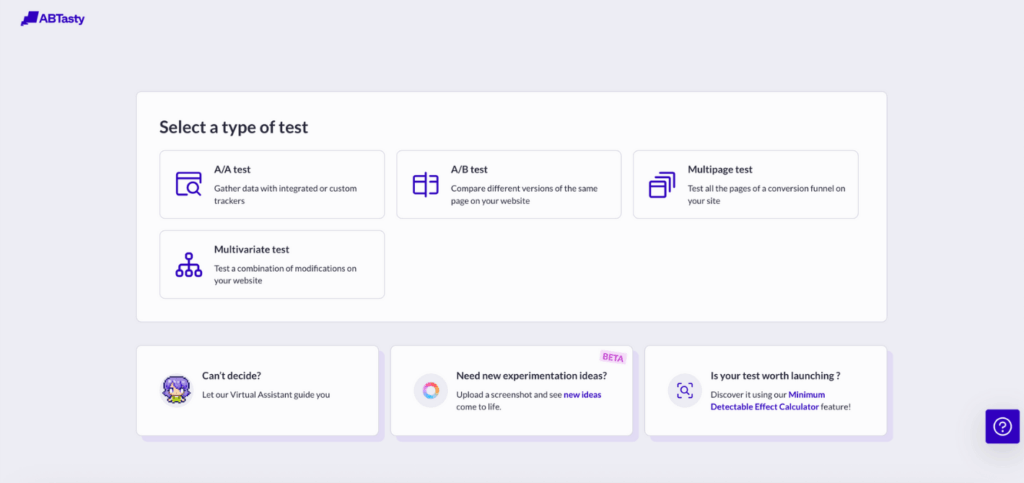
There are various types of A/B tests, chosen depending on your particular needs and goals.
1. Classic A/B Test
This test uses two variations of your pages at the same URL to compare several variations of the same element.
2. Split Test
Sometimes A/B and split tests are used interchangeably, but there’s one major difference: in a split test, the changed variation is on a different URL. Traffic is directed between the control on the original URL and the variations on a different URL (this new URL is hidden from users).
3. Multivariate Test (MVT)
This test measures the impact of several changes on the same web page to deduce which combination of variables performs best out of all possible combinations. This test is generally more complicated to run than the others and requires a significant amount of traffic.
Learn more on how to choose the right a/b testing here →
Server-Side vs Client-Side A/B Tests
Here’s a key distinction: where your test actually runs.

On the one hand, client-side a/b testing is when experimentation happens in the user’s browser through JavaScript. Page variations are created directly in the browser, allowing you to test visual elements and UI changes that users see and interact with on their screen.
On the other hand, server-side a/b testing is when testing occurs on the web server before HTML pages are even rendered by the user’s browser. Variations are delivered directly from the server, meaning users interact with the updated content without their browsers being aware of any changes.
Working server-side means you can run optimization campaigns on the backend architecture directly from within the code. That opens up pretty huge possibilities.
The Client-Side Challenge
Client-side testing places a cookie in your browser to identify you. When you return to the site, it remembers who you are and shows you the same version you saw the first time. In a world trending toward cookieless experiences, that can be challenging.
Performance is another hurdle.
Client-side testing relies on JavaScript snippets that need to be fetched from a third-party provider and executed to apply modifications. This can lead to flickering—also called FOOC (Flash of Original Content)—which damages the user experience and can compromise the validity of your experiment. Read all about how to avoid the flickering effect.
Server-side testing keeps track of users based on unique user IDs you manage on the backend however you prefer—user databases for logged-in users, session IDs, or cookies as a last resort.
Why Does A/B Testing Client-Side Still Matter?
Client-side testing is easy to set up, especially for non-technical teams. It helps you gain valuable insights to customize and optimize the user experience while investing little time and money.
For testing small changes—like visual aspects or UI tweaks—client-side testing may be all you need. However, as your application becomes more advanced, you’ll want to explore more in-depth testing techniques.
Why Does A/B Testing Server-Side Go Further?
For a long time, marketing teams have relied on client-side testing to run experiments on a website’s front-end features. But web applications have grown in complexity, requiring more sophisticated approaches—mainly focused on the backend.
Server-side testing is useful for running more sophisticated experiments. The implementation is more direct, allowing you to test across the full stack. With this approach, you can delve deeper into experiments that explore how a product actually works.
Who Uses Which Approach?
Client-side solutions usually don’t require any technical expertise since they generate the experiment code themselves. They’re particularly popular with marketing teams for conversion rate optimization purposes.
Meanwhile, server-side solutions need technical and coding skills as you’ll need to incorporate experiments into your code and deploy them.
This doesn’t mean that marketing and product teams cannot make use of such solutions. Non-technical teams would define the experiments in server-side tests and then the engineers can execute them, promoting collaboration and a truly agile workflow. The experiments can then be monitored and analyzed through a dashboard.
9 Benefits of Server-Side Testing
1. Minimal Flicker Effect
Since experiments are not rendered on the browser, the experiment is not as noticeable on the user side. The page load time will suffer minimal impact, thereby bypassing the so-called “flicker effect”—when the original page loads and then is replaced by the test variation. This flicker is usually seen by the user.
2. Full Control Over Code
With server-side testing, your tech team has full control over the server-side code so they can build experiments without any constraints.
3. Test Anything Backend
One of the most important benefits: while client-side testing can only help you test the look and feel of your website, server-side testing allows you to test anything on the backend—such as algorithms and backend logic. Basically, you can test anything on the backend in your application.
4. Omnichannel Experimentation
Finally, server-side testing is not just limited to testing websites—it also enables you to carry out omnichannel experiments, such as on mobile apps and email. There’s no limit to the devices and platforms you can test.
5. Server-Side Testing Use Cases
Working server-side allows you to run much more sophisticated tests. Such advanced testing and advanced experiment capabilities go deeper beyond the scope of UI or cosmetic changes, which revolve around the design or placement of key elements on a web page. It also goes beyond website testing and unlocks a whole new world of experimentation so you can optimize your products or mobile apps.
6. Testing Mobile Apps
With client-side testing, you’re limited to devices that have a default web browser—making it impossible to run A/B tests on native mobile apps or even connected devices.
With a server-side solution, however, you can deploy A/B tests as soon as the device is connected to the Internet, and you can match the identity of the consumer.
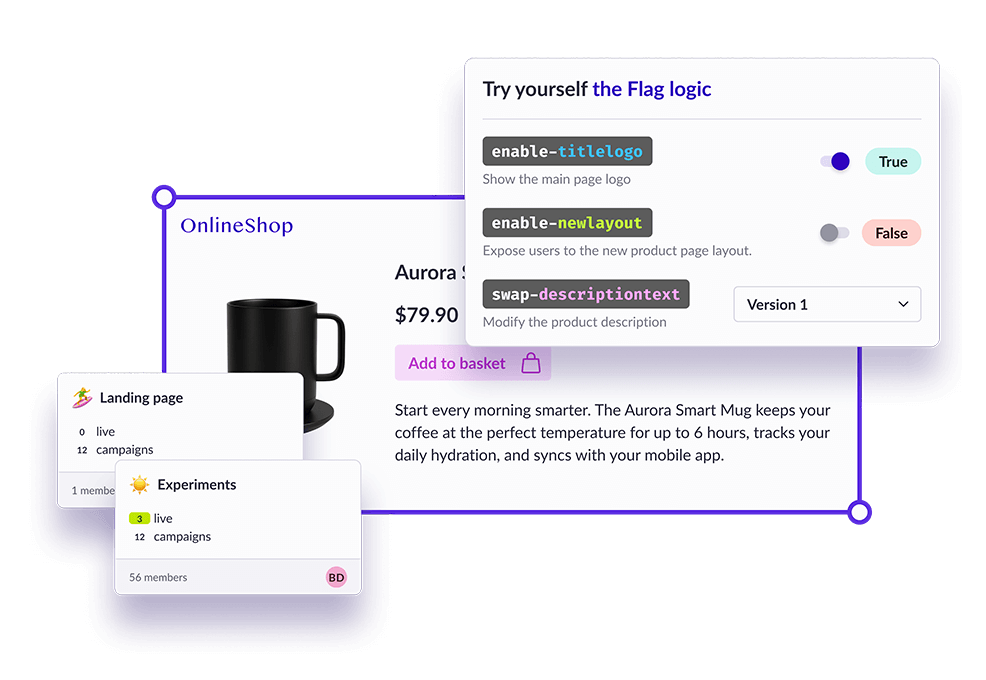
Running server-side experiments using feature flags allows you to run multiple experiments and roll out multiple versions of your mobile app to measure the impact of a change or update to meet customer demands. You’ll be able to determine for a given feature what the impact would be on your users and revenue as you can quickly test new features and modify ones that don’t work.
With remote config implemented through feature flags, you can upgrade your app continuously in real-time based on feedback from your users—without waiting on app store approval.
7. Testing Algorithm Efficiency
As already mentioned, server-side A/B tests are efficient for testing deeper-level modifications related to the backend and the architecture of your website.
For example, you may want to test different algorithms to convert visitors into customers by making suggestions to potential customers of products that might interest them (product recommendations). In this scenario, you can test out multiple algorithms to investigate which one is leading to higher conversions and revenue based on various product recommendation algorithms.
Server-side testing can also be used to run tests on search algorithms on a website. This can be challenging to run through client-side solutions as search pages are based on the search query, and so they are rendered dynamically. Server-side testing offers more comprehensive testing and allows you to experiment with multiple algorithms by modifying the existing code.
8. Testing Pricing Methods
Server-side testing allows you to test complex or significant changes without relying on JavaScript—such as pricing models or testing a pricing change.
For example, you can test out various shipping costs, which are usually run on server-side. You can also use feature flags to test out a new payment method on a subset of users and see how they adapt before rolling it out to everyone else.
When dealing with such sensitive data, server-side testing is the way to go since it ensures that the data remains safe internally within the server without worrying about a security threat.
9. Choose Based on Your Needs—or Use Both
Whatever method of testing you decide to use will ultimately depend on your objectives and use cases. You can even use both together to heighten productivity and achieve maximum impact.
For example, AB Tasty offers a client-side feature that helps marketers optimize conversions as well as a server-side feature you can use to enhance the functionality of your products and services.
For a deeper look at both types of testing and their pros and cons, check out our article on how to drive digital transformation with client- and server-side optimization.
What types of websites are relevant for A/B testing?
Any website can benefit from A/B testing since they all have a ‘reason for being’ – and this reason is quantifiable. Whether you’re an online store, a news site, or a lead generation site, A/B testing can help in various way. Whether you’re aiming to improve your ROI, reduce your bounce rate, or increase your conversions, A/B testing is a very relevant and important marketing technique.
1. Lead
The term “lead” refers to a prospective client when we’re talking about sales. E-mail marketing is very relevant to nurturing leads with more content, keeping the conversation going, suggesting products, and ultimately boosting your sales. with A/B testing e-mails, your brand should start to identify trends and common factors that lead to higher open and click-through rates.
2. Media
In a media context, it’s more relevant to talk about “editorial A/B testing”. In industries that work closely with the press, the idea behind A/B testing is to test the success of a given content category. For example, if you want to see if it’s a perfect fit with the target audience. Here, as opposed to the above example, A/B testing has an editorial function, not a sales one. A/B testing content headlines is a common practice in the media industry.
3. E-commerce
Unsurprisingly, the aim of using A/B testing in an e-commerce context is to measure how well a website or online commercial app is selling its merchandise. A/B testing uses the number of completed sales to determine which version performs best. It’s particularly important to look at the home page and the design of the product pages, but it’s also a good idea to consider all the visual elements involved in completing a purchase (buttons, calls-to-action).
What should you A/B test?
Test the elements that directly impact your conversion rates—from call to action buttons and forms to landing pages and pricing. Every situation is different. Rather than providing an exhaustive list of elements to test, here’s an A/B testing framework to identify what matters most.
Top Elements to A/B Test :
1. Titles and Headers
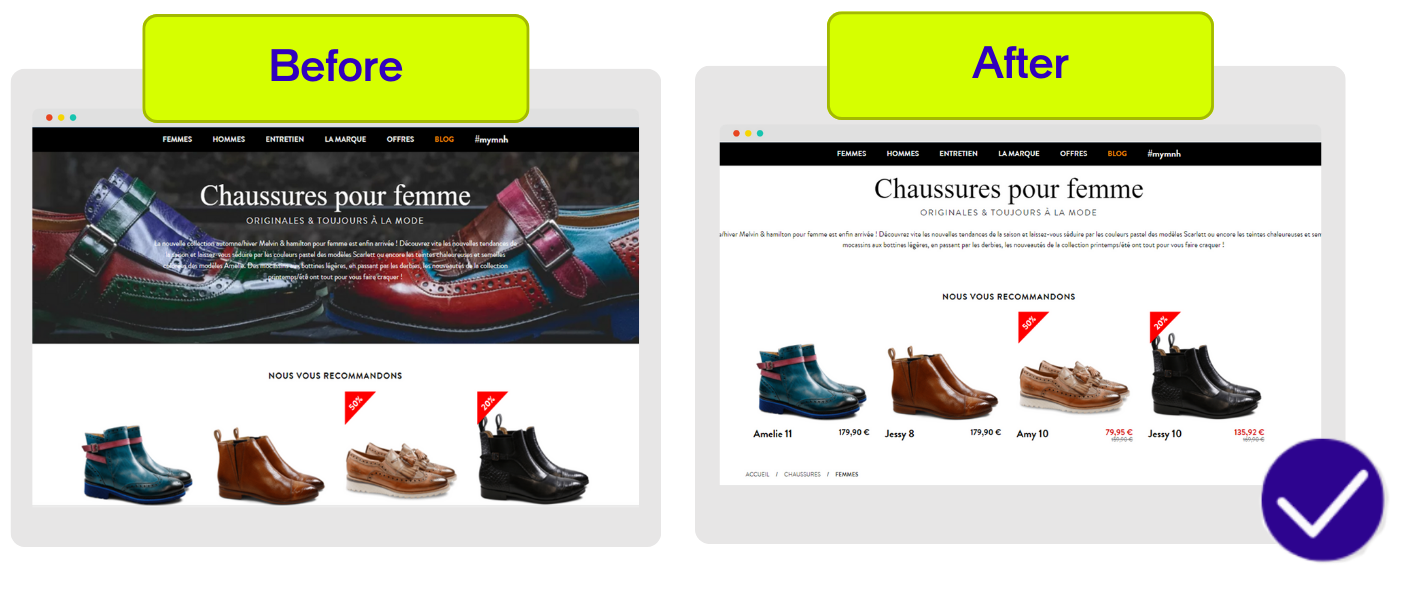
2. Navigation
Test different page connections by offering multiple conversion options. Combine or separate payment and delivery information.
3. Forms
Create clear and concise forms. Try modifying field titles, removing optional fields, or changing field placement and formatting using lines or columns.
4. Call to Action
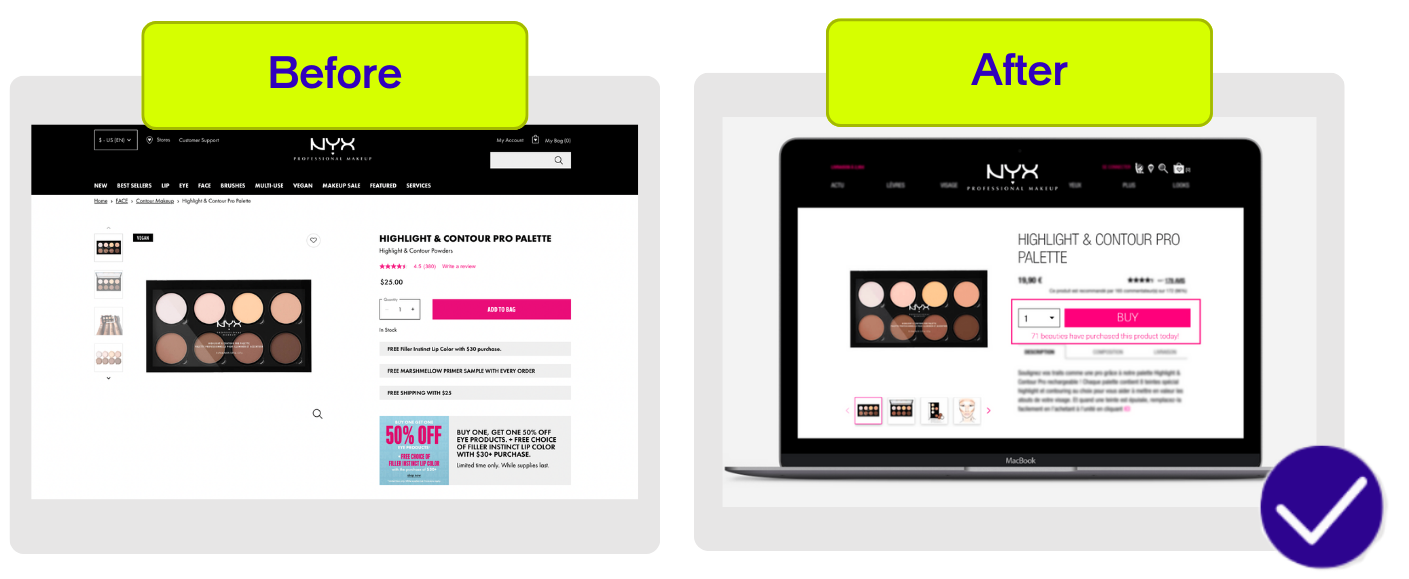
The call to action button is critical. Test color, copy, position, and wording (buy, add to cart, order, etc.) to boost your conversion rate.
5. Page Structure
The structure of your pages—whether home page or category pages—should be particularly well-crafted. Add a carousel, choose fixed images, or change your banners.
6. Business Model
Think over our action plan to generate additional profits. For example, if you’re selling target merchandise, why not diversify by offering additional products or complementary services?
If you want more concrete ideas based on your unique users’ journeys on your website, be sure to see our digital customer journey e-book and use case booklet to inspire you with A/B test success stories.
7. Landing Pages
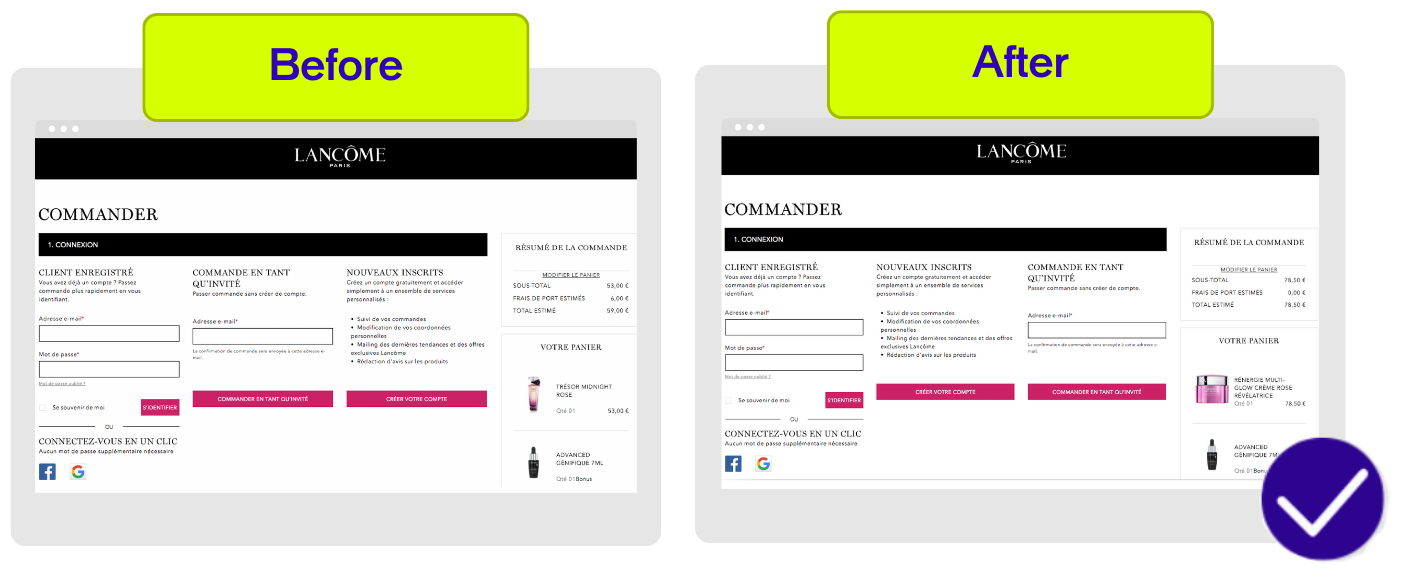
Lead generation landing pages are vital for prompting user action. Split testing compares different page versions, assessing varied layouts or designs.
8. Algorithms
Use different algorithms to transform visitors into customers or increase their cart: similar articles, most-searched products, or products they’ll love.
9. Pricing
A/B testing on pricing can be delicate because you cannot sell the same product or service for different prices. You’ll need ingenuity when testing your conversion rate.
10. Images
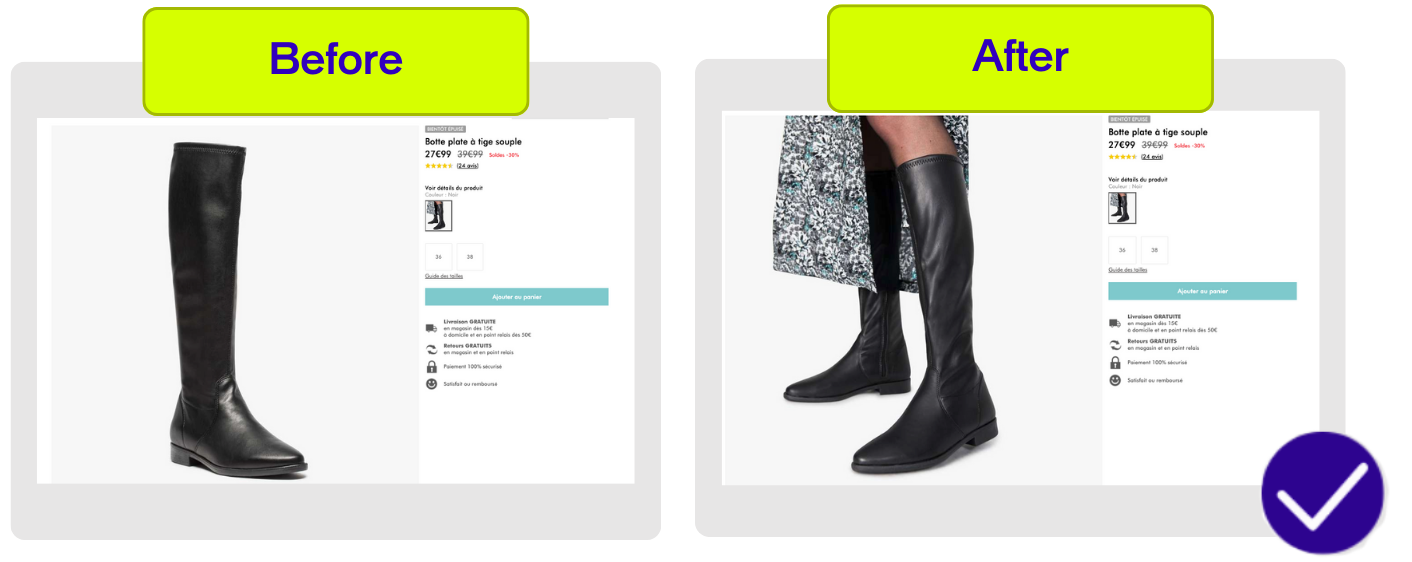
Images are just as important as text. Play with the size, aesthetic, and location of your photos to see what resonates best with your audiences.
Check out These Other Tests for Website Optimization! →
How to do A/B testing?
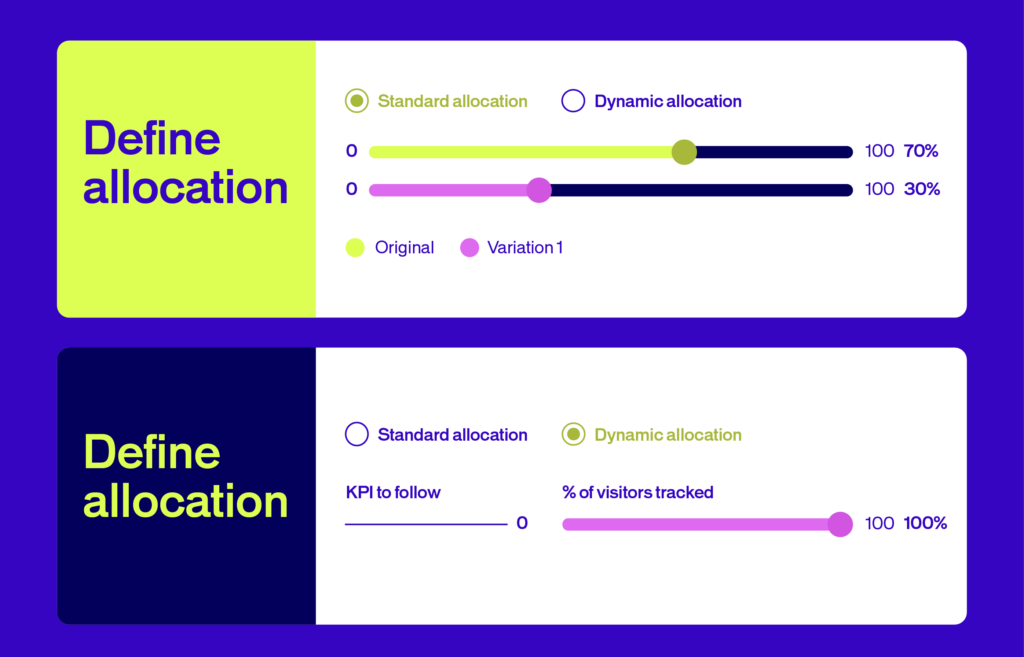
A/B testing is a structured way to compare two versions of a webpage, app, or marketing asset to see which one performs better.
Here’s a step-by-step guide to running a successful A/B test:
1. Define Your Hypothesis
Start with a clear, testable hypothesis. This is a statement predicting how a change will impact your key metric. For example: “Changing the CTA button color to orange will increase click-through rates.” A strong hypothesis guides your entire experiment and keeps your team focused on measurable outcomes.
2. Select the Variable to Test
Choose one variable to change at a time—such as a headline, button, or image. Isolating a single element ensures you know exactly what caused any difference in results. Testing multiple changes at once can muddy your insights.
3. Create Your Variants
Develop two versions:
- A (Control): The original version.
- B (Variant): The version with your proposed change.
Keep all other elements identical so your results are reliable and attributable to the change you’re testing.
4. Split Your Audience and Run the Test
Randomly divide your audience so each group sees only one version. Use an A/B testing tool to ensure fair distribution and to avoid bias. Make sure you have a large enough sample size and run the test for an adequate duration—typically at least two weeks—to account for variations in user behavior.
5. Measure and Analyze Results
Track how each version performs against your chosen metric (e.g., conversions, clicks, sales). Use statistical analysis to determine if the difference is significant—not just due to chance. Most A/B testing platforms provide dashboards and calculators to help you interpret the data.
6. Implement the Winning Version
If your test shows a clear winner, roll out the successful change to all users. If results are inconclusive, consider testing a new hypothesis or variable. Document your findings to inform future experiments.
Key Tips for Effective A/B Testing
- Only test one variable at a time for clear results.
- Ensure your sample size is large enough for statistical significance.
- Run tests for a sufficient duration to capture typical user behavior.
- Always document your process and learnings for future optimization.
A/B testing and conversion optimization
Conversion optimization and A/B testing help companies increase profits by generating more revenue with the same traffic. With high acquisition costs, why not get the most out of your current visitors?
A/B testing uses data to validate hypotheses and make better decisions. But it’s not enough on its own. While A/B testing solutions help you statistically validate ideas, they can’t give you a complete picture of user behavior.
Understanding user behavior is key to improving conversion rates. That’s why it’s essential to combine A/B testing with other data sources. This helps you understand your users better and, crucially, develop stronger hypotheses to test.
Build a Fuller Picture with These Data Sources:
1. Web analytics data
Although this data does not explain user behavior, it may bring conversion problems to the fore (e.g. identifying shopping cart abandonment). It can also help you decide which pages to test first.
2. Ergonomics evaluation
These analyses make it possible to inexpensively understand how a user experiences your website.
3. User test
Though limited by sample size constraints, user testing can provide a myriad of information not otherwise available using quantitative methods.
4. Heatmap and session recording
These methods offer visibility on the way that users interact with elements on a page or between pages.
5. Client feedback
Companies collect large amounts of feedback from their clients (e.g. opinions listed on the site, questions for customer service). Their analysis can be completed by customer satisfaction surveys or live chats.
How to find A/B test ideas?
Strong A/B test ideas start with understanding conversion problems and user behavior. This analysis phase is critical for creating hypotheses that drive results.
Build Strong Hypotheses
A correctly formulated hypothesis is the first step towards successful A/B testing. Every hypothesis must:
- Identify a clear problem with identifiable causes
- Propose a solution to address the problem
- Predict the outcome tied to a measurable KPI
Example: If your registration form has a high abandon rate because it seems too long, test this hypothesis: “Shortening the form by deleting optional fields will increase the number of contacts collected.”
This format ensures your A/B tests are data-driven, measurable, and aligned with your conversion optimization goals.
A/B Testing Metrics: Making Sense of the Numbers
A/B tests are based on statistical methods. It’s important to understand which statistical approach to take when running an A/B test and drawing the right conclusions to help you meet your business metrics.
Which Statistical Model Should You Choose?
There are generally two main approaches used by A/B testers when it comes to statistical significance: Frequentist and Bayesian tests.
1. Frequentist Approach
The Frequentist approach is based on the observation of data at a given moment. Analysis of results can only occur at the end of the test. When you design an A/B test using this approach, you pick the winning variation based solely on results from that one experiment you ran.
2. Bayesian Approach
A Bayesian approach is deductive and uses more of a forecasting approach, so it lets you analyze results before the end of the test. This approach takes the information collected from previous experiments and combines it with the current data drawn from the new test you ran, then draws a conclusion accordingly.
For a deeper understanding and for more on the differences between these two approaches, check out this Frequentist vs Bayesian article.
Understanding A/B Testing Statistical Significance
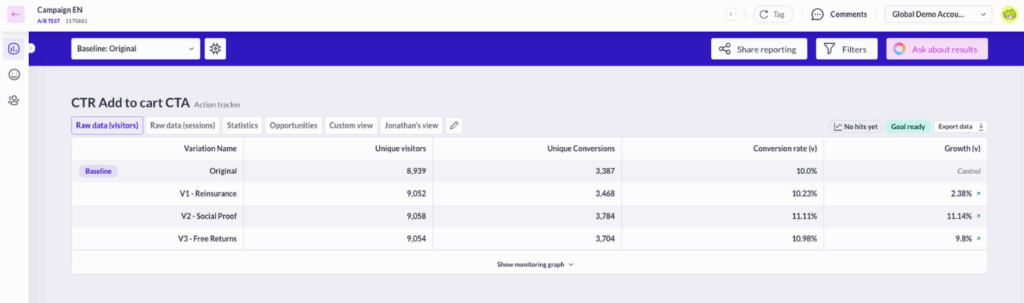
Statistical significance indicates that the result is highly unlikely to have occurred randomly and is instead attributed to a specific cause or trend. It is the level of confidence (P) that the difference between the control and variation is not by chance. This confidence level is obtained from a set of observations and represents the percentage that the same result will be obtained with different data in a similar future experiment.
The goal is to make sure you collect enough data to confidently make predictions based on the results. In other words, make sure the web pages you’re testing have high enough traffic.
What Does It Mean?
An A/B test is statistically significant if there’s a low probability that the result happened by chance. In A/B testing, we typically aim for 95% statistical significance (a p-value under 0.05) to ensure reliable outcomes.
The Null Hypothesis
In A/B testing, the null hypothesis assumes there’s no difference between two variables. For example: “Changing the CTA button size does not impact click rates”.
When your test reaches statistical significance, you reject the null hypothesis. You’ve proven the change made a real difference.
Important: Don’t end tests early when you see good results. Run tests for a sufficient duration—typically at least 4-6 weeks—to account for natural traffic fluctuations and gather reliable data. Ending early can create bias and lead to false conclusions.
Read more about statistical significance in A/B testing →
How to Read Your A/B Test Results? (and Actually Use Them)
Before you launch any test, you need a clear goal. Are you trying to boost conversions? Increase engagement? Drive more revenue? Your goal shapes everything—from which metrics you track to how you interpret your results.
Here’s how to make sense of what you’re seeing.
1. Start with the Right Metrics
A/B testing requires analytics that can track multiple metric types while connecting to your data warehouse for deeper insights. The specific metrics you track depend on your hypothesis and business goals, but here’s a solid framework to start with:
Primary Success Metrics
These directly measure the impact on your main objectives:
- Conversion rate – The percentage of visitors completing a desired action (purchases, signups, form submissions)
- Click-through rate (CTR) – The percentage of clicks on a specific link compared to the total number of times it was shown
- Revenue per visitor – Average revenue generated from each unique visitor
- Average order value (AOV) – How much customers spend per transaction
Supporting Indicators
These provide context on user engagement and journey patterns:
- Time on page
- Bounce rate
- Pages per session
- User journey patterns
Technical Performance
Crucial for ensuring a smooth user experience:
- Load time
- Error rates
- Mobile responsiveness
- Browser compatibility
Pro tip: E-commerce sites typically focus on purchase metrics, while B2B companies might prioritize lead generation metrics like form completions or demo requests.
2. Reading Your Test Results: A Real Example
Let’s say you’re testing a CTA button. Here’s what you’ll see:
- Number of visitors who saw each version
- Clicks on each variant
- Conversion rate (percentage of visitors who clicked)
- Statistical significance of the difference
When analyzing results:
- Compare against your baseline (the A version, or control)
- Look for a statistically significant uplift – more on this below
- Consider the practical impact of the improvement
- Check if results align with other metrics – did bounce rate change? Time on page?
Best practices for A/B testing
Follow these best practices to run reliable A/B tests and avoid common pitfalls:
1. Ensure Data Reliability
Conduct at least one A/A test to ensure random traffic assignment. Compare your A/B testing solution indicators with your web analytics platform to verify figures are in the ballpark.
2. Run Acceptance Tests First
Before starting, verify the test was set up correctly and objectives are properly defined. This saves time interpreting false results.
3. Test One Variable at a Time
Isolate the impact of each variable. If you change both the location and label of a call to action button simultaneously, you can’t identify which produced the impact.
4. Run One Test at a Time
Avoid running multiple tests in parallel, especially on the same page. Results become difficult to interpret otherwise.
5. Adapt Variations to Traffic Volume
High variations with low traffic means tests take too long. The lower the traffic, the fewer versions you should test.
6. Wait for Statistical Reliability
Don’t make decisions until your test reaches at least 95% statistical reliability. Otherwise, differences might be due to chance, not your modifications.
7. Let Tests Run Long Enough
Even if a test shows statistical reliability quickly, account for sample size and day-of-week behavior differences. Run tests for at least one week (ideally two) with at least 5,000 visitors and 300 conversions per version.
8. Know When to End an A/B Test
If a test takes too long to reach 95% reliability, the element likely doesn’t impact your measured indicator. End it and use that traffic for another test.
9. Measure Multiple Indicators
Track one primary objective to decide on versions and secondary objectives to enrich analysis. Measure click rate, cart addition rate, conversion rate, average cart, and more.
10. Track Marketing Actions During A/B Tests
External variables can falsify results. Traffic acquisition campaigns often attract users with unusual behavior. Detect and limit these collateral effects.
11. Segment Your A/B Tests
Testing all users doesn’t always make sense. If testing different formulations of customer advantages on registration rate, target new visitors—not your current registered users.
Why should you A/B test?
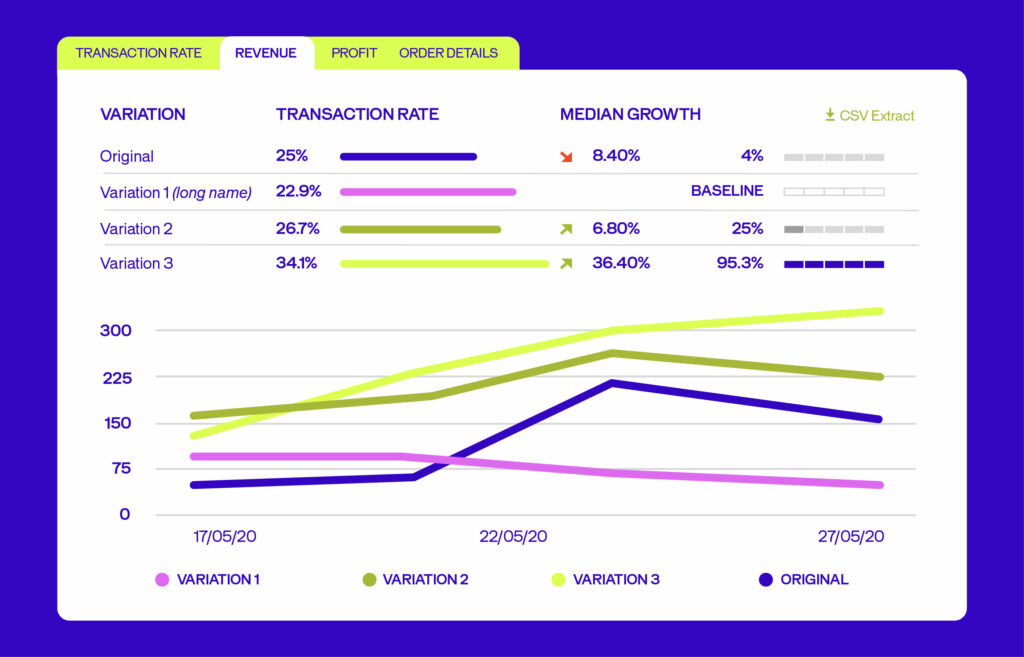
The short answer is that A/B testing helps you replace guesswork with real insight. Instead of wondering which headline, design, or call to action will work best, you test and find out.
Here’s why testing isn’t optional anymore. It’s how you move forward.
1. Turn More Visitors Into Customers
Small changes can spark big results. A/B testing shows you which version of your page, email, or campaign actually gets people to act—whether that’s signing up, buying, or clicking through.
Swap a headline. Shift a button. Rewrite your call to action. These tweaks might seem minor, but they can seriously impact conversions and revenue. Testing helps you find what works—so you can do more of it.
2. Make Your Site Work Better for Real People
If visitors can’t find what they need, they leave. Fast. A/B testing helps you spot friction points and smooth them out.
When you make your site easier to navigate and more engaging, people stick around longer. Lower bounce rates. Higher engagement. More loyal customers. That’s the payoff.
3. Stop Guessing. Start Knowing
Why wonder which design will win when you can test it? A/B testing replaces hunches with hard evidence.
You’re not relying on opinions or gut feelings anymore. You’re comparing two versions head-to-head and letting real user behavior tell you what’s working. That’s how you make smarter, faster decisions.
4. Climb Higher in Search Rankings
Search engines reward sites that people actually enjoy using. A/B testing helps you fine-tune the signals that matter—like click-through rates, time on page, and bounce rates.
Better user experience means better SEO performance. Test your way to improved rankings and more organic traffic.
5. Test Without the Risk
Rolling out a big change without testing? That’s a gamble. A/B testing lets you try ideas on a smaller scale first, so you can see what happens before you commit.
It’s a safer, smarter way to innovate. You avoid costly mistakes and build confidence in every change you make.
6. Keep Getting Better
A/B testing isn’t a one-and-done thing. It’s how you keep improving—campaign after campaign, page after page.
In fast-moving markets, the teams that test and adapt are the ones that win. You focus your energy on what’s proven to work, and you keep pushing forward.
What are the most common A/B testing mistakes?
A/B testing is a powerful way to learn what works—but only if you run your experiments the right way. Here are nine common a/b testing mistakes to steer clear of, so your team can test with confidence and get real results.
1. Testing Without a Clear Hypothesis
Running tests without a specific question or hypothesis leads to random experimentation and unreliable results. Always define what you want to learn and why before starting a test.
2. Stopping Tests Too Early (or Too Late)
Ending a test as soon as you see a positive result, or letting it run indefinitely, can both skew your findings. Wait until you reach statistical significance and have enough data before drawing conclusions.
3. Testing Too Many Changes at Once
Changing multiple elements in a single test makes it impossible to know which change caused the result. Test one variable at a time, or use multivariate testing if you need to test combinations.
4. Ignoring Sample Size and Statistical Significance
Making decisions based on too little data can lead to false positives or negatives. Use a sample size calculator and wait for statistical significance to ensure your results are trustworthy.
5. Not Segmenting Your Audience
Failing to analyze results by user segments (like new vs. returning visitors or mobile vs. desktop) can hide important insights. Segment your data to understand how different groups respond.
6. Overlooking External Factors
Seasonality, marketing campaigns, or technical issues can impact test results. Always consider external influences and avoid running tests during unusual periods.
7. Focusing Only on One Metric
Optimizing for a single KPI (like clicks) can hurt other important metrics (like conversions or user satisfaction). Track secondary metrics to catch unintended consequences.
8. Not Documenting or Learning from Results
If you don’t record your test setup, results, and learnings, you risk repeating mistakes or missing opportunities for improvement. Document every test and use insights to inform future experiments.
9. Running Tests Without Enough Traffic or Conversions
A/B testing requires a minimum amount of data to be valid. If your page doesn’t get enough traffic or conversions, your test may take too long or never reach significance.
A/B testing examples
Here are proven examples from real companies that used experimentation to boost conversions, revenue, and customer engagement. Each test shows what was changed, why it mattered, and the measurable impact it delivered.
1. Fashion & Apparel: GANNI Simplifies Checkout for Higher Conversions
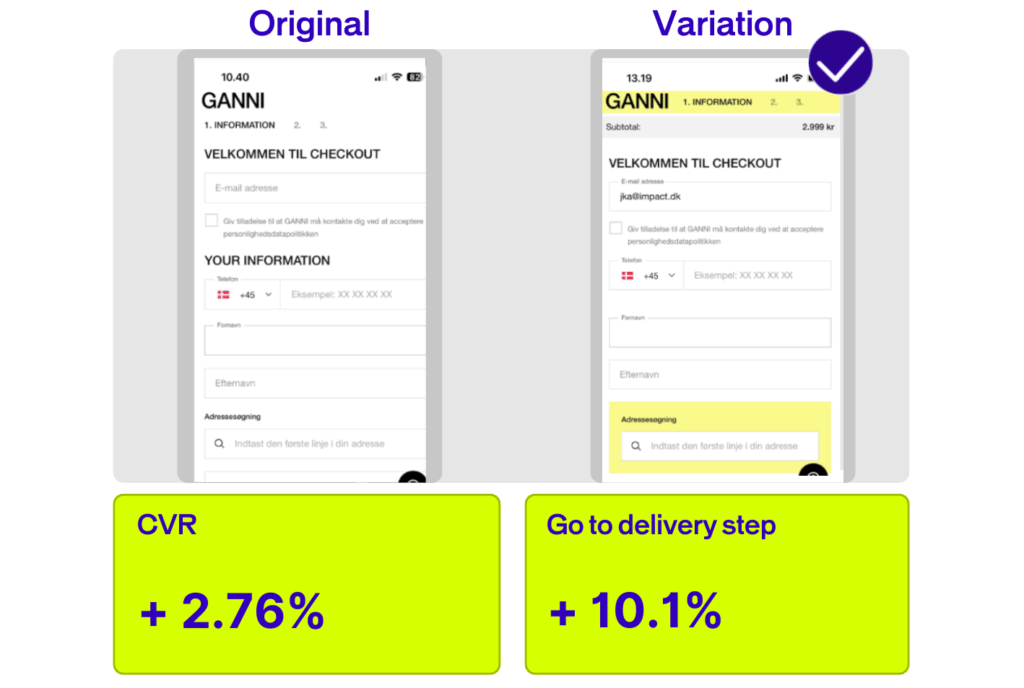
Company: GANNI, a Danish fashion and lifestyle brand known for eco-friendly products and everyday style inspiration.
The Challenge: GANNI noticed a significant 34% drop in conversion rate among users who used site search, signaling friction in their checkout flow.
What They Tested: The original checkout required users to enter their email address before seeing checkout information. GANNI tested merging the email step with the information step and removing unnecessary visual elements that distracted users.
Results:
- +2.76% conversion rate
- +10.1% increase in users progressing to the delivery step
- +12% average order value
Read the full GANNI case study →
2. Travel & Hospitality: Validates AI-Powered Innovation

Company: OUI.sncf (now SNCF Connect), France’s leading digital travel platform with over 3 million daily visits and 190 million tickets sold annually.
The Challenge: The conversion rate optimization team had developed an AI-powered ‘Exploration Assistant’ – an algorithm that suggests personalized trip itineraries to visitors with a high “interest score.” But would this feature actually drive bookings?
What They Tested: Using AB Tasty, the team ran a statistically rigorous A/B test to measure whether visitors who engaged with the AI-powered Exploration Assistant converted at higher rates than those who didn’t.
Results:
- +2.49% click-through rate
- +61% conversion rate increase on mobile web
- +33% conversion rate increase on desktop
Read the full OUI.sncf case study →
3. Retail & E-commerce: Wonderbox Optimizes Customer Journey
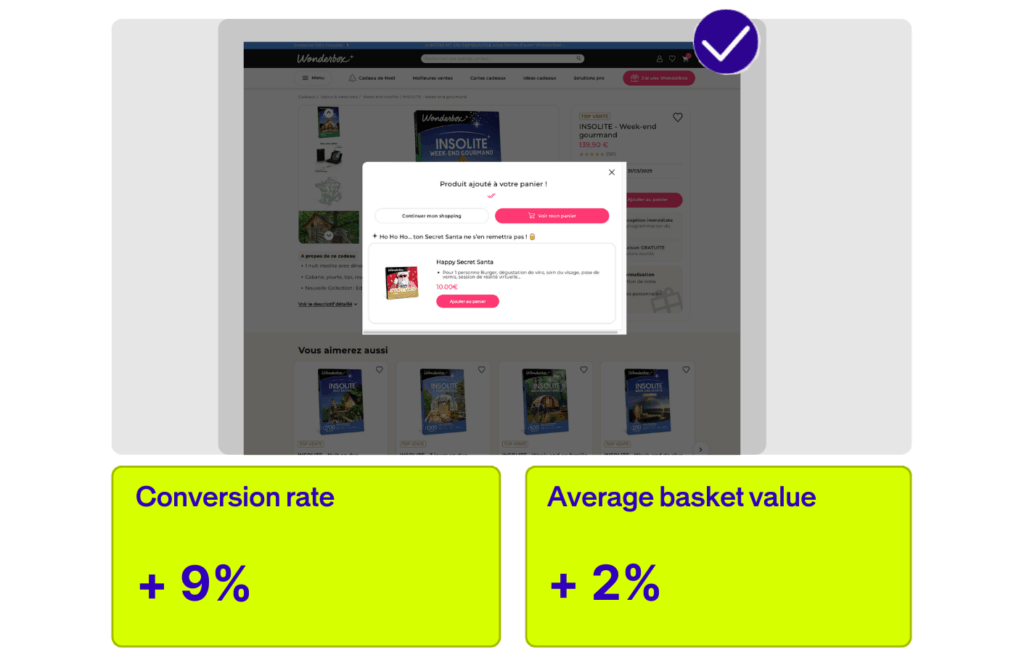
Company: Wonderbox, a leading provider of experience gifts and gift boxes.
The Challenge: Wonderbox wanted to improve the customer journey and increase both conversion rate and average basket value.
What They Tested: Wonderbox ran A/B tests on various elements of their website, including checkout flow and product presentation, to identify friction points and optimize the path to purchase.
Results:
- +9% conversion rate
- +2% average basket value
Read the full Wonderbox case study →
4. Luxury & Beauty: Maison Francis Kurkdjian (LVMH) Boosts Conversions with Recommendations
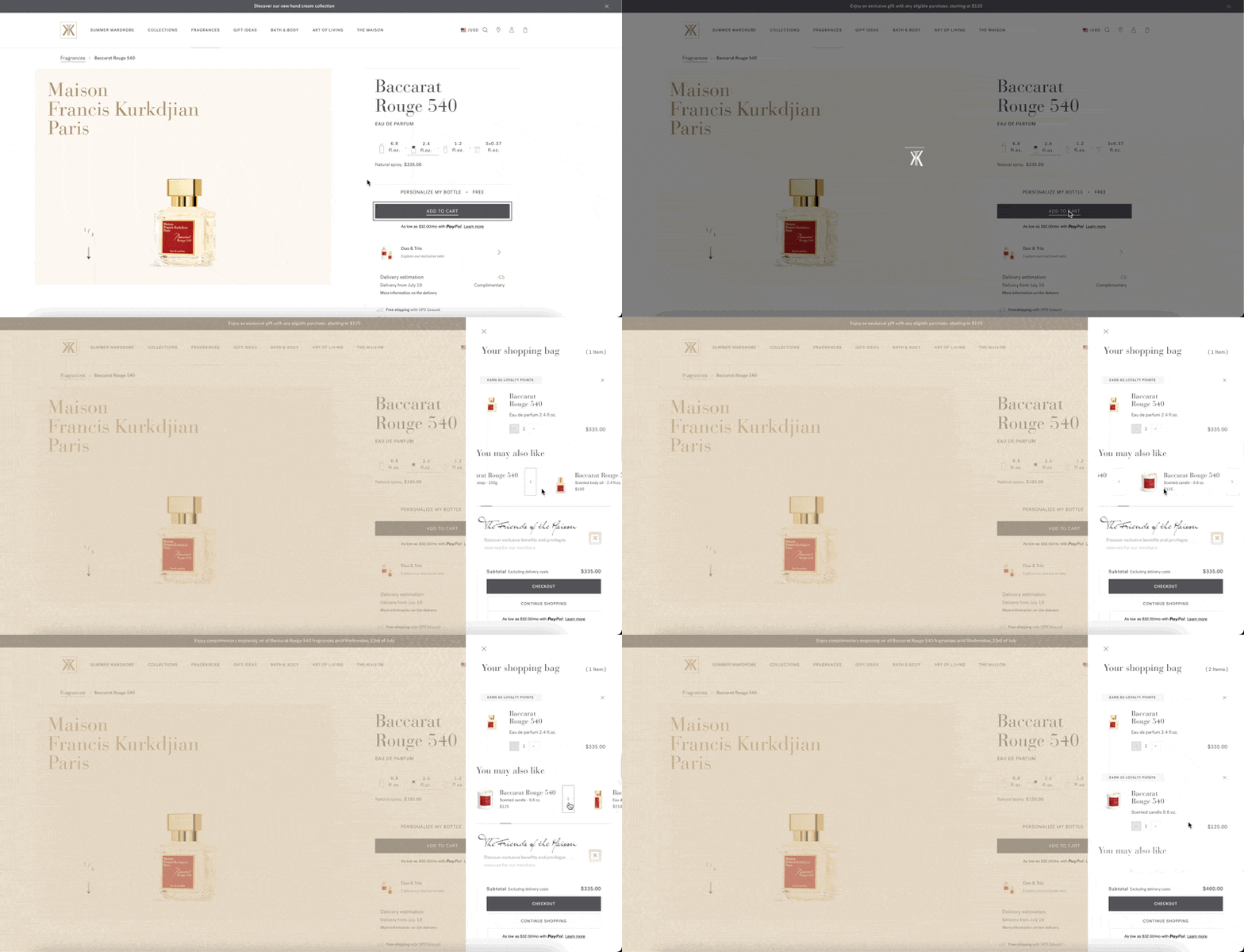
Company: Maison Francis Kurkdjian, a luxury fragrance brand.
The Challenge: The brand wanted to increase conversions by providing more relevant product recommendations to shoppers.
What They Tested: Maison Francis Kurkdjian used A/B testing to optimize the placement and content of product recommendations on key pages.
Results:
- The average basket value increased, particularly among new collections.
Read the full Maison Francis Kurkdjian case study →
Choosing an A/B testing software
Choosing the best A/B testing tool is difficult.
We can only recommend you use AB Tasty. In addition to offering a full A/B testing solution, AB Tasty offers a suite of software to optimize your conversions. You can also personalize your website in terms of numerous targeting criteria and audience segmentation.
But, in order to be exhaustive, and also to provide you with as much valuable information as possible when it comes to choosing a vendor, here are a few articles to help you choose your A/B testing tool with software reviews:
- The 20 Most Recommended AB Testing Tools By Leading CRO: Experts
- Which A/B testing tools or multivariate testing software should you use for split testing?
- 18 Top A/B Testing Tools Reviewed by CRO Experts
Other forms of A/B testing
A/B testing is not limited to modifications to your site’s pages. You can apply the concept to all your marketing activities, such as traffic acquisition via e-mail marketing campaigns, AdWords campaigns, Facebook Ads, and much more.
Resources for going further with A/B testing:
- A Beginner’s Guide to A/B Testing Your Email Campaigns
- 7 Tips for Implementing A/B Testing in Your Social Media Campaigns
- A Crash Course on A/B Testing Facebook Ad Campaigns
- How to Improve Your Click Rates with AdWords A/B Testing
Blogs to bookmark:
- HubSpot Blogs
- Unbounce
- ConversionXL
- Bryan Eisenberg
- Conversion Rate Experts
- Wider Funnel
- The Conversion Scientist
- The Online Behavior Blog
- Moz
- Conversioner
- The Daily Egg
- WordStream
Conclusion
Testing isn’t about perfection—it’s about progress. Every experiment brings you closer to what works. Start with a clear hypothesis, isolate one change at a time, and let real user behavior guide your next move. Whether you’re testing a headline or an algorithm, the goal stays the same: learn fast, iterate boldly, and keep going further.
Ready to go further? Let’s build better experiences together →
FAQs
What is A/B testing?
A/B testing is a method that compares two versions of a webpage, app, or feature to determine which one performs better. Version A (your control) and Version B (your variant) are randomly shown to different users. You track performance against your goal—clicks, conversions, signups, revenue—then use statistical analysis to determine the winner.
Why should I run A/B tests?
We run A/B tests to replace guesswork with evidence and make decisions based on real user behavior—not assumptions. Testing shows you what actually works for your audience, helping you boost conversions, reduce risk, and learn faster. Every test teaches you something, even when results don’t match your hypothesis.
How long should I run an A/B test?
You should run an A/B test for at least two weeks—sometimes 4–6 weeks depending on traffic and conversion volume. This duration ensures you collect enough data to reach statistical significance and capture natural variations in user behavior across weekdays, weekends, and external factors like campaigns or seasonality. Don’t stop early just because you see positive results—ending too soon leads to false conclusions.
What’s the difference between A/B testing and multivariate testing?
The difference is that A/B testing compares two versions by changing one element at a time, while multivariate testing (MVT) tests multiple changes and combinations simultaneously to find the best-performing mix. A/B tests are faster and simpler; MVT requires significantly more traffic but reveals how elements interact. Start with A/B testing for quick, reliable answers about single changes.
How do I determine the right sample size for an A/B test?
Use a sample size calculator before launching your test—input your baseline conversion rate, the minimum improvement you want to detect, and your desired confidence level (typically 95%). As a general guideline, aim for at least 5,000 visitors and 300 conversions per variation. If your traffic is too low, focus on high-impact pages with strong traffic and clear conversion goals.
Can A/B testing be applied to offline marketing strategies?
Yes, A/B testing principles can be applied to offline channels, though tracking requires more effort. Test direct mail by sending two postcard versions to separate lists, compare print ad designs using unique promo codes, or test in-store displays across comparable locations. The key is controlling variables and measuring outcomes consistently—harder than digital testing, but equally valuable.
What are the best resources on A/B testing and CRO?
We recommend you read our very own blog on A/B testing, but other experts in international optimization also publish very pertinent articles on the subject of A/B testing and conversion more generally. Here is our selection to stay up to date with the world of CRO.