Article

6min read

How AB Tasty Delivers High-Quality Risk-Free Releases with Feature Flags

With their feature flagging functionality, AB Tasty were able to safely and quickly launch new changes to end users without impacting quality through progressive delivery and continuous feedback loops.

In the world of SaaS, velocity and quality are of utmost importance. This is an industry that is constantly evolving and companies must work diligently to keep pace with consumers’ fast-changing needs and to maintain competitive advantage.

AB Tasty has seen a high growth in users all around the world. Consequently, AB Tasty had to accelerate their development processes, which meant that development and feature teams experienced high growth in order to enable the development of more features and increase speed of delivery to market.

The challenges of CI/CD

However, with such high growth and scaling, the company was faced with many growing pains and bottlenecks, which significantly slow down CI/CD processes. This increased the risk of pile up of issues, which defeats the initial purpose of accelerating time-to-market.

Even with mature CI/CD processes, developer and product teams are not immune to pitfalls that impact speed of delivery and go-to-market.

With these challenges in mind, the team at AB Tasty had four main objectives in mind:

  • Accelerate time-to-market.
  • Increase speed of delivery without sacrificing quality.
  • Allow teams to remain autonomous to avoid delays.
  • Reduce risk by avoiding big bang releases.

The team essentially needed a stress-free solution to push code into production and an easy-to-use interface that can be used by development teams to release features as soon as they’re ready to eliminate the issue of bottlenecks and by product teams to gain more control of the release process by running safe experiments in production to gather useful feedback.

This is when the team at AB Tasty turned to their flagging feature.

Feature flags were a way for the team to safely test and deploy new changes to any users of their choice while keeping them turned off for everyone else.

The team at AB Tasty was able to do this by, first, defining a flag in the feature management interface whose value is controlled remotely by the tool’s API.

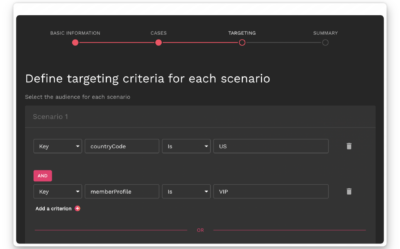
The team can then set targeting rules, that is the specific conditions for the flag to be triggered, based on the user ID. Using feature flags, they can perform highly granular user targeting, allowing them to target users using any user attributes to which they have access.

Then, in AB Tasty’s own codebase, teams can simply condition the activation of the feature that interests them, or its behavior, according to the value of the variable, using a simple conditional branch.

At the time, the company was working on a key project to revamp a major part of the UI namely the navigation system, which includes a new vertical navigation and new responsive grids to offer new personalization campaigns with the goal to make it more understandable to users.

For a project of this scope, there were big changes tied to many dependencies, such as the database, and so AB Tasty needed a way to progressively deploy these new changes to obtain initial feedback and avoid a big bang release.

Progressively deliver features

With such a large project, the goal was to mitigate risk by avoiding deploying major changes to all users at once. With feature flags, teams are able to reduce the number of users who can access the new changes.

In particular, the ON/OFF deployment logic of feature toggles within the feature management tool’s interface works like a switch so teams can progressively roll out features based on pre-set targeting rules while turning them off for everyone else.

Easily set up and manage beta and early adopter lists

After testing internally, the product team was looking for a way to easily manage their early adopter list before releasing to the rest of their users. This will enable them to receive quicker feedback from the most relevant (and more forgiving) users.

With AB Tasty’s flagging functionality, teams can simply add these early adopters’ account ID into the targeting of the flag, where they can then immediately access the new feature exclusively before anyone else.

Release without stress by ensuring that developers are ready to tackle any issues

Since most of the development team was based in France, the new changes were initially rolled out to that region so developers can ensure that everything works and can quickly fix any bugs before deploying to other regions (and timezones).

Should anything go wrong, teams can easily roll back the release with a kill switch by immediately toggling a flag off within the feature flagging platform interface so that the feature is no longer visible.

Enable continuous feedback loops

Teams can now test in production on end-users and to optimize features and iterate faster based on real production data. As a result, teams can launch the end-product to all users with the reassurance that they have identified and fixed any issues.

This also empowers teams to become more innovative, as they now have a safe way to test and receive feedback on their ideas, and are no longer limited in their scope of work.

Accelerate go-to-market

Furthermore, the ON/OFF deployment logic allows teams to release at their own pace. This accelerates the time-to-market as developers no longer need to wait for all changes to be ready to release their own changes resulting in less delays and disgruntled customers.

This speed would not be at the expense of quality as with continuous feedback loops, teams can iterate releases which ensures that only high quality products are released to users.

Teams can send features to production whenever they’re ready, make them visible to some users and officially launch to market once all deliverables are ready and good to go!

Article

9min read

Chaos Engineering 101: How Chaos Brings Order

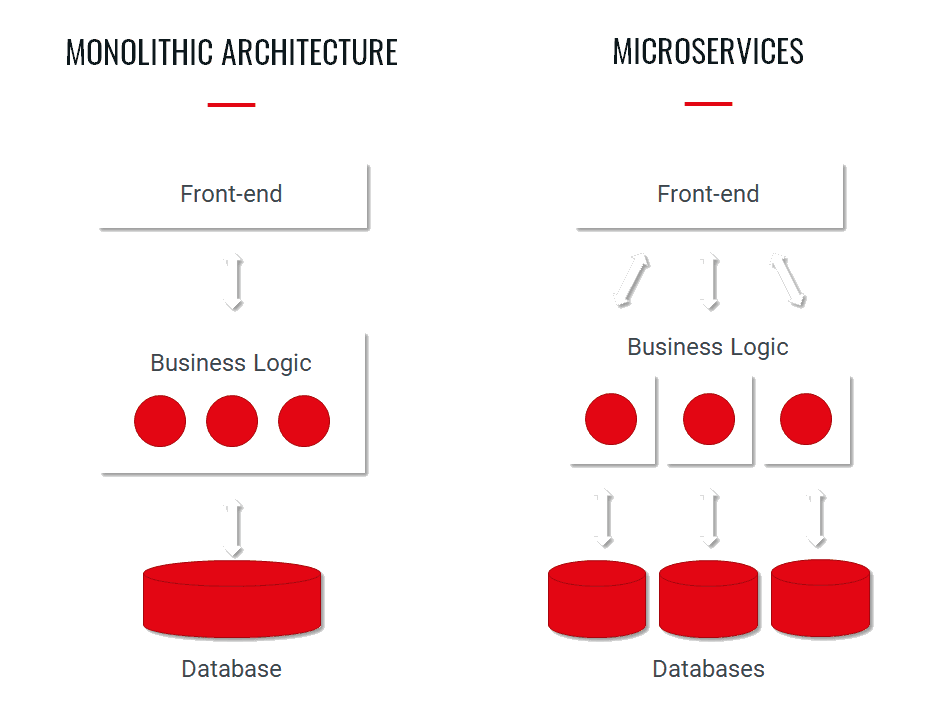
As we go deeper into digital transformation and as companies move towards large-scale globally distributed systems, the complexity that comes with them increases. This means that failures in these intricate systems become much harder to predict, as opposed to traditional, monolithic systems. 

Yet, these failures could result in high costs for teams to repair them; not to mention the painstaking probability of the potential loss of new and existing customers.

The question then is how can we build confidence in the systems that we put into production? How can teams make sure that they’re releasing stable and resilient software that can handle any unpredictable conditions that they’re put into?

This is when teams turn to what is aptly referred to as “chaos engineering”.

What is chaos engineering?

According to the Principles of Chaos, chaos engineering is “the discipline of experimenting on a system in order to build confidence in the system’s capability to withstand turbulent conditions in production.”

In other words, chaos engineering is the process of testing distributed systems to ensure that it can withstand turbulent conditions and unexpected disturbances. Strictly speaking, this is the “chaos” of production.

Chaos engineering is particularly applicable to large-scale, distributed systems. Since such systems are now hosted on globally distributed infrastructures, there are many complex dependencies and moving parts with several points of failure. This makes it harder to predict when an unexpected error will occur.

Due to the unpredictability of these failures of the components of the system, it becomes harder to test for them in a typical software development life cycle.

This is when the concept of chaos engineering came about as a way to predict and test for such failures and uncover hidden flaws within these systems. 

In other words, this concept determines the resilience of these systems by identifying their vulnerabilities by carrying out controlled experiments to test for any unpredictable and unstable behavior.

This is done by breaking things on purpose by injecting failure and various types of faults into the system to see how it responds. This will help determine any potential outages and weaknesses in the system.

The ultimate goal of this is a lesson in how to build more resilient systems.

Where does the term come from?

Before we delve any deeper into chaos engineering, it would be helpful to understand where this concept originated.

Chaos engineering started in 2010 when the engineering team at Netflix decided to develop “Chaos Monkey”, which was later made open source, as the team at Netflix migrated from a monolithic architecture to the cloud, deployed on AWS.

For Netflix, this migration to hundreds of microservices brought on a high amount of complexity; therefore, engineers at Netflix were seeking a better approach to prevent sudden outages in the system. 

These engineers were mainly looking for a way to disable instances and services within their architecture to ensure that their system can handle such failures with minimal impact on the user experience, allowing them to build a more resilient and reliable architecture.

The idea behind the Chaos Monkey tool was that they would unleash a “wild monkey” to break down individual components in a carefully monitored environment to make sure that a breakdown in this single component wouldn’t affect the entire system. 

This, in turn, helped them locate the weaknesses in the system and build automatic recovery plans to address them and alter the system if necessary so that it could easily tolerate unplanned failures in the future.

Afterwards, Chaos Monkey improved and evolved to allow Netflix engineers to more precisely determine failures by testing against more failure states, enhancing the resilience of their system.

From then on, the chaos journey began for Netflix and later on for many organizations dealing with similar distributed systems.

Principles of chaos engineering

We can deduce that chaos engineering involves running experiments to understand how a distributed system behaves when faced with failure.

Unlike other forms of testing, chaos engineering involves experimentation and learning new things about a system by creating a hypothesis and attempting to prove that hypothesis. If it’s not true, this is a chance to learn something new about the system.

Testing, on the other hand, involves making an assumption about a system based on existing knowledge and determining whether it’s true or not by running tests; in other words, the test is conducted based on knowledge of specific properties about the system. The results, therefore, don’t provide new insights or information.

Chaos engineering, for its part, involves exploring scenarios that don’t usually occur during testing designed to gain new knowledge about the system by considering factors that often go beyond the obvious issues that are normally tested for.

The following principles provide a basis on which to run such experiments on your system:

  1. Plan an experiment

The first step involves planning an experiment, where you will need to pinpoint things that could go wrong. This will require gaining an understanding of your system’s normal behavior and determining what constitutes a normal state. Afterwards, you start off by forming a hypothesis of how you think the components of your system will behave in case something goes wrong and then create your control and experimental groups accordingly. 

Defining a metric to measure at this stage is useful to gauge the level of normalcy within your system. These could include metrics such as error rates or latency. 

  1. Design real-world events

At this stage, you will outline and introduce real-world events that could potentially cause disruptions to your system such as those that occur within hardware or server or any other external event that could lead to outages in your system such as a sudden spike in traffic, hardware failures, network latency or any event that could potentially disrupt the steady state of the system.

  1. Run the experiment

After defining your system’s normal behavior and the events that could disrupt it, experiments can then be run on your system preferably in a production environment to measure the impact of the failure to gain a better understanding of your system’s real-world behavior.

This will also allow you to prove or disprove your hypothesis. The harder it is to cause an outage in the system, the more confident you can be in your system’s resilience

However, keep in mind that since your experiments are run in production, it’s important to minimize the blast radius in case something goes wrong. This will ensure that any adverse effects are kept at a minimum and if things go smoothly, you can then gradually increase this radius till it reaches full scale. It’s also wise to have a roll back plan if something does go wrong.

  1. Monitor results

The experiment should give you a clear idea of what’s working and of what needs to be improved by looking for a difference between the control and experimental group. Teams can then make the necessary changes as they’re able to identify what led to the outage or disruption to the service, if relevant. 

Why we should break things on purpose: Benefits of chaos engineering

We can look at chaos engineering as a sort of safeguard that helps prevent worst case scenarios from happening and impacting the user experience before they actually happen.

Consequently, chaos engineering has a number of benefits.

Increased reliability and resilience

As we’ve already mentioned, running such controlled chaos experiments will help determine your system’s capabilities, thereby preparing the system against unexpected failures. 

Information gathered from these experiments can be used to strengthen your system and increase its resilience by locating potential weaknesses and finding ways to resolve them.

In other words, by learning what failure scenarios to prepare for, teams can improve and speed up their response to troubleshooting incidents. 

Enhanced user experience

By strengthening your system, it is less likely that it will experience major outages and downtime that could negatively affect the user experience. It allows you to pinpoint issues and problems before they actually become customer pain points.

This will, in turn, result in improved user experience and increased customer satisfaction as you are now releasing high performing, more resilient software.

Reduced revenue loss

By running chaos experiments, companies can prevent lengthy disruptions and outages to the system, which otherwise could lead to losses in revenue as well as high maintenance costs.

Improved confidence in the system

The insights gathered from these experiments can help teams build more resilient and robust systems.

This means that teams, by predicting the unexpected, are prepared for worst-case scenarios, which helps to increase confidence in their systems by having a recovery plan set up for such scenarios.

Nonetheless, organizations should still carefully consider the challenges of chaos engineering before implementing it as, despite its benefits, it can also be costly and time-consuming.

Unleashing chaos for better digital experiences

As we’ve seen, chaos engineering is an essential practice when it comes to creating uninterrupted, seamless digital experiences for your customers.

It’s not just breaking things for the sake of breaking things; it’s a way to gain insight on how a system behaves and to gauge its resilience. In other words, chaos engineering is not only breaking things, but it’s also about fixing weaknesses in a system to build its resilience by exposing hidden threats thereby minimizing risk.

It’s important to note that chaos engineering isn’t meant to replace the other types of testing that are carried out throughout the software development life cycle but instead to complement these tests to provide a high performing system.

Finally, chaos engineering has an important role in DevOps. At the heart of DevOps is the idea of continuous improvement, which is why integrating chaos engineering into a DevOps methodology is essential to mitigate security risks. It’s also a way for DevOps teams to deal with the rising complexity of applications nowadays.

Consequently, introducing chaos experiments into your DevOps CI/CD pipeline will help teams detect hidden issues more quickly, which grows confidence in the system enabling them to deploy faster to end-users. 

Article

8min read

Continuous Testing in DevOps

Nowadays, organizations cannot afford to make any errors. If something does go wrong, it will more often than not result in disgruntled customers turning to competitors for better satisfaction. Consumer frustration quickly results in losing any potential leads and conversions. 

This is why continuously testing software through the software development life cycle is the key to eliminate any errors and ultimately release better and higher quality products.

This is especially important if you’re looking to implement DevOps practices within your organization as DevOps often relies on the fast and frequent release of software.

Continuous testing is now needed to keep up with the demand for speed in the modern software development world and keep pace with DevOps and Agile practices that advocate for shorter delivery cycles to keep up with rapidly changing consumer demands.

In other words, continuous testing goes hand-in-hand with effectively adopting DevOps practices and workflows in your organization.

What is continuous testing?

The basic idea behind continuous testing is evaluating and verifying the quality of the software as frequently as possible starting from the early stages of development using automation.

This means that the software undergoes continuous, uninterrupted testing at every stage of the software development lifecycle from development until it’s eventually deployed to the end-user to assess the quality and performance of the software.

This is the idea behind ‘shifting left’ or ‘shift-left testing’, which entails testing early on the development cycle so that issues are discovered early on, largely through the use of automated tests.

Put simply, if we want to retain the momentum of continuous testing, it’s important to automate whenever and wherever possible.

Therefore, automated testing can be carried out on a frequent basis every time code changes are made enabling fast feedback loops to quickly fix any issues as they arise. With such quick feedback loops, developers can quickly and efficiently optimize and improve products to match customer requirements.

Continuous testing is an integral part of continuous integration and continuous delivery. 

This is because these processes require the software to go through a series of automated tests from unit tests early on in development in order to test single parts of a software to integration and functional tests to make sure that the individual parts work seamlessly together. 

Why is this so important for a DevOps methodology?

Think of it this way: traditionally, testing is typically completed after the software development process is done, at which point it’s sent to quality assurance to be tested. If bugs are found, then the software is sent back to developers so that they can fix these bugs.

The issue with this traditional form of testing is that it’s risky. When developers rush to fix any issues, they often fix these issues so late in the development process that things get complicated fast. In this sense, it can be time-consuming and could delay the release process, which defeats the entire purpose of a DevOps methodology. 

Moreover, DevOps embraces everything ‘continuous’, meaning it is dependent on continuous feedback and improvement through the implementation of continuous integration, continuous delivery and continuous testing.

Continuous testing enables teams to achieve the main goal of DevOps, which is to deliver high quality software quicker than ever before, hence reducing time-to-market and accelerating release cycles.

Benefits of continuous testing

As can be deduced from the above, continuous testing is a key element of DevOps and has a number of benefits including:

  • Accelerating software delivery and helps teams respond quickly and efficiently to rapidly-changing market demands
  • Improving code quality as software is assessed at each stage which, in turn, reduces risk and increases confidence
  • Helping discover bugs early on: this is important as the earlier bugs are discovered, the less costly it will be to fix and also allows for faster recovery
  • Ensuring immediate feedback and encourages better collaboration between testing and development teams as well as continuous improvement as teams can use the feedback to improve products’ reliability and quality
  • Reducing manual efforts, hence freeing developers to focus on more important tasks
  • Earning customer loyalty and satisfaction with products optimized for their needs
  • Facilitating the adoption of a culture of DevOps and fulfills its underlying goal which is delivering of quality software faster

Challenges of continuous testing 

While there are a number of benefits to continuous testing, there are a few challenges and points that teams need to take into consideration.

First, teams need to ensure that the test environments are exact replicas of the production environment to make sure that the software behaves as expected as it would in the production environment. 

Setting up these simultaneous environments will require careful coordination of the different test environments and consume considerable resources and investments that may not always be readily available.

Keep in mind that teams should not only focus on testing. Continuous testing is not just about automating tests but it also involves using the results of these tests to continuously improve and optimize products. Consequently, it represents an opportunity for team members to utilize the feedback from these tests to find areas for improvement in code quality.

Thus, teams need to successfully implement a system for fast feedback loops that helps them gather relevant feedback in real-time, which may require advanced tools.

Furthermore, continuous testing becomes more complex as the scope for the product grows and moves towards the production environment. The number of tests increases as does the complexity of these tests. This may result in delayed tests which could result in some serious bottlenecks delaying releases and defeating the whole purpose of continuous testing.

There’s also the issue of the tools being used not having enough scalability as more tests are run which could overwhelm the testing system

Best practices for continuous testing

  • Adopt automation wherever possible

Automate tests as much as possible to achieve faster releases and reduce the human error component that often comes with manual testing.

Automation is also a key enabler of DevOps implementation and by setting up an efficient CI/CD pipeline, this will help automate workflows to reduce manual tasks.

Moreover, your products will reach your customers faster helping you gain competitive advantage.

Keep in mind, however, that continuous testing and test automation are not the same concept even though they’re sometimes used interchangeably.

As we mentioned above, test automation is a vital part of continuous testing but that’s not all there is to it. Continuous testing evolves beyond the idea of test automation.

It instead encompasses all the tools, processes and teams that come with automation and which aims to verify software through feedback at every step of the development process.

  • Select the right tools

Automation isn’t the only key component of continuous testing. It also involves teams having the right tools at hand to make the continuous testing process more efficient and easier.

Teams need to select the right tools that will reduce manual operations so they can focus on more pressing things: building better software. Therefore, they will need to set in place a robust test automation framework that focuses on all aspects of testing-for each layer of the testing pyramid- from unit to UI tests.

Remember that whatever tools you opt for will largely depend on your organization’s and teams’ needs and overall objectives. 

Read more: our picks of the best DevOps tools

  • Track the relevant metrics

You will need to keep track of relevant metrics to measure the success of your tests. In other words, you will need to keep track of all the bugs that occur as well as the number of successful and failed tests.

For example, if you see the number of errors and bugs increasing, you know that you will need to look into your development process in order to rectify it and in the long run will help you improve the functionality of your products.

Keeping tracks of tests will also help create a more efficient continuous testing strategy.

  • Establish clear lines of communication 

One of the most essential contributing factors to successfully implementing continuous testing is getting teams to collaborate to avoid different teams working in silos. This will help prevent bottlenecks and conflicts from occurring which could disrupt the development process.

Therefore, constant and transparent communication will keep your pipeline moving seamlessly and will increase productivity among teams.

Feature flags: Continuous testing in production

So you’ve run all the necessary tests to verify that the software is working as expected before releasing it into production so users can access it.

However, continuous testing shouldn’t end in staging environments pre-production. It’s still imperative to test your releases even after they’ve been deployed to production and thus should be incorporated into your testing strategy and framework.

No matter how much you try to replicate your staging environments to match a production environment, it’s unlikely that it would end up being an exact replica. This means that errors and bugs may still end up in production even after thorough testing pre-deployment.

As a result, testing in production is essential to uncover these bugs that you may have missed in your previous tests.

But how do you implement a safe strategy to test in production to reduce major negative impact on your end-users?

Two words: feature flags.

Through progressive deployment, feature flags will allow you to control who sees (or who doesn’t see) the new feature allowing you to verify this feature before releasing it to everyone else. You can even choose to limit a release to internal users only, a type of targeting known as dogfooding so your team can verify the code in production before end-users have access to it.

Read more: How feature flags can bring efficiency to your CI/CD pipeline to deliver releases quickly and more frequently

Continuous testing: The magic ingredient for your CI/CD pipeline for better and faster releases

As we’ve seen, uncovering bugs early on in the software development lifecycle will make your life and development process much easier and more efficient, not to mention that nowadays having major bugs show up in production is a major business risk that organizations can no longer afford to make. 

To fulfil the goal of DevOps, which is releasing high quality software fast, continuous testing needs to be implemented.

Make sure you set in place a robust testing strategy that covers all the stages of the software lifecycle and above all, make sure that it fulfills your requirements and needs.

There are many tests you can run as part of an effective continuous testing strategy. However, keep in mind that continuous testing goes over and beyond test automation and is key to building and maintaining an efficient CI/CD pipeline as well as reducing risk while accelerating time-to-market.

Article

11min read

Best DevOps Tools: Our Top Picks

We have previously stressed the importance of automation in our ultimate guide to DevOps. In other words, it’s imperative to automate wherever possible to free teams from manual, repetitive processes so that they can instead focus on developing high quality products while automating more tedious tasks.

Automation is an important principle of DevOps as it helps accelerate time-to-market, uncover bugs quickly that developers may have overlooked. This will ultimately result in better products and hence reduces any failures and rollbacks of software.

There are many tools that can help teams to effectively collaborate together. These tools are implemented throughout the software development lifecycle from development to release.

Organizations that want to incorporate DevOps practices and build a culture of DevOps will need to use the right stack of tools according to their unique business needs in order to implement DevOps successfully.

What are DevOps tools?

We can look at DevOps tools as tools that help automate the software development process. They include all the platforms, tools and other applications that are used throughout the DevOps lifecycle.

Their purpose is to facilitate collaboration between various teams, namely development and operations teams. An organization will also need to consider the right tools to implement during the key stages of the DevOps lifecycle, which include planning, building, continuous integration and deployment, testing, monitoring and gathering feedback.

In other words, these tools help to automate the different stages within the software development lifecycle from build to deployment in order to improve the speed and frequency of software releases, which is the main goal of DevOps.

In this article, we will list some of our top picks of DevOps tools that make it easier to manage development and operations’ processes and to ensure transparency, collaboration and automation among teams.

We will be listing a non-exhaustive list of DevOps tools divided into different categories. It’s important to note that some of these tools may have an overlap in functionalities.

As a result, they can be used in other stages of the software development process as there are a wide variety of DevOp tools for every requirement. 

Below we will be listing some of these tools that can help you implement DevOps practices seamlessly:

Version control tools

The DevOps lifecycle starts with source code management, which includes tasks such as version control. Version control is the process of monitoring and managing changes to software code in order to maintain the code and to help development teams collaborate more effectively. 

Git

Git is a free and open source distributed version control system that is suitable for both small and larger projects. Using Git, each developer has a full backup of the main server and so in the event that the central server crashes, the copy of the repositories can be restored from the developers who have downloaded the latest snapshot of the project.

Features:

  • Easy to learn and can be used by beginners and experts alike
  • Supports non-linear workflows and development 
  • Distributed system meaning that every user essentially has a full backup of the main server
  • Git is fast compared to other centralized systems as nearly all operations are performed locally rather than having to constantly communicate with a remote server
  • It is released under the General Public’s License (GPL) to make sure it is free for all users

GitLab 

GitLab is an open-source, all-in-one DevOps tool to help teams build software fast for every stage of the DevOps lifecycle. 

This tool, in particular, helps simplify source code management by enabling clear code reviews, asset version control, feedback loops, and powerful branching patterns.

Features:

  • Ability to manage code from a single distributed version control system
  • Enables collaboration by allowing multiple contributors to work on a single project
  • Facilitates code reviews and feedback with Merge Request Reviewers
  • Provides security features to protect source code and project access

Container management tools

Containerization is when software code is packaged together with all its necessary components so that they are isolated in their own container, keeping it independent of its surroundings. This allows the software or application to be deployed to different environments without further configuration regardless of potential environmental differences, while also ensuring better security through container isolation.

This makes the application flexible and portable and allows for efficient application development and deployment, hence making DevOps easier to implement.

Docker

Docker is one of the most popular container platforms that was launched in 2013 for fast, easy and portable application development. It is an open-source (that also offers commercial options) centralized platform for packaging, deploying, and running applications.

It uses OS-level virtualization to deliver software in packages called containers. Its main purpose is to help developers easily develop applications and ship them into these containers so that they can be deployed anywhere. Each container is independent of another and has everything the software needs to run including libraries, system tools, code and runtime.

Features

  • Docker runs in Windows, macOS and Linux and is compatible with cloud services
  • Provides a standardized packaging format for diverse applications
  • Docker Hub with more than one million container images, including Certified and community-provided images
  • It is easily scalable due to its lightweight nature
  • Small, containerized applications to easily deploy and identify any issues then roll back if needed

Kubernetes 

Originally developed by Google in 2014, Kubernetes is another open source DevOps tool that allows you to deploy and manage containerized applications anywhere.

It essentially provides a framework to run distributed systems resiliently and allows you to automate the process of managing hundreds or thousands of containers.

Features:

  • Automated rollouts and rollbacks by monitoring application health
  • It gives Pods their own IP addresses and a single DNS name for a set of Pods, and can load-balance across them
  • Automatically mount the storage system of your choice
  • Self-healing capabilities by restarting containers that fail

CI/CD tools

Continuous integration (CI) and continuous delivery (CD) encompass a set of practices within DevOps that enable modern development teams to deliver code changes more frequently and quickly.

Jenkins

Jenkins is one of the most popular automation tools. It’s a self-contained, open source automation server to automate a number of tasks related to building, testing or deploying software. 

As an extensible automation server, Jenkins can be used as a simple CI server or turned into the continuous delivery hub for any project.

Features:

  • With its hundreds of plugins, Jenkins integrates with practically every tool in the continuous integration and continuous delivery toolchain
  • It can be easily set up and configured through its web interface with on-the-fly error checks and built-in help
  • It can easily distribute work across multiple machines to drive builds, tests and deployments across multiple platforms faster

GitLab CI/CD

GitLab CI/CD is the part of GitLab that facilitates continuous integration, delivery, and deployment enabling teams to build, test and deploy software through automation.

Features:

  • Automatically build, test, deploy and monitor your applications using Auto DevOps
  • Automated pipeline triggered with every change
  • Provides security scans and compliance checks to safeguard deployments
  • Built for multi-cloud 
  • Built-in templates to easily get started

Configuration management tools

Tools under this category help teams track changes to applications and their infrastructure to ensure that configurations are in a known and trusted state. 

Tools in this category basically help organizations configure, maintain, correct, and ensure that computer systems and hardware remain in a desired state — without needing to manually track every change made, ultimately speeding up deployment.

Ansible

Ansible is a configuration management tool that is used for deploying, configuring and managing servers. It’s an open source tool whose purpose is to eliminate repetitive tasks allowing teams to be more productive by making IT automation accessible.

Features

  • Ansible is a simple-to-use platform, easy to install and configure
  • Ansible uses no agents and works with your existing security infrastructure
  • It uses a very simple language (YAML, in the form of Ansible Playbooks)
  • Supports a wide variety of integrations across the DevOps toolchain 
  • Ansible has deep and broad capabilities across the cloud ecosystem

Terraform

Terraform is an open source, infrastructure as code tool by HashiCorp to help you provision and manage all of your infrastructure throughout its lifecycle.

Features:

  • Easily integrates with existing workflows 
  • Uses the declarative approach, meaning that the configuration files describe the end state of your infrastructure. You do not need to write step-by-step instructions to create resources
  • Deploy across multiple clouds, which means you can use it with any cloud service provider
  • Supports an immutable infrastructure which reduces the complexity of upgrading or modifying your services and infrastructure

Test automation tools

The purpose of test automation is to verify the functionality and/or non-functional requirements of an application by executing test cases and reporting any defects without human intervention to increase speed, efficiency and reliability.

Selenium

This tool is primarily used for automating web applications for testing purposes and can also be used to automate web-based administration tasks and uses techniques to remotely control browser instances and emulate a user’s interaction with the browser.

In other words, Selenium encompasses a range of tools and libraries that enable and support the automation of web browsers.

Features:

  • This tool supports all major browsers on the market such as Chrome/Chromium, Firefox, Edge, Opera, and Safari
  • Selenium Grid allows you to run test cases in different machines across different platforms
  • Includes an easy-to-use Chrome and Firefox extension to develop test cases by recording the users’ actions in the browser for you
  • Supports a wide range of programming languages and platforms

Monitoring tools

The last stage of the DevOps cycle is monitoring your software or application in real-time to track errors and fix issues immediately as they arise.

Grafana and Prometheus

Prometheus is an open source monitoring solution that allows you to power your metrics and alerting. It records metrics in real time by using a highly dimensional data model and powerful queries.

It’s especially popular within the Grafana community. Both Grafana and Prometheus allow users to store large amounts of metrics that they can easily slice and break down to understand how their system is behaving.

Features:

  • Provides a functional query language called PromQL that lets you select and aggregate time series data in real time
  • Ability to export data from third-party systems
  • Multiple modes for visualizing data, including a Grafana integration

Which DevOps tools are right for your organization?

It’s always important to keep in mind that having the right DevOps tool for your organization is essential for the automation of the software delivery lifecycle, which will ultimately help you deploy better software faster, thereby accelerating time-to-market.

To choose the right tools, you should consider factors such as the following:

  • Integration with other tools
  • Scaling capabilities 
  • Price 
  • Support options
  • Compatibility with cloud platforms

Most importantly, building a culture of DevOps serves as the foundation for your teams to successfully implement these tools as this will require a collaborative effort. 

Ultimately, the tools you choose will depend on your objectives and the resources and expertise you have at your disposal. Whatever tools you opt for, you’ll have the advantage of having a more efficient development workflow and improved productivity.

Article

10min read

Building a Culture of DevOps

In our guide to DevOps, we discussed the increasing importance of this concept within the modern software development world.

To recap, DevOps can be seen as a cultural shift and a tactical approach that enables teams to collaborate more effectively in order to deliver high quality software faster than ever before.

In that sense, the main objectives of a DevOps methodology are to:

  • Increase speed to market
  • Continuously optimize software through continuous feedback loops
  • Break down barriers and remove silos between development and operations

With that said, in order to adopt DevOps practices, it’s important to keep in mind that it all starts with the culture within an organization itself as well as the people who are implementing these practices.

What is a DevOps culture?

DevOps is not a specific term or set of processes but more so about people and culture.

When we talk about building a DevOps culture, we’re not just referring to continuous integration and continuous delivery practices and automated testing. While these practices fall under the concept of DevOps, that’s not all this concept encompasses.

A DevOps culture is basically adopting the values that reinforce DevOps principles and incorporating its best practices and tools. You can look at it as a set of values that places emphasis on building an environment of continuous learning and encouraging open communication and feedback through cross-team collaboration.

In other words, a DevOps culture at its core means enhancing collaboration between development and operations teams to increase shared responsibility and accountability when it comes to software releases. It’s about those teams adopting a shared culture and mindset that allows them to focus on quality of software and speed of delivery.

The concept of DevOps also stresses the idea of continuous improvement by instilling such a culture of collaborative efforts throughout the software development life cycle.

The foundation that makes up a DevOps culture, then, is increased collaboration, transparency and communication between these teams that previously worked more in isolation to foster productivity.

How can you successfully achieve a DevOps culture?

Many organizations assume that since they have technology and workflow processes in place, they are successfully implementing DevOps.

However, as we’ve stated above, DevOps is much more than that. Sure, adopting these practices may improve the development process and increase velocity but these practices will only be effective if your team is not just blindly following a set of instructions because they are told to. You will need to establish the right team culture and mind-set that involves unified workflows to build better software.

A DevOps culture requires an environment transformation that fosters collaboration, trust and respect between team members and different teams. It’s important to ensure that teams share equal responsibilities and accountability throughout the project lifecycle.

Building a strong cultural foundation first based on these principles will allow your team to apply them much more easily in their day-to-day workflows so that DevOps becomes embedded within the organization as a whole. 

Consequently, unless these organizations actually adopt the cultural changes that come with DevOps, teams will find great difficulty in realizing the true promise of DevOps.

What does it take to build this kind of culture?

There are a number of principles that make up a culture of DevOps and applying them will help ensure that the implementation of such a culture will be truly successful. 

Below, we will outline some of these principles:

  • Start at the top

As mentioned previously, one of the objectives of DevOps is to break down traditional barriers and friction between development and operations teams.

Thus, to build a solid DevOps culture, communication and collaboration are imperative. To improve and facilitate communication and collaborative efforts between different teams, these teams must have a shared vision and goals that they can work towards.

How exactly can this be achieved?

By getting leadership to lay the groundwork for such a culture to flourish within an organization. Cultural change will only happen with top-down motivation so the idea is to start from the top and gradually make your way to the bottom.

In other words, it is important that senior stakeholders and leaders are involved and in full support of building an effective DevOps culture as good leadership tends to set the example for open communication by encouraging cross-team cooperation.

Leaders need to be advocates for DevOps, spreading its values across the organization as well as its benefits so that teams understand why it needs to be implemented across all workflows. 

However, DevOps is not a one-size-fits-all solution and so it’s not necessarily implemented the same way across different organizations. Every organization will have its own unique DevOps journey.

Needless to say, one DevOps team will not look the same as another. DevOps will only succeed if it’s aligned with what makes sense for your team and organization. 

One common trait that all good leaders share, on the other hand, is providing the resources and the set of practices necessary for teams to perform their jobs effectively while allowing each team to flourish in its own right.

Good leaders will also provide the kind of environment that will stimulate experimentation and promote knowledge sharing in order to nourish your DevOps culture.

  • Invest in the right people for your team

Just as important as good leadership, it’s equally important to establish the right team who understand the value of DevOps and will also advocate for it.

A cultural shift to DevOps starts with people and processes foremost. Focus on getting people with a problem-solving approach who are willing to learn and embrace your company’s culture and ensure they fit in with organizational DevOps vision so that they, in turn, can confidently lead this cultural change.

Afterall, your DevOps team will serve as the foundation on which all your DevOps efforts are built. The better different teams and team members collaborate with each other, the higher the quality of the end-product will be.

Therefore, every single member of your team must be willing to open up the lines of communication and enhance their collaborative efforts that will allow them to work together towards common goals.

In other words, implementing a DevOps culture will be more about changing your team’s habits and communication habits than just what tools they use.

This means you will need to begin assembling a team with a diverse background and expertise. Team members that come from different backgrounds can open up new ways of thinking and problem solving paving the way for innovative thinking.

  • Work towards common goals

One of the first questions you should ask yourself early on in your DevOps journey is what exactly the primary goal is.

Once that’s determined, it’s imperative that all teams have a clear understanding of where the organization is headed and that they’re all aligned around common objectives to have the right mindset in place.

This will help better orient your DevOps culture shift and will also help make better decisions when developing and deploying software as they use these goals to determine the kind of projects they should prioritize and products they work on that best meet business objectives.

This will include not only goals at the organizational level but also at team and project levels. Which goals you set will depend on the needs of your team and project such as reducing time to market or increasing efficiency. It will depend on the pain points and problems that your teams are facing, which is why ongoing communication is imperative.  

Again, leadership will play a huge role in communicating goals at all levels of the organization and sharing the overall vision to make sure all teams are on the same page.

  • Provide appropriate training and education

So you’ve lined up a great team but it’s not enough to get people with the right mindset. They will also need to receive the training and education necessary to be a productive member of the team.

As previously mentioned, leaders will need to be advocates for DevOps to educate on how and where DevOps practices add value to each team member and the organization as a whole.

DevOps teams will need to be involved throughout the software development lifecycle all the way from planning and building the software to deploying it. This will require that each team member has a well-rounded set of skills. As a result, teams will need to be trained on DevOps processes as well as the tools that will be used to carry out these processes.

Nevertheless, honing in technical skills should not be the sole focus. It’s just as important for teams to receive training on how to improve soft skills, primarily improving communication skills to enable cross-functional collaboration.

Training and education should be an ongoing endeavor for all teams and team leaders should make it a priority to check in often with team members to help them improve whenever necessary and open up lines of communication to create a safe space where everyone can freely participate.

  • Embrace failure

An essential part of DevOps is to encourage open communication between teams while at the same time giving them the space to be more autonomous and take ownership of their projects.

This instills a sense of shared responsibility as previously-drawn barriers are broken down and there’s a realization among everyone that they’re all in this together as they work towards ensuring the best possible outcome.

However, just as important as successes are, teams should also be encouraged to experiment with new processes and technologies to allow for continuous and faster innovation.

Therefore, failure should serve as a learning opportunity instead of pointing fingers and playing the blame game. Instead of talking negatively about things that didn’t work, teams can look at them as lessons to constantly improve.

By embracing failure, organizations can foster a culture of continuous learning and improvement so that team members are always learning and improving their skills as well as working towards further improving collaborative and communication efforts.

They can also incorporate these learnings to increase customer satisfaction and accelerate innovation to better meet fast-changing customer and market demands.

  • Automate wherever possible

A key aspect of a DevOps culture is automation in order to develop and deploy software more efficiently and reliably.

By automating processes, teams are able to continuously improve products and respond quickly to customer feedback.

Without automation, teams will need to perform numerous manual and repetitive tasks which could result in more delays and errors. On the other hand, automation frees up teams to focus on continuous improvement and innovation without worrying about tedious tasks which leads to better satisfaction for both consumers and teams.

Consequently, within any DevOps culture, it’s essential to have the right tools and technology at hand to ensure teams can perform their tasks and contribute to the software development and release processes as efficiently as possible.

In the long run, automation will save you time, money and resources and includes automation of vital processes such as infrastructure maintenance, software deployment and continuous testing to validate your releases. 

These tools should also play a large part in helping facilitate communication between all teams and team members and enhance their productivity.  

However, as already stated, remember that DevOps is not just about what set of tools you adopt but also the mindset of your team. 

DevOps: A gradual cultural shift that should be implemented organization-wide

Implementing a DevOps culture is so important today as it paves the way for open communication, collaboration and transparency which all serve to help you deliver better, more optimized products.

Building the right DevOps culture for your organization is not a process that happens overnight.

There are many key steps to take before fully embracing such a culture including preparing your teams for this shift by providing them with the necessary training and tools as well as instilling the DevOps culture mindset that comes with it.

A DevOps culture will not truly thrive unless your teams can come together and work collaboratively across common goals to deploy reliable software faster. This will require the support and commitment of leadership to create the right environment that promotes a DevOps culture and allow teams to make a seamless transition to the DevOps mentality. 

In other words, a true DevOps culture cannot be achieved unless the entire organization comes together as a tight-knit unit. Only then can you and your team reap the benefits of a DevOps culture that will ultimately deliver business value and drive growth. 

Article

8min read

How Feature Flags Support Your CI/CD Pipeline by Increasing Velocity and Decreasing Risk

As more modern software development teams start adopting DevOps practices that emphasize speed of delivery while maintaining product quality, these teams have had to instill certain processes that would allow them to deliver releases in small batches for the purpose of quicker feedback and faster time to market. 

Continuous integration (CI) and continuous delivery (CD), implemented in the development pipeline, embody a set of practices that enable modern development teams to deliver quickly and more frequently.

We’ll start by breaking down these terms to have a clearer understanding of how these processes help shorten the software development lifecycle and bring about the continuous delivery of features.

What is CI/CD?

A CI/CD pipeline first starts with continuous integration. This software development practice is where developers merge their changes into a shared trunk multiple times a day through trunk-based development – a modern git branching strategy well-suited for fast turnaround.

This method enables developers to integrate small changes frequently. This way, developers can get quick feedback as they will be able to see all the changes being merged by other developers as well as avoid merge conflicts when multiple developers attempt to merge long-lived branches simultaneously.

This also ensures that bugs are detected and fixed rapidly through the automated tests that are triggered with each commit to the trunk.

Afterwards, continuous delivery keeps the software that has made it through the CI pipeline in a constant releasable state decreasing time to market as code is always ready to be deployed to users.

During CI/CD, software goes through a series of automated tests from unit tests to integration tests and more which verify the build to detect any errors which can be quickly fixed early on.

This saves time and boosts productivity as all repetitive tasks can now be automated allowing developers to focus on developing high quality code faster.

We may also add continuous deployment to the pipeline, which goes one step further and deploys code automatically and so its purpose is to automate the whole release process. Meanwhile, with continuous delivery, teams manually release the code to the production environment.

To sum up, CI and CD have many advantages including shortening the software development cycle and allowing for a constant feedback loop to help developers improve their work resulting in higher quality code.

However, they can even be better when combined with feature flags. We can even go further and argue that you cannot implement a true CI/CD pipeline without feature flags.

So what are feature flags?

Before we go further, we will provide a brief overview of feature flags and their value in software development processes.

Feature flags are a software development tool that enables the decoupling of release from deployment giving you full control over the release process.

Feature flags range from a simple IF statement to more complex decision trees, which act upon different variables. Feature flags essentially act as switches that enable you to remotely modify application behavior without changing code.

Most importantly, feature flags allow you to decouple feature rollout from code deployment which means that code deployment is not equal to a release. This decoupling or separation gives you control over who sees your features and when.

Therefore, they help ship releases safely and quickly as any unfinished changes can be wrapped in a flag; hence, this allows features that are ready to be progressively deployed to your users according to pre-defined groups and then eventually these features can be released to the rest of your user base.

As a result, feature flags allow teams to deliver more features with less risk. It allows product teams, in particular, to test out their ideas, through A/B testing for example, to see what works and discard what isn’t before rolling the feature out to all users.

Therefore, there are many advantages to feature flags as their value extends to a wide variety of use cases including:    

  • Running experiments and testing in production
  • Progressive delivery
  • User targeting
  • Kill switch

Ultimately, there is one common underlying theme and purpose behind those use cases, which is risk mitigation.

Incorporating feature flags into your CI/CD pipeline

Feature flags are especially useful as part of the CI/CD pipeline as they represent a safety net to help you ship features quickly and safely and keep things moving across your pipeline.

As we’ve already seen, CI and CD will help shorten the software development cycle allowing you to release software faster but these processes aren’t without their risks. 

That’s where feature flags come in handy. Feature flags will allow you to enable or disable features and roll back in case anything goes wrong.

This way you can test your new features by targeting them to specific user groups and measure their impact in relation to the relevant KPIs set at the beginning of the experiment.

In other words, by the time you release your features to all users you’d have already tested them and so you’re confident that they will perform well.

To better understand how CI and CD are better with feature flags, we will look at each process individually and discuss how feature flags help improve the efficiency of CI and CD. 

Feature flags and CI

You’re only undertaking true continuous integration when you integrate early and often. However, without feature flags, developers who have finished their changes will have to wait until all the other developers on the team have also completed their changes to merge deploy the changes. 

Then, another issue arises when they don’t integrate often enough as this will result in long-lived feature branches that may lead to merge conflicts, and worst case scenario, merge hell.

Things become even more complicated as your developer team grows. With such delays, the purpose of CI would be defeated.

This is where feature flags step in.

Feature flags will allow developers to release their ready features without having to wait for others to be finished as any unfinished features can be wrapped in a flag and disabled so it doesn’t disrupt the next step, which is continuous delivery. 

Thus, feature flags allow developers to turn off portions of the code that are incomplete or causing issues after being integrated. This way, other developers can still integrate their changes often- as soon as they’re ready- without disrupting the CI process. 

Furthermore, practicing CI means you have to integrate frequently, often several times a day but what happens when a build fails? Feature flags will allow you to rollback buggy features until they are fixed and can then be toggled on when they are ready. 

Thus, any features that fail the automated tests upon integration can be simply turned off. This also helps to keep your master branch healthy and bug-free as you’re able to disable the portions of code that are causing problems. 

Feature flags and CD

Continuous delivery’s essence is speed so you should always be ready to deliver something in small increments frequently. This means if there’s a feature slowing you down or contains bugs then you cannot deploy and so you’ve lost the whole momentum of CD.

Again, this is where feature flags come in.

If developers haven’t finished working on their code, it can be turned off until it’s ready and still proceed with the release instead of delaying it for an indefinite amount of time resulting in disgruntled customers.

Any complete features can then be turned on in the trunk and other features remain unaffected and can remain disabled until they’re complete as well.

In other words, feature flags will allow you to still deploy your code so if there is an incomplete feature, users won’t be able to access the functionality as it would be turned off using feature flags. Only when the flag is activated making the feature visible can users finally access it.

Continuous delivery’s purpose is to keep code in a deployable state but if you’re not confident about the release and you’re worried about its impact on your users, what’s the solution?

Well, what if you don’t have to ship the release to all users? What if you can target specific users, for example internally within your organization, before releasing it to everyone else?

With feature flags, you can target certain user groups so that you test your new features in production without impacting all users.

Thus, you choose who you want to test on by using feature flags. If a feature isn’t working like it should while testing in production, then you can turn it off until you figure out the issue.

Feature flags + CI/CD= The answer to fast and risk-free deployments

Feature flags, then, help keep your features moving within your pipeline in a quick and safe manner.

Using feature flags means you no longer need to do a full rollback of a release while you fix any issues which could potentially take so long that you risk losing customers.

To put it simply, feature flags give you a safety net when integrating and delivering features by giving you control over what portions of code you enable or disable.

The key to success in modern software development is speed in order to keep up with rapidly changing consumer demands. Otherwise, you risk losing the race to competitors.

However, if not managed carefully, feature flags can be more burdensome than valuable. Thus, feature flags require careful management and monitoring to reap its benefits without bearing its potential heavy costs.

When we talk about heavy costs, we refer to the potential of feature flags accumulating into what is known as ‘technical debt’. If you don’t have a system in place to manage all your flags then feature flags can quickly become a liability.

This is why using a feature flag solution becomes crucial. Such sophisticated platforms give you a way to track and manage all the flags in your system throughout their entire lifecycle.

For example, AB Tasty’s flagging feature has a flag tracking dashboard that lists all the flags you have set up with their current values (on/off) and the campaigns that reference them. This would allow you to keep track of every single flag purpose. This will ultimately enable you to clean up any stale flags that you’re no longer using which would otherwise result in technical debt.

Article

14min read

How to Correctly Sunset a Feature

In a rapidly changing world with constantly evolving consumer demands, companies must continuously review their features and products to decide what they need to develop and optimize to remain competitive in their respective markets. 

However, it’s not merely developing new features that companies need to think about. They also need to consider what features to retire in order to pave the way for new, more impactful features or to put it simply, to free up resources to develop these new features.

In other words, as well as developing new features, teams must also consider killing off older features and/or features that are not delivering on their promise. Removing a feature will then allow teams to reprioritize and direct their time and energy towards more profitable pursuits.
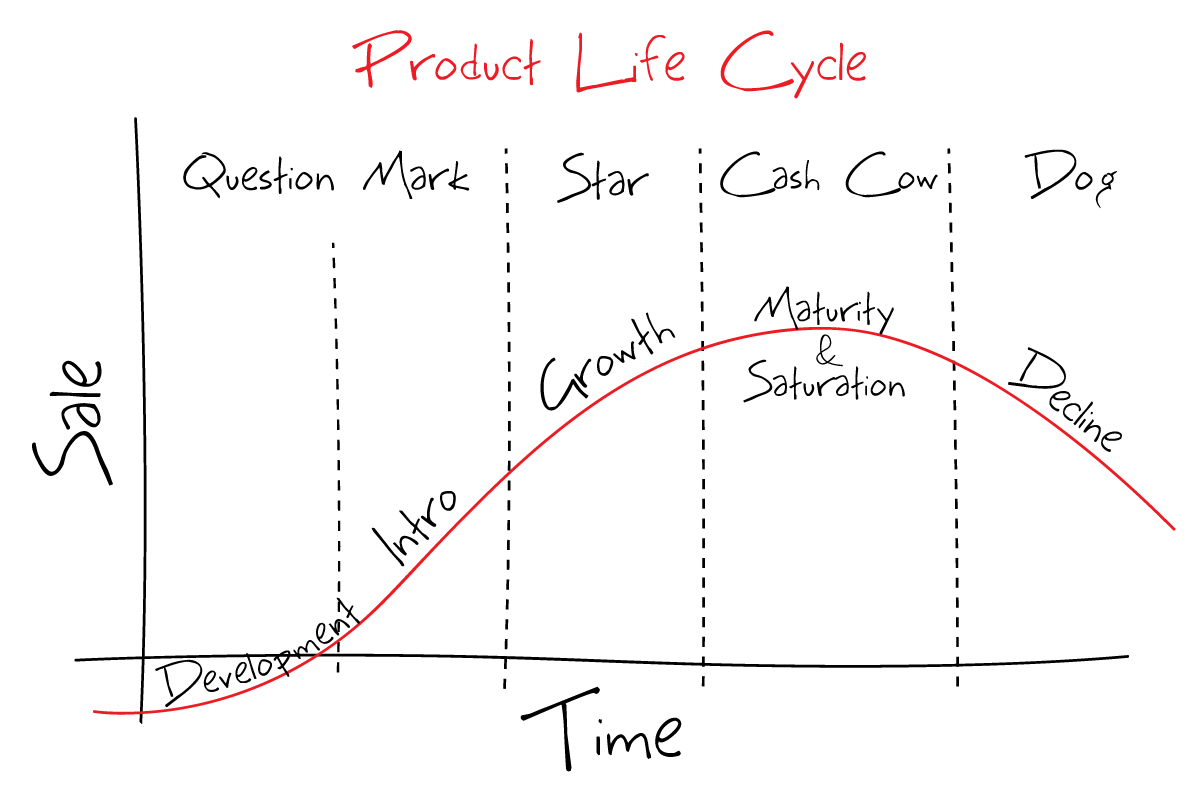
Retiring or sunsetting features is not as easy as it sounds. It’s not just waking up one day and deciding that an old feature has run its course and then simply removing it altogether.

The reality is much different. A sunset executed poorly may leave a lot of unhappy customers in its wake and at worst lead you to losing these customers. 

Therefore, it requires careful planning and consideration across various teams. Just as you would onboard users to new features, you should consider how to offboard users when killing a feature to allow them to see new value in your product.

In our newest addition to our ‘Feature Experimentation’ series, we will walk you through how to correctly and efficiently sunset a feature with minimal negative impact on your customers and to help you in deciding whether it’s truly time to let a particular feature go.

Read more: To read the first post in our series on feature experimentation best practices, click here. To read the second post on outcome-driven roadmaps, click here.

Why do companies decide to sunset products and/or features?

First, it’s important to address why companies decide to retire some of their features instead of keeping them around indefinitely. 

Look at it this way: developers spend a lot of time painstakingly developing features but they may also spend this time working on and maintaining a feature that may be used only by a small percentage of users, time which could be spent working on something which could bring greater value and revenue, such as new, more innovative features.

Any feature that is developed requires ongoing maintenance and support, which may use up resources you could be using to develop new features that satisfies your customers’ current needs rather than holding onto underperforming features.

Therefore, a certain feature might not be generating enough revenue in order to support the costs and resources used to maintain it.

There’s also the major issue of technical debt. When you let all your features pile up in your system, you eventually start to lose track of them and may accumulate into unwanted debt resulting in a breakdown of the software development and maintenance life cycle. 

Thus, some reasons which could prompt some companies to retire certain features include:

  • Low feature usage over time or feature engages a small number of users
  • Based on feedback from users
  • New features that replace existing ones
  • High costs i.e technical debt and drain of resources
  • No longer aligns with overall company strategy and objectives

Steps to follow to effectively sunset a feature

Consider your decision carefully before retiring a feature

Initially, there are a few questions you should be able to answer before retiring any features. These include:

  • What percentage of users are actually using the feature?
  • How is the feature being used and what kind of customers use it?
  • What are the costs and risks of sunsetting the feature compared to the current costs of maintaining the upkeep of this feature?
  • Do you have a communication plan in place to inform your customers of your decision before going ahead with the sunset? 

Consider how the feature fits into your short- and long-term goals. In terms of long-term goals, look at the bigger picture and consider whether your existing features fit in with your company’s long term goals and vision.

In the short-term, you should think about whether a certain feature still solves a pain point or problem that is still ongoing or whether this problem is no longer relevant.

Most importantly, look into your overall product strategy and use it as the basis for evaluating your features and their value to determine whether to keep or retire some of these features.

Check the data

To be able to answer questions such as the above, you will need to check what the data says.

The first couple of questions raised above focused on product usage. This is because product usage is usually one of the primary reasons why companies decide to retire a feature or product.

For example, if you start to see Monthly Active Users (MAU) numbers going down, this is your first indication that something is amiss with this feature and so you will need to investigate as to why that is.

Thus, at this point, you will want to track feature engagement. There are various tools that could help you do that.

However, be careful when it comes to tracking usage. 

If you do happen to see low usage levels, there could be other reasons such as the feature being too complex to use or access rather than a case of your customers not finding a certain feature valuable anymore.

Therefore, take the time to properly evaluate the reasons for the low usage before making the decision to sunset the feature.

It could also be that there is low usage but the users who are using the feature are among your valuable and highest-paying customers, then it could mean that you simply need to market that feature more efficiently.

To address these doubts, you will need to go straight to the source by directly communicating with your customers. More on that in a bit.

Another indication could be if you start to see a downward trend in your sales then this is a clear red flag. For that, you can look at metrics such as churn rate as well as customer acquisition and retention rates.

To have context for all this data, it’s essential to speak to different teams. For example, talk to your sales team to determine whether a certain feature is a ‘hard sell’ and understand how and if they’re closing deals that include this feature.

You can also talk to your development team to gain a deeper understanding of any issues that are being raised with a certain feature and whether fixing these issues are costing them time and money. 

In other words, take a look at the number of bugs that are being reported in regards to this feature. If there’s a large quantity of negative feedback then you know that customers are less than happy with it and that there are issues which need to be addressed.

This will help you have a good idea of what this feature is costing your company when it comes to customer support time and resources as well as how much time your development team is devoting to said feature from bug fixes to testing and maintenance.

Aside from your teams, you need to speak to external stakeholders as well- your customers. This brings us to the next point.

Talk to your customers

Looking at numbers gives you a good idea of how the feature is performing but to get to the root cause of the issue, you will need to speak to customers to provide some context to the downward trend you’ve uncovered.

The data will reveal whether a feature is not being used but it will not tell you why it’s not being used by customers.

You can segment your customers into those that use the feature and those that don’t, for example, and conduct customer research to better understand their perspectives.

You can also choose to be more specific in your segmentation to find patterns in feature usage by dividing users based on company, industry, role, etc.

Conducting customer or user research, such as interviews, could further provide you with meaningful insight into your customers’ needs and whether this feature provides the solution to their problem.

Have a communication strategy in place

If you decide to go for the sunsetting route, then you need to make sure you have a communication strategy in place as part of your phase-out plan, both internally with your teams and externally with your customers.

These represent two distinct processes and each should have its own plan. 

You’ll need to give notice in advance of the sunset allowing for a grace period and enough time to transition from the feature.

Be sure to also communicate what alternatives there are for your customers to use instead and educate them on how to use them, i.e set up an onboarding process to ease the transition.

However, you will also need to communicate internally with your team first to make sure everyone is aligned and is clear on the sunsetting process and the actions that need to be taken to ensure a smooth transition.

They will need to be carefully briefed so they’re prepared to deal with any fallout and to provide the necessary support for the upcoming changes.

In this scenario, the product marketing team usually takes over to oversee the transition and to assist with any training that may be needed so that the rest of your team knows how to talk to customers and be able to answer their questions and concerns.

Everyone will also need to be clear on the timelines. For example, let your sales and customer success teams know the dates in which you’re planning to retire the feature so they can prepare accordingly.

When it comes to your customers, start putting a plan together of how you will communicate the sunset.

Consider which channels you’ll use and are most appropriate to communicate this information. Some of the information you’ll need to put forward include:

  • Why you’re removing the feature
  • What are the benefits of sunsetting the feature
  • Give a clear timeline of the sunset to give customers ample time to prepare. The timeline chosen will depend on the feature in question and how much impact it will cause by removing it
  • As already mentioned, you should be able to provide a substitute and support to help them migrate to it

Buffer, a tool that helps customers build their brands and grow their business on social media, is an example of one company that we think effectively communicated the sunset of one of its features ‘Reply’. In a blog post by the CEO, the company provides its reasons for the sunset then talks about a new solution it’s building that’s better suited for its customers.

The post concludes by giving a list of partners that provide alternatives to ‘Reply’ with offers to ‘make a move more manageable’.

We’ve also talked previously about segmenting your customers when you want to have discussions with them to understand their usage pattern of the feature.

Likewise, during the actual sunsetting process, you can also create different communication strategies according to the types of users for the feature: those that are frequent and hard-core users of the feature and ‘dabblers’, those who have not used the feature much and thus do not rely on it like the hard-core users and, in turn, would not be heavily impacted by the sunset. 

You can even create another third segment of ‘disengaged’ users who have either stopped using the feature or never used it in the first place.

Establishing such segmentation will help you to choose the appropriate channels to reach out to them and create more personalized messaging for each group of users according to their usage rate.

Remember, deprioritizing and phasing out certain features will likely involve cross-team and company-wide feedback so you need to decide how and who is involved in the final decision.

The important thing is to be transparent with all the relevant stakeholders so they’re all clear on why and how this change is in the works.

Remove the feature 

When you decide to sunset or phase out a feature, make sure to remove all mentions of the feature from all marketing and sales material. If relevant, replace it with the alternative.

You can keep providing support for it in the phase-out period but make sure to let new users know this feature will be retired and will no longer be supported. 

You may even consider removing access to the feature altogether for new users and users who have never used it before so the number of affected users remains low.

By the time you retire the feature, you should have a clear idea of where the resources and budget dedicated to the retired feature will be allocated so your team has a clear plan of action in terms of the direction the company is heading towards and what kind of features are on the horizon that they’ll be working on.

However, the work doesn’t end when you sunset the feature. You need to think of the impact of this sunset.

This means you’ll need to monitor the results of your change by tracking some key metrics to understand better how your customers are reacting to the sunset.

If, for example, the old feature had many bug incidents that were reported, you can compare it to the number of support tickets being raised for development teams after feature removal, whether they’ve decreased.

If you’re offering an alternative, you’ll need to track its usage and how many users are turning to this alternative feature. 

Sunsetting with feature flags

You’ve probably heard of feature flags. They basically reduce risk of new releases by decoupling deployment from release allowing you to enable or disable features or enable them for certain users.

Consequently, feature flags play a valuable role in launching new functionalities but they’re also great for retiring old features. In fact, feature flags are a fool-proof way to manage a feature along its entire lifecycle from launch to retirement or sunsetting. 

In other words, feature flags give teams the ability to sunset features that are no longer necessary. 

Product teams can use feature flags to remove old features gradually in order to give customers time to wean off the feature so the process is not abrupt and to help ease the transition from the old feature.

Feature flags, therefore, allow you to track the usage of features to determine their usage by customers and then efficiently sunset any old, unused features to keep your code base clean and running smoothly.

We mentioned previously how you can prevent new users from accessing old features that you want to retire or users who had not used these features before. 

Feature flags essentially provide a switch to toggle off about-to-be retired features for these users and, if relevant, slowly transition current users to the new, alternative feature.

You should also have a sunsetting process in place to not only remove old features but also to remove old flags in your system. 

If you use feature flags extensively across several use cases and teams, you need to make sure that you keep track of all the flags you’re using with the help of a feature management tool and then sunset those flags once they’re no longer needed to avoid the accumulation of technical debt.

To bring it all together

As we’ve seen, the process behind sunsetting a feature may be long and delicate so tread carefully.

What it all comes down to is you basically need to make sure you have a solid plan in place when you make a sunsetting decision so that the process is clear to everyone in the organization. One way to help you do that is to create a ‘sunsetting roadmap’. 

In a previous post in the ‘Feature Experimentation’ series, we discussed how to build an outcome-driven roadmap for feature experimentation. It might also help to consider building a specific roadmap for sunsetting your features to allow you to visualize and map out your plan for phasing out your feature.

It will not only give you a clear step-by-step plan of the sunsetting process but it will also allow you to look at the bigger picture and see if going ahead with the sunset is the right move in the first place by enabling you to see how and if this feature still fits in with your long-term organizational goals. 

It will also help you when it comes to discussing your sunsetting decision with other members of your organization and the key decision-makers within it.

The sun will surely rise again

Think about when you develop a new feature. A lot of hard work goes into thinking about what kind of features to build and then into the development and release processes.

The same kind of careful planning should also occur when deciding to remove a feature.

Yes, there might be some slight bumps along the road to sunsetting but if you’ve thought it through and you have valid reasons to phase out a feature backed by solid data and feedback, you’ll start to see more of a positive impact in the long-term.

The key to effective sunsetting is to prepare everyone, internally and externally, for the change and to guide them so that they may see new value in your product and features. That way, you’ll be able to retain and even increase user engagement among existing and new customers alike.


Article

11min read

Outcome-Driven Roadmap: Paving the Way for Better Feature Experimentation

In our previous post within our ‘Feature Experimentation’ series, we listed some essential best practices when it comes to feature testing and experimentation.

We also mentioned the importance of having a roadmap in place to help guide your team so that they’re clear on the main business objectives so that they can build efficient tests.

This roadmap will essentially be the link between these objectives with a product manager’s ideas to be able to run experiments and track the right metrics.

As a product manager in a modern software development world, you know how critical it is to quickly deliver features or products to keep up with rapidly changing demands. 

You also understand how important it is to continuously run experiments to make sure that your releases are ones your customers actually want.

Having a roadmap in place will enable you and your team to plan experiments that lead you to the best outcomes in line with your company’s overall strategy and objectives.

Therefore, in this post, we will guide you on how to build and create an experimentation roadmap so you can determine what you need to optimize and figure out which experiments you need to run.

A well-structured roadmap will help you and your team prioritize which actions to take and which experimentation ideas are viable to achieve your goals and objectives.

It outlines a clear strategy for your team to follow so everyone is on the same page working towards the same objectives.

Why do you need an experimentation roadmap?

In the previous section, we quickly went over the importance of having an experimentation roadmap in place to achieve your goals. Here we will go into more detail about why you need such a roadmap.

We are focusing specifically on an ‘experiment-driven’ roadmap, which is a roadmap that illustrates the experiments a product team is aiming to run in order to achieve certain outcomes in line with business objectives.

Such a roadmap helps to point out which features to add, change or remove depending on the pain point you’re trying to solve and the data generated from experiments and any additional data gathered from other sources such as through the discovery phase process or from interviews or product usage.

Put simply, it will act as a strategic plan of action that communicates to all teams how your short-term goals align with the organization’s long-term goals.

Before embarking on your experimentation journey, having a roadmap should be the first step for various reasons, including:

Better resource planning

Creating a clear plan or roadmap before starting your experiments will help you plan your resources in advance instead of finding out you’re running out of resources halfway through an experiment.

Furthermore, as you run more experiments, you’ll be able to better allocate resources to each of these experiments to obtain more accurate results.

It’s also very likely that as you go further into your experimentation journey, you might want to create more complex experiments and tests. When you have a roadmap in place, you will be able to plan in advance for such tests.

Thus, a roadmap will enable you to see the kind of resources, such as maximum budget, you have at your disposal to plan your experiments more efficiently.

Working towards a common objective

As already mentioned, an experimentation roadmap will clarify for your teams the kind of goals and objectives you’re aiming to achieve so that every team is aligned and experiments can be built around these goals.

For example, if you have a roadmap established, you and your team will know which tests you need to run first so you can start planning these tests and the kind of resources you’ll need, as per the point above. This will end up being a huge time-saver as you have a clear idea of which experiments would fulfil company objectives. 

This is a more efficient way than running random tests which might not get you the results you’re looking for and that end up being a waste of time and resources. 

Greater visibility and enhanced communication

Because everyone has a clear goal to organize their workflow around, this gives greater visibility to all teams within an organization on the testing processes that are being set up. 

This, in turn, allows for better communication as everyone is on the same page on what needs to be done and the information they need to do it. In short, it helps to communicate and lay out to the teams involved what the plan is to achieve objectives.

This also helps establish a culture of experimentation within the organization as different teams share their insights and learnings from the experiments.

We’ve emphasised in our previous post in our Feature Experimentation series the importance of making experimentation a team effort and an experimentation roadmap facilitates this process.

By building this roadmap, you’re basically communicating to your teams that experimentation and optimization are taken seriously and are at the forefront of the business.

In short, from this section, we can conclude that an experimentation roadmap helps align teams, the company vision and its overall goals with the kind of experiments you run. 

It helps put experimentation at the core of your business and puts it into perspective within the wider business objectives. In other words, it gives teams purpose and direction in their day-to-day work. 

Keep your eye on the goal: Focus on the outcomes

In Agile product development, it is often the outcomes that matter foremost while putting users at the heart of the process to deliver concrete and measurable results.

What this means is that when drawing up your roadmap, you should focus on outcomes rather than just listing the features you’re looking to build within a certain timeframe and hence forcing you down a fixed path. 

When you look at outcomes, your main focus is on understanding problems and finding innovative ideas to solve these problems through experimentation.

This is the essence of an experimentation or experiment-driven roadmap. When you run experiments, you are given the opportunity to explore various solutions by testing different features within your experiments and tracking their performance. 

Consequently, your main focus will be on achieving outcomes rather than having a predefined list of features you think will be the solution to your pain points. Also referred to as a feature-driven roadmap, this roadmap instead focuses on a fixed list of features to be delivered over a given time period without taking into account the wider consumer or market context.

This means that the goal of an experimentation roadmap is to help you reach specific outcomes within various time frames, outcomes that fulfil both short- and long-term goals. 

Thus, you start out with a problem or pain point you’re trying to solve and the experimentation roadmap gives your team insight and a clear strategy on how to solve that problem by testing out your ideas through different experiments till you get the outcome you’re looking for. 

An example of a problem-focused roadmap can be seen in the image below, which includes a ‘discover and experiment’ phase to help tackle problems in each quarter:

This approach provides more autonomy for your teams and encourages them to share their own insights and knowledge which helps to instil a true culture of experimentation.

Focusing on the outcomes will enable product teams to be more flexible by making constant changes and reiterating to get to the outcome instead of committing in advance to features that they think will deliver the desired results.

Only once you’ve validated features through experiments should you proceed with releasing a feature that will actually deliver value.

The following image depicts a more simplified and straightforward version of this approach:

Outcome-focused roadmap

How to construct your experimentation roadmap: Step-by-step

In this section, we will discuss the steps to follow when creating your roadmap to help run efficient experiments and campaigns. 

1. Outline business mission and vision

We stressed the importance of aligning short-term goals of your experiments with the long-term organizational goals.

For that, you will need to clearly outline the mission and vision in order to create quarterly objectives and key results.

Afterwards, it is imperative to establish your business goals, based on the vision and mission, as these will be the basis for all the future experiments you run (or don’t run). 

2. Define goals

Once you have established the main business objectives, you will now need to consider why you are running these experiments in the first place. In other words, what the goals of these experiments are, i.e the why aspect of your experiments.

Your roadmap should contain specific, detailed descriptions of the kind of changes you want to see and define what success looks like for your company so you can set goals based on this information.

Your goals will usually be tied to your brand vision and overall business objectives. In other words, it will focus on the bigger picture so that it communicates clearly to all stakeholders the desired business outcomes.

Ironing out the details will then serve as the foundation of your experimentation framework and roadmap and act as a prerequisite for tactical planning.

Setting experiential goals will then help you formulate hypotheses as a starting point for any test you run. This is especially the case if you’re planning to run A/B tests, which usually start with a hypothesis that includes an assumption and the expected outcome. 

3. Define experimentation KPIs

After you’ve defined your goals, you’ll need to determine the primary and secondary KPIs you need to track in order to gauge the success of your experiments.

These KPIs will depend on the kind of results you’re looking to get from these experiments so KPIs can be anything from access rate of the product page to the number of clicks on the CTA.

Other KPIs to consider depending on the goal of your experiment may include product usage, conversion rate and sign-up rate.

4. Outline the key features of your tests

An experimentation roadmap will help you identify key features in each of your tests or experiments including:

  • What to test
  • When to test
  • Who to test on
  • Who is running the test

These are all key features to include within your roadmap to help you keep track of your experiments and the people and teams involved in the experiment process.

This is especially important when you’re part of a large organization and different teams are involved in and running their own experiments. This also ensures any knowledge, insights and learnings from experiments are visible throughout the organization.

5. Prioritize tests

You will also need to determine which tests to run first depending on priority, usually by directing your attention to the ones that will bring you the highest return on investment (ROI).

For example, you may decide to run tests depending on your existing resources-you will need to consider how easy or complicated it is to put together a certain experiment depending on existing organizational resources- or you may choose to run experiments based on the results you’re seeking and plan accordingly.

However you choose to prioritize your experiments, try to prioritize them based on your desired outcomes so you don’t waste time or resources running tests on features that don’t give you the data or insights you need to optimize your products.

Remember that being part of an agile product team, it’s important to remain flexible. This means that the roadmap you built will not be set in stone. You should always leave room for changes as often unexpected findings may occur during experiments that may force you to shift gears. 

There are many techniques for prioritizing roadmap items. One approach is referred to as the MoSCoW technique, which helps product teams to prioritize features. This approach is especially useful for Agile teams which tend to favor items that carry the highest value.

The below image depicts the requirements of this framework, where the top category ‘Must have’ are features that are absolutely critical to a project all the way to ‘Will not have’, which are features that are not worth the investment.

Moscow feature prioritization

Experimentation roadmap: Your road to better products and/or features

What we can conclude from this post is that an experimentation roadmap serves as a shared source of truth that outlines the company vision, priorities and planned features and their progress.

Most importantly, a roadmap is a way to empower teams down a path of maximum impact by giving them the information they need to get started on their experiments.

We emphasized the idea of flexibility so it’s ok to introduce changes to your roadmap as you start your experiments.

This is the whole point of experimentation; you are conducting experiments without the certainty of knowing what the solution will be so it’s a learn-as-you-go process and then adjusting your roadmap accordingly.

The only thing that should remain a staple within your roadmap is how the goals of your experiments will achieve long-term business objectives.  

Read more: Why you should slot feature flags into your Agile roadmap

Article

14min read

Migrating from Monolith to Microservices: How do Feature Flags Fit in?

If you’re looking to get started on building an application, you may be wondering whether to design it as a monolith or build it as a collection of microservices. In fact, this has been a long-standing point of debate for many years among application architects.

So what is the difference between these two architectures and how do you decide which one to choose and which one is best for your organization?

While monolithic architectures have been used for many years, microservices seem to be taking over as it’s becoming a key driver of digital transformation.

Indeed, in a world where speed and agility are more important than ever, you may find that switching over to the more versatile microservices approach to build applications that are quicker to create and deploy the go-to-strategy to remain competitive and to be able to continuously deliver software without delay.

In this post, we will investigate the above questions by comparing monolithic and microservices application architectures to help you in your decision. We will also explain, since moving to microservices might be a risky endeavor, how feature flags may help reduce some of that risk.

Monolithic vs Microservices

Monolithic architecture

Before we move on to the migration process, we will quickly go through the definitions of these architectures and why one may take precedence over the other.

By definition, a monolith refers to a “large block of stone”. In the same way, a monolithic application is an application made up of one piece or block built as a single indivisible unit. 

In that sense, in a typical monolith application, code is handled in one single, tightly knit codebase and so data is stored in a single database. 

Although this type of application is considered to be the common and traditional method to build applications, it may cause some major problems and over time may become unmanageable. 

The image below illustrates the makings of this architecture, which consists of a client-side user interface, server-side application and a database. They all function as a single unit and so changes are made in the code base and require an update of the entire application.

Monolithic Architecture Diagram
Source

Below, we will list some of the difficulties and drawbacks associated with this architecture, which prompts many to move to microservices.

Drawbacks of monolithic applications

  • Less scalability- components cannot be scaled independently; instead, the whole application will need to be scaled, not to mention that every monolith has scalability limitations. 
  • Reliability issues- given how the components of a monolithic application are interdependent, any minor issue may lead to the breakdown of the entire application.
  • Tight coupling- the components of the application are tightly coupled inside a single execution meaning that changes are harder to implement. Furthermore, all code changes affect the whole system, which could significantly slow down the development process.
  • Flexibility- with monolithic applications, you will need to stick to a single technology as integrating any new technology would mean rewriting the entire application which is costly and time consuming.
  • Complexity- as a monolithic application scales up, it becomes too complicated to understand due to how the structure is tightly connected and becomes even harder to modify that eventually it may become too difficult to manage the complex system of code within the application.

Despite its drawbacks, monoliths do offer some advantages. Firstly, monolithic applications are simple to build, test and deploy. All source code is located in one place and can be quickly understood. 

This offers the added advantage when it comes to debugging. As code is one place, any issues can be easily identified to be fixed.

As already mentioned, a monolithic approach has been in existence for a long time and since it’s become such a common method for developing apps, this means that engineering and development teams have the sufficient knowledge and skills to create a monolithic program.

Nonetheless, the many disadvantages of monolithic architecture has led to many businesses shifting to microservices.

Microservices architecture

Unlike a monolithic architecture, microservices architecture divides an application into smaller, independent units and breaks down an app into its core functions-each function is called a service. 

Every application process is handled by these units as a separate service and each service is self-contained; this means that in the event that a service fails, it won’t impact the other services.

In other words, the application is developed as a collection of services, where each service has its own logic and database and the ability to execute specialized functions. The following image depicts how this architecture works:

Microservices Architecture Diagram

You can look at each microservice as a way to break down an application into pieces or units that are easier to manage. In the words of Martin Fowler:

“In short, the microservice architectural style [1] is an approach to developing a single application as a suite of small services, each running in its own process and communicating with lightweight mechanisms, often an HTTP resource API.”

In other words, microservices architecture is a way to design software applications as suites of independently deployable services that communicate with one another through specific methods, i.e by using well-defined APIs.

Microservices: The answer to accelerated application development and time to market?

More distributed systems architectures such as microservices are increasingly replacing the more traditional monolithic architecture. One of the main reasons is that systems designed with microservices architecture are easier to modify and scale.

Due to its distributed nature, developers can develop multiple microservices simultaneously. 

Since services can be deployed independently, each service is a separate codebase that can be managed by a small development team, as can be seen in the image below, which illustrates the major differences between these two architectures: 

Migrating monolith app to microservices
Source

This results in shortened development cycles so releases are ready for market faster.

Microservices, as a result, are used to speed up the application development process as this type of architecture enables the rapid delivery of large, complex applications on a frequent basis. 

Moreover, since these services are deployed independently, a team can update an existing service without redeploying the entire application unlike monolithic architecture. This makes continuous deployment possible. 

This also makes these types of applications less risky to work with than monolithic applications. Risk mitigation, then, is one of the key drivers for adoption of microservices.

This makes it easier to add new changes or functionalities to it than to a monolithic program. This means that updating the program is more straightforward and less troublesome.

With monolithic applications, even the most minor modifications require redeployment of the entire system and so feature releases could be delayed and any bugs require a significant amount of time to be fixed.

Thus, microservices fits within an Agile workflow as using such an approach makes it easier to fix bugs and manage feature releases. You can update a service without redeploying the entire application and roll back if something goes wrong.

Not to mention that a microservices architecture addresses the scalability limitations that come with monolithic architecture. Because of its smaller, autonomous parts, each element can be scaled independently so this process is more cost- and time-efficient.

Finally, each service can be written in a different language without affecting the other services. Developers are also unrestricted by the technology they choose so they can use a variety of technologies and frameworks instead of going for a standardized one-size fit all approach.

To sum up the differences


The table below summarizes some of the major differences between the two architectures:

  Monolithic  Microservices
Deployment Simple deployment of the entire system  More complex as there are independent services which need to be deployed independently
Scalability Harder to scale; the whole system needs to be redeployed Each element can be scaled independently without downtime
Testing Easier to test: end-to-end testing Harder to test; each component needs to be tested individually
Flexibility Limited to single technology Freedom of choice of tech stack
Security Communication with a single unit and so security is handled in one place Large system of standalone services communicating via network protocols raises security concerns
Adoption  Traditional way to build applications so easier to implement and develop as developers possess necessary skills Specialized skills are required
Resiliency Single point of failure- any issue can cause a breakdown in the entire application A failure in one microservice doesn’t affect the other services

Tread carefully with microservices

In sum, a microservices architecture offers many advantages. Nonetheless, this type of architecture may not be suited for all companies so a proper evaluation will need to be made to choose the best approach for them depending on factors such as type of product or audience.

As a result, before moving onto the migration process, it is important to proceed carefully before attempting this migration as a microservices architecture is not without its cons. 

Among some of the drawbacks of microservices include:

  • We’ve already mentioned how monolithic architectures have been used for a long time that many engineering teams have the knowledge and experience to create a monolithic program. Meanwhile, building a microservice application without the necessary skills could be a risky endeavor as a microservice architecture is a distributed system and so you would need to configure all the modules and database connections.
  • Just a monolithic application could become complex with time, standalone services that make up a microservice application could also lead to high developmental and operational complexities.
  • Because of the distributed system that makes up this architecture, testing such an application is more difficult because of the large number of deployable parts.
  • Debugging and deploying these large numbers of independently deployable components are also much more complex processes. (However, should any individual microservice become unavailable, the entire application will not be disrupted).
  • Testing, such as integration and end-to-end testing, can become difficult due to its distributed nature. This is in contrast to monolithic apps which consist of a single unit that makes it easier to run end-to-end testing.

In the end, transitioning to a microservices architecture will ultimately depend on the pain point you’re trying to solve.

You’ve got to ask yourself whether your current (monolithic) architecture is giving you trouble and whether actually migrating to microservices will help solve your issues.

Make the transition less risky: Feature flags and microservices

With the above in mind, DevOps teams might still want to make the transition from monolithic to microservices architecture due to its compatibility with Agile development workflows, that come with with lower risks and fewer errors.

During this process, teams will look to replace the old code and roll out the new code at once, which could be very risky.

Therefore, migration to a microservice-based ecosystem could turn out to be a challenging and time consuming process, especially for businesses with large and complex systems with monolithic architecture.

This is where feature flags come into play.

Feature flags are a great asset when it comes to releases and we’re not only referring to front-end releases but also when it comes to your architectural strategy.

Feature flags give you greater control over the release process by choosing when and to whom you will release products and features by separating deployment from release.

Thus, you can turn features on or off for certain users by simply wrapping them up in a feature flag without redeploying, lessening the risk associated with the release process.

Just as feature flags enable progressive delivery of features instead of a big bang release, the same idea applies when it comes to migrating to services: it’s best to do it one piece at a time instead of all at once. 

The main idea is to slowly replace functionality in the system with microservices to minimize the impact of the migration.

You would essentially be making small deployments of your microservices by deciding who sees the new service instead of going ahead with a big bang migration.

This will be preceded by analyzing your current system to identify what you can start to migrate. You can experiment with functionalities within your customer journey to start migrating and gradually direct traffic to it via feature flags away from your monolith and then slowly kill off the old code. 

There are other ways to go about the migration process- which often involve a roll out of the new code all at once- but feature flags lessen the risk usually associated with microservices releases through progressive rollout instead.

Split your monolith into microservices using feature flags

The key is to move from monoliths towards microservices in incremental ways. Think of it as if you’re untangling a knot that’s been tightly woven together and feature flags as the tools that will help you to gradually unravel this knot.

  • Start with identifying a functionality within your monolith to migrate to a microservice architecture. It could be a core or preferably an edge functionality such as a code that sends coupon or welcome emails to users in the case of an e-commerce platform, for example.
  • Proceed by building a microservice version of this functionality. The code that controls the functionality within the monolith will need to be diverted to where the new functionality lives, i.e within the microservice.
  • Then, wrap a feature flag around this microservice with the traffic going to the old version. Once the feature flag is turned on, the microservice code is turned on so you can direct traffic to the new version to test it.
  • Note that you should keep the existing functionality in place in the monolith application during the transition so you can then alternate between different versions or implementations of this functionality-the one in the monolith and the one in the new microservice.
  • If anything goes wrong, you will be able to revert traffic back to the monolith with the original functionality. Hence, you can switch between the two functionalities until you’re satisfied that the microservice is working properly.
  • Using a dedicated feature flag management tool, you can test the microservices to ensure everything is working as expected. Feature flags allow you to target certain users such as percentage rollouts (similar to a canary deployment), through IP address or whatever other user attributes you set. 
  • If no issues come up, then you can turn the flag on for more users and continue to monitor the microservice to ensure that nothing goes wrong as you increase the traffic to it.
  • Should anything go wrong, you can roll back by turning the flag off (i.e kill switch) and delete the old application code.
  • Make sure you remove the flag once you no longer need it to avoid the accumulation of technical debt.
  • Then, you will repeat this process with each functionality and validate them with your target users using your feature flag management tool.

Remember, the whole point is to create these microservices progressively to ensure things go smoothly and with feature flags, you further decrease the risk of the migration process.

This is based on the idea of the ‘strangler fig’ pattern. 

This term is inspired by a kind of plan, where in a similar way to the plant, the pattern describes a process of wrapping an old system with a new one, the microservice architecture, using an HTTP proxy to divert calls from the old monolith functionality to the new microservice.. 

This would allow the new system to gradually take over more features from the old system, as can be seen in the image below, where the monolith is ‘strangled’: 

Progressively decompose a monolithic application

In this scenario, a feature flag can be applied to the proxy layer to be able to switch between implementations.

Conclusion

Monoliths aren’t all bad. They’re great when you’re just getting started with a simple application and have a small team; the only issue comes from their inability to support your growing business needs.

On the other hand, microservices are a good fit for more complex and evolving applications that need to be delivered rapidly and frequently and particularly when your existing architecture has become too difficult to manage. 

There is no one-size fits all approach. It will eventually depend on the unique needs of your company and the capabilities of your team.

Should you decide to take the plunge and shift to microservices architecture, make sure that you have a feature management tool where you can track the flags in your system and how your features are performing.

AB Tasty’s server-side functionality is one such tool that allows you to roll out new features to subsets of users and comes with an automatic triggered rollback in case something goes wrong during the migration process. 

The most important takeaway is to carefully consider whether you really need to migrate and if so, why. You must evaluate your options and think about the kind of outcome you’re hoping to achieve and whether a microservices architecture provides the right path to this outcome.

Article

12min read

Feature Experimentation Best Practices

Welcome to the first post within our new ‘Feature Experimentation’ series, where we’ll be broaching different topics related to this modern and essential practice in modern product development.

In this series, we’ll be introducing various scenarios where you can reap the benefits of feature experimentation as well as other relevant guides to help you on your experimentation journey.

In this first post, we will list and discuss some essential best practices when it comes to feature experimentation to ensure that your experiments run smoothly and successfully.

Why running experiments should be a central part of your product development process

Running experiments has become a growing, popular trend and a necessity to develop high quality features and products.

Such experiments are key in helping you uncover usage patterns and to give you insight on how your users interact with your products.

Therefore, experiments are a great way, particularly for product managers and product teams, to validate product quality and to ensure that a product aligns with business objectives.

To measure the outcome of your experiments, metrics can be used to help gauge how your customers are reacting to the new feature and whether it meets their expectations.

This means that experiments help you build and optimize your products so you can make sure that you’re releasing products that can guarantee customer satisfaction.

Experiments are also a great way to learn and prioritize resources so that product teams can focus on the most impactful areas for further iteration.

Experiments can come in different forms and these include tests such as A/B testing and multi-armed bandits.

What exactly is feature experimentation?

We talked generally about experiments in the previous section but in this series we will focus on a specific type of experimentation.

As the name suggests, feature experimentation involves feature testing or running experiments on developed or modified features with live users in order to see whether they’re performing as intended.

When we talk about feature experimentation, we’re referring to certain areas within your product that may have issues and need further optimization and improvement.

These features are ones that define the functionality of your software which make the product as a whole more effective and the overall user experience better such as a sign-up flow, a referral program, a purchase funnel or pricing offers, for example.

In other words, features refer to complete parts of your product that often involve multiple stakeholders or teams and are tied to your internal processes or business logic.

These are the features that often have a major impact, positive or negative. As a result, such features need to be tested to avoid the risks associated with blindly launching them into the wild without a clear understanding how they will perform or what their impact will be on revenue and sales or on product usage, for example.  

Thus, your team can compare different variations of features with users, instead of going for a full bang release, and see which one confirms your initial hypothesis and shows a positive impact.

This way, only your best features reach your customers after looking at the data that points to the better performing variation.

Experimentation will essentially give you the data you need to do exactly that. Once the winning feature is determined, it can then be rolled out to the rest of your users with the promise of a great user experience. 

Some essential best practices for running impactful experiments

As we’ve just seen, feature experimentation and experimentation in general is an indispensable tool for any modern tech and product teams. 

In this section, we will discuss some general best practices when it comes to running experiments so you can achieve the best results and avoid any missteps in your experimentation journey. 

Create a culture of experimentation

This should go without saying but in order to get started with experimentation, you need to build and nurture a culture of experimentation within your organization.

Some factors will come into play during this process such as your company size, your team’s workflow and capabilities and the type of industry and market you’re operating in.

What this essentially means is that you primarily need to have a clear strategy and roadmap in place so that your teams are aware of the main business objectives to build efficient tests.

We will look into building an experimentation roadmap in another post within our Feature Experimentation series so stay tuned for that! 

In the meantime, what is important to note is that this roadmap will serve as the key to link business objectives with product managers’ ideas in order to execute tests and experiments and to be able to set and track the right metrics.

Furthermore, having a culture of experimentation will enable you to make data-driven decisions.

The data gathered from your experiments will allow you to determine and measure the impact of your ideas to see how they resonate with your customers, enabling you to have a clearer understanding of your target audience’s needs.

Building such a culture means you will need to have the right tools in place to help you segment your audience accordingly and tools that will also help you to collect the appropriate metrics and to analyze the results.

Just as important is having and investing in the right people, management and infrastructure to get the most out of experimentation. 

However, keep in mind that building this culture of experimentation doesn’t happen overnight.

It requires time and effort but with the right mindset, you can start nurturing this kind of culture within your organization and motivating your team to get started on their roadmaps.  

Make it a team effort

To embrace experimentation as part of your company culture, all the relevant teams need to be involved in product or feature testing and not just engineers and developers.

It is important to remember that a good experiment comes as a result of well-defined, shared goals and metrics by all stakeholders.

For example, as mentioned previously, experimentation is a great way for product teams to test out their ideas so everyone needs to be part of the brainstoming process and to look at experiments as a learning experience even if they failed.

In fact, sometimes, it is failed experiments that give the best insight. Any data and learnings gathered from experiments, then, will need to be shared widely among teams so everyone gets a chance to review the results and take the necessary action.

Increasing experiment visibility will allow more people within an organization to clearly see the benefits and processes underlying this practice and highlighting the success and areas of improvement boosts engagement so that they can share their own inputs thereby further instilling a culture of experimentation.

Product managers, in turn, can empower the rest of the teams to be part of the decision-making process on how to improve and optimize products so experimentation becomes a collaborative effort. 

It also holds them accountable for the experiments they run so that there is a shared sense of commitment. The earlier a team is involved, the more invested they’ll be in the experiment.

Make it easy

You want to build a culture of experimentation, great, but it’s also important not to make it too complex or a time consuming process that ends up discouraging your team from running their own experiments. 

Remember, experimentation should be a collaborative effort, as mentioned previously. Often, experiments may involve cross-functional teams depending on the type and the scope of the experiment you’re looking to launch.

At the same time, there shouldn’t be too much dependence among teams. We already mentioned that every team, and not just development and engineering teams, should be able to run their own experiments.

Feature flags are one way to decrease risk of running experiments by decoupling release from deployment so that all teams feel confident enough to execute experiments. We will go into further detail on that later.

Set realistic experimentation goals 

The goal of running experiments is to improve your product for your customers. The results gathered should give you sufficient data to enable you to make informed decisions to optimize your products. 

To be able to obtain relevant data, you will need to have a specific goal or objective that will lead you to create a viable hypothesis that you can prove (or disprove).

This is why having a roadmap, as mentioned previously, will be important to allow you to focus your tests so you can get the right data with statistically significant results.

Also, remember that it’s not always possible to test everything. This means you will need to channel your testing energy into running experiments that are relevant to your goals and objectives.

Additionally, some companies may not have a high volume of traffic or users to be able to test everything. This is especially true for feature experiments. A feature needs to receive enough traffic when running A/B tests on this feature in order to generate efficient results.

In sum, good tests or experiments should be focused enough that they give you relevant results and data to improve your products to ultimately ensure customer satisfaction.

Learn from failure

If an experiment goes wrong for any reason and you don’t obtain the results you were expecting, this doesn’t mean that the experiment was a waste of time.

Failures when it comes to experimentation can be considered as a learning experience. This encourages your team to take more risks and boosts creativity.

As a result, implementing experimentation as part of your company culture, regardless whether your experiments turn out to be successful or not, means that it becomes embedded within your team’s natural workflow. 

Also, remember knowing what not to do will actually help in improving your product by preventing you from implementing ideas that didn’t perform well so that you know it’s time to move on to the next idea.

Consider the metrics

If you want to make the most out of your experiments by making data-driven decisions then you need to carefully consider the metrics you will track to help you judge whether your feature was a success such as clicks, registrations or sales.

This is an essential best practice as good, efficient experiments are built around a specific goal or metric- the key is to keep a certain focus during experiments, as already mentioned, so as not to deviate from the original goal and lose sight of why you were conducting the experiment in the first place. 

This all means that you need to basically tie your experiments to specific KPIs so you can track and analyze the impact of your experiments.

Choosing the right metrics serve as a baseline for your KPIs to enable you to track the results of your experiments so you can make sound decisions.

Target the right audience

This may seem like a no-brainer but to get the results you need to improve your products, you need to choose the right audience to give you those results. 

Proper targeting will allow you to see what kind of changes you need to make to your feature variations and consequently, you will be able to tailor the user experience according to the needs of a specific set of users.

This way, product managers can gain valuable insight into their target audience by observing how they interact with different variations of a feature, allowing these managers to validate theories and assumptions about a certain audience.

There are many ways you can go about segmenting your audience, which includes by region, company, device, etc. It will ultimately depend on your own unique objectives.

Remember that to target the right audience, gather the data and analyze the results, you will need to have the appropriate tools at hand depending on your business objectives and teams’ preferences.

Consider the duration of the tests

With feature experimentation, you need to run these experiments for long enough time so you can gather enough data to yield statistically significant results.

Click here to read more about statistical significance and type 1 and type 2 errors which may occur during experiments.

This is important because statistical significance indicates that the results of your experiments can be attributed to a specific cause or trend and are not just a random occurrence.

Therefore, as you start to build your roadmap, you will need to include guidelines for the scheduling and duration of your tests in order to standardize workflows for your team.

However, keep in mind that having a sufficient sample size will be more important than the amount of time an experiment runs.

Use feature flags for safer experiments

For some, the idea of testing in production seems risky and stressful. 

However, there is a way to run feature experiments safely without any headaches.

Feature flags are software development tools that decouple deployment from release giving you full control over the release process. In that sense, feature flags can be considered as the foundation of a good experiment.

Feature flags allow you to safely conduct experiments by turning on features for certain users and turning them off for everyone else. If anything goes wrong during your experiment, then you can easily turn off the faulty feature until it’s fixed. 

Using feature flags alongside feature experimentation will help you maintain the continuous delivery momentum that is required from modern software development while minimizing the risk of disgruntled customers due to an unstable release.

Furthermore, once you have completed your experiment and obtained the results, you can implement the necessary changes through progressive rollout to further test how these new changes perform with users.

Therefore, through progressive delivery using feature flags, you can introduce changes slowly to your users to ensure a smooth user experience before releasing them to everyone else.

Embrace feature experimentation as part of your company DNA

Some of the biggest companies have achieved their market leadership position precisely because they have embraced experimentation as part of their culture. 

Therefore, feature experimentation, when done right, will allow you to make more powerful decisions based on quantifiable data straight from your users.

This means that instead of making decisions on a whim, experimentation will demonstrate what works and what doesn’t based on mathematically-sound data.

Experimentation is one of the most important capabilities offered by many feature management tools

Our own feature flagging solution, for example, offers an experiment platform that runs A/B tests to track the business impact of feature releases. 

This means that everyone has the tools and confidence to take part in experimentation.

For product managers, in particular, it gives them the power to set up, monitor and release confidently without waiting on engineering teams to run the experiments for them through a simple, easy-to-use dashboard. 

Our platform focuses specifically on more advanced server-side experiments that allow you to test deeper modifications tied to your back-end architecture using feature flags where you can then measure their impact on the user experience and business.

Flagship's Report Interface for Experimentation & A/B Tests

Find out how AB Tasty can help you transition seamlessly into the world of experimentation by signing up for a free trial.