Article

10min read

Feature Rollout Plan 101: Create the Perfect Plan for Stress-Free Releases

In modern software development, teams adopting a DevOps methodology aim to release more frequent releases in smaller batches to validate them and test their impact.

This enables teams to reduce the risk of a big bang release that could lead to buggy features that could damage the user experience. This also prevents doing a full rollback and then implementing rollout all over again.

This ultimately means that software organizations are constantly releasing new updates and features to improve their products’ stability and quality and to deliver the best user experience possible.

Having a set plan in place to introduce new features allows teams to roll out releases to gather feedback and optimize accordingly before going for a full release. 

What is a feature rollout plan?

A feature rollout, as the name implies, is when new product features (or updates to existing features) are released to end-users. It’s all the processes that go into gradually introducing a feature to a set of users to test its functionality before deploying to all your users.

Put simply, the main purpose of a feature rollout plan is to keep all teams involved in the development and release of new features on the same page by making it easier to identify what are the key elements of each phase in the rollout.

Failure of efficiently managing the release of these new features could potentially lead to low quality releases and a negative impact on the user experience. This could all severely damage a company’s reputation and competitiveness in a world where customer expectations are at an all time high. In that sense, a solid rollout plan will ensure more adoption of the software by your customers and improved and more organized workflows for all teams involved. 

Therefore, it’s generally recommended to put together a detailed, robust plan early on in the development process and not scramble at the last minute as this plan will require meticulous planning to ensure the successful release of your new features.

Feature rollout process

It’s important to first highlight the steps involved in a feature rollout so teams can effectively incorporate the requirements of each phase into their planning. 

Typically, the rollout process is divided into the following phases:

  • Design and planning – Define your objectives and KPIs, key stakeholders involved, set deliverables and communicate this plan to teams. This includes determining which features to prioritize and release to create the rollout plan accordingly.
  • Develop rollout strategy – Identify your target users whose needs are best addressed with the new feature and determine how you will give them access to your new features- your deployment strategy.
  • Build the feature and manage its progress throughout the development process.
  • Controlled rollout – validate and test your features with controlled rollouts using feature flags, for example.
  • Collect feedback by putting in place a constant feedback loop.
  • Full release – once the feature has been optimized and refined according to the feedback collected, it is ready to be released to all users.

You will also need to identify and anticipate any potential roadblocks and challenges along the way in your planning and address them early on.

As you advance in the rollout process, plan in-house training sessions and a user onboarding strategy as well as proper documentation to support your feature rollout to serve as a guide for users (both internal and external) to understand the feature in-depth and its value proposition.

Therefore, based on the above, your rollout plan should ideally include the following components to make sure your releases go without any hiccups:

  • Main objective and goals for each phase
  • Action steps and the teams involved 
  • Timeframe to provide clarity and set expectations for all teams
  • Metrics to observe
  • Checkpoints to monitor progress and ensure the project stays on track

Best practices to creating the ideal plan

All in all, to have an efficient rollout plan at hand, you can follow these best practices:

Start early

As already mentioned, you need to draw up your plan early, way before the development and deployment stages. For a successful feature launch, you should start working on your rollout plan as soon as the development process kicks off.  

Planning a seamless feature rollout could take months so the earlier you start considering all the elements within your plan, the easier it will be to keep your teams aligned and avoid any mishaps along the way.

Be flexible 

It’s important that your plan allows for enough flexibility and can be adapted throughout the development process. This means your rollout plan shouldn’t be so rigid that it cannot be updated as priorities and timelines continuously shift throughout the software development lifecycle. 

Define a clear rollout strategy

Your rollout plan will revolve around what strategy you’re adopting to roll out your new features. This means you need to determine how you’ll be rolling out your new features and the type of deployment strategy that is best suited to your new feature.

For example, should you choose a small group of beta users to opt in to test your product first to collect feedback and optimize your product before going for a full launch? Or is it better to run alpha testing on internal users first before releasing to real-world users?

Alternatively, you may decide to do a progressive rollout using canary deployment where you start with a small percentage of your users then expand the rollout process gradually until it’s released to all your users.

Set a tentative timeline

Being flexible is not equal to not having deadlines. You need to set a rough timeline of your rollout process with a clear rollout date that your team should target.

Setting a realistic timeline creates accountability by allowing individuals to outline their own responsibilities and build a personal roadmap that defines smaller deadlines leading up to the rollout release.

Set milestones

Setting key milestones in your feature rollout plan can be useful to further keep all stakeholders aligned and in sync throughout the project. This will allow them to clearly monitor as the software goes from one stage of the rollout to the next to track its progress by establishing clearly defined roadmaps for success. 

Keep stakeholders in the loop

As we’ve seen, a feature rollout process requires coordination and collaboration between stakeholders and multiple teams across an organization.

Early on, establish a core team including relevant and key stakeholders from each department to get their input on key decisions in the rollout process and provide them with all the information needed to understand the value of the new feature and to ensure a successful rollout. 

Outline an external communication plan

So you’ve developed and released your new feature but how do you make sure that your target users know about your exciting new releases?

You will need to make sure that you set a communication strategy so that customers know your software release is available. This is particularly important when you’re releasing new changes or updates to your features so customers know you’re continuously striving to improve your products.

Afterwards, you will also have to determine how you will start collecting the feedback you need to reiterate your products throughout the rollout process.

However, as we’ve mentioned in the previous point, make sure that your communication strategy includes all relevant stakeholders, external and internal users, and your  customer-facing teams. Clear and consistent communication is required from top management so that teams are aware of and understand the vision and strategy behind any new feature. 

Why do you need a feature rollout plan?

One of the biggest advantages of a feature rollout plan is that it allows for enhanced collaboration and communication among teams involved in the feature rollout process.

A rollout plan helps keep teams on the same page and move forward towards the same objectives to get your software into the hands of your users. In that sense, feature rollouts usually require the close collaboration of many teams and not just development teams so a plan helps different teams aligned around the same end-goals.

Furthermore, as new features are gradually introduced to users, such a plan enables careful planning. Thus, it gives teams more control over the release process by carefully planning who gets to see the new feature and when. 

We also mentioned the importance of identifying any potential roadblocks in your feature rollout process. A rollout plan can facilitate the discovery of these roadblocks and anticipate them so you can work on removing them so they don’t interfere with the new feature release. Otherwise, you might end up coming across these roadblocks when it’s way too late in the process significantly delaying your release. 

Above all, a rollout plan’s primary purpose is to manage and mitigate any potential risk among which includes a backup plan in case things go awry during the rollout process to minimize negative impact on your user base as much as possible.  

Feature flags: The foolproof ingredient for successful rollouts

There are many ways and strategies to roll out new features, one of which includes the use of feature flags.

Feature flags are a powerful software development tool that allows teams to mitigate risk of release by separating code deployment from release.

This means that teams can hide new features behind a flag and turn them on for certain user segments while keeping them switched off for the rest while they monitor performance and impact on KPIs.

Feature flags, therefore, are an essential ingredient in your feature rollout plans for your teams to have more control over their releases and perform gradual rollouts of new features to gather necessary feedback.

There are many deployment and rollout strategies you can use alongside feature flags including A/B testing, canary deployments and blue/green deployments to test new features before committing to a full rollout.

Your release strategy can also be more specific. For example, you can choose to release your feature to users in a certain country while keeping them turned off for everyone else.

Keep reading: How you can use feature flags for risk-free deployments for a more optimized user experience 

Plan for success

Feature rollout is not a one-time event. Rather, it’s a continuous process that many teams will need to partake in. 

For that reason, releasing and implementing new features can be very stressful.There are a lot of elements and risks involved in the process, which means having a clear plan in place can make the process much easier. 

A well-designed plan is key to providing a structured framework or blueprint to plan and execute the rollout process efficiently and it’s also an indispensable tool when it comes to successful implementation and coordination among teams.

Ultimately, the success of any project will depend on how well cross-functional teams work together towards shared objectives by communicating, defining clear goals, adapting quickly to changes as they occur while staying motivated and productive.


Article

10min read

Rollout and Deployment Strategies: Definition, Types and the Role of Feature Flags in Your Deployment Process

How teams decide to deploy software is an important consideration before starting the software development process.

This means long before the code is written and tested, teams need to carefully plan the deployment process of new features and/or updates to ensure it won’t negatively impact the user experience.

Having an efficient deployment strategy in place is crucial to ensure that high quality software is delivered in a quick, efficient, consistent and safe way to your intended users with minimal disruptions. 

In this article, we’ll go through what a deployment strategy is, the different types of strategies you can implement in your own processes and the role of feature flags in successful rollouts.

What is a deployment strategy?

A deployment strategy is a technique adopted by teams to successfully launch and deploy new application versions or features. It helps teams plan the processes and tools they will need to successfully deliver code changes to production environments.

It’s worth noting that there’s a difference between deployment and release though they may seem synonymous at first.

Deployment is the process of rolling out code to a test or live environment while release is the process of shipping a specific version of your code to end-users and the moment they get access to your new features. Thus, when you deploy software, you’re not necessarily exposing it to real-world users yet.

In that sense, a deployment strategy is the process by which code is pushed from one environment into another to test and validate the software and then eventually release it to end-users. It’s basically the steps involved in making your software available to its intended users.

This strategy is now more important than ever as modern standards for software development are demanding and require continuous deployment to keep up with customer demands and expectations.

Having the right strategy will help ensure minimal downtime and will reduce the risk of errors or bugs so users get the best experience possible. Otherwise, you may find yourself dealing with high costs due to the number of bugs that need to be fixed resulting in disgruntled customers which could severely damage your company’s reputation.

Types of deployment strategies

Teams have a number of deployment strategies to choose from, each with their own pros and cons depending on the team objectives. 

The deployment strategy an organization opts for will depend on various factors including team size, the resources available as well as how complex your software is and the frequency of your deployment and/or releases.

Below, we’ll highlight some of the most common deployment strategies that are often used by modern software development and DevOps teams.

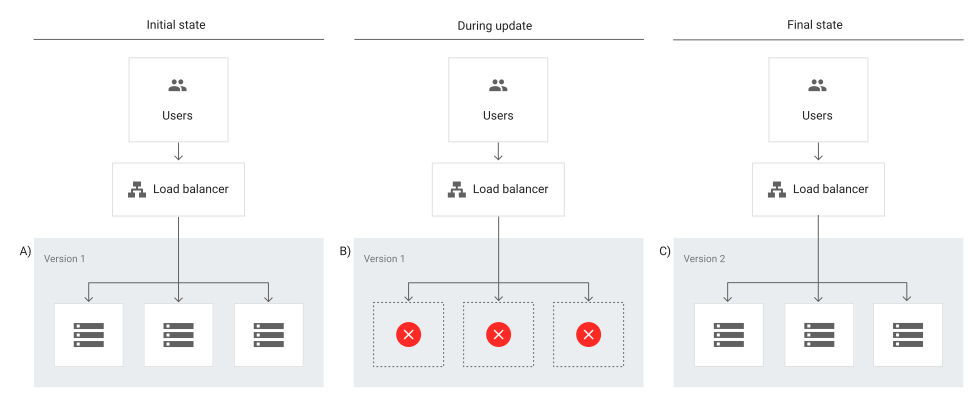
Recreate deployment

Image 

A recreate deployment strategy involves developers scaling down the previous version of the software to zero in order to be removed and to upload a new one. This requires a shutdown of the initial version of the application to replace it with the updated version.

This is considered to be a simple approach as developers only have to deal with one scaling process at a time without having to manage parallel application deployments. 

However, this strategy will require the application to be inaccessible for some time and could have significant consequences for users. This means it’s not suited for critical applications that always need to be available and works best for applications that have relatively low traffic where some downtime wouldn’t be a major issue.

Rolling deployment

Image

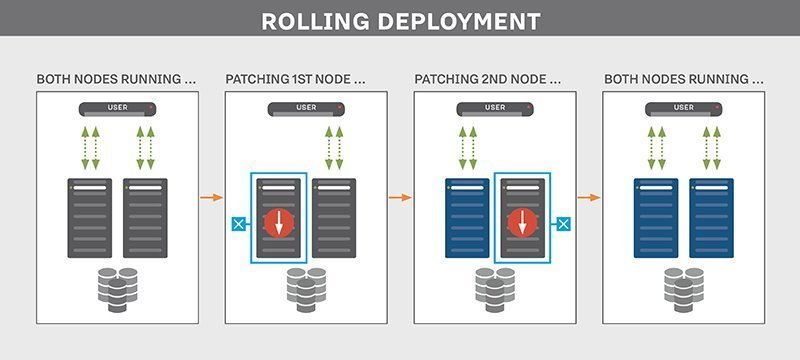
A rolling deployment strategy involves updating running instances of the software with the new release.

Rolling deployments offer more flexibility in scaling up to the new software version before scaling down the old version. In other words, updates are rolled out to subsets of instances one at a time; the window size refers to the number of instances updated at a time. Each subset is validated before the next update is deployed to ensure the system remains functioning and stable throughout the deployment process.

This type of deployment strategy prevents any disruptions in service as you would be updating incrementally- which means less users are affected by any faulty update- and you would then direct traffic to the updated deployment only after it’s ready to accept traffic. If any issue is detected during a subset deployment, it can be stopped while the issue is fixed. 

However, rollback may be slow as it also needs to be done gradually.

Blue-green deployment

Image


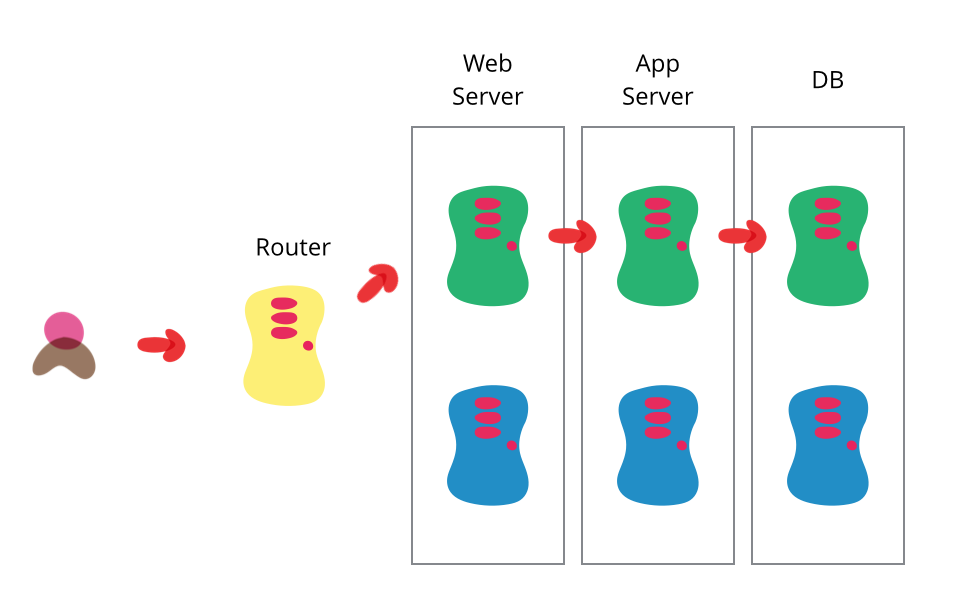
A blue/green deployment strategy consists of setting up two identical production environments nicknamed “blue” and “green” which run side-by-side, but only one is live, receiving user transactions. The other is up but idle.

Thus, at any given time, only one of them is the live environment receiving user transactions- the green environment that represents the new application version. Meanwhile, teams use the idle blue system as the test or staging environment to conduct the final round of testing when preparing to release a new feature.

Afterwards, once they’ve validated the new feature, the load balancer or traffic router switches all traffic from the blue to the green environment where users will be able to see the updated application.

The blue environment is maintained as a backup until you are able to verify that your new active environment is bug-free. If any issues are discovered, the router can switch back to the original environment, the blue one in this case, which has the previous version of the code.

This strategy has the advantage of easy rollbacks. Because you have two separate but identical production environments, you can easily make the shift between the two environments, switching all traffic immediately to the original (for example, blue) environment if issues arise.

Teams can also seamlessly switch between previous and updated versions and cutover occurs rapidly with no downtime. However, for that reason this strategy may be very costly as it requires a well-built infrastructure to maintain two identical environments and facilitate the switch between them.

Canary deployment

Image

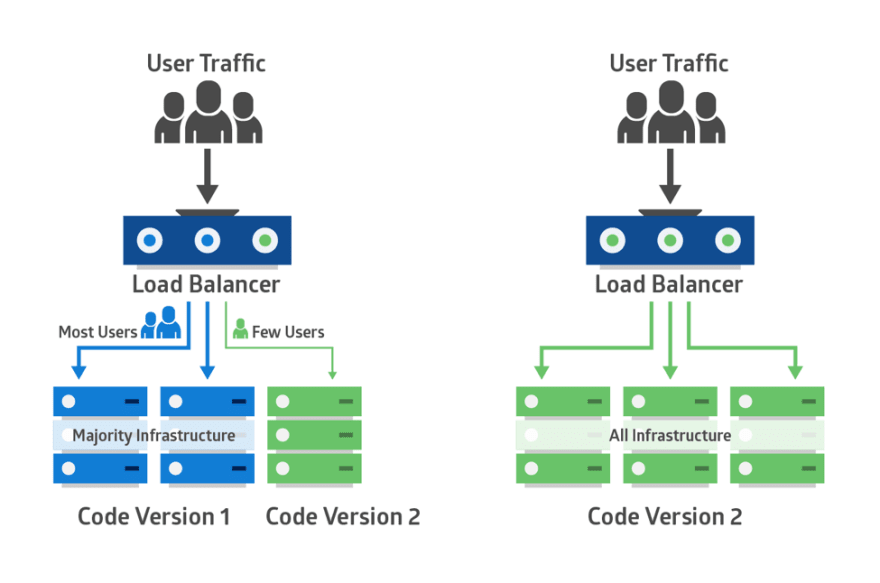
Canary deployments is a strategy that significantly reduces the risk of releasing new software by allowing you to release the software gradually to a small subset of users. Traffic is directed to the new version using a load balancer or feature flag while the rest of your users will see the current version 

This set of users identifies bugs, broken features, and unintuitive features before your software gets wider exposure. These users could be early adopters, a demographically targeted segment or a random sample.

Therefore, you start testing on this subset of users then as you gain more confidence in your release, you widen your release and direct more users to it. 

Canary deployments are less risky than blue-green deployments as you’re adopting a gradual approach to deployment instead of switching from one environment to the next. 

While blue/green deployments are ideal for minimizing downtime and when you have the resources available to support two separate environments, canary deployments are better suited for testing a new feature in a production environment with minimal risk and are much more targeted.

In that sense, canary deployments are a great way to test in production on live users but on a smaller scale to avoid the risks of a big bang release. It also has the advantage of a fast rollback should anything go wrong by redirecting users back to the older version.

However, deployment is done in increments, which is less risky but also requires monitoring for a considerable period of time which may delay the overall release.

A/B testing

Image

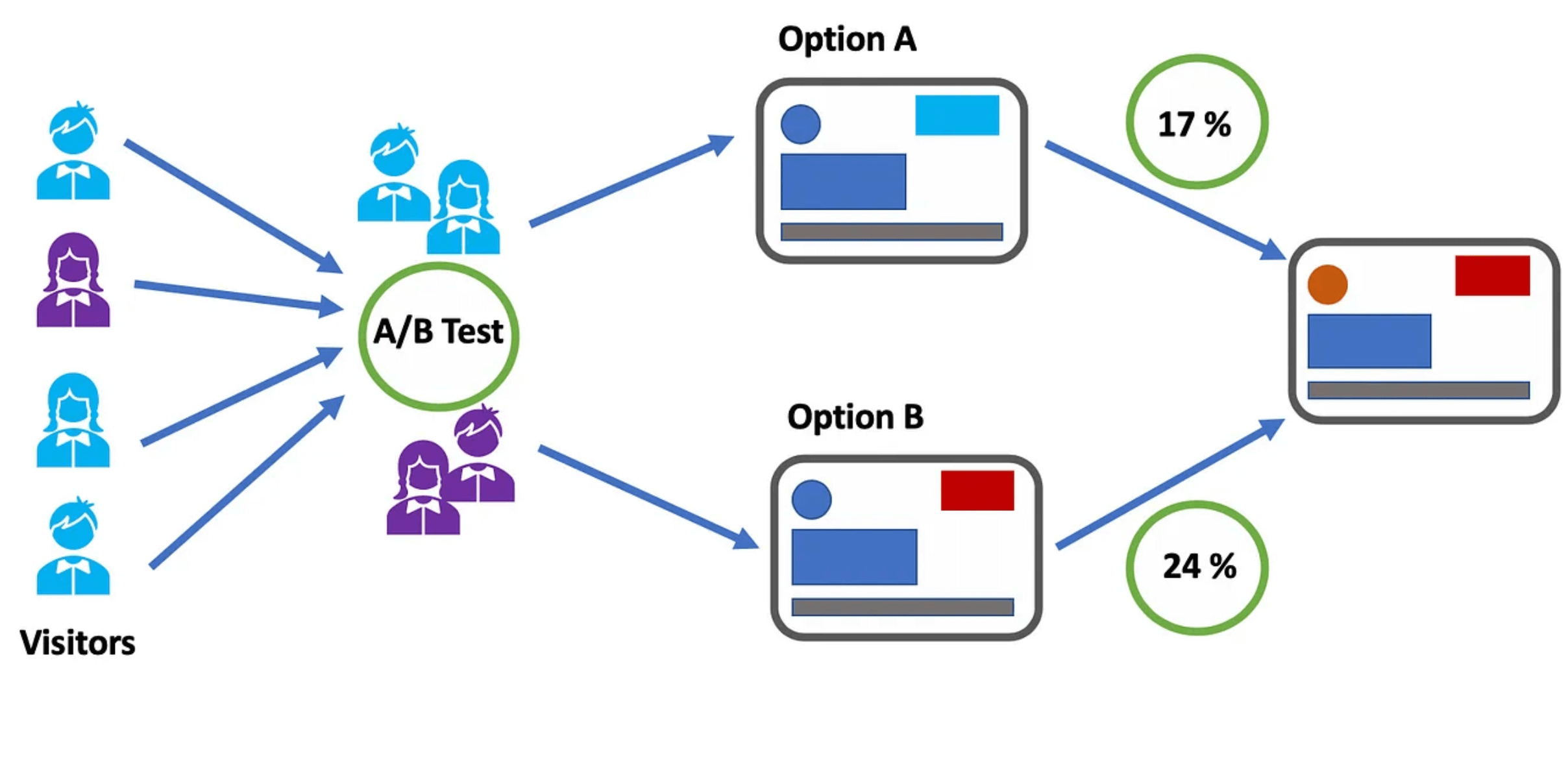
A/B testing, also known as split testing, involves comparing two versions of a web page or application to see which performs better, where variations A and B are presented randomly to users. In other words, users are divided into two groups with each group receiving a different variation of the software application. 

A statistical analysis of the results then determines which version, A or B, performed better, according to certain predefined indicators.

A/B testing enables teams to make data-driven decisions based on the performance of each variation and allows them to optimize the user experience to achieve better outcomes.

It also gives them more control over which users get access to the new feature while monitoring results in real-time so if results are not as expected, they can redirect visitors back to the original version.

However, A/B tests require a representative sample of your users and they also need to run for a significant period to gain statistically significant results. Moreover, determining the validity of the results without a knowledge database can be challenging as several factors may skew these results.

AB Tasty is an example of an A/B testing tool that allows you to quickly set up tests with low code implementation of front-end or UX changes on your web pages, gather insights via an ROI dashboard, and determine which route will increase your revenue.

Feature flags: The perfect companion for your deployment strategy

Whichever deployments you choose, feature flags can be easily implemented with each of these strategies to improve the speed and quality of the software delivery process while minimizing risk. 

By decoupling deployment from release, feature flags enable teams to choose which set of users get access to which features to gradually roll out new features.

For example, feature flags can help you manage traffic in blue-green deployments as they can work in conjunction with a load balancer to manage which users see which application updates and feature subsets. 

Instead of switching over entire applications to shift to the new environment all at once, you can cut over to the new application and then gradually turn individual features on and off on the live and idle systems until you’ve completely upgraded.

Feature flags also allow for control at the feature level. Instead of rolling back an entire release if one feature is broken, you can use feature flags to roll back and switch off only the faulty feature. The same applies for canary deployments, which operate on a larger scale. Feature flags can help prevent a full rollback of a deployment; if anything goes wrong, you only need to kill that one feature instead of the entire deployment. 

Feature flags also offer great value when it comes to running experiments and feature testing by setting up A/B tests by allowing for highly granular user targeting and control over individual features.

Put simply, feature flags are a powerful tool to enable the progressive rollout and deployment of new features, run A/B testing and test in production. 

What is the right deployment strategy?

Choosing the right deployment strategy is imperative to ensure efficient, safe and seamless delivery of features and updates of your application to end-users. 

There are plenty of strategies to choose from, and while there is no right or wrong choice, each comes with its own advantages and disadvantages. 

Whichever strategy you opt for will depend on several factors according to the needs and objectives of the business as well as the complexity of your application and the type of targeting you’re looking to implement i.e whether you want to test a new feature on a select group of users to validate it before a wider release.

No matter your deployment strategy, AB Tasty is your partner for easier and low risk deployments with Feature Experimentation and Rollouts. Sign up for a free trial to explore how AB Tasty can help you improve your software delivery processes.

Article

18min read

The Many Uses of Feature Flags to Control Your Releases

The use of feature flags has evolved and expanded as teams now recognize the value they can bring to their releases. 

First, let’s start with a simple definition of feature flags. A feature flag is a software development technique that lets you turn functionalities on and off to test new features in production without changing code.

This means that feature flags significantly accelerate software development processes while giving teams greater control and autonomy over releases.

Keep reading: Our complete guide to feature flagging

This is a technique that can be employed by all teams in an organization across a wide range of use cases, from the most simple to more advanced uses to improve their daily workflows. 

In this article, we will explore these different uses to illustrate what feature flags can do across different contexts depending on your pain points and objectives.

Feature flags examples and use cases

Many of the use cases outlined below allow teams to take back control of releases and enable them to deliver new features quickly and safely. There may be a bug in production and you want to turn it off without delaying the release or you have second thoughts about a feature and you’re not ready for all your users to see it so you’d rather test this feature on a subset of users. 

Feature flags also increase productivity and speed of teams. You’re no longer waiting to merge your code if other changes are incomplete; you just put it behind a flag until it’s ready. With this, you get more predictability to your releases. There’s no need to delay your release cycle for any last-minute bugs detected. 

Therefore, we will see how the use cases outlined below bring these benefits to your team.

  • Prepare for launch
  • Hassle-free deployments: Release anytime by decoupling release from deployment
  • Experience rollouts and progressive delivery
  • Time your launch
  • Running experiments and A/B testing
  • Continuous integration and continuous delivery
  • Managing access: User targeting
  • Risk mitigation
  • Test in production
  • Feature flags and mobile app deployment: Bypass app store validation
  • Kill Switch: Feature rollback
  • Sunsetting features
  • Managing migrations
  • Feature flags as circuit breakers
  • Bottomline: Use feature flags often but proceed with caution

Hassle-free deployments: Release anytime by decoupling release from deployment

Feature flags allow you to deploy whenever you and your team sees fit. You no longer need to delay your releases. Any changes to a feature that are not yet ready can be toggled off with a switch.

What feature flags do in this scenario is separate code deployment from release. This is done through a release toggle, which allows specific parts of a feature to be activated or deactivated so any unfinished features will remain invisible to users until they are ready to be released. 

Why is the distinction between deployment and release significant? To answer this question, it is worth noting the difference between the two terms:

  • Deployment is the process of putting code in its final destination on a server or any other place in your infrastructure where your code will run.
  • Release is exposing your code to your end-users and so it is the moment when they get access to your new features.

This difference is why we talk about decoupling deployment from release because once you do that, you can push code anywhere, anytime, without impacting your users. Then, you can release gradually and selectively whenever you’re ready through progressive and controlled rollouts as we will see below.

Experience rollouts and progressive delivery

With feature flags, you are in complete control. This means once you have a feature ready for release, you can control which subset of users will see this feature through phased rollout of releases. 

When we talk about experience rollouts, we’re referring to the risk-free deployment of  features that improve and optimize the customer experience.

This is usually achieved through progressive rollouts, which builds on continuous delivery to include the use of feature flags to gradually introduce features to your users.

Rather than releasing to all your users, which is often risky, you may want to release to just 5% or 10% of your users. These users should represent your overall users. Meanwhile, the team observes how these users respond to the new feature before rolling out to everyone else. 

One progressive rollout technique is known as canary deployment. This is where you test how good your feature is on a small group of users and if there’s any issue, you can immediately fix it before it’s exposed to a larger number of users. This sort of gradual rollout helps mitigate the risk of a so-called big bang release. It also helps ease the pressure on your server in case it cannot handle the load.

You may also carry out what is known as ‘ring deployments.’ This technique is used to limit the impact on end-users by gradually rolling out new features to different groups. These groups are represented by an expanding series of rings, hence the name, where you start with a small group and keep expanding this group to eventually encompass all users. 

In a ring deployment, you choose a group of users based on similar attributes and then make the features available to this group. 

Rings and feature flags work together where feature flags can help you hide certain parts of your feature if they’re not ready in any of the deployment rings.

The advantage of such controlled rollouts is the feedback you would generate from users, especially for releases you’re less than confident about and so with the feedback received, you can improve your product accordingly.

Time your launch

We know at this point that feature flags give you the control to release at any time you deem suitable. Feature flags, then, are important because you always decide the ‘when.’ As such, with feature flags, you can aim for a timed launch where you push your feature for people in your trusted circle, such as your QA team, to test in production. 

Afterwards, when it’s time to launch, you simply turn on the feature for everyone else without any fuss with the added advantage that you’re feeling much more confident when it comes to the actual release to everyone else.

This significantly reduces stress among your team because you’ve tested the feature before the official launch and you’ve made sure it’s working as it should before going ahead with a wider release.

Running experiments and A/B testing

Feature flags are great for A/B tests, where you can assign a subset of users to a feature variation and see which performs better.

This is a great use for product and marketing teams who can easily test new ideas and eliminate them if they don’t fulfil the hypothesis defined upon creation of the test.

For example, feature flags would allow your product and marketing teams to send 50% of users to the new variation of a feature and the other 50% to the original one to compare performance according to the goals set and see which variation runs better according to the KPIs set.

Using feature flags to run A/B tests is particularly useful when a feature receives enough traffic to generate efficient results. So, as a cautionary note, keep in mind that not everything can be an A/B test when it comes to feature flags.

In this sense, you can look at feature flags like a light switch. You decide when you want to turn on the feature, when to turn it off and which users have access to it. This allows you to continuously test in production until you’re satisfied with the end-result which you can then roll out to the rest of your users.

Continuous integration and continuous delivery

Feature flags means developers no longer need multiple long-lived feature branches which more often than not lead to merge conflicts.

Let’s imagine you are all set to release but then one developer’s changes have not yet been integrated into the main feature branch. Does this mean you need to wait especially when you know time is precious when it comes to releasing to impatient customers in this day and age?

With this method, developers can integrate their changes, or commit code in small increments, much more frequently, perhaps even several times a day. Through trunk-based development, a key enabler of continuous integration, developers can merge their changes directly into the master trunk helping them move faster to ensure that code is always in a ready-to-be-released state. 

Consequently, we can deduce that feature flags also facilitate the process of continuous delivery.

Feature flags are essential to maintain the momentum of CI/CD processes because as mentioned, feature flags decouple deployment from release so even unfinished features can be merged but can easily be hidden behind a flag so users don’t see it while other changes can still be delivered to users without waiting on those unfinished features.

In other words, feature flags will still allow you to still continuously deploy your code so even if there is an incomplete feature, users won’t be able to access the functionality as it would be hidden behind a flag.

Read more: Feature flags and CI/CD: Increased velocity and less risk

Managing access: User targeting

You don’t just choose the when, you also choose to whom.

Feature flags, as we’ve seen, gives you a lot of control over the release process by putting the power of when to release in your hands. 

It‘s worth mentioning yet another form of power feature flags can give you, which is the ability to choose which users can access the feature. When you are testing in production, having the option to choose who you want to test on is extremely valuable depending on the kind of feedback you’re seeking.

Giving early access

We’ve seen in canary deployment that sometimes the sample you pick can be completely random. Other times, however, you might decide to carefully handpick a select group of users to give them early access to your new feature.

Why is this important? Because these are the users that are considered to be ‘early adopters.’ They are users you trust and whose feedback is top priority and who are most interested in this particular feature. These users are also the most forgiving should anything go wrong with the release.

With feature flags, you can release the feature to these early adopters who are more than willing to provide the kind of feedback you need to improve your product. This technique works well if you have a very risky release that you’re hesitant to release to a wider audience.

Power to the users: beta testing

Beta testing is another side to early access where in this scenario users willingly opt-in to test out your new features before they are released to the rest of your users.

As a result, the customers who opt-in get to see and test the feature by turning it on in their accounts and should they wish to back out they can easily disable the feature, which makes these users more inclined to opt-in in the first place as it makes them feel more in control.

This is an important use-case because it shows your customers that you’re really listening to their feedback by asking them to test your release. 

The users who opt-in are those who you’re targeting with this feature so how they react to the feature will be of extreme use to you. Hence, you get to test out your new feature and you deliver value to your customers by responding to their feedback; it’s a win-win situation!

Dogfooding

This term refers to eating your own dog food, or in this case refers to an organization using its own product or service. You can, therefore, look at it as a way to test in production on internal teams. 

It’s a form of alpha testing that you can run on internal users (within the organization) to make sure that the software meets all expectations and is working as it should. Thus, it represents an opportunity to evaluate the performance and functionality of a product release as well as obtain feedback from technical users.

This is a great way of testing to obtain meaningful feedback especially when you’re introducing new features or major changes that you’re not fully confident about. 

This way, you are taking less risks because it’s only people within your organization who can see the releases as opposed to your actual, external users who may be more unforgiving in case things take a bad turn during a release.

No trespassing allowed: blocking users

Just as you can pick users who you want to access your feature, you can also block users from seeing it. For example, you can block certain users from a particular country or organization.

What feature flags would allow you to do is hide some features from users who might not give you the right sort of feedback while giving access to the relevant target consumers who would be most impacted by the new feature. You can also target certain features for a certain type of user to provide a more personalized experience for them.

Managing entitlements

With feature flags, you can manage which groups of users get access to different features. This is especially common in SaaS companies that offer various membership plans and so with entitlements, you can dictate which features each plan can access. This way, you would be offering different experiences to your users.

Let’s take the example of Spotify. Spotify offers free and paid plans. With the free membership, you can stream music but with advertisements while with the premium membership, you can stream unlimited music with no ads. You also get unlimited skips and you can download music to listen to offline. There are also different levels of premium to choose from including student and family plans. Consequently, with each plan, you are entitled to different content and features.

With feature flags, you can wrap a flag around a feature and release it to a particular customer depending on their subscription plan. These types of flags are usually referred to as permission toggles. They also allow you to move features easily between the different plans i.e. paid and free versions, for example.

Managing entitlements is considered to be an advanced use case as it requires careful coordination across teams and involves working with multiple flags to control permissions for the features. The person who manages entitlements is usually on the product team so careful planning and monitoring of each change performed by which person is required. 

There should also be a seamless process in place to move users from one plan to another. Thus, this use case requires vigilant implementation.

Product demos and free trials

On a similar note, product and sales teams may be looking for a way to offer prospective customers a demo or a free trial or specialized demo of a feature.

Feature flags are a great way to give prospects temporary access to certain features under various pricing plans to give them a taste of through a live demo of the features among the higher plans so they can decide if an upgrade is worth it by simply toggling these features on with a flag then turning it off once the demo is complete. 

Risk mitigation

Test in production

Through the use of Feature flags, teams can confidently ship their releases by testing code directly in production to validate new features on a subset of users.

Unlike testing in a staging environment, when you test in a production environment, you can collect real-world feedback from live users to ensure that teams are building a viable pipeline of products.

Testing in production also allows you to uncover any bugs that you may have missed in the development stages and discern whether your new feature can handle a high volume of real-world usage and then optimize your features accordingly.

Feature flags and mobile app deployment: Bypass app store validation

This is when we use A/B testing to test different experiences within mobile apps. Imagine you’ve just released a brand new app or introduced a new shiny update to your app.

How can you make sure your app or this update is running smoothly or that you haven’t unintentionally introduced an update full of bugs that crashes on your users? Anything that goes wrong will involve a lengthy review process that will setback your entire release as you attempt to locate and resolve the issue.

You no longer need to wait for app store approval, which could take some time and the changes are released to all users instead of smaller segments.

Instead, with remote config implemented through feature flags, any changes can be made instantly and remotely and then released to a small subset of users to get feedback before releasing it to everyone else. Therefore, you can upgrade your app continuously in real-time based on feedback from your users without waiting on app store approval.

It’s also a good way to personalize experiences for different types of users rather than creating a unified experience for all users depending on the demographics you set forth. 

As a result, with feature flags, you can roll out different versions of your mobile app to monitor their impact by releasing different features to different groups of users. Afterwards, you can decide on what features will be incorporated in the final release of your app.

Using feature flags to test out your mobile app is an excellent way to generate buzz around your release by giving exclusive access to a select number of users.

Kill Switch: Feature rollback

Using feature flags will allow you to disable a feature if it’s not working as it should. This is done by using a kill switch. Thus, whenever anything goes wrong in production, you can turn it off immediately while your team fixes the issue. This would prevent you from having to roll back the entire release so other changes can be deployed and released without worrying about delaying the whole release.

With a kill switch, you can switch off a specific, troublesome feature so you can decrease the number of users who can see it, including turning it off for all users if necessary until the issue is analyzed and resolved by your team. This way, you won’t have to go through the entire code review process to locate the issue.

Kill switches therefore give you even more control over the release process. This not only empowers your team of developers but also marketing and production teams with no software development experience who can now easily test in production and kill a feature without having to rely on engineering support.

AB Tasty offers an automatic rollback option that enables you to stop the deployment of a feature and to revert all the changes that have been made in order to ensure that your feature isn’t breaking your customer experience. This is done by defining the business KPI you want to track that would indicate the performance of your feature. If it reaches a certain value, the rollback is automatically triggered.  

Sunsetting features

Feature flags can also enable the ‘sunsetting’ of features. For example, with time, you might see your usage of feature flags increasing and widening to encompass a number of features. However, this accumulation of features may eventually turn into a heavy debt. 

This is why it is important to continuously keep track of which features you are using and which features have run their time and need to be retired from your system.

Sunsetting, then, enables you to kill off features that are no longer being used. Feature flags would give you an idea of the usage of certain features which would help you determine whether it’s time to kill it off, lest you end up with the dreaded technical debt.

Removing unused features and clearing up old flags is the best way to keep such hidden costs in check. Thus, you should have a careful plan in mind to remove some flags once they have served their purpose or otherwise you end up with the aforementioned technical debt. This will require you to have an efficient feature flag management system in place to track down ‘stale’ flags.

Managing migrations

Feature flags can be used to safely and effectively migrate to a new database as business requirements change and evolve. What organizations would normally do before feature flags is a one-time migration then hope for the best as rollbacks are usually a painful process.

Obviously, the biggest risk that comes with switching databases is loss of data. Therefore, developers need a way to test that the data will remain intact during the migration process. 

Enter feature flags. They allow you to facilitate migration and should something go wrong, you can disable the migration by simply toggling the flag off.

A percentage rollout can then be implemented using feature flags to validate the new database and any changes can be reversed by using feature flags as a kill switch.

Read more: How to migrate from monolith to microservices architecture using feature flags

Feature flags as circuit breakers

Feature flags are particularly useful when your system is experiencing heavy load during times of exceptionally high traffic. 

In particular, the on/off switch of feature flags (operational toggles) can be used as circuit breakers to disable non-critical features that add stress to the system to help your website run better and avoid any backlash from any potential downtime caused by a heavy load. 

For example, many e-commerce websites experience heavy traffic during Black Friday. To avoid a potential system outage or failure, development teams can use feature flags to turn on critical features and turn off the rest until this period of heavy traffic passes to shed some of the load from a system.

Bottomline: Use feature flags often but proceed with caution

As we’ve seen so far, many of the use cases can be easily implemented. However, others will require the ability to make detailed, complex and context-specific decisions so a more advanced feature flagging system that enables such functionalities would be needed.

Regardless of what you decide to use feature flags for, one thing is clear: feature flags put you in the driver seat when it comes to releases. You are in complete control of the when and to whom you release. It also allows you to experiment to your heart’s content but without the risks, especially when the release doesn’t go as expected. 

Working with feature flags also increases productivity among teams. As we’ve seen in the use cases outlined above, it’s not only developers who have complete control over and access to the release process but product and operations teams can also release and roll back as needed.

Read more: Feature flags use cases for product teams

You can use features for many things across different contexts. Some may remain for a long period of time while others need to be extracted as soon as possible so as not to accumulate technical debt

Thus, the general advice would be to use feature flags often but keep in mind that proactive flag management and implementation will be needed to maximize the benefits while minimizing the costs.

Don’t just take our word for it. Start your feature flag journey and see for yourself what  feature flags can do for you by signing up for a free trial at AB Tasty.

Article

10min read

Why You Should Slot Feature Flags into Your Agile Roadmap

It’s easy to lose your way when building an Agile roadmap.

If you get too detailed with your planning, you end up building a roadmap that is Agile in name alone but looks more like a traditional Waterfall roadmap. If you don’t perform enough planning, then you’ll produce a skeleton of a roadmap that sends you running in multiple directions without ever arriving anywhere meaningful. 

The correct approach lies somewhere in the middle. You keep things loose, nimble, and iterative but you also set a beacon that will guide each of your sprints to an impactful destination.

From our experience, one “beacon” that will keep your Agile product roadmap grounded, and your products moving in the right direction, is a simple function— the feature flag.

It isn’t fancy. It isn’t flashy. And it doesn’t look overly strategic. If you use feature flags properly, then they will keep your Agile roadmap focused on the outcomes that matter most without forcing you down a fixed path. Here’s why. 

First principles: The real benefit of Agile over Waterfall

It feels like a given these days: if you work as a Product Manager (especially in the tech sector) then you’re going to follow some kind of Agile methodology. Depending on your work history, you may never have worked with a Waterfall roadmap, let alone developed one, in your entire career.    

If that’s the case, it might even feel confusing why Waterfall was ever developed. The methodology is slow. It’s rigid. It’s opaque. On the surface, it looks inferior to Agile in every way. But once you dig into it a little, there is one area where waterfall trumps Agile. Waterfall is a better fit within a traditional corporate context than Agile.

While Agile and Waterfall are popular in software development, each one is best suited for different types of projects. 

For example, a Waterfall approach makes sense when a software project has clearly defined requirements with low probability that any changes will occur halfway through.

Waterfall fits really well into that broader corporate world’s standard operating procedures. It collects business requirements in a standard one-off phase and then sets them in stone with a concrete project. Waterfall adopts a more linear way of working so that development phases flow in one direction just like the flow of a waterfall, hence the name and tends to occur over a long period of time. 

It breaks that project into a clear, crisply defined plan and each step must be completed before moving onto the next phase. In the end, the project’s success will be defined by how well its leaders completed the milestones in the project’s plan, and if they delivered to the project’s requirements on-time and on-budget.

Waterfall methodology isn’t really about trying to create the most effective, efficient, or accountable system. It’s about having the product developers and managers operate in a way that makes sense to a large, lumbering corporation.  

A new approach—Agile— was only possible because it was developed outside of this legacy corporate context. In fact, Agile is an iterative approach that came about as a response and alternative to Waterfall’s rigid and linear structure

And here’s what they came up with: product management would deliver a greater impact if it stopped lining up to what a corporation wanted, and if it instead lined up to what actual real-world users want.

In an Agile approach, which introduces flexibility, teams work on multiple phases at the same time with the goal to enable faster software delivery for the purpose of collecting customer feedback. It does this by breaking down the software development life cycle into sprints, which could last from one to four weeks, that include regular feedback loops.

Incremental releases means teams can build better features much quicker that offer more value and optimize and iterate these features based on the feedback received. It aligns the product not only with the product vision but also with customer needs.

This is the real innovation of an Agile roadmap over a Waterfall one. It isn’t the increased speed & efficiency that everyone fixates on. It’s the simple but powerful fact that an Agile roadmap re-aligns the product manager’s focus onto the user. 

Here are some of the advantages of an Agile methodology:

  • Faster feedback loops
  • Higher customer satisfaction
  • Reduced time-to-market
  • Increased flexibility with more room for innovation
  • Enhanced productivity by breaking down projects into smaller, more manageable chunks

And most of Agile methodology’s core user-alignment activities occur during Feature Release Management and are brought to life by the right feature flag tool.  

A quick caveat: Yes, business impact still matters in Agile

Before we move on, let’s make one point very clear.

When we say Waterfall aligns well to corporate context, we mean corporate operational context. But we don’t mean a Waterfall approach offers the best way to deliver results

Most often, these big Waterfall projects deliver poor results because they can take months—or even years—between their initial requirements collection and their project’s completion. During this time, the project’s alignment, and even its viability to its users, often shifts, reducing its chances of producing any meaningful business impact. 

By contrast, a properly developed and managed Agile roadmap will maintain alignment with its users throughout its entire lifecycle and deliver concrete, measurable, and accountable results. 

Feature release management, and feature flags, can also drive this tight connection between user-centered development and KPI improvement. We’ll get to how in just a minute.

Feature release management: The heart of any effective Agile roadmap

From a user-alignment perspective, feature releases are the key point that differentiates an Agile roadmap from a Waterfall roadmap.

Agile looks different from Waterfall in many areas of activity.

In Waterfall, new products and features are released to all users at once, in a single big bang, after a very long development cycle. In an Agile roadmap, new products and features can be—and should be—released at a much faster rate. 

This is the key functional difference that makes Agile more user-centered than Waterfall. Rapid and effective feature release management lets you:

  • Keep your users top-of-mind at all times.
  • Regularly collect your users’ data and feedback.
  • Use up-to-date feedback to guide your development cycles.
  • Repeat the cycle, to make sure you correctly incorporated user feedback in your next round of features and product updates.

If you want to keep your development user-centered then feature release management is critical to effectively incorporate into your Agile product roadmap. Here’s how.

The 5 key elements to include in your Agile release planning

Agile release planning is key to building customer-centric products by allowing you to prioritize and release product requirements as needed. In other words, it allows you to plan your product’s incremental releases- your features- and helps ensure your project is headed in the right direction and following the Agile methodology. 

It differs from a product roadmap in that release planning focuses on one sprint at a time (on short-term goals) while a product roadmap looks further ahead in the future and focuses on long-term objectives.

Put simply, the goal of a release plan is to help you prioritize features of your product and focus on releasing specific features in less time to improve the customer experience. Thus, teams use this kind of planning when they’re dividing a project into short sprints or increments instead of planning for one major product release. 

It is a unique approach to planning as it takes into account the flexible nature of software development by leaving room for any necessary adjustments as you go through the development lifecycle to incorporate customer (and stakeholder) feedback. 

The idea is to be open to prioritizing tasks to provide improved value to your customers.

Here are the key elements to include in each of your feature releases that will turn them into a critical, recurring touchpoint between you and your users.

1. User segmentation

At a basic level, you need to carefully select which user audiences you will first release (and test) new features and products to. 

At a deeper level, user segmentation can flow throughout every step of feature release management. You can personalize the experience of your new products and features to each segment you test them with. In other words, you try out different versions of each new product or feature with different segments. 

During testing, you can rapidly toggle features off for segments who are not responding well to them. And you can even guide the ongoing development of your products and features depending on which user segments respond the best to them.

2. KPIs measurement

However you measure product or feature success, you must quantify it, and measure those metrics in real-time during each release. 

Doing so serves two purposes: First, it gives you the ability to produce an accurate, objective measure about which products and features are succeeding with which segment (and whether or not you are actually improving their performance during each development sprint). 

Second, they let you demonstrate concrete, measurable, and accountable results for your business—to both report on the success of your most recent development, and to create meaningful justifications for more robust rollouts.

3. Governance

You need some formalized way to make decisions off the data that you produce. When do you toggle a feature on or off and for who? When do you roll out the product or feature to new segments? When is a product or feature ready to deploy to your entire user community? 

To make these decisions, you must have established definitions for success (see “KPIs”), and defined procedures for monitoring and acting on release performance data both in real-time and during post-release recaps.

4. A/B testing

Any time you are segmenting audiences, testing multiple variations on products and features, and collecting copious amounts of real-world user data, then you are setting the stage for multiple A/B tests. 

By performing comprehensive A/B tests during each of your feature releases, you will eliminate multiple developmental dead ends and narrow the list of viable “next steps” for your next sprint.

5. Automation

If you incorporate these four elements, then your feature release management process will get pretty complex, pretty quickly. But if you select the right tool to automate as many of these elements and their internal processes,as possible, then you can let go of most operational elements. Afterwards, you would simply sit back during feature releases and focus on making informed decisions before, during, and after each of your releases.

By incorporating each of these five elements into your feature release process, you will ensure that each of these critical touch points brings you and keeps you as close as possible to your users.

And, thankfully, there is one single function that incorporates each of these elements and makes them a practical and effortless habit in your Agile roadmap— feature flags.

Bringing it all home: Feature flags

At their core, the goal of feature flags is to enable you to toggle features on or off, with a single click on your dashboard, without having to adjust your codebase. 

That may seem very basic at first glance but buried in this simplicity is a lot of depth, and a lot of room to easily deliver on each of the above elements of user-centered feature release management.

With the right feature flag tool, you can:

  • Perform sophisticated real-time control over which user segments get new products and features.
  • Attach core KPIs to your releases and immediately kill products and features that are not performing well while immediately expanding the release of those that are knocking it out of the park.
  • Monitor your results (and take action) in real-time.
  • Easily manage and act on complex A/B tests.
  • Bundle feature flags in with a complete suite of feature release functionality to wrap the whole exercise up in a single, highly-automated platform.

We kept each of these functions in mind when we built our own Feature Flag function, and release management platform. 

If you’d like to take it for a test run and see how easy you can incorporate the core actions of Feature Flagging, feature release management, and user-centered Agile product management into your roadmap, drop us a line!

Article

11min read

How Can Teams Use Feature Flags in Mobile App Deployment?

In the digital age, companies can no longer only focus their efforts on optimizing for desktop especially as more and more consumers are using their mobile devices to visit websites and make purchases through apps.

However with millions of apps out there, competition and consumer demands and expectations are at an all-time high. This means your app needs to stand out in an overcrowded market.

It’s important to point out that deploying mobile apps doesn’t follow the same process as a website app.

In this article, we will investigate the challenges of mobile app deployment and release and how feature flags are the key to help you deliver optimized mobile apps that meet your consumers’ needs.

The challenges of mobile app deployment

Mobile development teams are particularly susceptible to bugs and long, tedious release cycles.

In short, there are two main problems when it comes releasing or updating features on mobile apps:

  1. You have to wait until approval from app stores (which could take some time and significantly delay a release).
  2. Afterwards, you have to wait for users to manually download the update from the store (which could also take a lot of time).

For example, let’s take a look at this scenario: you’re working on an update to your mobile app. You finally release it only to find out that there’s a bug you missed that’s causing your app to crash. 

By the time you release a new update with a fix to the issue, wait for the release to the app store and watch for users to download the update, you might risk losing a significant number of users. 

Mobile developers and engineers are all too familiar with such a scenario. 

Therefore, it can be a painstakingly long process to get a release approved. Once approved, any buggy release will need to be fixed and put through the app store approval process all over again, leading to further delays. 

Although the review time has improved in recent years, if your app fails to meet the app store review guidelines it may be further delayed. This means that you cannot push real-time updates to production as you would with web apps.

Put simply, the process of deploying mobile apps is not as straightforward as it might be for web apps. 

Unlike web apps which are automatically updated once visitors access the site, users have to download an update of the mobile app in their store to get the latest version.  As updates pile up after going through the review process, you have no control over whether users download the latest versions. 

Therefore, it can take more time to deploy mobile app updates compared to web apps. And in an age where customers demand the best every time, it’s not feasible to have them wait that long for an update, especially when there’s a bug involved, much less having to wait to deploy a new app version once the bug is removed.  

In modern software development, when continuous delivery is vital to retain competitiveness and meet fast-changing consumer demands, teams must turn to another solution to achieve a more frequent release cadence.

The value of feature flags in mobile app deployment and release

This is where feature flags come into play.

Unlike client-side testing where experiments are focused on web browsers, feature flags give teams the ability to carry out server-side experiments across multiple channels including mobile apps.

Feature flags allow teams to enable or disable features to users of their choosing to minimize risk and negative impact

This is because feature flags allow you to decouple deployment from feature releases meaning you can turn functionality on or off remotely without redeploying code to app stores and waiting for its approval or having to wait for all changes to be ready at the same time to release your own changes. This way you can deploy code to whoever whenever you want.

Read more: What is remote configuration in app development?

Thus, you can upgrade your app continuously in real time based on feedback from your users without sending an app store update or waiting on its approval. You can also gradually release new features without users having to go through the hassle of always having to update their app version.

With feature flags, mobile developers can safely test in production on a pre-defined audience and disable any features with a kill switch should any issues come up, thereby reducing any negative impact. Developers can then work on pinpointing the issue and fixing it before releasing the feature to all users.

How can you use feature flags in mobile apps?

Feature flags can be used not only by developers but also by product and release managers to optimize mobile experiences in various ways.

Here are some examples of use cases for mobile feature flags:

  • A/B testing: With feature flags, you can divide your users into subsets with each set of users receiving a different variation of the feature. This allows you to test and determine which is the top-performing variation to roll out to all your users. Put simply, running A/B tests allow you to collect valuable live feedback from your users so you can make informed decisions about how to optimize your features and products.
  • Targeted rollouts: Teams can use feature flags to test out their ideas by progressively rolling out their feature, giving only a limited number of users ]early access to the app through beta testing for example. This helps generate buzz around your release and lets you monitor its impact on these select users. Targeted rollouts  allow teams to make more informed decisions about what to optimize and fine-tune an app based on live user feedback.
  • Personalization: Feature flags are a great way to personalize experiences for different types of users rather than delivering a unified experience for all your users. By changing the features that certain users receive, you can tailor the user experience in mobile apps to individual users or user segments. For example, you can offer a unique experience based on the country the user is in.
  • Roll back/kill switch: What’s really unique about feature flags is that they enable teams to roll back any buggy updates quickly. By simply disabling the relevant feature flag, you can solve a bug without going through the lengthy app store review process.

Mobile feature flags: Use cases

We’ve talked mainly about how feature flags can be used in mobile app deployment but they’re also a great way to reduce risk when deploying and testing on mobile sites, especially when it comes to deep level modifications tied to back-end architecture such as testing new payment methods.

This can be easily done using a feature flagging platform, where teams can safely deploy frequent releases with an easy-to-use platform that can be used by all teams. 

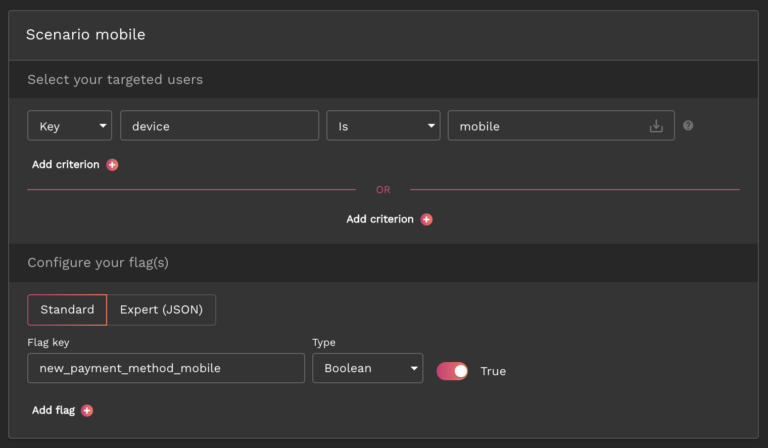
For example, let’s say you developed two payment features: one for desktop and one for mobile. Before doing a full release, you’re looking to test them on a small group of early adopters to monitor its impact and determine its usage rate.

Using AB Tasty, you can easily create a Feature Toggling use case on your AB Tasty account and choose the KPI you want to follow, in this case that would be the clicks on the “Proceed to checkout” button and then “conversion rate” as a sub KPI.

You can then define the two scenarios: one to enable the feature on desktop and another to enable it on mobile devices. You will then configure the flag that will turn on the new payment method for each scenario as seen in the image below in the “Scenario mobile” on the dashboard.

Next, let’s take a look at real-life examples of how AB Tasty clients use feature flags to carry out mobile testing:

Use case 1

Decathlon, a French sporting goods retailer with over 2,000 stores in 56 countries, wanted to test CTA placement to measure its impact across all devices, including mobile, and product listing pages (PLPs) with the help of feature flags.

In the original version, seen below, Decathlon APAC’s team was looking to test an earlier placement of the “add to cart” button on mobile on the main page below the product image to ensure a positive rollout and measure uplift. In the original version, users had to click on the product to go to the PDP before seeing this button.

With AB Tasty’s robust solution, the team was able to test the impact of this new feature on conversion. Changing the CTA placement proved to be a success, resulting in a 10.37% increase in transaction rate and an $11.27 increase in the average order value.

Use case 2

EDF (Electricité de France) is the largest electricity supplier in France for over 70 years. The team at EDF wanted to increase the number of online subscriptions and calls via their application.

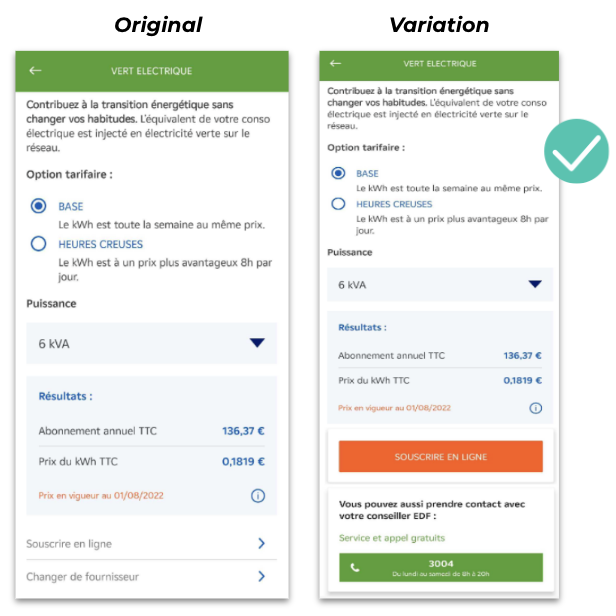
In particular, they wanted to monitor the effect of changing the CTA design in the app. Using feature flags to increase the visibility of the CTAs, the team could then measure the impact on (and boost) clicks for online subscriptions and/or calls with EDF advisors respectively.

The team ran an A/B test with the subscription CTA against an orange background and the call CTA against a green background. They also added text to communicate hours of operation. 

The call CTA was the one that yielded more positive results allowing the team to generate more qualified leads with an increase in calls with EDF advisors.

Thus, with a 20% increase in calls, the team could then confidently develop and roll out an adapted variation in the app where the new call CTA was more visible.                

Use case 3

Often, A/B tests are a fool-proof way to eliminate potential bias and can save a company from investing in an optimization campaign that would otherwise take up a lot of valuable time and resources. 

That was the case with Ornikar, a driving school platform in France with more than 2.5 million customers. The team was looking to revamp the home screen of their application and needed to identify which changes should be kept and which should be discarded.

The team set up an A/B test on AB Tasty to replace the existing carousel of four slides and two CTAs (left image) with a new screen featuring Ornikar benefits, a new CTA order and a more detailed carousel (right image).

The test was conducted for a duration of three weeks. After a week, they found that the new variation was not performing as wellas they expected so the team paused the test and adjusted the CTA and ran the test again for two weeks. 

The results were still negative after two weeks and the team decided not to deploy the new home screen into production.

Due to the flexibility of the AB Tasty platform, the team was able to make quick iterations over a short period of time. Above all, Ornikar was able to avoid losing out on conversions and wasting time and resources as well as minimizing negative impact by testing the new home screen first before rolling it out to all its users.

Feature flags: The ultimate tool for better mobile experiences

As we’ve seen, feature flags are a powerful tool allowing teams across an organization to have more control over mobile testing and release while reducing risk.

Beyond giving you full control of new feature releases despite App and Play Store approval processes, feature flags enable teams to optimize their mobile apps and personalize the user experience. They also allow you to ship features more often and obtain quick feedback from your most relevant users.

With increasing mobile usage and millions  of mobile apps to compete with, it’s essential to provide the very best user experience on mobile devices. Running experiments and using progressive rollouts with feature flags are key to delivering optimal and great mobile experiences.

Using a third-party feature flagging platform makes it easy to toggle features on and off and remotely configure your flags straight from the interface. By controlling all your feature flags in an easy to use web dashboard, it also ensures you’re keeping up with essential best practices to set you up for success and help you stand out from competitors. 

Article

15min read

Prevent and Manage Technical Debt Using Feature Flags

In modern software development, teams often have to prioritize speed and less than ideal solutions to put out products quickly to keep up with fast-changing consumer demands. 

Unfortunately, taking such shortcuts could have dire consequences in the form of heavy costs or technical debt that could take a toll on your code quality and your whole software development and delivery processes if left unattended.

In this article, we’ll explore what technical debt is, the causes and different types of technical debt as well as how to manage it, largely through the use of feature flags.

What is technical debt?

The term “technical debt” was first coined by Ward Cunningham, one of the authors of the Agile Manifesto, in the early 1990s. Since then, the term has gained momentum and is a serious issue that many tech teams today still struggle to manage properly.

His reason for its name is that technical debt bears direct correlations with financial debt. Software development teams can take shortcuts to satisfy immediate business requirements, but the debt plus accrued interest will have to be paid at a later stage.

Technical debt is the consequence of action taken by software development teams to expedite the delivery of a software application or specific feature which later needs to be refactored or redeveloped.

Put simply, technical debt refers to the build up of technical issues during software development due to a number of causes which we’ll discuss in the next section. 

If not attended to, technical debt can spiral out of control, resulting in the total breakdown of the software development and maintenance lifecycle.

Therefore, it is critical to ensure that DevOps and software development teams pay close attention to technical debt management and technical debt reduction methods.

Here are some warning signs to look out for:

  • Buggy, difficult to maintain code
  • Unstable production environments
  • Bug fixes introduce more bugs
  • Data inconsistency 
  • Decreased development pace and bottlenecks 

What causes technical debt?

We can deduce that technical debt comes mainly as a result of delivering a release quickly at the expense of “perfect” code.

In other words, it often comes as a consequence of ineffective and inadequate practices to build software for a short-term benefit in the interest of saving time.

That is one major cause but it’s also more complex than that as technical debt can be due to a number of other reasons. 

Some causes behind technical debt include:

  • Time pressure: Teams today are under great pressure to deliver releases quicker than ever before to remain competitive and meet consumer demands fast.
  • Poor code: This could be due to a number of reasons including use of tools without proper documentation or training.
  • Insufficient software testing: Lack of QA support or automated testing means a lot of bugs could remain in the code undetected which gives rise to technical debt.  
  • Outdated technology: Over time, many technologies become obsolete and are no longer supported and could become a source of debt.
  • Lack of skill: Teams can sometimes unknowingly incur debt because they lack the skills to write better code. For example, having junior developers working on building complex software beyond their skill and experience level is a sure way to accumulate debt fast.

Over time, all these factors could result in accumulation of debt that will need to be addressed. The real danger is not actually having the debt in the first place- as often that’s inevitable- but it’s allowing this debt to build up with no plan or strategy to pay it off in the future. 

Types of technical debt

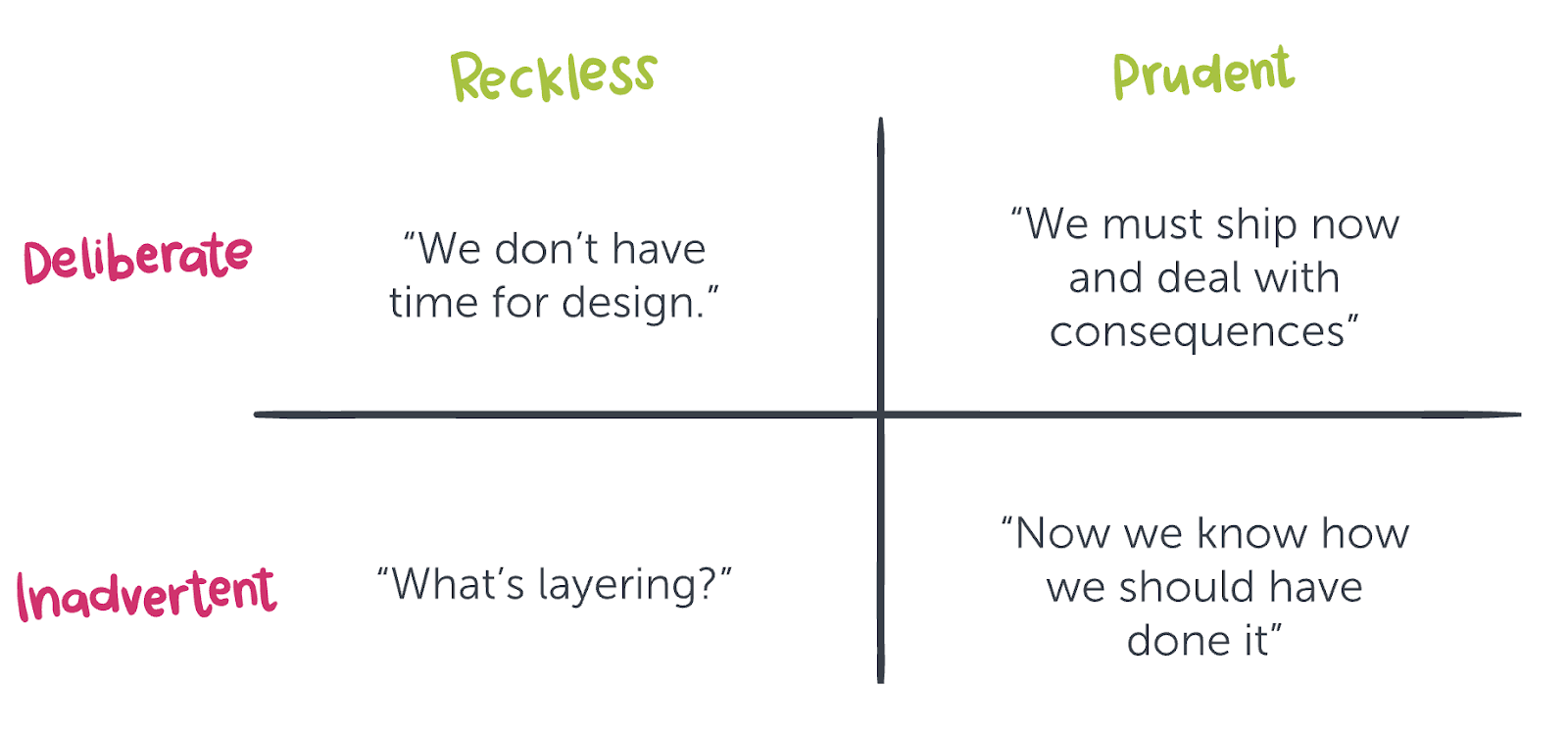
There are many ways to classify technical debt. One of the most popular ways comes from Martin Fowler’s technical debt quadrant.

The quadrant is based on the idea of not whether something should be considered debt per se but rather whether this debt can be considered prudent.

What does this mean exactly? Think of it as a way of answering the question of whether all technical debt is bad and the answer, according to the quadrant, would be “it depends.”

Martin Fowler’s technical debt quadrant seeks to categorize the types of technical debt according to intent and context.

Generally speaking, there are two overarching types of technical debt: intentional and unintentional (deliberate vs inadvertent).

Intentional technical debt occurs when software development teams choose to leave their code as it is, without refactoring or improving it, to reduce the time-to-market metrics. In other words, they choose to incur technical debt.

Unintentional technical debt, for its part, occurs when poor code is written and so the code quality will need to be improved over time.

Suffice to say, as soon as these technical debt-causing issues are highlighted, it is imperative to fix them as quickly as possible.

Source: Devopsgroup.com

Let’s take a closer look at the 4 main types of technical debt, according to Martin Fowler:

  • Reckless/deliberate: Teams possess the knowledge to carry out the task but decide to go for a “quick and poor quality” solution to save time and for quick implementation.
  • Prudent/deliberate: Teams are aware of the debt they’re taking on but decide that the payoff for an earlier release exceeds the costs. However, in this scenario unlike the above, teams have a plan on how to deal with the repercussions of taking on this debt.
  • Reckless/inadvertent: This is arguably the least desired form of debt where teams don’t have enough experience and blindly implement a solution without applying best practices. As a result, they’re unconscious of the fact that technical debt is being accumulated. Thus, no real plan to address this debt can be formulated.
  • Prudent/inadvertent: This occurs when teams apply best practices during software development but still accumulate debt due to unexpected coding mistakes. Thus, this type of debt is unintentional. Teams have the necessary skill and knowledge to identify and pay off the debt but the experience serves as a learning opportunity for developers to optimize and improve the code for future projects.

When it comes down to it, deciding what to classify as technical debt is not always black or white. It requires putting things into context first. This is especially important when you think of the pressure on teams to put out products quickly to meet consumer and market demands. 

This means that they will constantly have to deal with the dilemma between taking on technical debt or delaying a release. However, it’s more of a matter of how to deal with and manage this debt rather than avoiding it completely- which may not always be possible- to minimize negative impact as much as possible.

Types of technical debt to avoid

At this juncture, it is reasonable to conclude that teams should avoid technical debt. Additionally, it is imperative to minimize and eliminate tech debt, particularly reckless and deliberate code debt.

Over time, technical debt could become too expensive to fix the longer it remains unfixed as “interest” builds up the same way that financial debt accrues interest. Eventually, technical debt can lead to a code becoming harder to maintain as the foundation of the codebase deteriorates. This will ultimately result in lower-quality products with the company reputation taking a major hit. 

Prudent tech debt is the partial exception to this rule. This form of code debt can benefit software development organizations as part of the reducing time-to-value methodology. 

In other words, the advantages of delivering a product to market as soon as possible can outweigh the cost incurred by technical debt. However, it is critical to monitor the tech debt to ensure that its value does not spiral out of control, negating the benefits of the reduced time-to-value exercise.

How feature flags can help with technical debt

Feature flags can help reduce the technical debt accumulated during the development, testing, and deployment of a software application.

However, if feature flags are not monitored and maintained, they can increase the application’s technical debt. 

Before we look at how feature flags reduce technical debt, let’s take a quick look at what a feature flag is:

Feature toggles [feature flags] are among the most powerful methods to support continuous integration and continuous delivery (CI/CD)… [They] are a method for modifying features at runtime without modifying code.”

One of the most common sources of technical debt is the pressure to release a version of the software application.

The business demands that the software be deployed, and they don’t care how the developers make it happen. Feature flags are a valuable tool to help manage the “pressure-cooker” release environment.

There are several benefits to the use of feature flags as a software release and deployment aid, including:

  • The risk of deploying a bug-ridden application is substantially reduced. Developers can simply switch off features that are not yet complete or thoroughly tested.
  • By implementing a CI/CD methodology (continuous integration/continuous delivery), developers can often use feature flags to deploy new features without waiting for the next release to be deployed. In summary, this functionality reduces the time-to-value and increases customer satisfaction: A win-win for all.
  • Implementing feature flags is also a means to negotiate with management about which functionality to complete before specified deadline dates, increasing the flexibility to develop and test features thoroughly before deploying them.

In summary, feature flags help manage and reduce technical debt by helping software development teams manage the development/testing/deployment lifecycle more effectively.

Feature flags are useful for dark launching, a practice of releasing specific features to a subset of your user base to determine what the response is to a new feature or set of new features. As an aside, this is also known as a canary deployment or canary testing.

Testing in production is another form of dark launching. By utilizing this option, you can assess the application’s health, collect real-world app usage metrics, and validate that the software application delivers what your customers want.

Feature flags can also create technical debt. While they play a significant role in mitigating technical debt in all other areas of the software development lifecycle, implementing them is usually via a set of complex if-else statements.

Therefore, in practice, a feature flag is an if statement defining the path between at least two different code paths depending on one or more conditions.

The following simple scenario describes how to implement feature flags.

Let’s assume that an e-commerce site offers free shipping for all customers that spend more than a specified minimum amount at one time.

This code sample is an example of a feature flag. If the total amount paid is more than $50, then the shipping is free. Otherwise, the shipping amount is the amount spent multiplied by the rate (a percentage of the total amount).


def ShippingYN(amt, rate) :
  if amt > 50.0 :
    shipping = 0.0
  else :
    shipping = amount * rate

  return shipping


Best practices using feature flags to avoid technical debt

As with all aspects of software development and deployment, it is vital to observe the following feature flag best practices:

1. Feature flag management

As your organization matures in its use of feature flags as an integral part of the software development/testing/deployment lifecycle, it is vital to be mindful of the fact that some of the feature flags are short-term and should be removed; otherwise, they will add to the application’s complexity, resulting in more technical debt. 

Consequently, it is imperative to have a plan in place to remove the flags before even setting them. 

It is also possible, and a good idea, to track and measure different metrics for each feature flag, such as how long it has been active, its states (on/off), different configurations, and how many code iterations it has been through.

Once your feature flag has been through the required number of iterations to code and test a feature, this flag must be removed and the code merged into your code repository. 

Note: Before removing a feature flag, it is a good idea to evaluate its function and purpose; otherwise, there is a risk, albeit slight, that the flag might still be needed and is erroneously removed. 

A vital part of the feature flag management process is to define and implement temporary and permanent flags.

1.1 Temporary feature flags

As highlighted above, if a feature is designed to be rolled out to every application user or you are using the feature as a short-term experiment, it is critical to attach a monitoring ticket to this flag to make sure it is removed once the feature has been deployed or the experiment is concluded. 

Examples of these temporary flags which can last weeks, months, or even quarters, include:

  • Performance experiments: A performance experiment is similar to A/B testing, where two versions of the feature are deployed with the idea of determining which one performs better. A/B testing employs the same construct in that it deploys two versions of an element to the application’s user base to select which one users prefer. 
  • Painted-door experiments: These experiments are only used in the early phases of the software development lifecycle and are User-Interface mock-ups to determine any customer interest. Once the consumer interest has been determined, these flags can be removed.
  • Large-scale code refactoring: It is a good idea to deploy code refactoring changes behind a feature flag until you are positive that the functionality has not been changed or broken. Once the refactoring exercise is complete, you can remove these feature flags.

1.2 Permanent feature flags

Permanent feature flags are used to implement different features or functionality for different groups of users.

As a result, it is reasonable to assume that these flags will remain in the software application indefinitely or at least for a very long time.

Therefore, it is vital to ensure that they are monitored, documented, and reviewed regularly. As with the temporary flags, there are several different types, including:

  • Permission flags: These feature flags are helpful when your product has different permission levels, such as the ability to create journal entries in an online financial general ledger or whether users can view a list of these entries. A second use case for these flags is your SaaS application has different subscription models like Basic, Professional, and Enterprise.
  • Promotional flags: These flags help implement regular promotions. For instance, let’s assume your e-commerce store offers a Mother’s Day promotion every year where specific products bought include the shipping costs.
  • Configuration-based software flags: Any software driven by config files will benefit from using feature flags to implement the different possible configurations. A typical use case for config flags is the layout of the User Interface.
  • Operational flags: These feature flags help manage a distributed cloud-based application. For example, additional compute engines can be spun up when the workload reaches a specific level.

2. Use a central code repository

Feature flags or toggles are most commonly stored in config files.

Another option is to keep them in a database table. However, let’s look at how to manage these config files. Large systems can have many if not hundreds of feature flag settings. Apart from using a database table, the only way to manage these settings is to store them in config files.

The best way to maintain the config files is to upload these files to a feature flag library in a central code repository like Git.

Not only is Git good for keeping control of these files, but it is also a valuable version control system. Developers can use it to create feature branches of config files used during the software development process without negatively affecting the production version of these files.

Once the config files have been updated and tested, they can be merged back into the Git master branch using a merge request.

3. Adhere to naming conventions

It is absolutely critical to give your flags intuitive, easy-to-understand names, especially for long-term flags, although it is a good idea to include short-term flags in this best practice.

Naming the feature flags, flag 1, flag 2… flag 100 will not help people who have to work with these flags in the future.

A good example of wisely named feature flags can be found in the scenario highlighted above.

It is reasonable to assume that the flag, AdvancedSearchYN, is one of hundreds of flags used in our eCommerce application. Even if they are the only two flags used, it is still advisable to give them intuitive, related names.

For more details on the best way to manage feature flags to keep technical debt at bay, download our feature flag best practices e-book.

4. Use a feature management system

Using a dedicated feature flagging system is a great way to manage flags in your code so you don’t find yourself with piles of technical debt from unused or stale flags.

AB Tasty’s server-side feature enables you to remotely manage feature flags and take control over how, when and to who features are deployed to mitigate risk while optimizing user experience.

To help with technical debt management, AB Tasty provides dedicated features to keep control over your feature flags. Two of them are especially useful in this regard:

  • The Flag Tracking dashboard lists all flags setup in the platform, with their current values (ex: on/off) and campaigns that reference them. This way, you can easily keep track of every single flag purpose (ex: flag 1 is used in progressive rollout campaign X, while flag 2 is used in feature experiment Y). When you manage hundreds of flags, it turns out to be a real time saver.
  • The Code Analyzer is an advanced Git integration to see where your flags are used in your repository. In conjunction with the flag tracking dashboard, you can quickly find flags in your code that are not referenced in any campaigns. It also deeply integrates with your current CI/CD pipeline. As a CLI and a Docker image, it analyzes your codebase and detects the usage of flags everytime code is pushed to a specific branch or tag. This way, your flag dashboard is always in sync with your codebase. On one hand, you can safely remove flags if they are not referenced in campaigns, and on the other hand you make sure that flags your campaign is relying on are indeed available in your code. View code on Github.
Feature flag references in github/gitlab codebase
The Flag Tracking dashboard with flag references to the codebase

Try it for free!

Final thoughts

As described throughout this article, feature flags in DevOps and software development play a fundamental role in managing and reducing technical debt.

Consequently, it is vital to implement a feature flags framework as a foundational part of the software development lifecycle.

Cobbling it on afterward can increase the risk of incurring more technical debt, especially once the system grows in scale. Thus, these feature flags must be carefully maintained and monitored to ensure that they don’t amass additional technical debt.

Finally, it is essential to be mindful that, while technical debt is primarily seen as a negative, there are instances, as described by Martin Fowler’s technical debt quadrant, where incurring prudent and deliberate tech debt can be beneficial.

It is also worth noting that both Agile and Scrum use the concept of technical debt in a positive way to reduce the time-to-value of a new application or feature release, driving sustainable growth through customer satisfaction.

Article

11min read

Enrich Tech Teams’ Software Delivery Processes With Feature Flags

Let’s face it, continuous delivery can put a lot of pressure on technical teams. 

Release cycles are short, workloads are heavy, yet the results must perform optimally. 

A small but powerful technique can help tech teams avoid delivery bottlenecks and safely release new features and that’s through feature flags.

Let’s talk more about feature flagging and how a feature management solution for tech teams can help streamline release processes. 

What are feature flags, and why use them?

Feature flags are part of feature management and enable tech teams to manage a feature throughout its entire lifecycle. 

You can use feature flags to separate feature release from code deployment and to turn features on and off at any time. This gives you full control over the release process allowing you to ship features to subsets of users and avoid the risky big bang release. 

Therefore, there are many benefits to using feature flags, among them include the following three key benefits:

  • They are emergency switches. Have you ever seen the red buttons on big machinery labeled “Emergency Stop”? Feature flags are like these buttons for your software. Let’s say a new feature causes damage to your server. The solution: Deactivate the function using its feature flag without having to deploy any code.
  • They help reduce risks. Do you have a new idea for a feature but don’t know whether your users will like it? Use a feature flag to enable the feature only for a defined set of users. But there’s more you can do as feature flags can be used alongside a number of deployment strategies, such as canary deployments, beta programs, and A/B testing. They all help ensure a feature’s quality and performance before releasing it to your user base.
  • They support continuous delivery. Suppose your next release is imminent. Yet, one of the features is still under development. Sure, you could use complex feature branching and make sure they don’t go into production. But it would be a lot easier to only have the main branch, wrap the unfinished feature in a feature flag, disable it and still deliver your new release.

The role of feature flags in the bigger picture of product development

Some tech teams aren’t sure if the time invested in creating and maintaining feature flags is worth it. 

Yet, feature flags reveal their true potential only when you combine them with other techniques. Thanks to progressive rollouts and server-side experimentation, you can ensure that your product meets users’ needs in the right way. 

In the end, they allow tech teams to do their jobs more efficiently. Developers don’t need to worry about unpleasant surprises and the final ramifications of a release. 

Other teams besides development teams can also reap their benefits as feature flags can be used across a number of use cases to suit each teams’ needs.

This is especially the case when you have an advanced feature management solution which gives all teams more control and flexibility over the release process. 

Why is the need for dedicated feature management solutions rising?

More and more people around the world rely on software for their personal and professional lives. 

The increasing demand also means that more software companies jump into existence, and the market is becoming denser. 

You aim to continuously deliver products, updates, and new features to stay relevant and keep up with your niche competition. However, tech teams need reliable workflows and tools to get the desired results in this fast-paced environment.

While many companies did not have organized release processes in place a few years ago, the situation has changed since then. Today, many use continuous development and delivery to respond to rapidly changing consumer demands.

By integrating feature management techniques, you can further optimize these processes. But how can you use feature flags for your purposes? And how can you combine them with experimentation and progressive rollouts?

Yes, you guessed it: invest in a dedicated feature management solution. You have three options depending on your needs and resources: 

1) Build a tool yourself from scratch

2) Create a platform based on adequate open-source projects

3) Use an existing third-party solution

In theory, you could build the platform yourself. But do you want to burden your tech teams with this complicated task? 

You also need to consider whether you have the right expertise and resources available, and you will have to worry about ongoing maintenance. There’s a lot you have to think about, including the points highlighted below when it comes to the build vs buy debate

The next section will look into how opting for an advanced third-party solution can help streamline your teams’ delivery and release processes.

Tackle the challenges of continuous delivery with a feature management platform

The challenges that tech teams have to face on a daily basis are manifold. But what difficulties do these teams meet in their day-to-day work with feature management? And how can a dedicated solution like AB Tasty help them? Let’s find out!

AB Tasty’s flagging functionality eliminates the risks of future releases by separating code deployments from feature releases so you can safely deploy new features anytime to anyone you choose. The platform is packed full of features and was especially built to cater to the needs of both development and product teams. 

Product teams 

Product managers often have great ideas but often, such ideas come with great risk. Feature flags are a great way for product managers and their teams to test out these ideas safely while collecting valuable feedback from real-world users.

In particular, feature flags provide value for product managers in two key ways:

Feature flags & progressive rollouts

You may be familiar with the following situation: Before you release a new feature, you want to test it with QA and a small group of users

Since the tests produce good results, you push the new component into production. Unfortunately, the feature and your server configuration don’t play well together. Your server crashes. As a result, you may break SLA agreements with customers, lose money, and damage your reputation.

This is where feature flags can come to the rescue. 

Once you notice the damage, you can disable the malfunctioning feature in seconds – without deploying any code – to avoid any major negative impact. 

However, keep in mind that progressive rollouts can actually prevent this situation from happening in the first place. 

With progressive rollouts, as the name implies, you can progressively release a feature to a specific audience directly from the AB Tasty dashboard by choosing each deployment step and the proportion of traffic allocated to your users.

This way, teams can identify any problems earlier when the feature is still being served to a limited number of users. Then they have the chance to react to this malfunction and avoid application downtime.

Feature flags & experimentation

Let’s imagine another situation. Your customers and stakeholders have a lot of feature requests and feedback on your product. 

But even after you’ve categorized these inputs and boiled them down to a minimum, there are still plenty of different ways to turn them into reality. You’re also not quite sure which solutions will bring the best results. But, you are under pressure to act and have to deliver.

Experimentation helps you master this challenge. 

With experimentation, product teams can compare different variations of features with users to reveal which one has the best positive impact. Afterwards, the better performing variation can be rolled out to the rest of your users.

Thus, experiments are a great way to help product teams to learn and prioritize resources allowing them to focus on what to optimize for the best outcomes.

Feature flags give you more control over the release process by running experiments on developed or modified features with a small subset of live users in order to see whether they’re performing as intended before going for a big bang release.

AB Tasty, in particular, offers server-side experimentation allowing you to run more sophisticated tests and advanced experiment capabilities. You can then conduct safe experiments for your features by setting up user-targeting and KPIs to track putting you on the road to quicker and safer releases.


CTOs & IT teams

CTOs want high-performing development teams to continuously deliver high-quality software. They likely have several teams under their wings that they expect to act independently and ensure release quality. 

Modern software contains many feature flags that must be maintained over a long time. But how can CTOs keep track of things? A tool to collaborate with tech teams on release management would help CTOs save time and diminish costly misunderstandings.

Yet, the successful implementation and integration of such a complex tool into the IT landscape can represent a significant hurdle. 

IT teams must have enough resources and expertise. In the long term, they have to spend a lot of time monitoring and maintaining the platform. Apart from that, IT teams already have their hands full with tasks for their company’s digital transformation. 

A dedicated feature management tool brings all teams together on a common platform. 

In this way, you can optimize the release times and minimize risks thanks to more efficient and effective collaboration and feature management. 

Since AB Tasty is a managed SaaS, IT professionals don’t need to spend resources on maintenance. We take care of things for you and develop our server-side solution further so that you can always work with a secure and state-of-the-art solution.

Data teams

For data-driven product development, teams need to access relevant analytics data to check a feature’s performance. 

For example, they need to analyze and assess user behavior in detail after a new feature has been integrated into a product. When testing new features, they need to activate and deactivate them and control what to test when and with whom. 

Unfortunately, it is often impossible to simulate an identical copy of the production environment. This leads to inaccurate results, and lets teams make imprecise data-driven decisions.

With AB Tasty, data teams can comfortably analyze feature performance in a visual dashboard, set goals, and track them with real-time reports. 

This way, they can ensure that the results align with business goals and find new ways to improve the product. 

Finally, feature flags and progressive rollouts eliminate the need for staging servers and prevent inaccurate data. As a result, data teams can fruitfully improve the software by making appropriate data-driven decisions.

Development teams

Software developers should focus on building functionality, not fixing bugs from previous versions, and doing rollbacks.

Working with feature flags can also be very time-consuming, as software engineers shouldn’t lose track of the flags’ status. Moreover, the risk of unnecessary errors creeping into the software increases when working with large teams. As a result, developers may be discouraged from using feature flags due to the time pressure and perhaps no longer use them at all. 

Additionally, bottlenecks in development can affect release times. Poorly structured release processes can also hinder development by preventing engineers from developing new features. 

Finally, if there’s no suitable solution, these issues can affect the duration and regularity of release cycles.

Hence, development teams need a framework that allows them to enforce feature flag best practices, stay in control, and collaborate effectively with team members. 

We understand that feature development and feature releases are two sides of the same coin. As a result, AB Tasty aims to bring teams closer together by collaborating on common matters in a shared tool. 

To do this, they have access to all essential feature management tools by default. So there’s no need to invest manpower in building a solution themselves. We also make things easier for them by providing a visual dashboard for creating and managing feature flags with simple clicks – no code deployments required.

And since we have developed our server-side tool for developers, we offer them everything they need to work with the tool including:

  • Easy-to-use SDKs 
  • Comprehensive documentation 
  • API references 
  • Other useful developer resources like this blog

QA & release teams

Without proper workflows, tech teams struggle to conduct controlled releases and experiments. DevOps spend a lot of time managing staging servers and keeping their configurations similar to production. Nevertheless, there’s a higher risk that tests run on staging servers will yield inaccurate results that lead to incorrect conclusions.

Yet, QA specialists and DevOps teams rely on A/B tests, canary releases, and beta programs to ensure that they deploy high-quality features securely. Often they don’t know about the current status or the use of a feature flag in the code either. Especially if they don’t have access to an overview of existing feature flags. As a result, it gets trickier to keep track of ongoing tests and deployments, and who can see which features at what times.

We designed our feature flagging platform to meet today’s demands for fast and continuous delivery. Our solution enables tech teams to collaborate in one place, monitor issues, and control each deployment in a visual dashboard. Release teams can thus keep full control over deployments and take full advantage of progressive rollouts.

Additionally, DevOps teams can focus on more important things than managing staging servers. That’s because AB Tasty eliminates the need to use these environments in the first place. Using feature flags in production, QA can always see how a feature works in its real-world environment and get accurate test results to work with.

The power of feature flags is at your fingertips

Feature flags are an integral part of modern product development, including experimentation and progressive rollouts. This simple technique is vital if you want to provide stable, high-quality functionality to your users.

Using a feature management solution, your tech teams can use a single tool to streamline workflows and communication. Regardless of a team’s tasks or focus, our feature management service has everything it takes to deliver the right features in the right way.

Article

12min read

Code Freezes: Are They Still Relevant in Agile Practices?

During peak traffic season, the topic of code freezes often comes up as a way to deal with the influx of exceptionally high traffic during that time.

Code freezes may seem like an outdated concept nowadays, a leftover from the days when rigid Waterfall methodologies offered the only option for product development and release.

The whole concept of stopping production and delaying release—just to test for bugs and other functional issues—has no place in Agile and DevOps practices where code is tested and verified at each stage of the development process.  

At least that seems to be the general consensus for many tech teams.

But does it hold up? Once you scratch the surface of the most common arguments against incorporating code freezes into Agile product management, will they still seem archaic?

In this article, we’ll explore the three main arguments against incorporating code freezes into your Agile product management, and we’ll break down where those arguments fall apart, all to help you make a better decision about whether or not you should incorporate code freezes into your organization’s workflows.

What’s a code freeze?

We will first start with what a code freeze actually is to understand whether it still has a place in modern software development.

A code freeze is a traditional practice among developers to stop making changes or pushing new code to ensure site or app stability during a certain period of time. A code freeze is usually implemented during periods when higher traffic than normal is expected, particularly for e-commerce websites during the holiday season. 

What does this mean? During busy periods in the e-commerce industry, you are temporarily refraining from making any changes to the website. Any changes to impact the user experience during peak traffic time can ultimately result in a loss of conversions and profit.

In other words, a code freeze is done as a way to safeguard against any potential mishaps because of the extra load on a website

Let’s look at a practical example: developers decide to introduce a new code change during Black Friday when there is a high volume of traffic with shoppers looking to get the best deals. However, it turns out that there’s a bug they hadn’t anticipated. With the website facing downtime as developers quickly attempt to fix the issue, this may result in loss of potential revenue as customers are unable to complete their purchases.

To avoid this worst case scenario, developers instead impose a code freeze time, a time where no more code changes are made. This is done to ensure a website is up and running without any issues until this high traffic period ends.

What does an Agile methodology entail?

We will discuss the idea behind the Agile concept to better determine whether it aligns with code freezes before we explore the most common arguments against them.

The Agile methodology seeks to break up projects into regularly iterated cycles known as sprints and is largely driven by consumer feedback. This helps teams deliver more value to consumers quickly.

In other words, this methodology encourages continuous iteration and improvement of products and testing throughout the software development life cycle.

By breaking down development into sprints, cycle time is reduced, increasing speed-to-market and allowing teams to respond to market demands faster.

With this in mind, a code freeze may potentially reduce the ability for teams to quickly deliver value as they impose a freeze period.

Next, we’ll look at some of the common arguments against code freezes in the context of an Agile methodology.

Argument 1: Code Freezes are Irrelevant and Unnecessary

This argument is pretty simple and concrete— modern Agile methodologies and tools have eliminated the need for a dedicated QA and testing window.

Agile methodologies such as peer code reviews, pair programming, and the constant monitoring of system health give you much greater visibility into an application or feature’s performance while it’s being developed. Bugs and issues are easier, and more likely, to be caught during development itself, and resolved prior to any dedicated testing and QA activities.

The more refined your approach to Agile, the more you will try to shrink this window of time. The most refined current approaches to Agile are Continuous Integration and Continuous Deployment (CI/CD),

These processes aim to break development into small, incremental changes in order to “release” changes to the code as quickly as possible. In the purest application of CI/CD, development and release barely exist as distinct phases— new code is integrated into the application almost as soon as it’s completed.

New tools have also automated many tests. They constantly evaluate code to make sure it’s clean and ready for production at all times. Issues are identified in real-time, and alerts are immediately sent out to resolve them, reducing the volume of manual tests that need to be performed.

The result of these new Agile methodologies and tools is easy to see. Most of the core testing and QA activities performed during a code freeze are either being performed during development, or performed by software.

In Agile, software and features now exit development at a much higher level of confidence than they used to, making a dedicated code freeze harder and harder to justify.

Argument 2: Code Freezes Break a Core Agile Principle

This second argument is a little higher-level. Basically, it argues that code freezes don’t have a home in Agile methodology because they break one of this methodology’s core principles— reducing the time between development and release.

By contrast, you need to maintain distinct development and release phases if you’re going to deploy code freezes. After all, that’s where the code freeze lives— in between those two distinct phases.

Instead of trying to minimize or eliminate that window of time between development and release like most of Agile methodology, code freezes force you to formalize this window to the point that you need to build your development and release schedules around it.

If code freezes don’t align with core Agile principles, then it’s hard to make the case that they still belong in the methodology.

Argument 3: Code Freezes Lead to Slower, Lower-Quality Releases

This final argument is a big one, and it includes a few different angles.

Firstly, it argues that code freezes add a lot of complexity and additional moving parts to your roadmap, and naturally increase the chances that something will go wrong and throw off your timeline.

Even if nothing goes wrong, the work involved in code freezes is time-consuming and unpredictable (as you don’t know what bugs you will find or how long it will take to fix them), that by simply adding code freezes to your roadmap you will create slower development and release cycles.

It’s worth pointing out that, on the one hand, when you’re in a code freeze, developers will continue to develop code but without integrating or testing it while they wait for the freeze to be over. This will result in a build-up of code leading to greater risks and instabilities which could significantly slow down the momentum of your CI/CD processes. 

On the other hand, developers may want to get new code changes out before the code freeze period begins. This could lead to incomplete or poorly written code which may not undergo the usual thorough testing for the sake of saving time as they rush to get projects done before the code freeze. The end-result is lower-quality, less comprehensive software and applications.

Furthermore, code freezes may reduce your development team’s productivity. While Agile in general, and CI/CD specifically, keep your developers constantly working in an unbroken chain of productivity, code freezes force your developers to stop work at pre-defined intervals.

In other words, they could break your CI/CD pipeline.

By doing this, you will break your team’s rhythm and force them to try to work around your code freeze policies, instead of finding and maintaining whatever flow makes them most productive.

Making the Case for Code Freezes: A Losing Battle?

At this point, it’s looking pretty bleak for anyone who still wants to include code freezes in Agile methodology. There are some very compelling arguments and an overall solid case that, since the development of modern Agile methodology, code freezes have become:

  1. Obsolete and irrelevant
  2. Misaligned with modern development practices
  3. A barrier to rapid, high-quality releases

But while these arguments are compelling, and contain a lot of accurate information, they are not bulletproof. And there are fundamental flaws within each that need to be discussed before closing the book on code freezes as a useful element of Agile product management.

The Problem With Argument 1: Automated Testing Is Not Comprehensive

Automated QA and Agile development practices have increased the quality of code as it’s produced, that’s a fact. However, just because a piece of code has passed unit testing, that doesn’t mean it’s actually production-ready.

Even the most refined CI/CD approaches don’t always include critical steps—like regression testing—that ensure a piece of code is defect-free. When it comes down to it there are just some things you can’t test and resolve while a piece of code is in production.

If you choose to utilize code freezes, you aren’t going to give up the benefits of automated QA and Agile best practices.

You and your team will simply catch your code’s smaller, more trivial problems during production, clearing the decks to focus on catching larger, higher-impact issues during your freeze, such as the overall stability and reliability of your new software or feature.

The Problem With Argument 2: “Reduce”, Not “Eliminate”

While Agile is designed to reduce the time between development and release, there’s a big difference between trying to reduce this window, and trying to completely eliminate it. Doing so would be next-to-impossible, especially for larger projects.

The code freeze may be very short in CI/CD— or may only apply to a specific branch while development continues on other branches—but it still exists.

No matter how refined Agile became, there is almost always going to be a point in all development and release roadmaps where a new piece of software or feature will be evaluated in a fixed state before it goes out to real-world users.

The Problem With Argument 3: Rethinking Speed and Quality

If you utilize code freezes, you will add a new step to your development and release cycle and any time you add a new step to any process, you slow down that process and you create a new potential failure point. Code freezes are no exception.

But it’s important to take a step back, and to take a broader view of this slowdown and lost productivity.

If your feature has bugs, you will need to fix them, regardless of whether you caught those bugs during a code freeze, or whether they made themselves known after release. From a pure development perspective, the amount of time needed to fix them will be about the same in both scenarios.

But if you’re dealing with bugs in a live environment, you have a host of other issues you need to take the time to deal with, including:

  • Deciding whether to roll back the buggy feature or leave it live.
  • Taking your developers off their new projects, after they’ve begun work.
  • Making it up to your real-world users who were impacted by the bugs.
  • Answering to and managing your internal stakeholders who are not too happy about your problematic release.

The list goes on. There’s nothing more complicated, time-consuming, and destructive to productivity—for you and your team—than releasing a broken feature or product. Code freezes minimize the chances of this happening.

And as to the argument that code freezes lead to lower quality features and products because they reduce the amount of business requirements you can collect?

Your business requirements will always be little more than a “best guess” as to what your product or feature should function like. The most valuable requirements will always come from real-world users when deploying your product or feature in real-world scenarios.

How feature flags can replace code freezes

As we’ve already mentioned, a code freeze is done as a preventative measure against risky and/or faulty new code changes during sensitive periods. 

However, a code freeze could actually increase risk. As developers continue to work on new changes that don’t get released during the freeze period, this means that the next release will have a pile up of commits making this release incredibly risky. 

If any issues come up, it will be that much harder to pinpoint the source of the problem which means more time is wasted trying to locate and fix it.

This is where feature flags come in. Using feature flags means that developers no longer need to depend on code freezes during high traffic times to reduce the risk of code changes. 

By decoupling deployment from release, feature flags allow developers to deploy a new feature or code change into production and toggle it off so it’s not visible to users and then gradually release it to specific user sets—for example, internally within your organization.

As a result, teams can continuously ship new code and work on new features with customers none the wiser as they will be hidden behind these flags and can be toggled on or off at any time. Teams can also turn off— or roll back— a buggy change at any time with a kill switch so users no longer have access to it while it’s being fixed.

In summary, feature flags give teams more control over the release process and help reduce the risk of deploying into production, especially during particularly sensitive, high traffic periods without negatively impacting the user experience. 

Is it time to kill the code freeze?

Ultimately, code freezes still play an important role to avoid downtime or unexpected bugs during exceptionally busy times in the year.

Every e-commerce website is different so you will need to decide if a code freeze is the right choice for your website. If you do decide to implement a code freeze, draw up a carefully detailed plan in advance with your development team. 

This will help you determine what codes need to be frozen, what needs to be optimized and what projects should be put on hold to avoid “sloppy” releases before going ahead with the freeze period.

There are cases where they play a less critical role. Very small projects may not need dedicated code freeze periods, for example.

New features that have relatively minor consequences might not be worth the freeze. The same is true for phased release plans when you just want to test new features with a warm audience who you have primed to expect a buggy, imperfect experience, in which case feature flags are an efficient way to progressively roll out these features.

It is worth taking the time—even a very short period of time—to make sure your new features are as perfect as you think they are before you put them in the hands of the people who matter most: your real-world users.

This is where feature flags become your greatest ally to allow you to provide an optimal customer experience without having to pause your deployments.

However, keep in mind that feature flags are a great asset that should be used year-round and not only during periods of high traffic to minimize risk and maximize quality.

Article

8min read

How Feature Flags Support Your CI/CD Pipeline by Increasing Velocity and Decreasing Risk

As more modern software development teams start adopting DevOps practices that emphasize speed of delivery while maintaining product quality, these teams have had to instill certain processes that would allow them to deliver releases in small batches for the purpose of quicker feedback and faster time to market. 

Continuous integration (CI) and continuous delivery (CD), implemented in the development pipeline, embody a set of practices that enable modern development teams to deliver quickly and more frequently.

We’ll start by breaking down these terms to have a clearer understanding of how these processes help shorten the software development lifecycle and bring about the continuous delivery of features.

What is CI/CD?

A CI/CD pipeline first starts with continuous integration. This software development practice is where developers merge their changes into a shared trunk multiple times a day through trunk-based development – a modern git branching strategy well-suited for fast turnaround.

This method enables developers to integrate small changes frequently. This way, developers can get quick feedback as they will be able to see all the changes being merged by other developers as well as avoid merge conflicts when multiple developers attempt to merge long-lived branches simultaneously.

This also ensures that bugs are detected and fixed rapidly through the automated tests that are triggered with each commit to the trunk.

Afterwards, continuous delivery keeps the software that has made it through the CI pipeline in a constant releasable state decreasing time to market as code is always ready to be deployed to users.

During CI/CD, software goes through a series of automated tests from unit tests to integration tests and more which verify the build to detect any errors which can be quickly fixed early on.

This saves time and boosts productivity as all repetitive tasks can now be automated allowing developers to focus on developing high quality code faster.

We may also add continuous deployment to the pipeline, which goes one step further and deploys code automatically and so its purpose is to automate the whole release process. Meanwhile, with continuous delivery, teams manually release the code to the production environment.

To sum up, CI and CD have many advantages including shortening the software development cycle and allowing for a constant feedback loop to help developers improve their work resulting in higher quality code.

However, they can even be better when combined with feature flags. We can even go further and argue that you cannot implement a true CI/CD pipeline without feature flags.

So what are feature flags?

Before we go further, we will provide a brief overview of feature flags and their value in software development processes.

Feature flags are a software development tool that enables the decoupling of release from deployment giving you full control over the release process.

Feature flags range from a simple IF statement to more complex decision trees, which act upon different variables. Feature flags essentially act as switches that enable you to remotely modify application behavior without changing code.

Most importantly, feature flags allow you to decouple feature rollout from code deployment which means that code deployment is not equal to a release. This decoupling or separation gives you control over who sees your features and when.

Therefore, they help ship releases safely and quickly as any unfinished changes can be wrapped in a flag; hence, this allows features that are ready to be progressively deployed to your users according to pre-defined groups and then eventually these features can be released to the rest of your user base.

As a result, feature flags allow teams to deliver more features with less risk. It allows product teams, in particular, to test out their ideas, through A/B testing for example, to see what works and discard what isn’t before rolling the feature out to all users.

Therefore, there are many advantages to feature flags as their value extends to a wide variety of use cases including:    

  • Running experiments and testing in production
  • Progressive delivery
  • User targeting
  • Kill switch

Ultimately, there is one common underlying theme and purpose behind those use cases, which is risk mitigation.

Incorporating feature flags into your CI/CD pipeline

Feature flags are especially useful as part of the CI/CD pipeline as they represent a safety net to help you ship features quickly and safely and keep things moving across your pipeline.

As we’ve already seen, CI and CD will help shorten the software development cycle allowing you to release software faster but these processes aren’t without their risks. 

That’s where feature flags come in handy. Feature flags will allow you to enable or disable features and roll back in case anything goes wrong.

This way you can test your new features by targeting them to specific user groups and measure their impact in relation to the relevant KPIs set at the beginning of the experiment.

In other words, by the time you release your features to all users you’d have already tested them and so you’re confident that they will perform well.

To better understand how CI and CD are better with feature flags, we will look at each process individually and discuss how feature flags help improve the efficiency of CI and CD. 

Feature flags and CI

You’re only undertaking true continuous integration when you integrate early and often. However, without feature flags, developers who have finished their changes will have to wait until all the other developers on the team have also completed their changes to merge deploy the changes. 

Then, another issue arises when they don’t integrate often enough as this will result in long-lived feature branches that may lead to merge conflicts, and worst case scenario, merge hell.

Things become even more complicated as your developer team grows. With such delays, the purpose of CI would be defeated.

This is where feature flags step in.

Feature flags will allow developers to release their ready features without having to wait for others to be finished as any unfinished features can be wrapped in a flag and disabled so it doesn’t disrupt the next step, which is continuous delivery. 

Thus, feature flags allow developers to turn off portions of the code that are incomplete or causing issues after being integrated. This way, other developers can still integrate their changes often- as soon as they’re ready- without disrupting the CI process. 

Furthermore, practicing CI means you have to integrate frequently, often several times a day but what happens when a build fails? Feature flags will allow you to rollback buggy features until they are fixed and can then be toggled on when they are ready. 

Thus, any features that fail the automated tests upon integration can be simply turned off. This also helps to keep your master branch healthy and bug-free as you’re able to disable the portions of code that are causing problems. 

Feature flags and CD

Continuous delivery’s essence is speed so you should always be ready to deliver something in small increments frequently. This means if there’s a feature slowing you down or contains bugs then you cannot deploy and so you’ve lost the whole momentum of CD.

Again, this is where feature flags come in.

If developers haven’t finished working on their code, it can be turned off until it’s ready and still proceed with the release instead of delaying it for an indefinite amount of time resulting in disgruntled customers.

Any complete features can then be turned on in the trunk and other features remain unaffected and can remain disabled until they’re complete as well.

In other words, feature flags will allow you to still deploy your code so if there is an incomplete feature, users won’t be able to access the functionality as it would be turned off using feature flags. Only when the flag is activated making the feature visible can users finally access it.

Continuous delivery’s purpose is to keep code in a deployable state but if you’re not confident about the release and you’re worried about its impact on your users, what’s the solution?

Well, what if you don’t have to ship the release to all users? What if you can target specific users, for example internally within your organization, before releasing it to everyone else?

With feature flags, you can target certain user groups so that you test your new features in production without impacting all users.

Thus, you choose who you want to test on by using feature flags. If a feature isn’t working like it should while testing in production, then you can turn it off until you figure out the issue.

Feature flags + CI/CD= The answer to fast and risk-free deployments

Feature flags, then, help keep your features moving within your pipeline in a quick and safe manner.

Using feature flags means you no longer need to do a full rollback of a release while you fix any issues which could potentially take so long that you risk losing customers.

To put it simply, feature flags give you a safety net when integrating and delivering features by giving you control over what portions of code you enable or disable.

The key to success in modern software development is speed in order to keep up with rapidly changing consumer demands. Otherwise, you risk losing the race to competitors.

However, if not managed carefully, feature flags can be more burdensome than valuable. Thus, feature flags require careful management and monitoring to reap its benefits without bearing its potential heavy costs.

When we talk about heavy costs, we refer to the potential of feature flags accumulating into what is known as ‘technical debt’. If you don’t have a system in place to manage all your flags then feature flags can quickly become a liability.

This is why using a feature flag solution becomes crucial. Such sophisticated platforms give you a way to track and manage all the flags in your system throughout their entire lifecycle.

For example, AB Tasty’s flagging feature has a flag tracking dashboard that lists all the flags you have set up with their current values (on/off) and the campaigns that reference them. This would allow you to keep track of every single flag purpose. This will ultimately enable you to clean up any stale flags that you’re no longer using which would otherwise result in technical debt.

Article

14min read

Migrating from Monolith to Microservices: How do Feature Flags Fit in?

If you’re looking to get started on building an application, you may be wondering whether to design it as a monolith or build it as a collection of microservices. In fact, this has been a long-standing point of debate for many years among application architects.

So what is the difference between these two architectures and how do you decide which one to choose and which one is best for your organization?

While monolithic architectures have been used for many years, microservices seem to be taking over as it’s becoming a key driver of digital transformation.

Indeed, in a world where speed and agility are more important than ever, you may find that switching over to the more versatile microservices approach to build applications that are quicker to create and deploy the go-to-strategy to remain competitive and to be able to continuously deliver software without delay.

In this post, we will investigate the above questions by comparing monolithic and microservices application architectures to help you in your decision. We will also explain, since moving to microservices might be a risky endeavor, how feature flags may help reduce some of that risk.

Monolithic vs Microservices

Monolithic architecture

Before we move on to the migration process, we will quickly go through the definitions of these architectures and why one may take precedence over the other.

By definition, a monolith refers to a “large block of stone”. In the same way, a monolithic application is an application made up of one piece or block built as a single indivisible unit. 

In that sense, in a typical monolith application, code is handled in one single, tightly knit codebase and so data is stored in a single database. 

Although this type of application is considered to be the common and traditional method to build applications, it may cause some major problems and over time may become unmanageable. 

The image below illustrates the makings of this architecture, which consists of a client-side user interface, server-side application and a database. They all function as a single unit and so changes are made in the code base and require an update of the entire application.

Monolithic Architecture Diagram
Source

Below, we will list some of the difficulties and drawbacks associated with this architecture, which prompts many to move to microservices.

Drawbacks of monolithic applications

  • Less scalability- components cannot be scaled independently; instead, the whole application will need to be scaled, not to mention that every monolith has scalability limitations. 
  • Reliability issues- given how the components of a monolithic application are interdependent, any minor issue may lead to the breakdown of the entire application.
  • Tight coupling- the components of the application are tightly coupled inside a single execution meaning that changes are harder to implement. Furthermore, all code changes affect the whole system, which could significantly slow down the development process.
  • Flexibility- with monolithic applications, you will need to stick to a single technology as integrating any new technology would mean rewriting the entire application which is costly and time consuming.
  • Complexity- as a monolithic application scales up, it becomes too complicated to understand due to how the structure is tightly connected and becomes even harder to modify that eventually it may become too difficult to manage the complex system of code within the application.

Despite its drawbacks, monoliths do offer some advantages. Firstly, monolithic applications are simple to build, test and deploy. All source code is located in one place and can be quickly understood. 

This offers the added advantage when it comes to debugging. As code is one place, any issues can be easily identified to be fixed.

As already mentioned, a monolithic approach has been in existence for a long time and since it’s become such a common method for developing apps, this means that engineering and development teams have the sufficient knowledge and skills to create a monolithic program.

Nonetheless, the many disadvantages of monolithic architecture has led to many businesses shifting to microservices.

Microservices architecture

Unlike a monolithic architecture, microservices architecture divides an application into smaller, independent units and breaks down an app into its core functions-each function is called a service. 

Every application process is handled by these units as a separate service and each service is self-contained; this means that in the event that a service fails, it won’t impact the other services.

In other words, the application is developed as a collection of services, where each service has its own logic and database and the ability to execute specialized functions. The following image depicts how this architecture works:

Microservices Architecture Diagram

You can look at each microservice as a way to break down an application into pieces or units that are easier to manage. In the words of Martin Fowler:

“In short, the microservice architectural style [1] is an approach to developing a single application as a suite of small services, each running in its own process and communicating with lightweight mechanisms, often an HTTP resource API.”

In other words, microservices architecture is a way to design software applications as suites of independently deployable services that communicate with one another through specific methods, i.e by using well-defined APIs.

Microservices: The answer to accelerated application development and time to market?

More distributed systems architectures such as microservices are increasingly replacing the more traditional monolithic architecture. One of the main reasons is that systems designed with microservices architecture are easier to modify and scale.

Due to its distributed nature, developers can develop multiple microservices simultaneously. 

Since services can be deployed independently, each service is a separate codebase that can be managed by a small development team, as can be seen in the image below, which illustrates the major differences between these two architectures: 

Migrating monolith app to microservices
Source

This results in shortened development cycles so releases are ready for market faster.

Microservices, as a result, are used to speed up the application development process as this type of architecture enables the rapid delivery of large, complex applications on a frequent basis. 

Moreover, since these services are deployed independently, a team can update an existing service without redeploying the entire application unlike monolithic architecture. This makes continuous deployment possible. 

This also makes these types of applications less risky to work with than monolithic applications. Risk mitigation, then, is one of the key drivers for adoption of microservices.

This makes it easier to add new changes or functionalities to it than to a monolithic program. This means that updating the program is more straightforward and less troublesome.

With monolithic applications, even the most minor modifications require redeployment of the entire system and so feature releases could be delayed and any bugs require a significant amount of time to be fixed.

Thus, microservices fits within an Agile workflow as using such an approach makes it easier to fix bugs and manage feature releases. You can update a service without redeploying the entire application and roll back if something goes wrong.

Not to mention that a microservices architecture addresses the scalability limitations that come with monolithic architecture. Because of its smaller, autonomous parts, each element can be scaled independently so this process is more cost- and time-efficient.

Finally, each service can be written in a different language without affecting the other services. Developers are also unrestricted by the technology they choose so they can use a variety of technologies and frameworks instead of going for a standardized one-size fit all approach.

To sum up the differences…

The table below summarizes some of the major differences between the two architectures:

  Monolithic  Microservices
Deployment Simple deployment of the entire system  More complex as there are independent services which need to be deployed independently
Scalability Harder to scale; the whole system needs to be redeployed Each element can be scaled independently without downtime
Testing Easier to test: end-to-end testing Harder to test; each component needs to be tested individually
Flexibility Limited to single technology Freedom of choice of tech stack
Security Communication with a single unit and so security is handled in one place Large system of standalone services communicating via network protocols raises security concerns
Adoption  Traditional way to build applications so easier to implement and develop as developers possess necessary skills Specialized skills are required
Resiliency Single point of failure- any issue can cause a breakdown in the entire application A failure in one microservice doesn’t affect the other services

Tread carefully with microservices

In sum, a microservices architecture offers many advantages. Nonetheless, this type of architecture may not be suited for all companies so a proper evaluation will need to be made to choose the best approach for them depending on factors such as type of product or audience.

As a result, before moving onto the migration process, it is important to proceed carefully before attempting this migration as a microservices architecture is not without its cons. 

Among some of the drawbacks of microservices include:

  • We’ve already mentioned how monolithic architectures have been used for a long time that many engineering teams have the knowledge and experience to create a monolithic program. Meanwhile, building a microservice application without the necessary skills could be a risky endeavor as a microservice architecture is a distributed system and so you would need to configure all the modules and database connections.
  • Just a monolithic application could become complex with time, standalone services that make up a microservice application could also lead to high developmental and operational complexities.
  • Because of the distributed system that makes up this architecture, testing such an application is more difficult because of the large number of deployable parts.
  • Debugging and deploying these large numbers of independently deployable components are also much more complex processes. (However, should any individual microservice become unavailable, the entire application will not be disrupted).
  • Testing, such as integration and end-to-end testing, can become difficult due to its distributed nature. This is in contrast to monolithic apps which consist of a single unit that makes it easier to run end-to-end testing.

In the end, transitioning to a microservices architecture will ultimately depend on the pain point you’re trying to solve.

You’ve got to ask yourself whether your current (monolithic) architecture is giving you trouble and whether actually migrating to microservices will help solve your issues.

Make the transition less risky: Feature flags and microservices

With the above in mind, DevOps teams might still want to make the transition from monolithic to microservices architecture due to its compatibility with Agile development workflows, that come with with lower risks and fewer errors.

During this process, teams will look to replace the old code and roll out the new code at once, which could be very risky.

Therefore, migration to a microservice-based ecosystem could turn out to be a challenging and time consuming process, especially for businesses with large and complex systems with monolithic architecture.

This is where feature flags come into play.

Feature flags are a great asset when it comes to releases and we’re not only referring to front-end releases but also when it comes to your architectural strategy.

Feature flags give you greater control over the release process by choosing when and to whom you will release products and features by separating deployment from release.

Thus, you can turn features on or off for certain users by simply wrapping them up in a feature flag without redeploying, lessening the risk associated with the release process.

Just as feature flags enable progressive delivery of features instead of a big bang release, the same idea applies when it comes to migrating to services: it’s best to do it one piece at a time instead of all at once. 

The main idea is to slowly replace functionality in the system with microservices to minimize the impact of the migration.

You would essentially be making small deployments of your microservices by deciding who sees the new service instead of going ahead with a big bang migration.

This will be preceded by analyzing your current system to identify what you can start to migrate. You can experiment with functionalities within your customer journey to start migrating and gradually direct traffic to it via feature flags away from your monolith and then slowly kill off the old code. 

There are other ways to go about the migration process- which often involve a roll out of the new code all at once- but feature flags lessen the risk usually associated with microservices releases through progressive rollout instead.

Split your monolith into microservices using feature flags

The key is to move from monoliths towards microservices in incremental ways. Think of it as if you’re untangling a knot that’s been tightly woven together and feature flags as the tools that will help you to gradually unravel this knot.

  • Start with identifying a functionality within your monolith to migrate to a microservice architecture. It could be a core or preferably an edge functionality such as a code that sends coupon or welcome emails to users in the case of an e-commerce platform, for example.
  • Proceed by building a microservice version of this functionality. The code that controls the functionality within the monolith will need to be diverted to where the new functionality lives, i.e within the microservice.
  • Then, wrap a feature flag around this microservice with the traffic going to the old version. Once the feature flag is turned on, the microservice code is turned on so you can direct traffic to the new version to test it.
  • Note that you should keep the existing functionality in place in the monolith application during the transition so you can then alternate between different versions or implementations of this functionality-the one in the monolith and the one in the new microservice.
  • If anything goes wrong, you will be able to revert traffic back to the monolith with the original functionality. Hence, you can switch between the two functionalities until you’re satisfied that the microservice is working properly.
  • Using a dedicated feature flag management tool, you can test the microservices to ensure everything is working as expected. Feature flags allow you to target certain users such as percentage rollouts (similar to a canary deployment), through IP address or whatever other user attributes you set. 
  • If no issues come up, then you can turn the flag on for more users and continue to monitor the microservice to ensure that nothing goes wrong as you increase the traffic to it.
  • Should anything go wrong, you can roll back by turning the flag off (i.e kill switch) and delete the old application code.
  • Make sure you remove the flag once you no longer need it to avoid the accumulation of technical debt.
  • Then, you will repeat this process with each functionality and validate them with your target users using your feature flag management tool.

Remember, the whole point is to create these microservices progressively to ensure things go smoothly and with feature flags, you further decrease the risk of the migration process.

This is based on the idea of the ‘strangler fig’ pattern

This term is inspired by a kind of plan, where in a similar way to the plant, the pattern describes a process of wrapping an old system with a new one, the microservice architecture, using an HTTP proxy to divert calls from the old monolith functionality to the new microservice.. 

This would allow the new system to gradually take over more features from the old system, as can be seen in the image below, where the monolith is ‘strangled’: 

Progressively decompose a monolithic application

In this scenario, a feature flag can be applied to the proxy layer to be able to switch between implementations.

Conclusion

Monoliths aren’t all bad. They’re great when you’re just getting started with a simple application and have a small team; the only issue comes from their inability to support your growing business needs.

On the other hand, microservices are a good fit for more complex and evolving applications that need to be delivered rapidly and frequently and particularly when your existing architecture has become too difficult to manage. 

There is no one-size fits all approach. It will eventually depend on the unique needs of your company and the capabilities of your team.

Should you decide to take the plunge and shift to microservices architecture, make sure that you have a feature management tool where you can track the flags in your system and how your features are performing.

AB Tasty’s server-side functionality is one such tool that allows you to roll out new features to subsets of users and comes with an automatic triggered rollback in case something goes wrong during the migration process. 

The most important takeaway is to carefully consider whether you really need to migrate and if so, why. You must evaluate your options and think about the kind of outcome you’re hoping to achieve and whether a microservices architecture provides the right path to this outcome.