
Article

17min read

AB Tasty’s JavaScript Tag Performance and Report Analysis

Hello! I am LĂ©o, Product Manager at AB Tasty. I’m in charge, among several things, of our JavaScript tag that is currently running on thousands of websites for our clients. As you can guess, my roadmap is full of topics around data collection, privacy and
 performance.

In today’s article, we are going to talk about JavaScript tag performance, open-data monitoring and competition. Let’s go!

Performance investigation

As performance has become a big and hot topic during the past few years, mainly thanks to Google’s initiative to deploy their Core Web Vitals, my team and I have been focused a lot on that. We’ve changed a lot of things, improved many parts of our tag and reached excellent milestones. Many of our users have testified of their satisfaction around that. I have already made a (long) series of blog articles about that here. Sorry though, it’s only in French. ??

From time to time, we get tickled by competitors about a specific report around performance that seems to show us as underperforming based on some metrics. Some competitors claim that they are up to 4 times faster than us! And that’s true, I mean, that’s what the report shows.

You can easily imagine how devastating this can be for the image of my company and how hard it could be for our sales team when a client draws this card. This is especially demoralizing for me and my team after all the work we’ve pushed through this topic during the last few years.

Though it was the first feeling I got when seeing this report, I know for a fact that our performance is excellent. We’ve reached tremendous improvements after the release of several projects and optimizations. Today all the benchmarks and audits I run over our customers’ websites show very good performance and a small impact on the famous Core Web Vitals.

Also, it’s very rare that a customer complains about our performance. It can happen, that’s for sure, but most of the time all their doubts disappear after a quick chat, some explanations and hints about optimization best practices.

But that report is still there, right? So maybe I’m missing something. Maybe I’m not looking at the correct metric. Maybe I’ve only audited customers where everything is good, but there’s a huge army of customers that don’t complain that our tag is drastically slowing their website down.

One easy way to tackle that would be to say that we are doing more with our tag than our competitors do.

Is CRO the same as analytics? 

On the report (I promise I will talk about it in depth below ?), we are grouped in the Analytics Category. However, Conversion Rate Optimization isn’t the same as Analytics. An analytics tool only collects data while we activate campaigns, run personalizations, implement widgets, add pop-ins and more. In this sense, our impact will be higher.

Let’s talk about our competitors: Even though we have the best solution out there (?), our competitors do more or less the same things as us by using the same technics with the same limits and issues. Therefore, it’s legit to compare us with the same metrics. It might be true that we do a bit more than they do, but in the end, this shouldn’t explain a 4x difference in our performance.

Back then, and before digging into the details, I took the results of the report with humility. Therefore, my ambition was to crawl the data, analyze websites where their tag is running and try to find what they do better than us. We call that retro-engineering, and I find it healthy as it would help to have a faster website for everyone.

My engagement with my management was to find where we had a performance leak and solve it to be able to decrease our average execution time and get closer to our competitors.

But first, I needed to analyze the data. And, wow, I wasn’t prepared for that.

The report

The report is a dataset that is being monthly generated by The HTTP Archive. Here is a quote from their About Page:

“Successful societies and institutions recognize the need to record their history – this provides a way to review the past, find explanations for current behavior, and spot emerging trends. In 1996, Brewster Kahle realized the cultural significance of the Internet and the need to record its history. As a result he founded the Internet Archive which collects and permanently stores the Web’s digitized content.”

“In addition to the content of web pages, it’s important to record how this digitized content is constructed and served. The HTTP Archive provides this record. It is a permanent repository of web performance information such as size of pages, failed requests, and technologies utilized. This performance information allows us to see trends in how the Web is built and provides a common data set from which to conduct web performance research.”

Every month, they run a Lighthouse audit on millions of websites and generate a dataset containing the raw results.

As it is open-source and legit, it can be used by anyone to draw data visualization and ease access to this type of data.

That’s what the inventor of Google Lighthouse, Patrick Hulce, has done. Through his website, GitHub, he provides a nice visualization of this huge dataset and allows anyone to dig into details through several categories such as Analytics, Ads, Social Media and more. As I said, you’ll find the CRO tools in the Analytics category.

The website is fully open-source. The methodology is known and can be accessed.

So, what’s wrong with the report?

Well, there’s nothing technically wrong with it. We could find it disappointing that the dataset isn’t automatically updated every month, but the repository is open-source, so anyone motivated could do it.

However, this is only displaying the data in a fancy manner and not providing any insights or deep analysis of it. Any flaw or inconsistency will remain hidden and it could lead to a situation where a third party is seen as having bad performance compared to others when it is not necessarily the case.

One issue though, not related to the report itself, is the flaw an average could bring with it. That’s also something we are all aware of but that we tend to forget. If you take 10 people, 9 of them earn 800€ a month but one is earning 12 million euros a month, then we could conclude that everyone earns 1.2 million euros per month. Statistically right, but sounds a bit wrong, doesn’t it? More on that in a minute.

Knowing that, it was time to get my hands a bit dirty. With my team, we downloaded the full dataset from February 2023 to run our own audit and understand where we had performance leaks.

Note that downloading the full dataset is something we have been doing regularly for about one and a half years to monitor our trend. However, this time I decided to dig into the February 2023 report in particular.

The analysis

On this dataset, we could find the full list of websites running AB Tasty that have been crawled and the impact our tag had on them. To be more accurate, we have the exact measured execution time of our tag, in milliseconds.
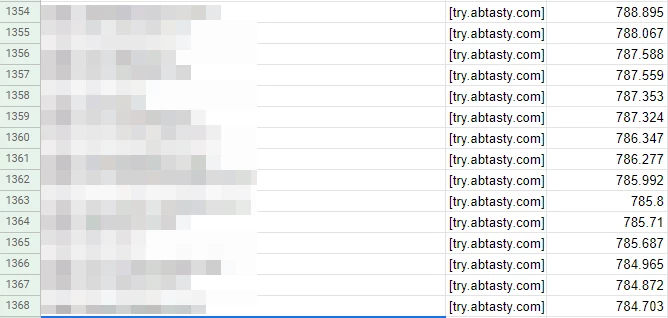
This is what we extracted. The pixellated column is the website URL. The last column is the execution time in milliseconds.

With the raw data, we were able to calculate a lot of useful metrics.

Keep in mind that I am not a mathematician or anything close to a statistics expert. My methodology might sound odd, but it’s adequate for this analysis.

  • Average execution time

This is the first metric I get — the raw average for all the websites. That’s probably very close, if not equal, to what is used by the thirdpartyweb.today website. We already saw the downside of having an average, however, it’s still an interesting value to monitor.

  • Mean higher half and mean lower half

Then, I split the dataset in half. If I have 2000 rows, I create two groups of 1000 rows. The “higher” one and the “lower” one. It helps me have a view of the websites where we perform – the worst compared to the best. Then, I calculate the average of each half.

  • The difference between the two halves

The difference between the two halves is important as it shows the disparity within the dataset. The closer it is, the less extreme values we have.

  • The number of websites with a value above 6k ms

It’s just an internal metric we follow to give us a mid-term goal of having 0 websites above this value.

  • The evolution of the last dataset

I compute the evolution between the last dataset I have and the current. It helps me see if we get better in general, as well as how many websites are leaving or entering the chart.

The results

These are the results that we have:

Here are their corresponding graphs:
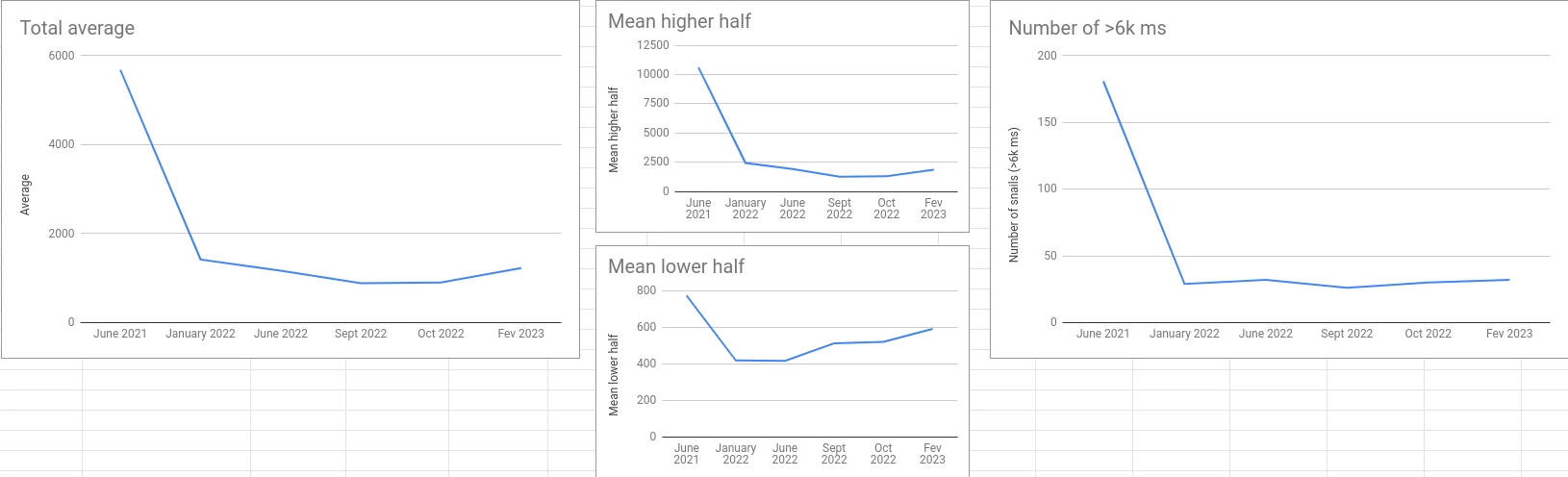
This is the evolution between October 2022 and February 2023:
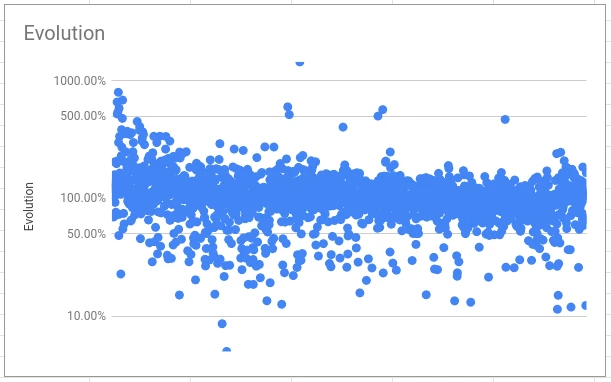
Watch out: Logarithmic scale! Sorted by February 2023 execution time from left to right.

The figures say it all. But, if I can give a global conclusion, it’s that we made tremendous improvements in the first six months and staled a bit after with finer adjustments (the famous 80/20 of Pareto’s).

However, after the initial fall, two key figures are important.

First of all, the difference between the two halves is getting very close. This means that we don’t have a lot of potential performance leaks anymore (features that lead to an abnormal increase in the execution time). This is our first recent win.

Then, the evolution shows that in general, and except for the worst cases, it is steady or going down. Another recent win.

Digging into the details

What I have just shared is the raw results without having a look at the details of each row and each website that is being crawled.

However, as we say, the devil is in the details. Let’s dig in a bit.

Let’s focus on the websites where AB Tasty takes more than six seconds to execute.

Six seconds might sound like a lot (and it is), but don’t forget that the audit simulates a low-end CPU which is not representative of the average device. Instead, it shows the worst-case scenario.

In the February 2023 report, there are 33 of them. This is an average execution time of 19877 ms. I quickly identified that:

  • 27 of them are from the same AB Tasty customer
  • One of them is abtasty.com and the total execution of resources coming from *abtasty.com on this website is very high ?
  • Two others are also coming from one singular AB Tasty customer

In the end, we have only 5 customers on this list (but still 33 websites, don’t get me wrong).

Let’s now try to group up these two customers with duplicates to see the impact on the average. The customer with 27 duplicates also has websites that are below the 6k ms mark, but I’m going to ignore it for now (and to ease things up).

For each of the two customers with duplicates, I’m going to compute the average of all their duplicates. For the first one, the result is 21671 ms. For the second, the result is 14708 ms.

I’m also going to remove abtasty.com, which is not relevant.

With the new list, I went from 1223 ms for the full list average to 1005 ms. I just improved our average by more than 200 ms! ?

Wait, what? But you’re just removing the worst websites. Obviously, you are getting better


Yep, that’s true. That’s cheating for sure! But, the point of this whole article is to demonstrate that data doesn’t say it all.

Let’s talk first about what is happening with this customer that has 27 duplicates.

The same tag has been deployed on more than 50 very different websites! You might not be very familiar with AB Tasty, so let me explain why this is an issue.

You might have several websites which have the same layout (that’s often the case when you have different languages). It makes sense to have the same tag on these different domains to be able to deploy the same personalizations on all of them at once. That’s not the most optimal way of doing it, but as of today, that’s the easiest way to do it with our tool.

However, if your websites are all different, there is absolutely no point in doing that. You are going to create a lot of campaigns (in this case, hundreds!) that will almost never be executed on the website (because it’s not the correct domain) but are still at least partially included in the tag. So our tag is going to spend its time checking hundreds of campaigns that have no chance to execute as the URL is rarely going to be valid.

Though we are working on a way to block this behavior (as we have alternatives and better options), it will take months before it disappears from the report.

Note: If you start using AB Tasty, you will not be advised to do that. Furthermore, the performance of your tag will be far better than that.

Again, I didn’t take the time to group all the duplicated domains as it is pointless, the goal was to demonstrate that it is easy to show better performance if we exclude anomalies that are not representative. We can imagine that we would improve more than 200+ ms by keeping only one domain.

I took the most obvious case, but a quick look at the rest of the dataset showed me some other examples.

The competitors’ figures

Knowing these facts and how our score might look worse than it is because of one single anomaly, I started looking into our competitors’ figures to see if they have the same type of issue.

I’m going to say it again: I’m not trying to say that we are better (or worse) than any of our competitors here, that’s not my point. I’m just trying to show you why statistics should be deeply analyzed to avoid any interpretation mistakes.

Let’s start by comparing AB Tasty’s figures for February 2023 with the same metrics for one of them.
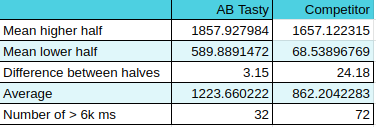
Competitor's figures

In general, they look a bit better, right? Better average and even the means for each half is better (and the lower half by a lot!).

However, between the two halves, the factor is huge: 24! Does it mean that depending on your usage, the impact of their tag might get multiplied by 24?

If I wanted to tease them a little bit, I would say that when testing the tag on your website, you might find excellent performance but when starting to use it intensely you might face serious performance drops.

But, that would be interpreting a very small part of what the data said.

Also, they have more than twice the number of websites that are above the 6k ms mark (again: this mark is an AB Tasty internal thing). And that is by keeping the duplicates in AB Tasty’s dataset that we discussed just before! They also have duplicates, but not as many as we do.

A first (and premature) conclusion is that they have more websites with a big impact on performance but at the same time, their impact is lower in general.

Now that I know that in our case we have several customers that have duplicates, I wanted to check if our competitors have the same. And this one does – big time.

Among the 2,537 websites that have been crawled, 40% of them belong to the same customer. This represents 1,016 subdomains of the same domain.

How does this impact their score?

Well, their customer wasn’t using the solution at the moment the data was collected (I made sure of it by visiting some of the subdomains). This means that the tag wasn’t doing anything at all. It was there, but inactive.

The average execution time of these 1,016 rows in the dataset is 59 ms!! ? It also has a max value of 527 ms and a min value of 25 ms.

I don’t need to explain why this “anomaly” interestingly pulls down their average, right?

The 1,016 subdomains are not fake websites at all. I’m not implying that this competitor cheated on purpose to look better- I’m sure they didn’t. It is just a very nice coincidence for them, whether they are aware of it or not.

To finish, let’s compare the average of our two datasets after removing these 1,016 subdomains.

AB Tasty is at 1223 ms (untouched list) when this competitor is now at
 1471 ms.

They went from 361 ms better to 248 ms worse. I told you that I can let the figures say whatever I want. ?

I would have a lot of other things to say about these datasets, but I didn’t run all the analysis that could have been done here. I already spent too much time on it, to be honest.

Hopefully, though, I’ve made my point of showing that the same dataset can be interpreted in a lot of different manners.

What can we conclude from all of this?

The first thing I want to say is: TEST IT.

Our solution is very easy to implement. You simply put the tag on your website and run an audit. To compare, you can put another tool’s tag on your website and run the same audit. Run it several times with the same conditions and compare. Is the second tool better on your website? Fine, then it will probably perform better for your specific case.

Does a random report on the web says that one solution is better than another? Alright, that’s one insight, but you should either crunch the data to challenge it or avoid paying too much attention to it. Just accepting the numbers as it is displayed (or worse: advertised
) might make you miss a big part of the story.

Does AB Tasty have a bad performance?

No, it doesn’t. Most of our customers never complained about performance and some are very grateful for the latest improvements we’ve released on this topic.

So, some customers are complaining?

Yes. This is because sometimes AB Tasty can have a lower performance depending on your usage. But, we provide tools to help you optimize everything directly from our platform. We call this the Performance Center. It is a full section inside the platform and is dedicated to showing you which campaign is impacting your performance and what you can do to improve it. Just follow the guidelines and you’ll be good. It’s a very innovative and unique feature in the market, and we are very proud of it.

Though, I must admit that a few customers (only a few) have unrealistic expectations about performance. AB Tasty is a JS tag that is doing DOM manipulations, asynchronous checks, data collection and a lot of fancy stuff. Of course, it will impact your website more than a simple analytics tool will. The goal for you is to make sure that the effect of optimizing your conversions is higher than what it costs you in terms of performance. And it will be the same, whatever the CRO tool you are using, except if you use a server-side tool like Flagship by AB Tasty, for example.

I am convinced that we should aim towards a faster web. I am very concerned about my impact on the environment, and I’m trying to keep my devices as long as possible. My smartphone is 7 years old (and I’m currently switching to another one that is 10 years old) and my laptop isn’t very recent either. So, I know that a slow website can be a pain.

Final Remarks

Let me assure you that at AB Tasty we are fully committed to improving our performance because our customers are expecting us to do it, because I am personally motivated to do it, and because that is a very fun and interesting challenge for the team (and also because my management asks me to do it ? ).

Also, kudos to HTTP Archive which does very important work in gathering all this data and especially sharing it with everyone. Kudos to Patrick Hulce who took the time to build a very interesting website that helps people have a visual representation of HTTP Archive’s data. Kudos to anyone that works to build a better, faster and more secure web, often for free and because that’s what they believe in.

Want to test our tool for yourself? AB Tasty is the complete platform for experimentation, content personalization, and AI-powered recommendations equipped with the tools you need to create a richer digital experience for your customers — fast. With embedded AI and automation, this platform can help you achieve omnichannel personalization and revolutionize your brand and product experiences.
Article

4min read

Unleash your creativity: code once, customize infinitely


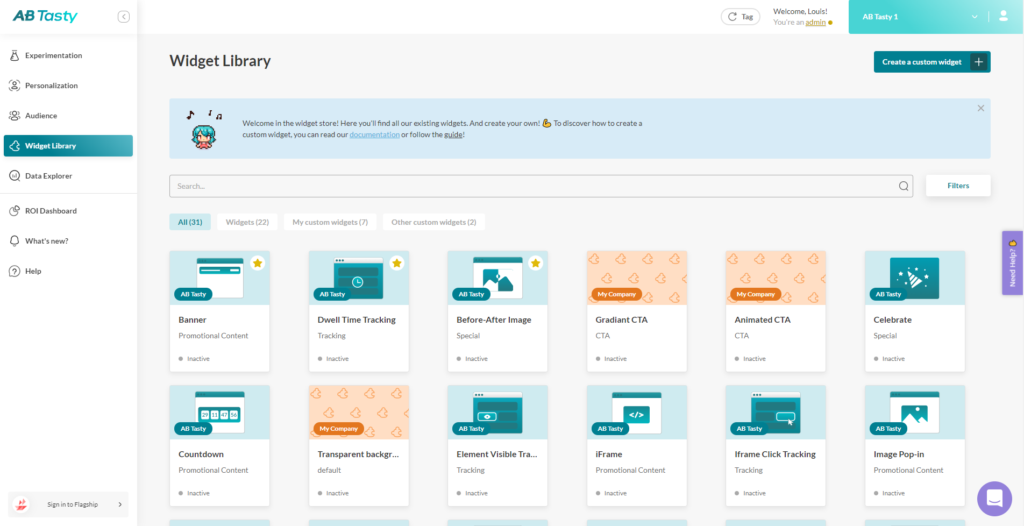
Say hello to Custom Widgets and goodbye to time-consuming back-and-forths when scaling ambitious customer experiences. With Custom Widgets, scale your best CX ideas across teams, brands and markets. AB Tasty has the largest widget library on the market, providing brands with over 25 pre-built ways to quickly engage consumers including scratch cards, NPS surveys and countdowns. But now we’re also giving you the ability to build, customize and share your own widgets! ?
Optimize the workflow between marketers, designers and developers

Custom Widgets are an innovation catalyst that fosters cross-team collaboration to bring ideas to life. Developers can now create highly customizable widgets following a step-by-step process. They simply code the different parts of the widgets using HTML, CSS and JavaScript and add various configuration options?‍?.  This allows designers to easily tailor the widgets and ensure they meet brand guidelines ?‍?.  Marketers can then customize them for their campaign needs ?‍♀.The new possibilities to engage with visitors are endless: wheel of fortune, carousels, lightboxes, etc. These Custom Widgets result in an optimized workflow that saves everyone time but still delivers exciting experiences. ?
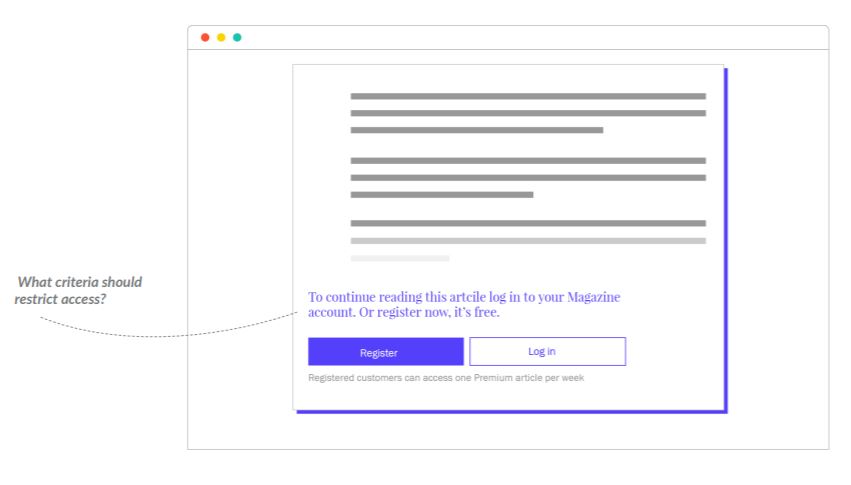
Create and scale a library of your best CX ideas

All Custom Widgets created (by developers, agencies, or AB Tasty) will be available in the widget library shared across all affiliates and accounts of a company. The library, accessible from the dashboard, is a great source of inspiration and ideation that will speed up time to market and facilitate deployment across brands and markets ✹. The widget library will also include our existing widgets with selected use cases from AB Tasty clients to further guide you in creating the best customer journey. And, like with any other widget, marketers can easily customize the content and combine it with AB Tasty’s targeting to create powerful personalized campaigns with no coding skills and in minutes ?‍♀.

Not sure where to start?

In our new widget library, our users can already enjoy 2 custom widgets available on the platform, a Wheel of Fortune and a gradient CTA button, that they can duplicate and modify to dive into how they work. On that same page they can click on “Create a custom widget” and follow our step-by-step process ?. 

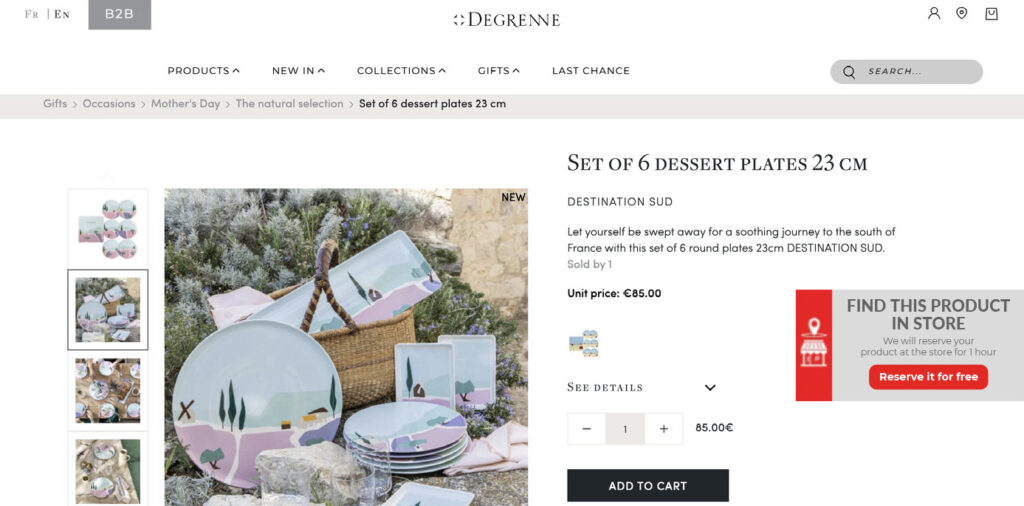
Why not try them now? If you’re looking for inspiration for your first Custom Widgets, check out our 30 Black Friday Tests ebook. It features successful tests from brands like Degrenne, a French cutlery and tableware retailer whose quality products are a staple in the hospitality industry. They wanted to accelerate the purchase process and provide a consistent omnichannel experience to their consumers. Using our widgets they gave their visitors the ability to see item availability in their local store ?.

If you want to replicate this, your developers can create a Custom Widget that leverages geolocation data to create a pop-up displaying product availability in nearby stores. Your customers will be able to reserve their items and opt for in-store pickup. Once available in the widget library, other brands or countries you work with can access it, modify it and leverage it to provide their visitors with an omnichannel experience.

To learn more check out the ebook ?:

With AB Tasty, let your good ideas take flight!

Article

9min read

What Is Customer Experience Innovation?

In today’s world of fickle attention spans and abundant choice for consumers, building your brand experience is no longer something that companies could consider doing. Nowadays, it has become a must-have for anyone that wants to stay in the game.

Establishing a relationship with your customers by adding value to each touchpoint – be it via services that go beyond what they’d expect, special rewards that inspire and entice, or personal touches that address their direct needs – will be what keeps them coming back. It will also play an integral role in building your brand’s very reputation by delivering the ‘wow’ experiences that put you ahead of your competition and at the top of the class.

In recent weeks we’ve discussed the importance of customer experience optimization (that is, maximizing conversion and delivering against KPIs, as well as leveraging responsive and quick-win experimentation to ensure nothing gets left on the table). When it comes to customer experience innovation, it’s about taking that to the next level. If optimization is the bare minimum that you should be doing, innovation is maximizing the long-term value of your brand and building a competitive edge to set you apart from the other brands in your category.

In this article, we’ll cover:

[toc]

Why customer experience innovation matters

Here at AB Tasty, customer experience innovation means going beyond the product to create an exchange that delights your customers, cements their loyalty and sets the bar so high that you’re the standard they come to expect from every company they encounter. It’s also more than just optimizing to ensure you have a high-performing, functional website. When it comes to innovation, the goal is to stand out from the pack, staying ahead of your competition, to create a signature brand experience that distinguishes your business from others.

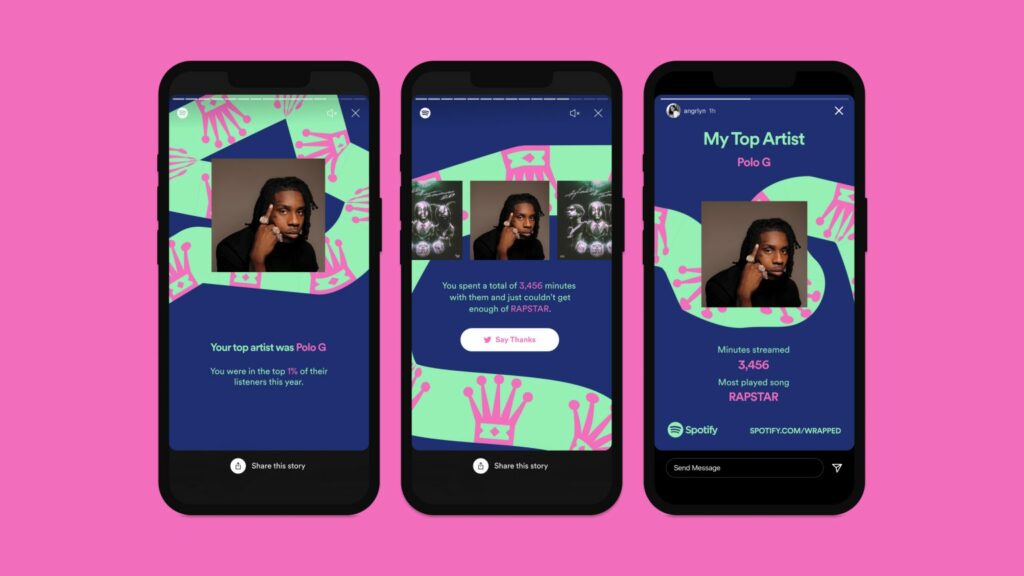
Think of Spotify. At a basic level, they’re a streaming service that offers a huge library of content that is easy to access, and simple to subscribe to with seamless payment that makes for uninterrupted listening. But Spotify is more than just an optimized service, they’re also about innovation that delivers experiences that go beyond. One example is their user recaps, which leverage data to create a personalized experience to help listeners celebrate who they are (based on what they’ve listened to) and give each individual their own story to tell. (It’s also a nifty way for Spotify to get their users to advertise on their behalf!) Spotify is also making it clear that they’re more than a streaming service: they’re the embodiment of their users’ wishes brought to life.

Spotify leverages data to create a personalized experience for their listeners
Spotify leverages data to create a personalized experience for its listeners (Source)

Companies that wrap an immersive experience around their product (as Spotify does with its year-end recaps) create a more engaging environment for their consumers that goes beyond the mere items they sell and delivers an experience that’s more than just a transaction. From Nike creating a community of fitness to Tim Horton’s gamifying its loyalty program and Oui.SNCF leveraging AI to elevate trip planning, these companies are using customer experience innovation to drive sales.

The key components of experience innovation

In 2020, Accenture’s Business of Experience report found that 77% of CEOs believe their company will fundamentally change the way it connects and interacts with its customers, and that leading companies are twice as likely to have the agility to pivot towards new models that deliver value than their competitors. Not sure on which side you fall? Let’s take a look at the key elements for customer experience innovation.

In the current environment of fast-moving technological change marked by devices and services which are never far out of reach (and thus never truly off), your brand is accessible at all times; long gone are the days when shops would close and your customers would have to wait for them to reopen the following morning. This presents a multitude of opportunities to drive meaningful interactions and engagements with your consumers alongside added value to your business. And to get there, you need to leverage experimentation.

Companies need to leverage experimentation in order to drive meaningful interactions with their consumers
Companies need to leverage experimentation in order to drive meaningful interactions with their consumers (Source)

Experimentation can be run client-side (front-facing, on the website’s interface) and server-side (on the back-end, across all digital touchpoints if necessary). Client-side testing runs in your visitors’ browsers and is limited in scope to largely aesthetic and layout measures. To dive deeper into experience innovation, you’ll need to get into server-side.

Server-side experimentation

Server-side experimentation allows for more sophisticated experiments, tests features that go beyond the surface level and is platform- and language-agnostic. It’s also a heavier lift and needs developer and tech team input; as it’s run using a website’s source code, this testing relies upon coding skills. To implement server-side experimentation, you’ll need buy-in from both marketing and product teams, and a willingness to invest developer resources into running your experiments. But you’ll also achieve more flexible and sophisticated testing, such as price sensitivity and elasticity testing, as well as testing across multiple channels.

Feature management

Feature management is a process by which developers release updates gradually, through the use of feature flags, to allow platform updates to be tested while minimizing the risk of major site crashes or performance issues when rolling out new software releases. Using progressive deployment and rollbacks, where parts of the code are removed to allow features to be toggled off and on, feature management can test multiple versions of an update to determine which yields the best result – optimizing against set KPIs – and should thus be adopted permanently. Using this approach also ensures that you nail the transition to an updated platform with existing users, delivering an elevated experience that guarantees they never look back.

Each experimentation method has strengths and challenges, but it is in their combination that their greatest power lies. By leveraging both client- and server-side testing, you are able to go beyond optimization to build total brand experiences.
Get the most out of experimentation by leveraging both client- and server-side testing
Get the most out of experimentation by leveraging both client- and server-side testing (Source)

Three innovative companies that are taking up the challenge

1. Zwift

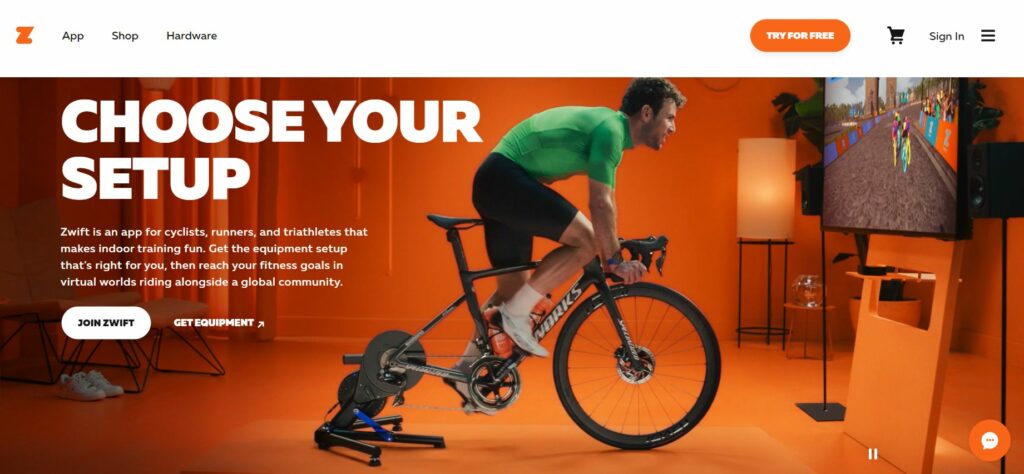
Zwift is a multiplayer online game and fitness platform that leverages virtual reality to transport its players’ running and cycling workouts to various iconic locations around the world. Ever wanted to tackle the famous Alpe d’Huez stage of the Tour de France or the bone-jamming cobblestones of Paris-Roubaix? This is the kind of platform that can make that happen. Users connect their turbo trainer or treadmill to the Zwift app and the in-game avatars bring workouts to more than 240 miles of virtual terrain, and permit group sessions and participatory events such as the Virtual Tour de France. The pandemic saw a considerable upswing in at-home fitness, but Zwift’s innovation takes the experience of working out at home to another level.

Zwift takes the experience of working out at home to another level with virtual reality
Zwift takes the experience of working out at home to another level with virtual reality (Source)

2. Uber

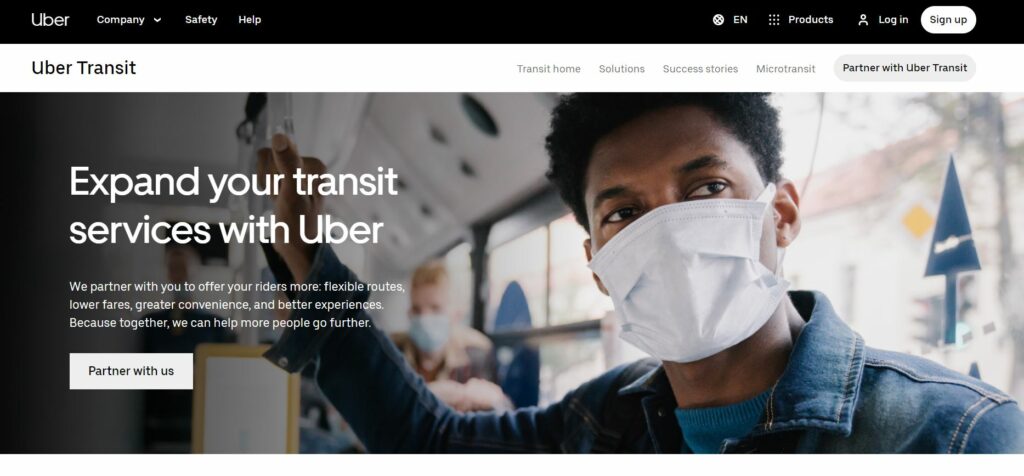
Ride-sharing phenomenon Uber identified that 60% of trips in Sydney, Australia, begin or end in areas with limited access to frequent public transport. Leveraging that user insight, they launched the Uber and Transit feature in September 2020, enabling riders to identify the best combination of public transit and UberX rides to complete their journey. The feature gives passengers the ability to compare the cost and time for their trips depending on the constellation of transport methods they adopt, an approach that prioritizes customer needs without driving users away from their core service.

Uber prioritizes customer needs to offer them a better experience
Uber prioritizes customer needs to offer them a better experience (Source)

3. On

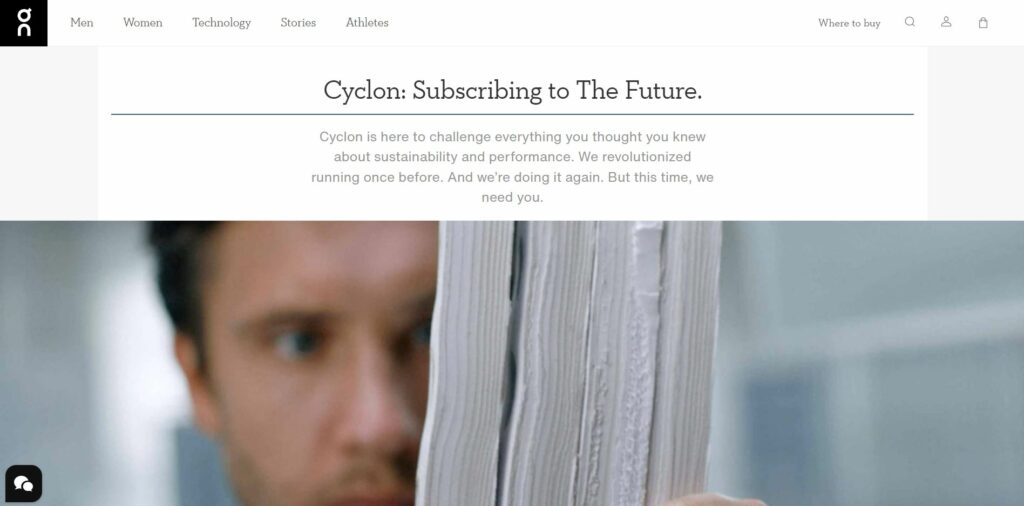
Consumers are increasingly conscious of the sustainability commitments of the brands with which they engage. Swiss sporting goods manufacturer On adopted a subscriber approach to support a business model which encourages circularity without stymying both the desire and the necessity to consume products (in this company’s case, shoes). Customers pay a US29.99 subscription fee which allows them to swap out their current shoes for new ones as often as they’d like, and also delivers On sufficient sneaker returns to make circularity feasible. The shoes are made from castor beans and can be completely recycled, giving that growing consumer base of sustainability-focused customers peace of mind whilst still serving their performance needs.

On offers its sustainability-focused customers a product that caters to their needs
On offers its sustainability-focused customers a product that caters to their needs (Source)

Want even more best-practice examples of brands hitting it out of the park? Check out AB Tasty’s guide to optimization trends. Get your copy of the “50 Tests You Should Know for Your Website” E-book now!

Collaborate across teams for continual evolution and development

We’ve already established that experience optimization is the bare minimum when approaching your brand’s online presence and commercial activities, and that experience innovation is what takes you to the next level in your category. To innovate is to experiment – exploring different configurations, layouts, price thresholds and incentives, as Jonny Longden of Journey Further told us on the “1000 Experiments Club” podcast. Your experimentation roadmap is essential to retaining your customers, recruiting new ones and growing your business.

Experience innovation is not owned by one team: It takes multiple divisions collaborating toward the common goal that is established by your roadmap. Setting up your internal organization to anticipate customer demands requires investment in your tech stack, alignment and cooperation between product, tech and marketing teams, and allocation of resources in accordance with your agreed-upon experimentation plan.

Experience innovation requires alignment between product, tech and marketing teams
Experience innovation requires alignment between product, tech and marketing teams (Source)

To maximize customer experience innovation, your teams should be empowered to be the innovators. Allocate resources and responsibilities fairly and toward efforts that the individual teams can influence, simplify the tech processes for implementation and rollout, and drive innovation around business priorities so that everyone is paddling in the same direction and the outcomes from experimentation efforts find success.

Article

3min read

Using a Deep Understanding of User Journeys through Heap to Fuel Optimization in AB Tasty

We’ve spent the past couple of months at AB Tasty developing our product integrations with the leading Product Analytics providers. In this post, I’m excited to highlight Heap. Not only does Heap feature my favorite color (dark purple) in its branding, it offers its users an unbridled view for product managers and marketers to see how their customers engage with and move through digital journeys.

We think that’s quite a feat, and we want to showcase how our customers can create actionable programs to capitalize on the insights provided by Heap.

Without having a full understanding of your basic user journey and the various offshoots that customers may take along the way, marketers and product teams are forced to guess or rely on qualitative feedback to improve, optimize, or build on digital experiences.
Evolution, rapid iteration, and growth begins with understanding precisely how your users behave and why.

You need to have a clear picture of your user experience to understand their frictional moments and have the ability to quickly and efficiently test different hypotheses and action plans to find the best way to resolve those pain points.

On the other hand, while experimenting to identify potential solutions, you need to have insights into their impacts and how they resolve a frictional experience.

Measure everything along the customer journey with Heap. Plan actions and set up experimentation and personalization campaigns to optimize your user experience with AB Tasty then analyze the results of your campaigns.

Allow me to take you through an example, which may hit home for many readers. I know it hits home with me, personally, although I am a proud member of #teamhotleads scrapping for the coveted demo request as opposed to shopping cart conversions. Anyway…

The journey starts with Heap. Within the Heap platform, you can track all aspects of your users’ digital experiences, identify critical drop-off points in the clickstream that prevent conversions while identifying ways to simplify and clarify steps for customers.

Maybe you have a snazzy new checkout page that has increased your purchase rate. How can you be sure you’re funneling the maximum amount of traffic to that snazzy new page to reach your full purchase potential? Enter Heap.

Use your Heap platform to pin-point exact moments in your users’ journeys that result in drop-offs or, spinning it as a positive, as we like to do, “areas for improvement.” Once you’re able to identify these less-than-optimal moments in the journey within Heap, you need to formulate a game plan to take action to improve your traffic flow to your snazzy new checkout page. How? Enter AB Tasty.

Within AB Tasty you can craft experimentation programs ranging from changing your button colors to targeting hyper-specialized segments of visitors with powerful personalization campaigns. Using your experimentation results, create optimization roadmaps that allow you a path to realizing your full traffic potential on that checkout page that you spent so much time developing.

Formulate hypotheses and create an action plan, then conduct precise personalization and experimentation campaigns with real-time and retroactive data with the AB Tasty optimization platform. Once you’ve taken action, you can measure the impact and track the success in the Heap platform.

This seems pretty tactical, right? Let’s take it up a few levels to understand where this can provide strategic value.

Running ad hoc experiments can sometimes yield surprising and valuable improvements in certain metrics. An experimentation roadmap can bring you even more impact to those improvements.

By focusing your experiments on targeted points within the customer journey and building a roadmap of your experimentation plan, you can achieve compounding improvements to your customer experience, and, as a result, your revenue goals.

To learn more about how to set up your AB Tasty campaign data with Heap, check out our knowledge base article.

Article

6min read

Server-Side Testing: Definition, Advantages and Examples

AB Tasty makes server-side testing available to our clients thought the Feature platform . This opens up a whole new world of testing possibilities – but it also makes us realize that not everyone is 100% familiar with what server-side testing is, when it’s useful, and how it can be fully exploited.

So, here’s a quick recap for those of you who might still be wondering – just what is server-side testing?

Server-side and client-side testing

Before we dive into server-side, let’s get some terminology straight.

If you’re using a website optimization SaaS solution (AB Tasty or similar), you’re already familiar with server-side testing’s counterpart – client-side testing.

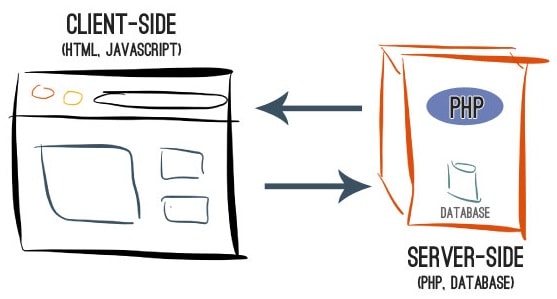
Client-side testing simply means website optimization changes are only happening in the visitor’s browser. You don’t necessarily have to have any coding knowledge – in fact, it’s one of our promises at AB Tasty – though sometimes familiarity with HTML, JS, or CSS can be useful.

This is one of the main things to remember about client-side – the web interface is the control room of your tests, and all of the scripts are running on your visitors’ browsers.

Image Source

However, the relative ease of use of client-side testing – little to no coding needed – also comes with drawbacks. Namely, the scope of your tests remains largely related to design: changing color, wording, layout, hiding or adding elements, etc.

With client-side testing, the scope of your tests remains largely related to design: changing color, wording, layout, hiding or adding elements, etc.

For some companies, this is just fine – and there are countless test ideas you can run client-side – but after a certain point, many want to do more. This is where server-side comes in.

Client-Side Server-Side
Marketing + Tech Tech + Marketing
Agility & Reactivity Advanced Scenarios & Constraints
WYSIWYG + HTML/CSS/JS In Code / App Implementation
Content, UI and UX Features & Business Logics
Web Technologies Platform & Language Agnostic

More sophisticated tests with server-side

In a certain sense, server-side testing cuts out the middleman – the AB Tasty tag used with client-side tests. Instead, using code, developers can go straight to the source and work on the servers that deliver the website to the end user’s browser. Marketers can still set the parameters of a test up in the AB Tasty interface, but all of the implementation takes place at the level of the web server.

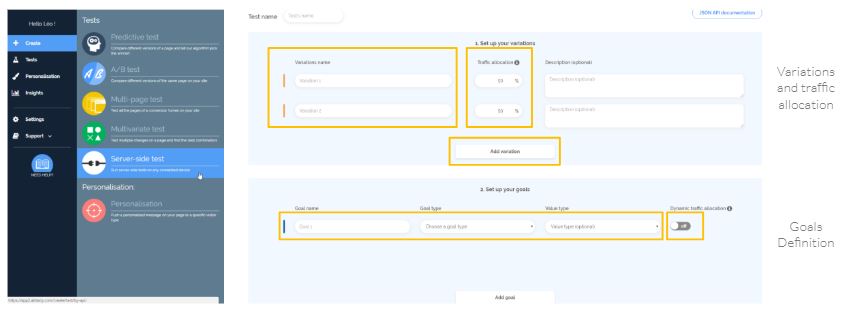
Client-side campaigns are defined in the AB Tasty interface. In the above screenshot, you define your variations, your goals and set the traffic allocation, whether dynamic or not.

Because the kind of implementation involved in server-side is more direct, it allows for much more sophisticated tests and website optimization campaigns.

However, the inescapable fact about server-side testing is that whoever is setting up the tests needs to be fluent in back-end coding languages, like PHP, Node.js or Python. If the marketing, digital or e-commerce team is the one running your CRO program, you may already have the appropriate web developer on staff. Others may look to hire a freelancer. However you go about it, if you want to start out with server-side testing, you’ll need both:

  • Access to the source code of your website
  • A skilled developer to set up and manage the server-side campaigns

Advantages and limits

Neither way of testing is inherently ‘better’ than the other – both have their place in a website optimization strategy. Instead, it’s more about choosing which is right for your company based on your resources and goals. Very often, you’ll want to use both techniques at once.

Advantages of client-side testing:

  • Simple and quick to get started – easy ramp-up
  • No knowledge of coding necessary (marketers don’t need to get the IT team involved)
  • All testing data stored in easy-to-read SaaS interface

Limits of client-side testing:

  • Testing scope is ‘cosmetic’ in nature (shape, color, configuration)
  • Difficult or impossible to involve multiple channels (desktop, mobile web apps, IoT
)

Advantages of server-side testing:

  • Complex and sophisticated tests possible, including omnichannel

Limits of server-side testing:

  • Web developer / significant coding skills necessary
  • Marketers are less autonomous

With AB Tasty, your server-side tests will also benefit from what we offer, client-side: sophisticated reporting, reliable Bayesian statistics, and a dynamic traffic allocation algorithm that means you can optimize every website visit to the max.

Some examples of server-side tests

So, is server-side worth the investment? It depends on your resources, goals and level of maturity, but some of the following examples illustrate just how powerful server-side tests can be:

Find the ‘freemium‘ to ‘premium’ sweet spot

Companies that offer a free version of their product know that, at some point, they need to start charging for their services. The question is, at exactly what point?

This is the issue that AlloVoisins, the French online marketplace for exchanging services among neighbors, was asking themselves. With the help of AB Tasty’s server-side solution, they were able to run a one-month test to determine the optimal number of free ads one could post or accept before being required to switch to the paid version. Finding this sweet spot would allow them to continue offering a free service to entice new customers, without losing out on revenues.

Find the ideal limit for free shipping

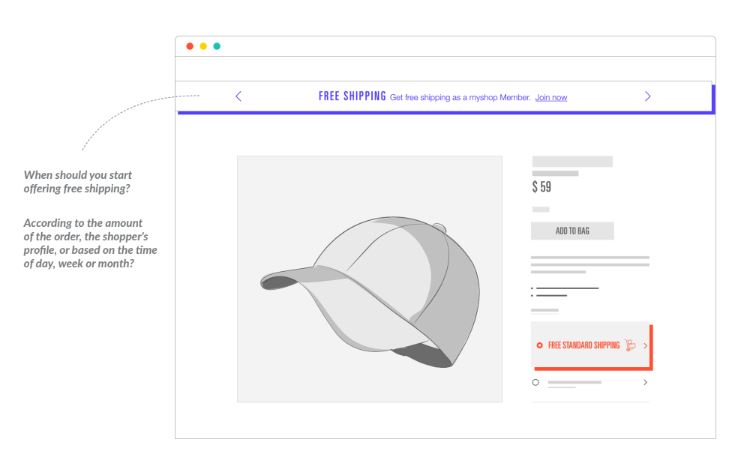
Deciding at which basket value an e-commerce site should offer free shipping is a big issue for many companies. A server-side testing approach can help you determine the sweet spot that incentivizes purchases without taking too much off of your bottom line.

Test your search algorithms

Any testing having to do with your search engine or searchandizing solution will need to go through a server-side approach: testing that involves the number of products viewed, the rate at which products are added to the cart, transaction rate, average order value…all need a server-side methodology.

Find the ideal paywall form

If you’re an online media outlet, paywalls are probably part of your website.

Though it is possible to put in place a paywall client-side, people can easily get around them by deleting their cookies or browsing history. For a 100% trustworthy solution, the trigger rules should be managed server-side. This way, you can securely test the impact of different kinds of paywall configurations on your subscription rate.

I want to learn more about server-side testing with AB Tasty!

Interested in learning more about server-side testing? Check out our ebook on 10 tests you can only run server-side.

Ready to take the next step? Contact your dedicated Key Account Manager or write an email to Contact@abtasty.com to learn more.

Article

8min read

Client and Server-Side A/B Testing – The Best of Both Worlds

We’re enriching our conversion rate optimization platform with a server-side A/B testing solution. What is server-side A/B testing, you ask? It’s the subject of an announcement of ours that will make anybody who’s passionate about experimentation pretty excited…because it means they can now test any hypothesis on any device.

No matter if you want to test visual modifications suggested by your marketing team or advanced modifications tied to your back office that are essential in the decision-making process of your product team, we’ve got the right tool for you.

What’s the difference between A/B testing client-side, and A/B testing server-side?

Client-side A/B testing tools help you create variations of your pages by changing the content sent by your server to internet users in the web browser. So, all the magic happens at the level of the web browser (called ‘client’ in the IT world), thanks to JavaScript. Your server is never called, and never intervenes in this process: it still sends the same content to the internet user.

Server-side A/B testing tools, on the other hand, offload all of this work from the web browser. In this case, it’s your server that takes on the task of randomly sending the internet user a modified version.

4 reasons to A/B test, server-side

Running an A/B test server-side has many advantages.

1. Dedicated to the needs of your product team

Client-side A/B testing is often limited to surface-level modifications. These refer to visual aspects, like the page’s organization, adding or deleting of blocks of content or modifying text. If you’re interested in deeper-level modifications related to your back office – for example, reorganizing your purchase funnel, or the results of your search or product sorting algorithm – it’s a bit more complicated.

With server-side testing, you have a lot more options to work with, since you can modify all aspects of your site, whether front-end or back-end. With server-side testing, you have a lot more options to work with, since you can modify all aspects of your site, whether front-end or back-end.

All of this is possible because you remain in control of the content sent by your server to your website visitors. Your product team will be overjoyed since they’ll gain an enormous amount of flexibility. They can now test all kinds of features and benefit from a truly data-driven approach, to make better decisions. The price of this increased flexibility is the fact that server-side testing requires your IT team to get involved in order to implement modifications. We’ll get back to this later.

Your product team will be overjoyed to test all kinds of features

2. Better performance

Poor performance – loading time or the flickering effect – is often the first criticism made about client-side A/B testing solutions.

In the most extreme cases, some sites only add the JavaScript tag to the footer of the page to avoid any potential impact on their technical performance. This policy automatically means excluding using any client-side A/B testing tools, since a ‘footer’ tag is often synonymous with flickering effect.

When using a server-side A/B testing tool, you don’t have any JavaScript tag to insert on your pages, and you’re in control of any potential performance bottlenecks. You also remain responsible for your company’s security policy and the adherence to internal technical procedure.

3. Adapted to your business’s rules

In some cases, your A/B test might be limited to design-related modifications, but you have to deal with profession-specific constraints that make it difficult to interpret a classic A/B test.

For example, an e-commerce merchant might understandably wish to take into account canceled orders in their results, or else exclude highly unusual orders which skew their stats (the notion of outliers).

With a client-side A/B test, a conversion is counted as soon as it occurs on the web browser side when the purchase confirmation page loads or a transaction event type is triggered. With a server-side A/B test, you remain in complete control of what is taken into account, and you can, for example, exclude in real time certain conversions or register others after the fact, by batch. You can also optimize for more long-term goals like customer lifetime value (LTV).

4. New omnichannel opportunities

Server-side A/B testing is inseparably linked to omni-channel and multi-devices strategies.

With a client-side solution – which relies on JavaScript and cookies – your playing field is limited to devices that have a web browser, whether it’s on desktop, tablet or mobile. It’s therefore impossible to A/B test on native mobile apps (iOS or Android) or on connected objects, those that already exist and those still yet to come.

On the other hand, with a server-side solution, as soon as you can match up the identity of a consumer, whatever the device used, you can deploy A/B tests or omnichannel personalization campaigns as part of a unified client journey. Your playing field just got a lot bigger 🙂 and the opportunities are numerous. Think connected objects, TV apps, chatbots, beacons, digital stores…

Use cases for server-side A/B testing

Now, you’re probably wondering what you can concretely test with a server-side solution that you couldn’t test with a client-side tool?

Download our presentation: “10 Examples of Server-side Tests That You Can’t do With a Client-side Solution”

Included are tests for sign up forms, tests for order funnels, tests for research algorithms, feature tests…

How can you put in place a server-side A/B test?

To put a server-side A/B test in place, you’ll need to use our API. We’ve described below in general terms how it works. For more information, you can contact our support team, who can give you the complete technical documentation.

When an internet user lands on your site, the first step is to call our API to get a unique visitor ID from AB Tasty, which you then store (ex: cookie, session storage). If a visitor already has an ID from another visit, you’ll use this one instead.

On pages where a test needs to be triggered, you’ll then call our API passing in parameters the visitor ID mentioned above and the ID of the test in question. This test ID is accessible from our interface when you create the test.

As a response to your API request, AB Tasty sends the variation ID to be displayed. Your server then needs to build its response based on this variation ID. Lastly, you need to inform our data servers as soon as a conversion takes place, by calling the API with the visitor ID, and data relevant to the conversion, like its type (action tracking, transaction, custom event
) and/or its value.

Don’t hesitate to use our expertise to analyze and optimize your test results thanks to our dynamic traffic allocation algorithms, which tackle the so-called ‘multi-armed bandit’ issue.

As you’ve seen, putting in place a server-side A/B test absolutely requires involvement from your tech team and a change in your work routine.

While client-side A/B testing is often managed and centralized by your marketing team, server-side A/B testing is decentralized at the product team or project level. While client-side A/B testing is often managed and centralized by your marketing team, server-side A/B testing is decentralized at the product team or project level.

Should you stop using client-side A/B tests?

The answer is no. Client and server-side A/B testing aren’t contradictory, they’re complementary. The highest performing businesses use both in tandem according to their needs and the teams involved.

  • Client-side A/B testing is easy to start using, and ideal for marketing teams that want to stay autonomous and not involve their head of IT. The keyword here is AGILITY. You can quickly test a lot of ideas.
  • Server-side A/B testing is more oriented towards product teams, whose needs involve more business rules and which are tightly linked to product features. The keyword here is FLEXIBILITY.

By offering you the best of both worlds, AB Tasty become an indispensable partner for all of your testing and data-driven, decision-making needs.

Don’t hesitate to get in touch to discuss your testing projects – even the craziest ones!

Article

7min read

AB Tasty Reaches a New Milestone in Optimizing UX for Dynamic Websites

AB Tasty once again pushes the boundaries of tech, making it that much easier to optimize user experience on all types of sites

We’re very proud to announce the roll-out of an A/B testing and personalization platform that’s fully compatible with ReactJS, Angular.js and other popular JavaScript frameworks.  The best part? Running campaigns on any Single Page Application (SPA) doesn’t require you to write a single line of code!

We would be remiss if we didn’t thank our extraordinary R&D team – many of whom were hired specifically for their skills working with these frameworks – who toiled tirelessly to make this new functionality possible.

Current AB Tasty users don’t have to change anything about how they use the interface since this innovation is seamlessly integrated into the platform.  This evolution allows us to stay true to our values of simplicity and efficiency, while at the same time bringing a host of advantages to our users, including:

  • Compatibility with all current or future frameworks
  • A boost in performance with a faster page load time and a lighter JavaScript tag
  • No more flickering effect

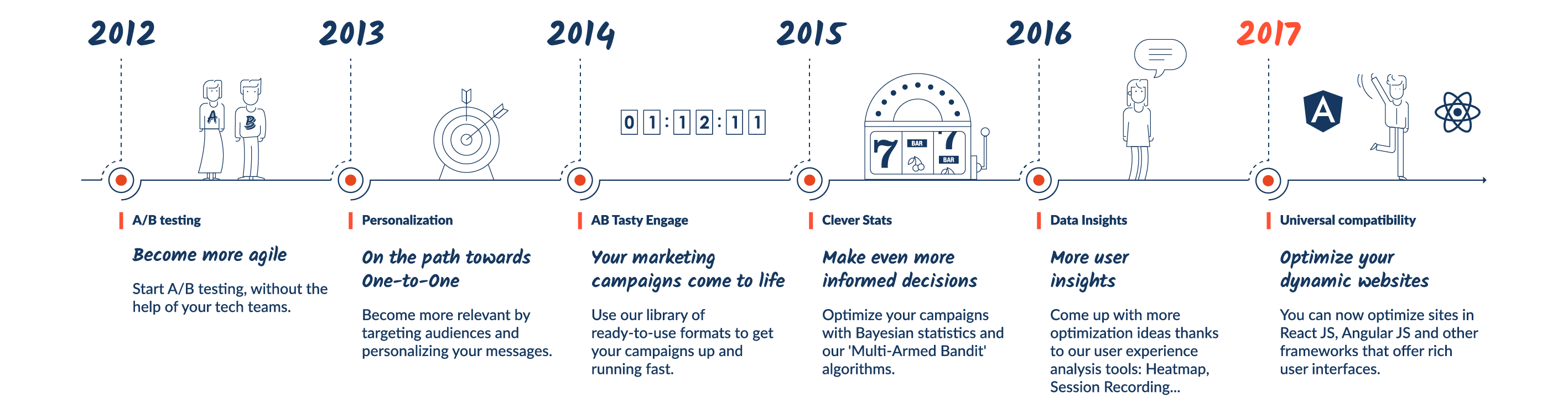
An overview of 6 years of constant innovation…
all so we can better serve our clients

AB Tasty Innovation Timeline

Some technical background

A/B testing softwares that work on the client side, such as AB Tasty, rely heavily on JavaScript. To clearly understand what new JavaScript frameworks bring to the table and what implications they have, we need to first clarify how traditional A/B testing usually works. When an Internet user requests a page from a website (“server”), the former sends the requested content as a static page that includes all the HTML code and assets that the user browser (“client”) will interpret and render.

Part of this content is the A/B testing solution code, that automatically executes on every page load in order to modify the DOM (Document Object Model). The DOM is the representation of the page content and can be manipulated, using jQuery. For instance, changing or deleting page elements such as text, imagery, layout, etc. That’s what A/B testing does, at its core.

What’s changed with new JavaScript frameworks?

Javascript frameworks or libraries such as React JS, Vue.js, Ember.js have gained popularity over the past few years due to the streamlined user experience they offer: no page refresh, highly interactive navigation, less data transfer, and so on. They have become part of any modern web development stack and are used by an increasing number of websites such as Facebook (its creator), Airbnb, American Express, Spotify, and many more.

React and JavaScript Frameworks

But the way these frameworks behave pose one major issue for traditional A/B testing client-side tools: there is no page reload when a user interacts with the page/content, which means that the A/B testing code is loaded once, and is not aware of state changes induced by these frameworks. Any user interactions generally trigger a change in the state of the application: meaning, what’s displayed to the user at any given time, depending on the data available and the trigger. For React JS applications, one common issue is that UI components are re-rendered every time the state is changed. So, traditional A/B testing tool changes won’t stick, as they’re removed by React 🙁

How can you run A/B tests on single page applications?

If you’re running a single page application or using one of the aforementioned JavaScript frameworks, running A/B tests can be messy and involve a lot of development work. Some solutions require you to identify the states you want to target and conditionally activate your experiment code through API calls once a visitor enters the desired state. Other solutions hardcode test modifications in your application or even require a custom deploy for every new A/B test.

A/B testing tools need custom developments to work with React

These solutions may fit with your organization and development team’s knowledge, but make things difficult for users (product managers, marketers, etc) who want to launch tests without having to involve their dev team. All the solutions mentioned above require collaboration with developers to write the needed code. This is far from ideal if you’re looking for agility!

AB Tasty, the game changing testing software for the modern web

Since AB Tasty’s creation, our mission has remained unchanged: to make it easy to run A/B tests and accessible to all teams, regardless of their level of technical knowledge. This mission is at the forefront of everything we do and we consider it our role to adapt to innovation and development trends, rather than making our users adapt.

We foresaw the emergence of new JavaScript frameworks and the impacts they’d have on traditional A/B testing a while ago and started working on a truly innovative solution to make AB Tasty compliant with modern web development stacks while keeping it easy to use. As these frameworks are here to stay (even if there are a lot of them, some with specific flavors) we put all of our efforts and resources into providing you with the best solution possible.

[clickToTweet tweet=”You can now easily A/B test sites with #reactjs or #angularjs using @ABTasty. ” quote=”You can now easily A/B test sites with #reactjs or #angularjs using @ABTasty. “]

By that we mean, we hired an army of highly proficient front-end developers to focus on this specific topic (12 to be precise!) After months of hard work, they’ve come up with a pretty darn good solution (if we do say so ourselves).

It relies on our ability to check and apply modifications in modern browsers 60 times per second. Every 16ms, before the browser starts to render its display, we hook in, check if there are modifications to apply, and, if so, apply them. This is a totally independent framework. So, if a user interaction triggers a React component to be re-rendered, we apply the modification before the browser starts to render whatever React is sending back to them. It works the same way for Vue.js, Ember.js, or any other JavaScript frameworks.

[clickToTweet tweet=”The dev team at @ABTasty developed a meta-language to make #abtesting possible on #reactjs!” quote=”The dev team at @ABTasty developed a meta-language to make #abtesting possible on #reactjs!”]

To make this possible, our engineers also wrote a new meta-language to describe the content of the variations and interpret it. This allows us to not store this content as JavaScript (even if we still do it for backward compatibility), keep a history of all modifications, and apply them on-demand, like when a state change occurs. This makes your tests possible on any single-page applications.

What are the benefits of this new approach?

Finally, a solution that doesn’t require jQuery and entirely gets rid of the flickering effect

Framework agnostic

It works with React JS and all other JavaScript frameworks and libraries (Ember.js, Vue.js, AngularJS, Meteor.js, etc.). It doesn’t matter if you use one of them for your whole site or just specific areas like your shopping cart or sales funnel.

Zero chance of having a flicker effect

Everything is now managed in an asynchronous way and we apply modifications every 16ms so they won’t be visually noticed.

Ability to use the AB Tasty WYSIWYG editor, as usual

Backwards compatibility

By using our new framework (v2.3), you can be confident that your existing campaigns will deliver correctly, even if you don’t use any of these JavaScript frameworks or use older versions.

Want to try it?

Are you an experiment addict, frustrated with not being able to run tests on these popular Javascript frameworks? Are you looking for more agility? Are you tired of the flickering effect? If so, request your custom demonstration.