Article

7min read

How to Conduct Usability Testing for Mobile Apps

Did you know that 90% of the time people spend on their phones is in mobile apps? Creating an app for your business is a great way to ensure that people can easily find your services right on their phones.

However, a lackluster app can sour your relationship and brand image. Regular usability testing of your mobile app helps you see how this handy marketing tool can be improved.

Read on to learn how you can conduct high-quality usability testing for your mobile apps.

Good Usability Testing: The Benefits  

Usability tests for mobile apps are designed to observe test-subject users while they use your app. The purpose of testing is to measure the app’s user-friendliness and learn about how it can better support your brand’s key marketing objectives.

Usability testing helps to ensure that your app is adding value to your business, as well as meeting the expectations of the final users. Ensuring you have good usability for your mobile app will help your business improve customer satisfaction, decrease time on customer support, and increase your sales and revenue.

Seven Steps to Run an Effective Usability Test

Decide on your Objectives

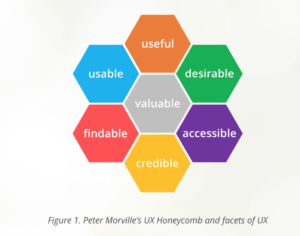
First and foremost, come up with specific objectives for your usability test. When designing your objectives, keep the five usability attributes in mind:


usability-attributes
Source

Once you have the big idea objectives, nail them down to specifics.

One objective could be determining what aspects users enjoy about your mobile app. Perhaps they find it easy to use, or they like the colors you’ve assigned. Another objective might be seeing if a new feature helps or hinders users from completing a specific task.

Whichever way you decide to do it, make sure you have some core objectives and some flexible ones. Core objectives should be questions you ask every time you run a usability test. Flexible objectives are ones that depend on new updates or changes that didn’t exist before.

Design the Tasks

Next, it’s time to design the tasks that you’ll ask your users to do. There are a few key guidelines you should follow when designing usability tasks.

First, even if your mobile app is still in development, remove placeholder text like “lorem ipsum” with a draft of what should be there. This will help you get a better sense of how people navigate the site and decide which information is important. If they see placeholder text everywhere, you’re not getting a good sense of how they weigh the information presented to them.

Avoid providing clues in your instructions. Offering extra hints and tips might lead them to take actions they wouldn’t have otherwise figured out. 

Before you run your test, check that there isn’t any ambiguity in your instructions. If you leave instructions up to interpretation, your results might make it seem that your app isn’t user-friendly.

Choose Between Lab Settings or Remote Testing

There isn’t one right option when choosing between a lab setting or running your test remotely. However, there are pros and cons to each choice.

You don’t need an actual lab to run a test in a lab setting. This just means that you’re running the test yourself in a controlled environment.

In Lab settings, you have the benefit of gaining extra observations. Even small things like hesitation or scrunched eyebrows can tell you a lot about their user experience. You also gain complete control over their experience and the environment in which the test is conducted.

One downside of lab settings is that you risk muddling the results with the framing effect. If you accidentally ask a question in a leading way or provide too much information, you’ll end up getting results that reflect your knowledge and experience with the app – instead of your users.

The advantage of remote testing is that you don’t need to schedule a time and place to host your users. The users do the test on their own time, and you get sent the results, which saves time for your team. And like we mentioned, remote testing is a great way to avoid the framing effect.

There is a range of testing tools available for mobile UX, so be sure you choose one that supports the measurement of your key objectives.

Ready, Set, Run the Test

Now that everything is ready, it’s time to run your test. There are a few different moderation methods you can choose from.

One option is to ask your participants to think out loud as they work through the tasks. “Oops, didn’t think it’d do that”  is great feedback. If you’re running a test remotely, this can give you extra information about their thought process. One downside to this is that having to speak out loud might be a distraction or cause the user to complete the test slower than they would otherwise.

If you’re doing a lab test, you can take advantage of being in-person to ask them questions as they progress. However, it’s important to ask questions in a non-judgmental and non-leading tone.

Finally, you can moderate retroactively. This type of moderation asks your user to watch a replay of themselves and explain their actions, or you ask users to elaborate on certain decisions they made. 

Organize and Analyze Your Data

Now that you’ve collected your usability data, it’s time to organize and analyze it. Drawing meaningful conclusions is arguably the most important step to boost the impact of your testing.

It’s best practice to review the testing sessions one at a time. Look at all the materials you have for that user, including notes on recordings, transcripts, and other info you might have.

Organize your data in an easily digestible way. Some standard categories for reporting might include the user’s name or ID number, task title, and encountered problems. You might also want to categorize problems for easy sorting – confusion, broken links, or disappointment might be some examples.

Regardless of how you choose to analyze your research, don’t forget to look at both quantitative and qualitative data. Quantitative data is great for giving your app an overall scorecard and providing summaries to higher-ups. But, keeping the qualitative data is important for remembering the details of your testing.

Work to identify positive trends and patterns, as well as challenges and roadblocks that your users faced. Be sure to cross-check your data against different metrics to help reveal if certain patterns only revealed themselves on certain devices or demographics of your audience.

Try to get in the habit of developing a standardized report so that you can easily compare changes over time. This will help ensure that you and your team can easily review progress and setbacks you’ve faced from your last usability test.

Time to Act: How to Improve Based on What You Learned

Running usability tests on mobile apps can be overwhelming. You receive so much information at once that it’s like drinking from a firehose. The first step to avoiding feeling totally overwhelmed is to prioritize your feedback.

Look at your data and choose which aspects should be the biggest priority. You can rank priorities from one to ten or categorize them from low importance to critical. Distribute these tasks in order of importance.

Take careful notes of what your team achieves and what still needs to be completed before the next test.

Which brings us to


Plan Your Next Test

For salespeople, the slogan is “ABC – Always Be Closing.” For developers, it’s ABT – Always Be Testing.

Usability testing should happen on a regular and scheduled basis. These tests can guide choices for new design features, and updates to improve functionality.

Based on what you learned from past usability tests, you should check that major issues from before have since been resolved. Through A/B testing, you can test your newest update to your older version.

Regardless if your mobile app is in development or you’re undergoing an update, you should keep an eye on competitor mobile apps. This can help you stay ahead of the curve and keep up with usability expectations for your industry. It can also inspire changes that take advantage of the familiarity principle.

Getting feedback on the usability of your app can be a difficult pill to swallow. It’s important to remember that a lot of feedback means you ran a successful usability test, and not that your app is a failure. Every test you run will bring you closer to perfecting the user-experience and supporting larger business goals. 

Article

5min read

Cosmetics: The Future of the Customer Experience

A recent study by Orbis Research projects that the global cosmetics market will reach 805.61 billion dollars by 2023.

That’s a huge potential for beauty brands to tap into.

It also begs the question – by 2023, what will shoppers expect these brands to deliver? What does the future of the digital customer experience look like?

What’s Working Today

To figure out what might work tomorrow, it’s best to start with what’s working well today.

To that end, here are a few of our most successful tests from our clients in the cosmetics industry.

Freebies

Many of the brands we work with have experienced big gains through better showcasing freebies – whether it’s a complimentary gift, free shipping or a discount.

Let’s take the iconic beauty brand, Sephora. They ran a test on their Portuguese website in which they added a progress bar to their basket pages and pop-ins, indicating how much more a shopper would need to spend before getting free shipping. This little nudge definitely motivated their audience! Average order value shot up by 8%, with 16% more clicks to ‘Continue to Purchase’.

This jives well with one of our recent studies on e-commerce personalization, that found that free shipping was absolutely essential to the online shopping experience.

Sephora PT

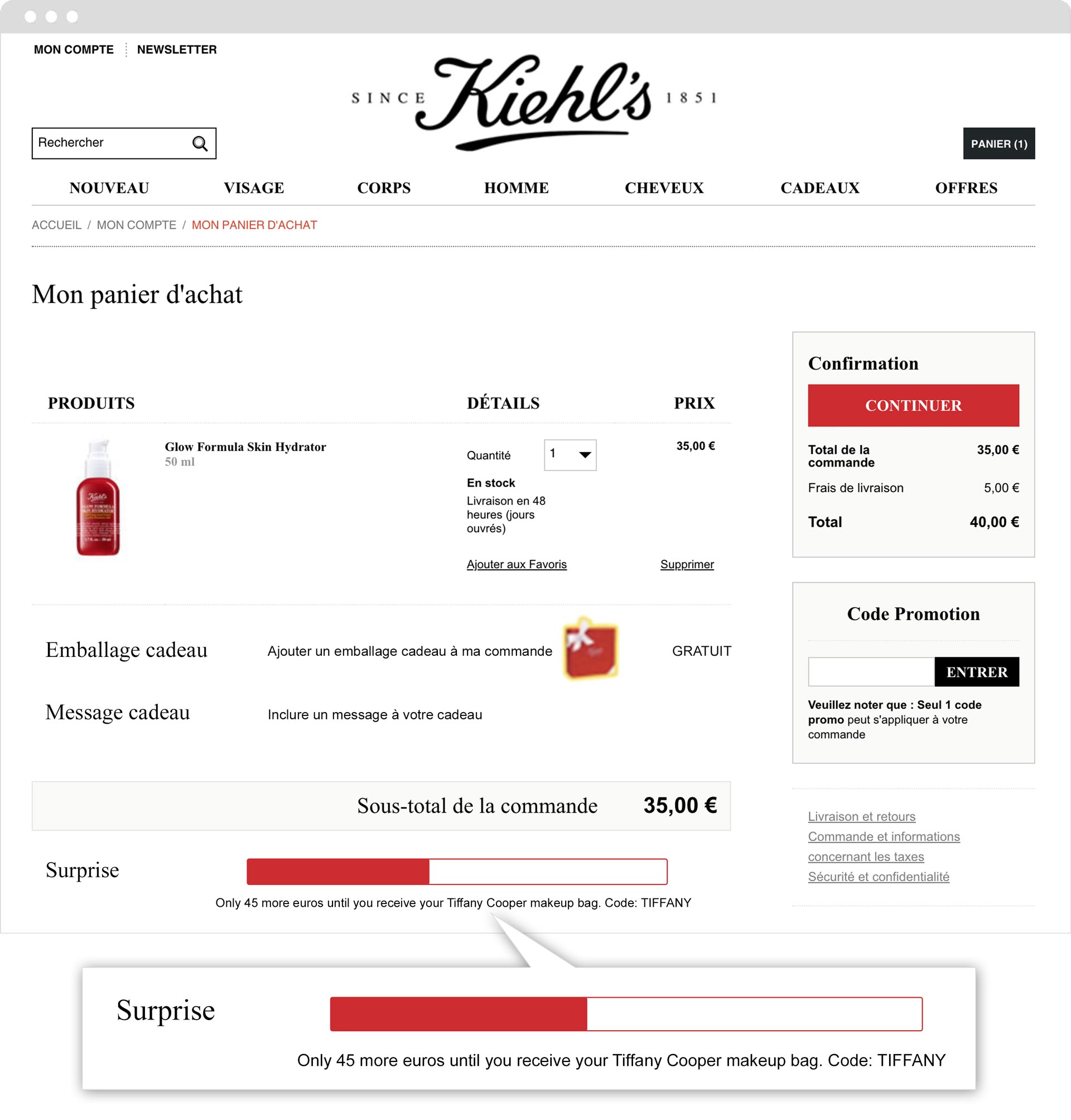
Kiehl’s ran a similar test on their French site, with equally impressive results. By adding a progress bar showing how much more a shopper needed to spend to get a free gift, they increased revenue by 31%.

Kiehl's AB Tasty A/B Test

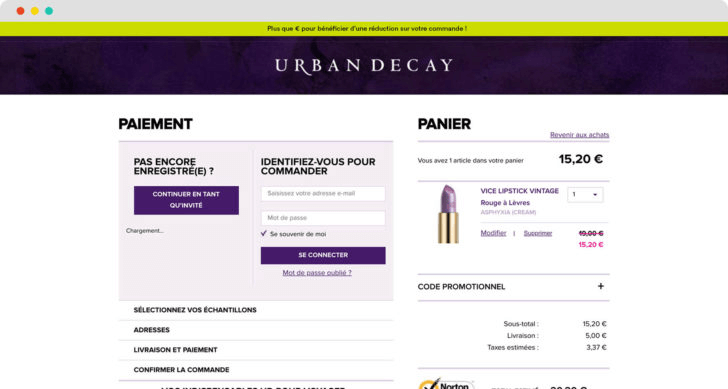
Still not convinced? Check out this example from Urban Decay. By simply pushing a banner on their basket pages showing how much more shoppers needed to spend before getting a discount, they increased their revenue by 7% during the duration of the test.

Urban Decay EN

Social Proof

Along with gifts, discounts and free shipping, the use of social proof messaging is especially powerful when it comes to cosmetics. After all, there’s a big element of ‘following the herd’ when it comes to beauty products. If 100 other people bought this mascara in the past hour, it couldn’t possibly be clumpy! If 130 people are looking at this bright red lipstick, it must be flattering. 

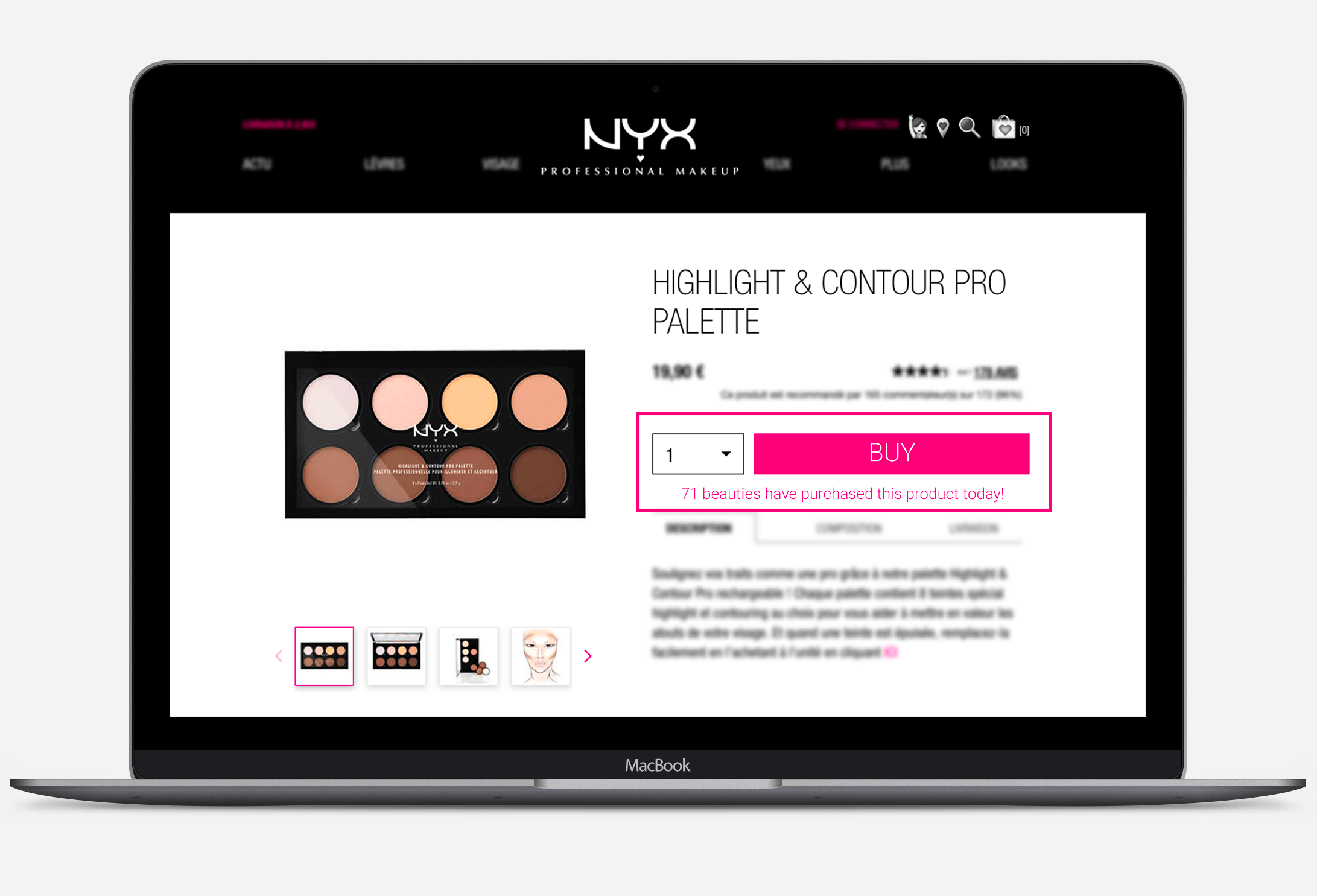
NYX Professional Makeup put this idea to the test – and doubled their transactions.

NYX Professional make up social proof messaging

Emerging Trends

Virtual Try-Ons

The flip side of the ‘social proof’ coin is the idea of personalization. Yes, consumers want to be ‘in vogue’, and knowing what their peers are shopping for can stimulate trends and reassure browsers. But beauty products are also extremely personal items. They tap into our feeling of being unique, of our desire to express ourselves. Of the thousands of shades of red lipstick, shoppers want to find the one that will look the best on them.

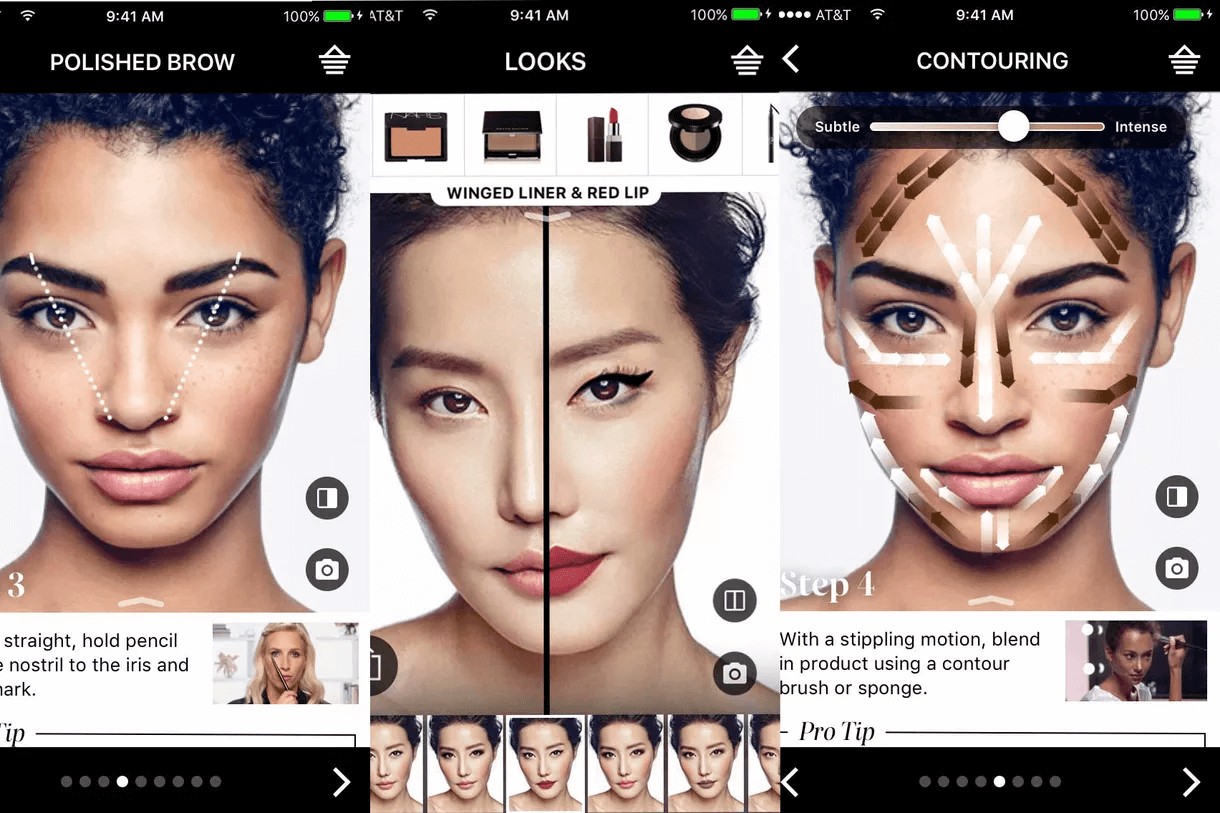
Virtual try-ons – the ability to use AR technology to simulate what a particular cosmetic will look like on you – is a fast-emerging trend that addresses this need.

Virtual try on
Source

The allure of a virtual try-on is multifaceted: not only can you experiment with looks at home or on the go, you don’t have to bother with endless cotton balls and makeup remover, like when you actually try them on physically in a store.

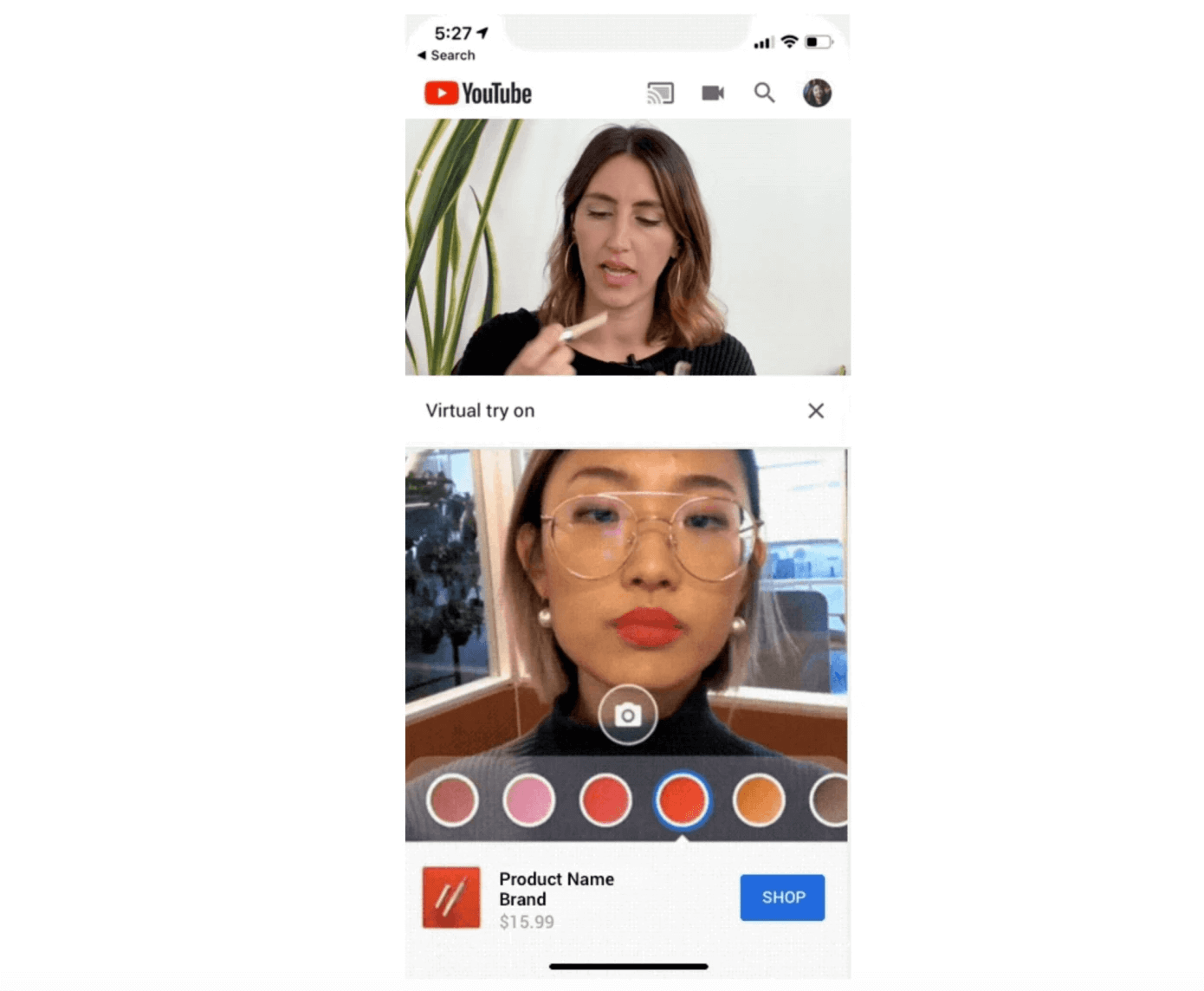
YouTube is currently experimenting with their own AR beauty try-on capability:

“Called AR Beauty Try-On, the feature is designed to be used in a split-screen experience while YouTube viewers watch the makeup tutorial. When available, the YouTube makeup review or tutorial video plays at the top of the screen, with a stream from your own front-facing camera below. Here, a YouTube viewer could access a palate of colors — like new lipstick shades, for example — and tap to apply them to their own face while the video plays above.” TechCrunch

Youtube virtual try on
Source

Virtual try-ons continue to blur the lines between the physical and digital, in-store and online customer experiences, offering more flexibility, personalization and ‘on-demand’ experiences for consumers.

Beauty Tech

“According to Jean-Paul Agon, president and CEO of L’OrĂ©al, the impact of new technologies, AI and the consumer experience will be stronger within the beauty industry than in any other consumer sector.” Peclers Paris

Many beauty brands already harness the notion of ‘science’ to legitimize and empower their products. Now, they’re going a step further to innovate technology that addresses their customers’ pain points.

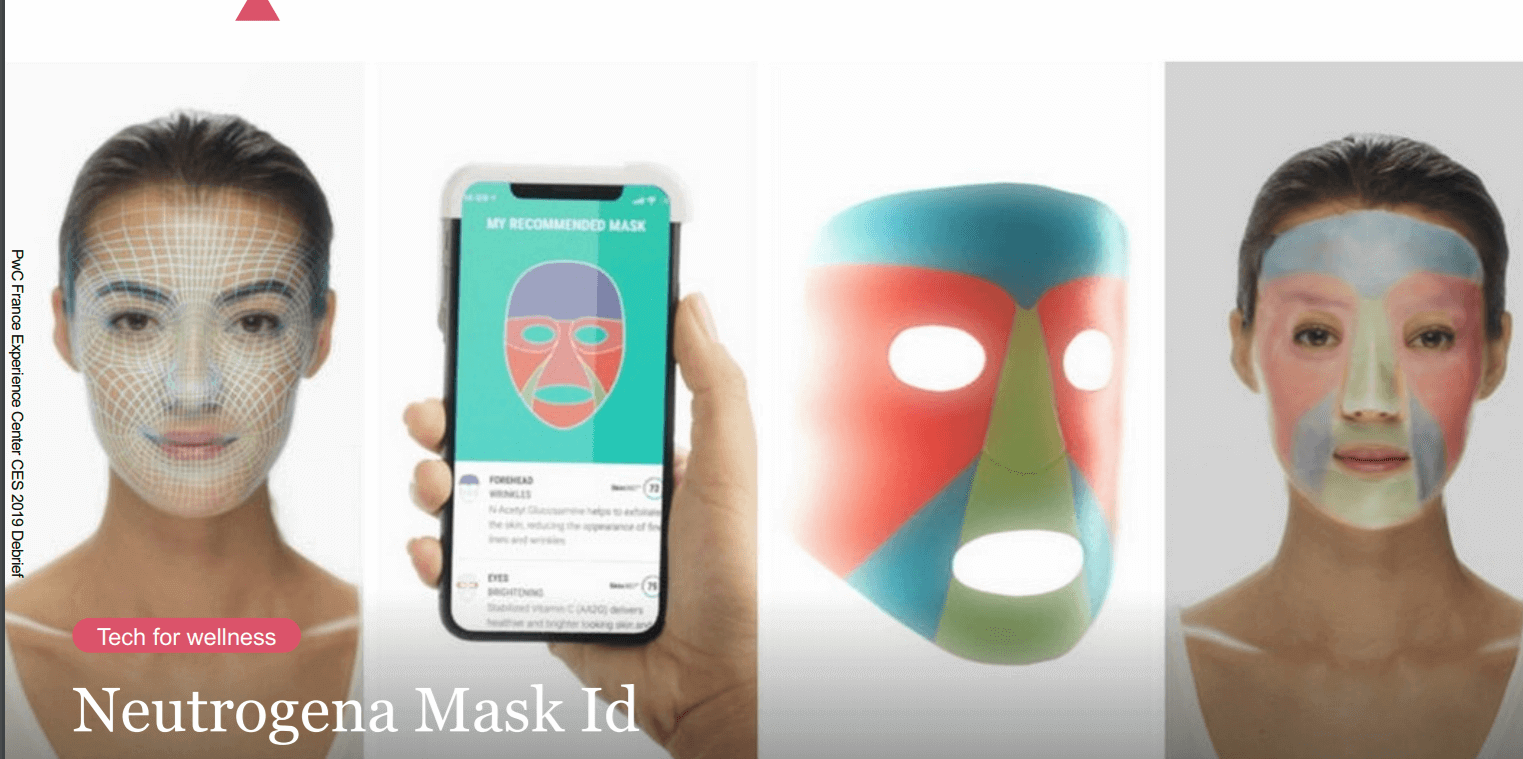
Neutrogena, for example, showcased their ‘Mask ID’ at this year’s CES event. After you scan your facial skin in order to have an in-depth understanding of your skin type, Neutrogena then sends you your hyper-personalized mask.

Neutrogena mask ID
Source

CareOS even taps into the realm of fairytale with their smart (magic?) mirror. The aim? “Help people meet their personal health and wellness goals, experiment with new products and practices.”

Takeaway

The cosmetics industry is booming, and is only slated to grow. Beauty brands are already improving the customer experience – and business results – through freebies, social proof messaging and other tried-and-true tactics. For these brands, the future of customer experience will be based on even more novel ways to personalize the user experience, harness emerging technology and blur the lines between physical and digital experiences.

Want more tips and experimentation ideas? Download our beauty book based on our client success stories.

Article

7min read

How To Write A Good User Satisfaction Survey

The sign of an excellent product or service is one that’s designed to suit the customer – whether that’s addressing a problem they may have or simply providing them with an experience that puts them at the center of it. Whether you’re running a B2B or B2C business, gaining customer feedback on their experience is essential for growing and developing your business, as well as improving on areas they found issues with. Customer satisfaction is imperative for the ongoing success of any business but it can sometimes prove to be rather tricky to get customers to give feedback on their experience in the first place.

Unlike NPS surveys where the purpose is to keep it short and sweet, the user satisfaction survey allows businesses to ask more in-depth questions and can enable customers to give more details about their experiences. But how do you write a survey that engages and interacts with customers enough to gain responses from them? 

We explore some great tips to writing good user satisfaction surveys that will not only get you the responses you’re looking for, but help improve your business based on previous customer experiences.

Open With The Right Questions

In a previous article on NPS surveys, I touched on starting with the ‘right’ questions and the same applies for starting with a good user satisfaction survey – start by asking them directly about the product or service they have just used. Opening a satisfaction survey with the right type of question will enable customers to answer directly, avoiding any vague responses or possible misinterpretation. After all, you’re looking for constructive feedback about your business, so make sure your questions allow them to do this. Here are some great opening questions to try:

  • How often do you use the product or service?
  • What do you like best about the product or service?
  • What area would you improve on?

Encourage customers to give you more detailed responses with open text replies. By giving them the freedom and space to explain or describe their experience in detail, you will gain much more insight and obtain more information than simply asking them to tick a box or answer a simple yes or no.

Use Scales or Star Ratings

Having a scale of 1-10 or 1-5 will allow customers to measure their satisfaction by attributing a number to their experience. It’s up to you to decide which way the scale goes – with 1 being best or worst. Having a scale can be a great way to quantify satisfaction from customers when using a particular service, for example, but it can also mean customers don’t feel able to share their experiences as they give a number instead. A great way to tackle this is to elaborate after your scale, with a leading question like:

‘Why did you rate your experience with this score?’

The leading question after your scale will empower customers who do want to give a bit more detail about why they scored your business they way they did. There will be a number of customers who don’t feel compelled to elaborate on why they have scored your business with that particular number, so make sure to use their score to help understand what kind of experience they had and perhaps how you can improve for next time.

Remember, the whole purpose is to improve your business from their feedback so if you use a scale, make sure you are clear on what the numbers mean and apply metrics that will look to improve your product or service.

Include Yes Or No Questions

A great user satisfaction survey should have a mix of quick answers and ‘open-ended’ options to allow customers to give more details should they want to. Some customers are going to be immediately put off when faced with lots of open-ended questions, as they won’t want to take the time to give you the appropriate feedback, so make sure to mix it up. Include some simple ‘yes ‘ or ‘no’ style questions too to encourage those customers who are time-poor, to answer your survey quickly. Try questions like:

  • Would you use our services again?
  • Would you recommend us to friends and family?
  • Did our services meet your expectations? – Ask ‘if not, could you give us a bit more detail’ to allow a customer to describe their experience
  • Did you find what you were looking for? – Try offering different responses if they click yes or no here if no – ask them why

Yes or no answers may not appear to give a company enough feedback, but when followed up with a further leading question and open answer, it empowers customers to divulge more about their experience, allowing the brand to learn and look to improve on the particular experience.

Start to Explore Demographics

This isn’t compulsory for your customer satisfaction guide but it does really help businesses develop if they have a better profile and understanding of their demographics, as you can really start to segment your audience. If you haven’t already, try to gain further information from existing customers about their personal situation: how old they are, what their employment status is and even where they are in the world. Obtaining this kind of information can really help businesses improve their personalization approach whilst creating a more accurate depiction of the types of customers the brand appeals to. Try asking the following:

  • How old are you? – We recommend giving a range of ages, e.g.: 35-50, 51-65
  • Where do you live? – Again, if being town-specific will help, use specific locations. Otherwise, per country is fine
  • What is your marital status? – Be inclusive and try not to unintentionally alienate anyone
  • What is your employment status? – Try to angle it with ‘self-employed’, ‘Contractor’, etc

Try Multiple Choice Questions

If you’re looking to create customer profiles from their survey answers, try incorporating some multiple-choice questions, too. Giving customers options to choose from often encourages them to complete your survey, as it means they will spend less time overall giving their feedback, but also means you can obtain further details about them as an individual as well as their experience with your brand. Try incorporating the following questions in your next user satisfaction survey:

  • Which best describes the reason for your visit today – ‘Leisure’, ‘Business’, ‘just browsing’ etc
  • What services/products have you bought from us in the past? Are you looking for similar products/ services?
  • What was your main reason for visiting the website/ store today – To find out more information? to purchase a specific item? to speak to us directly?

These multiple choice answers give enough details about the customers’ experience for business to learn from and will appear to ‘save time’ as they offer an answer instead of openly asking customers to respond – a win, win situation for both business and customer!

Use It To Test New Experiences

User satisfaction surveys aren’t exclusive to improving customer experience, they can also be used when looking to launch new products or test a new digital experience, such as a new website or online journey. The best way to get good, productive feedback on prototypes or new designs is to let customers use them and give their own feedback on how it went!

For instance, if you have developed a new website or want to test how well received a new product is, give users the option to use it and create a survey around their experience. Twitter is a great example of a platform that looks for active user feedback each time it rolls out an update, by offering certain users access to their ‘new look’ platform. The survey allows for tweaks to be made, if required, and saves both time and money addressing any issues further down the line once the product is properly launched.

If you’re looking to try this approach try questions like:

  • Did you find what you were looking for today? A ‘Yes or No’ would be a great option here, with a follow-up if they respond ‘no’
  • How would you rate your experience using the new website? – Use a scale
  • What do you think of the new layout? – Perhaps offer multiple choice answers here to avoid vague answers

Ultimately, a good user satisfaction survey can use any or a combination of all of the above elements, as long as the overall intention of measuring satisfaction and experience is easily quantified, the way you ask customers doesn’t really matter. As long as the responses enable your business to learn and improve areas that customers highlight, the general structure of your survey is up to you!

Don’t forget – the journey of providing a great customer experience starts at the first point of contact with your business, whether that’s via social channels, adverts, email marketing or from your website, so next time you’re looking to improve things, start by looking at the experience a customer may get at these various touch points.

Article

6min read

Mobile APP Growth: Why The In-App Experience Is More Important Than Ever

This is a guest post by Michelle Deery. Michelle is a copywriter and editor for Heroic Search, a SEO agency based in Tulsa. Her content has been featured in Entrepreneur magazine. She focuses on growth and is passionate about marketing and technology. You can find her on Twitter.


Downloaded an app last week? Bet you can’t even remember what it was now. It happens to many of us – especially since 80-90% of our time on mobile is spent in apps.

Sure, many of us are total suckers for things that look pretty, but simply being pretty doesn’t keep customers at your side over the long term. The competition is fierce, with over 258.2 billion app downloads projected to occur worldwide in 2022.

This is why you need to start thinking about the in-app experience.

In-app experience is a bit of a broad term, but it refers to every way in which the user interacts with your app. For a user to engage and turn into a loyal customer, they must be able to see the value that your app offers them regularly.

This article will walk you through the challenges of mobile engagement, why the in-app experience is so important – and what you can do to improve it.

The Problem With Mobile Engagement

Houston, we have a problem. Not a download problem, but an engagement and retention one.

The purpose of a mobile app is not simply to raise awareness of our brand. Instead, it’s to promote engagement and retention.

Many small businesses now use mobile apps to turn customers into loyal ones but there’s still a major engagement problem. Less than 1 in 4 of us will return to an app after we first download it.

This is hardly helped by the fact that there are well over 2.2 million mobile apps on the market, with more being created all the time.

The truth is that the market is saturated with apps. So what do we do to stand out?

Why The In-App Experience Is So Important

The user experience needs to be at the forefront of your strategy from now on because aesthetics alone don’t cut it with the 2018 mobile user. In 2018, the mobile user wants a fast, convenient and value-driven experience that actually adds something to their life.

Starbucks led the way with this, and it’s estimated that 1 in 3 of their customers are engaged with their mobile ecosystem, which is the biggest in the world. They also have eight million mobile paying customers worldwide.

Starbucks shifted focus to the in-app experience, adding a forward-thinking conversational ordering system to their app. Called My Starbucks Barista, the feature uses AI to allow customers the chance to use voice command to place an order.

Marriot International Inc is another company that has shifted focus to the in-app experience, adding a feature to their app that lets hotel guests use their mobile device as a room key!

The ultimate point is that, if a customer can’t see that your app adds any value to their daily life, they will disengage with it almost instantly and you won’t achieve your objectives.

How To Improve the In-App Experience

The good news is that you don’t have to go overboard with new features in the same way that Starbucks and Marriot International Inc did.

Of course, not all of us have that kind of budget. Instead, to improve your in-app experience, you can focus on a few little things that you’ve missed so far.

Make your in-app permissions less scary

Our apps need permissions if the user is going to get as much out of it as possible. But how many of us are guilty of making our permissions a bit, well, scary?

Remember that users don’t hand over their personal information lightly, which means that you need to explain all your permission requests. Explain exactly why the app needs specific info. This will increase the likelihood of a user accepting.

It’s also a good idea to reward users for accepting your permission and also build trust during your onboarding process.

Add some personality to your micro-interactions

Micro-interactions are happening all the time. Each time we set an alarm, we’re carrying out a micro-interaction. When we change our settings, we’re executing another micro-interaction.

The problem is that many – if not all – of these micro-interactions are mundane. They hardly make an app interesting!

If you’re not spicing up your micro-interactions, you’re missing a huge trick. Making them more personal and involving is a great way to build a connection between the customer and your brand. This can boost engagement and long-term retention.

Provide in-app assistance

One major thing that customers want us to do better is customer support.

Customer support is so important to your success. According to research, customers are willing to wait up to an hour for a response on desktop. After that, frustration will set in and they might try an alternative business.

78% of mobile users report using apps for customer service reasons. Mobile users are notoriously more impatient than desktop users and they want fast answers.

If you can offer assistance within your app, you’re onto a winner. In-app assistance keeps people engaging with your app, and prevents them from leaving the app to find a solution.

To improve your in-app assistance, all you need to do is add a live chat feature. This allows the customer to chat to your support team and ask questions whenever they need to.

Increase payment options

Customers in 2018 want to be able to buy when they want, where they want. They’ve grown used to an omnichannel shopping experience, and they have no aversion with starting their buying journey on one device before ending it on another.

This is all about ease of use, and it’s something that you need to satisfy with your in-app experience.

For example, perhaps your customer started browsing on your app but wanted to purchase the item in person. You could add a point of sales card reader to your online store to make the payment process super efficient for the customer, allowing them to buy wherever they are.

The card reader also stores each customer’s data so that you understand their buying habits better. This ultimately means that you can use the data to personalize their experience more in the future, which can further boost engagement and retention.

Conclusion

All in all, improving the user experience is about listening to the needs of your customers and giving them what they want. Keep things simple, make things convenient, add value and you can grow your audience.

Article

8min read

A Beginner’s Guide to Usability & User Testing

In a digital world that mainly relies on a customer-centric approach and data-driven technologies, collecting user feedback is key to developing successful products, be they apps, websites, or services.

In order to design products and services that truly answer customers needs and expectations, effective companies use iterative design processes whose sole purpose is to constantly allow for better user experiences.

Usability testing is all about asking people and monitoring how intuitive and how easy is it to use a product.

Many people assume that usability testing only happens in the pre-launch design phase.

That’s not the case.

In fact, developing an iterative design process implies implementing repeated user tests at every stage of your product lifecycle.

Why?

Mostly because your product will undergo multiple new versions, features, and services that will all require user tests to validate assumptions.

Because digital marketers and UX researchers have long studied the methods and processes to harvest user insights, many different usability testing options have emerged in recent years.

What Exactly is Usability Testing?

Usability Testing and User Tests

Usability tests are processes designed to observe and track real users while they use a product to measure its usability and user-friendliness in order to achieve marketing objectives.

Moderated or not, your usability tests are meant to harvest user insights in order to develop an efficient user experience and design an overall better product.

Usability tests are used to confront assumptions before launching a new product or releasing a new feature.

They are also useful to measure a product’s efficiency in its current version in order to identify possible pain points and therefore solve them.

Your Objectives Behind Usability Testing

Because development and marketing teams often have to cope with tight deadlines and management pressure the temptation to skip any usability testing phase can be strong.

But this could cost you a lot.

In fact, usability testing should be included in your product development roadmap from the beginning.

That way, you’ll be certain to have time to actually carry out proper user tests.

Why is usability testing so important?

As a product developer, your job is to deliver a product or service that is:

  • Efficient
  • User-friendly
  • Profitable

In order to achieve these 3 objectives, your goal is to gather as much feedback as you can before actually releasing the product or the feature.

With this in mind, your user tests will have to deliver meaningful insights that will eventually lead to product updates.

Note: the objectives behind usability testing differ from one product to another.

However, here are some crucial objectives that can be tracked through user tests, regardless of your company’s product.

  1. Do people enjoy using your product?
  2. Are users able to successfully complete pre-determined tasks?
  3. Does the product match your core target’s expectations?
  4. How easy to use is your product?
  5. Are users pleased with the interface, colors, buttons, forms?

Now that we covered the general aspects of usability testing, let’s take a closer look at the different types of usability tests that you can implement in order to develop a better product.

Moderated & Unmoderated User Tests

a) Moderated User Tests

What are moderated user tests?

Moderated user testing consists of different tests run on users with the presence of moderators.

These moderators will guide test participants, answer their questions and harvest useful feedback.

Although moderators might interfere with the live experience, moderated tests are useful to ask precise questions at very specific stages in order to collect targeted feedback based on assumptions.

These tests are a great opportunity for companies developing prototypes that require extensive feedback in the early design phases.

Using moderated tests, you will be able to gather actionable insights that will save your company precious time and money that would otherwise have been spent on a costly inefficient prototype.

Key takeaway: moderated user tests are specifically adapted to early-stage products and services because moderators can guide participants through the process. However, be careful so that your moderators don’t actually tell users what to do: the user experience has to remain natural.

Good to know: moderated user tests can either be run remotely or with the actual presence of participants.

Naturally, having users come to you or vice versa will cost you more than remote tests.

Although both types of tests are viable, you will usually generate more reaction from the participants during a real live test than a remote test.

b) Unmoderated User Tests

As the name suggests, unmoderated user tests are led without any supervision from your side.

Generally, these types of test are run remotely without the presence of a moderator.

These tests require the use of specific tools or SaaS platforms to automatically gather user insights and record their interactions for a delayed analysis.

During unmoderated tests, users are assigned pre-determined tasks to complete and are invited to express their thoughts and struggles out loud.

Using this solution, your company will then analyze users’ reactions that have been recorded during the tests.

Key Takeaway: unmoderated tests are definitely cheaper and easier to implement. Solution providers like UserTesting can deliver ready-to-use panels tailored to your core target in a matter of hours, which is extremely convenient compared to having to manually recruit participants.

Because there’s no involvement from your side apart from designing and reviewing user tests, unmoderated tests can also be run simultaneously and on a much larger scale.

Good to know: unmoderated tests don’t necessarily replace moderated tests – they rather complete each other.

Because there will be no supervision from your side, it is highly advised to craft crystal-clear guidelines and expectations to avoid confusion among users.

Focus Groups

Focus Group

Focus groups are specific processes that consist of inviting approximately 10 participants to discuss their needs and expectations about your product.

These tests can be run both before and after a product’s release – depending on your objectives.

Contrary to moderated user tests, focus groups are used to discuss participants’ needs, expectations and feelings about your product rather than just evaluating your design’s usability.

Typically, moderators will create a set of predetermined questions that will lead to multiple discussions regarding how participants feel about your product or certain features.

Key Takeaway: focus groups are useful to gather insights about your users’ potential needs and expectations. Used in complement with moderated or unmoderated user tests, they will provide meaningful feedback that can be leveraged to create new features or rethink the user interface.

Beta Tests & Surveys

Although they truly differ from other user tests, beta tests can be extremely useful to provide your usability testing process with a more quantitative approach.

Simply put, beta tests consist in giving access to a new feature or product to a restrained number of voluntary participants.

Because beta tests require a large sample, companies can find it difficult to recruit a sufficient and representative number of beta-testers for the test to be viable.

However, beta tests can become a priceless opportunity to uncover many usability issues at once, comforted by a large variety of opinions coming from hundreds or thousands of participants.

Particularly popular in the video game industry, beta tests can also be used to test your MVP (minimum viable product) before your final product actually launches.

surveys and online questionnairesUsing the same quantitative approach, surveys and online questionnaires are a cheap, quick and semi-reliable way to gather feedback on your product.
For these to work, you will have to address the right audience if you want relevant answers to appear in your questionnaires.

Surveys are useful when it comes to quantitative comparison.

Example: Your company develops a new fashion marketplace and hesitates between two logo designs: you could send survey questionnaires to your target audience that would ask to choose between the two designs.

A/B Tests

Agreed, these tests are a bit different – but they really work.

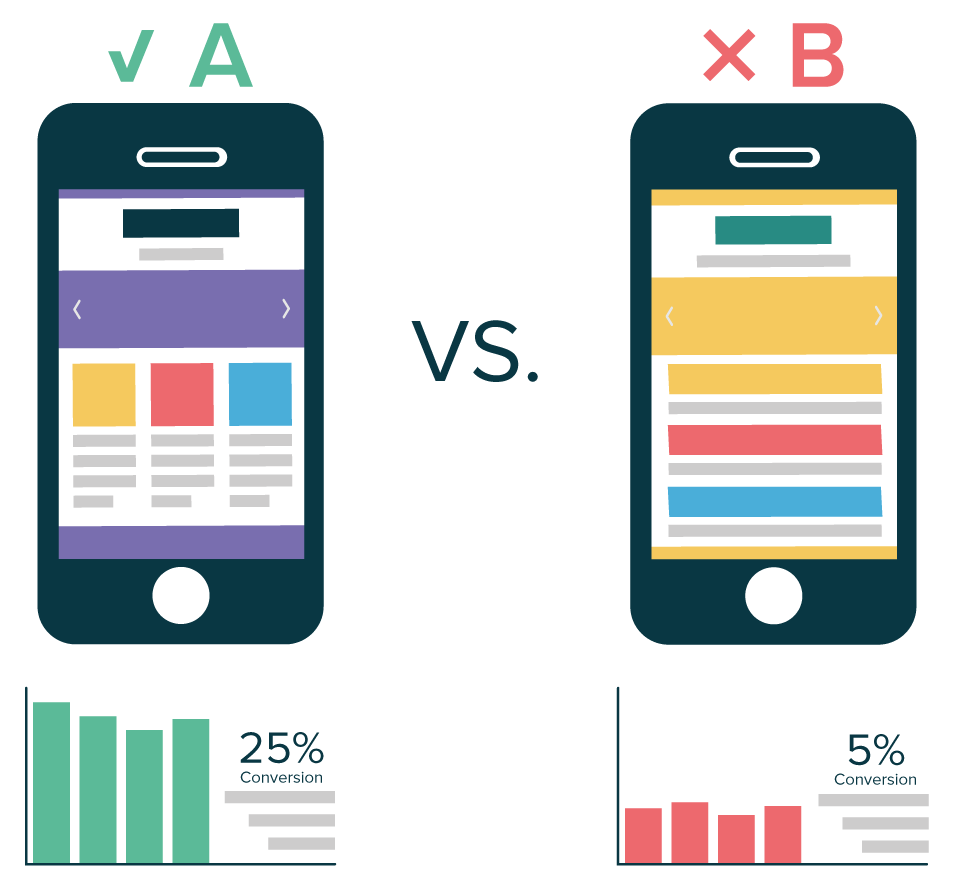
As opposed to most of the other tests we’ve mentioned, A/B tests are run on your product’s current version in order to determine which of two design options is better.

A/B Testing and User Tests

Example: let’s say that your company runs an ecommerce website and recently created a new product page layout. Your team wants to decide between the two layouts (version A & B) without compromising on conversions: they will use A/B testing to sort this out and choose a “winner” from these two options.

A/B tests can be conveniently used to track all sorts of “goals” depending on your website or product – which is extremely convenient to gather data and boost your current product’s usability and user-friendliness.


Did you like this article? Feel free to share and check out our other in-depth articles on how to optimize your website, ecommerce and digital marketing.

AB Tasty is a complete personalization and A/B testing software integrating cutting-edge features so that you, as a marketer, can take action now and increase your website’s performance.