Article

1min read

Trial and Error of Building a Culture of Experimentation in Marketing | Rand Fishkin

Rand Fishkin discusses the importance of “non-attributable” marketing and why companies should take more risks and allow themselves the freedom to fail.

Rand Fishkin is the co-founder and CEO of SparkToro, a software company that specializes in audience research for targeted marketing. Previously, Rand was the co-founder and CEO of Moz, where he started SEOmoz as a blog that turned into a consulting company, then a software business. Over his seven years as CEO, Rand grew the company to 130+ employees, $30M+ in revenue, and brought website traffic to 30M+ visitors/year. 

He’s also dedicated his professional life to helping people do better marketing through his writing, videos, speaking, and his latest book, Lost and Founder.

AB Tasty’s VP Marketing Marylin Montoya spoke with Rand Fishkin about the culture of experimentation and fear of failure when it comes to marketing channels and investments. Rand also shares some of his recommendations on how to get your brand in front of the right audience. 

Here are some key takeaways from their conversation.

Taking a more risk-based approach

Rand believes there’s too much focus on large markets that people often overlook the enormous potential of smaller markets to go down the more typical venture path. In that sense, founders become biased towards huge, totally addressable markets.

“They don’t consider: here’s this tiny group of people. Maybe there are only three or 4000 people or companies who really need this product, but if I make it for them, they’re going to love it. I think that there’s a tremendous amount of opportunity there. If folks would get out of their head that you have to look for a big market,” Rand says.

People avoid such opportunities because of the regulatory challenges, restrictions, and other barriers to entry that often come with them but for Rand, these underserved markets are worth the risk because competition is scarce. There’s a real potential to build something truly special for those willing to overcome the challenges that come with it, Rand argues. 

There are a lot of underserved niches and many business opportunities out there in the tech world, if companies would shift away from the “growth at all cost” mentality. 

“The thing about being profitable is once you’re there, no one can take the business from you. You can just keep iterating and finding that market, finding new customers, finding new opportunities. But if you are constantly trying to chase growth unprofitably and get to the metrics needed for your next round, you know all that goes out the window,” Rand says.

Freedom to fail

Similarly, Rand states that there’s a huge competitive advantage in committing resources toward marketing channels where attribution is hard or impossible because no one else is investing in these kinds of channels. That’s where Rand believes companies should allocate their resources.

“If you take the worst 10 or 20%, worst performing 10 or 20% of your ads budget, your performance budget, and you shift that over to hard-to-measure, experimental, serendipitous, long-term brand investment types of channels, you are going to see extraordinary results.”

However, the problem is getting buy-in from more senior stakeholders within a company because of these “hard-to-attribute” and “hard-to-measure” channels. In other words, they refuse to invest in channels where they can’t prove an attribute – a change of conversion rate or sales – or return on investment. Thus, any channels that are poor at providing proof of attribution get underinvested. Rand strongly believes that it’s still possible to get clicks on an organic listing of your website and get conversions even if a brand doesn’t spend anything on ads. 

“I think brand and PR and content and social and search and all these other organic things are a huge part of it. But ads are where those companies can charge because the CEO, CMO, CFO haven’t figured out that believing in hard-to-measure channels and hard-to-attribute channels and putting some of your budget towards experimental stuff is the right way to do things,” Rand argues.

According to Rand, these are exactly the kinds of channels where more resources need to be allocated as they generate a higher return on investment than any ad a company might spend on the more typical and bigger name platforms. 

“Your job is to go find the places your audience pays attention to and figure out what your brand could do to be present in those places and recommended by the people who own those channels.”

According to Rand, there is a learning curve in finding the message that resonates with this audience and the content that drives their interest as well as the platforms where you can connect with them and this will all depend on who your audience is.

Experiment with AI

For Rand, the AI boom is more realistic and interesting than previous big tech trends. He especially sees its biggest advantage in solving big problems within organizations that can be best solved with large language model generative AI. 

However, it’s important not to insert AI in a business or create problems just for the sake of using it or to apply it to the wrong places.

“If you find that stuff fascinating and you want to experiment with it and learn more about it, that’s great. I think that’s an awesome thing to do. Just don’t don’t go trying to create problems just to solve this, to use it.” 

He believes the best use case for AI is for more tedious jobs that would be otherwise too time-consuming as opposed to using it for more tactical or strategic marketing advice. Nonetheless, he does believe that there are a lot of interesting and useful solutions and products being built with AI that will solve many problems.

What else can you learn from our conversation with Rand Fishkin?

  • The importance of brand and long-term brand investments
  • Why it’s hard to get leadership to shift away from common ad platforms
  • How social networks have become “closed networks”
  • Why attention needs to shift to your audience and how they can become “recommenders” of your product

About Rand Fishkin

Rand Fishkin is the co-founder and CEO of SparkToro, makers of fine audience research software to make audience research accessible to everyone. He’s also the founder and former CEO of Moz and also co-founded Inbound.org alongside Dharmesh Shah, which was sold to Hubspot in 2014. Rand has become a frequent worldwide keynote speaker over the years on marketing and entrepreneurship with a mission to help people do better marketing. 

About 1,000 Experiments Club

The 1,000 Experiments Club is an AB Tasty-produced podcast hosted by John Hughes, Head of Marketing at AB Tasty. Join John as he sits down with the experts in the world of experimentation to uncover their insights on what it takes to build and run successful experimentation programs.

Article

6min read

Taking an Outcome-Driven Approach | Ruben de Boer

Ruben de Boer explains what it takes to create a healthy testing environment that paves the way for better experimentation organization-wide

Ruben de Boer is a lead CRO Manager and consultant with over 14 years of experience in data and optimization. At Online Dialogue, Ruben leads the Conversion Managers team, developing team skills and quality as well as setting the team strategy and goals. He spreads his knowledge far both as a teacher with Udemy with over 12,000 students and as a public speaker on topics such as experimentation, change management, CRO and personal growth.

In 2019, Ruben founded his company, Conversion Ideas, where he helps people kick start their career in Conversion Rate Optimization and Experimentation by providing affordable, high-quality online courses and a number of resources.

AB Tasty’s VP Marketing Marylin Montoya spoke with Ruben about exciting trends and evolutions within the world of experimentation, including  the various ways AI can impact the optimization of the experimentation process. Ruben also shares ways to involve cross-functional teams to implement a successful culture of experimentation within the organization and why it’s important to steer these teams towards an outcome- rather than an output-driven mindset.

Here are some key takeaways from their conversation. 

The goal should always be outcome-driven

Based on his experience, Ruben believes that one of the biggest pitfalls companies face when trying to kick start their experimentation journey is they focus more on outputs rather than outcomes.

“When a company is still very much in an output mindset, meaning we have to deliver an X amount of sprint points per sprint and we have to release so many new features this year, then of course experimentation can be seen as something that slows it down, right?  Let’s say as a rule of thumb, 25% of A/B tests or experiments result in a winner and so 75% of what was built will not be released, which means the manager does not get the output goals.”

In this scenario, experimentation becomes an obstacle that slows down these outputs. Whereas, when a company shifts towards an outcome mindset, it makes more sense to run experiments with the goal to create more value for the customer. With an outcome-mindset, teams embrace experimentation with customers at the heart of the process.

When teams are more outcome-oriented, the product is based more on research and experiments instead of a fixed long-term roadmap. According to Ruben, it’s vital that companies adopt such a way of working as it helps create better products and business outcomes, which ultimately helps them maintain their competitive advantage.

Importance of cross-functional teams

Ruben argues that experimentation is maturing in that it’s becoming more embedded within product teams.

He notes there’s a rising trend of different teams working together, which Ruben believes is essential for knowledge sharing when it comes to learning new things about the customer journey and the product itself. For Ruben, this helps create an ideal, healthy experimentation environment for teams to experiment better and get the results they want. 

Ideally, there would be experts in experimentation coming in from different teams sharing knowledge, ideas and insights on a regular basis which helps drive inspiration and innovation when it comes to future test ideas. 

The recipe behind the success of these experimentation teams varies and depends on the maturity of the experimentation program and the skills of these teams.  

This could start with a look into the culture of the organization by sending questionnaires to various teams to understand their work process and how autonomous they are. This analysis would also help teams to understand what their current state of experimentation is like such as how accepting they are of experimentation. This helps to devise a strategy and roadmap to successfully implement a culture of experimentation throughout the whole organization.  

This culture scan also helps determine the maturity of an experimentation program.

“Process, data, team, scope, alignment, and company culture: that’s what I generally look at when I assess the maturity of an organization. Is there a CRO specialist throughout the different product teams? How’s decision-making being done by leadership? Is it based on the HIPPO decisions or fully based on experimentation? Then there’s the outcome versus output mindset, the scope and alignment of experimentation as well as the structure of the team- is it just a single CRO specialist or a multidisciplinary team? What does the process look like? Is it just a single CRO process or is it a process embedded in a project team?” Ruben says.

A world of possibilities with AI

With the advent of AI technology, Ruben believes there’s a lot of possibilities with what can be done with it, particularly in the experimentation process. 

While he admits it’s still too early to speculate and that there are also the many privacy concerns that come with such technology, he believes AI can bring a lot of exciting things in the future.

“It would be so nice to have an AI go over experiments on the product detail page with all the results and all the learnings, and just ask the AI, what did I actually learn and what would be good follow up experiments on that? And that would be enormously interesting to have an AI run through all the experiments in the database,” Ruben says.

Therefore, Ruben admits there are a number of possibilities of what teams can do when it comes to designing experiments and saving time and steps in the experimentation process. 

“And just think about maybe three or four years from now, everyone will just have an AI app on their phone and say, I need to buy this and I will buy it for you. And maybe a website with only AI apps on it to purchase stuff, who knows? And then optimization becomes very different all of a sudden.” 

There’s also significant potential with AI when it comes to changing the way people work as well as provide inspiration and ultimately optimize and bring innovation to the experimentation process.

“Maybe based on all the input we give from chat logs, social media channels, reviews, surveys, we can make the AI behave like a user at some point in the future somewhere, which you then don’t have to run user tests anymore because you just let AI see your website.”

What else can you learn from our conversation with Ruben de Boer?

  • Evolving trends in experimentation 
  • His take on change management to help organizations adopt experimentation
  • His own experiences with building cross-functional teams
  • How to tackle resistance when it comes to experimentation   
About Ruben de Boer

With over 14 years of experience as a lead CRO manager and consultant in data and optimization, Ruben is a two-time winner in the Experimentation Elite Awards 2023 and a best-selling instructor on Udemy with over 12,000 students. He is also a public speaker on topics such as experimentation culture, change management, conversion rate optimization, and personal growth. Today, Ruben is the Lead Conversion Manager responsible for leading the Conversion Managers team, developing team skills and quality, setting the team strategy and goals, and business development.

About 1,000 Experiments Club

The 1,000 Experiments Club is an AB Tasty-produced podcast hosted by Marylin Montoya, CMO at AB Tasty. Join Marylin and the Marketing team as they sit down with the most knowledgeable experts in the world of experimentation to uncover their insights on what it takes to build and run successful experimentation programs.

Article

10min read

Software Development Team Best Practices

Software development isn’t just developers writing code. It also includes less technical processes that precede the actual development process such as the planning and the testing stages as well as post-development when the software is released and feedback is gathered from end-users.

What this means is that many teams beyond development are involved in the software development life cycle, such as product, design, testing, sales and marketing teams. These teams are all involved in achieving common objectives and ensuring a high-quality product.

Software development teams

To understand why it’s so important for teams to work cross-functionally, it helps to take a look at the different types of teams involved in software development. This will uncover the best practices to get these teams on the road for enhanced collaboration.

When we visualize a software development team, it’s easy to imagine a group of developers writing and releasing code but the reality is that it’s much more than that.

A software development team brings together a wide range of expertise from different teams within an organization to ensure the success of a project. This means that most teams are not solely made up of developers because while they’re responsible for creating the product, there also needs to be people dedicated to building the vision of the product, managing its life cycle, testing the product and marketing it and so on.

A software development team typically consists of the following roles:

With various teams from different departments coming together, there’s a great advantage in having expertise across multiple disciplines, which can bring innovative solutions to problems and insights which otherwise would be overlooked if these teams were to work in silos. Therefore, each of these roles is key to the effective development of your product.

Many factors will influence the structure of your development team such as project complexity, budget and size as well as the needs and expectations of stakeholders.

Ultimately, the team you put together will determine your project’s likelihood of success or failure and their collaboration will be key to achieving desired outcomes.

Why is cross-functional collaboration important?

It’s inevitable for different teams to clash during projects. For example, developers and product teams tend to approach projects from vastly different perspectives and their metrics for success will also differ.

Product managers are often focused on achieving outcomes and overall business objectives. They’re looking to quickly validate their ideas and just as quickly release features that will bring in more revenue for the business. Developers, for their part, aim to build the best possible product by focusing on the deliverables that come with building this product. 

The same applies to other teams within the organization with the different types of mindset, skills and goals coming into play during a project.

It’s vital for cross-functional teams to communicate and collaborate effectively around a shared goal in order to successfully achieve it.

Effective collaboration results in better products. Less conflict between the different teams translates to more time dedicated to building and releasing high-quality products. In other words, when teams are on the same page, it allows them to focus on what really matters, which is creating value for the customer through quality software.

Furthermore, cross-functional collaboration is a key driver for creativity and innovation. Collaboration often results in new ideas that can help companies gain competitive advantages as different people come together to work on a project as they encourage each other to consider things from different angles.

Software development team best practices

To enhance productivity and to continue to deliver value to customers, software development teams should stick to some best practices to put them on the path to improved collaboration and success.

Define clear goals

While each team has their own set of internal goals, they still need to make sure that those goals align with the overall business objectives of the company (and product). It’s essential that all teams have a shared understanding of business goals and how to achieve them.

This means keeping all teams coordinated and aligned around the product vision throughout the software development life cycle. It also involves determining the project scope and requirements that will best achieve these objectives.

Once shared goals are established, teams can work with each other instead of against each other even as they perform their own distinct tasks while pushing ahead in the same direction. 

The responsibilities of everyone involved in the software development process need to be clearly defined to avoid clashes and create a sense of accountability. The clearer the roles, the less chance of confusion as teams go deeper into the project.

This is a time when having the right leadership can make all the difference. Leaders must clearly define roles and responsibilities and ensure that all teams understand how their work creates value for the organization and its customers. 

Choose the appropriate project management methodology

Depending on the size and complexity of your project and teams, it’s important to choose a methodology that works well with the organization’s culture and values. 

From Waterfall to Agile methodologies, there are many approaches you can choose. For large projects with a clearly defined start and end-point, the Waterfall approach would work best. However, for projects that are adaptable and divided to smaller sprints, an Agile approach is better suited.

This will serve as the foundation on how you begin to structure your teams and the type of tools they should implement in their daily workflows.  

Invest in DevOps

Many software development companies organize themselves in a way that often leads to functional silos so that all the different teams tend to work in isolation while focused on their own goals.

As we’ve discussed, a project also consists of many moving parts and effective communication throughout the different stages of the project becomes complicated as there’s less visibility during these stages.

The DevOps methodology mainly grew out of frustration of the silos between teams, primarily development and operations teams. However, the term has evolved in modern software development to encompass a set of practices and tools that increase an organization’s ability to quickly deliver new software by promoting enhanced collaboration and communication between different teams.

DevOps goes beyond adopting the right tools to achieve high performance and better quality. It also involves undergoing a cultural transformation and teams adopting a shared culture and mindset that allows them to focus on quality of software and speed of delivery.

Choose the right tools

There are a number of collaborative tools your teams can adopt to establish efficient communication practices. The tools you choose will serve as the foundation to help teams work together towards common goals.

Among those are ones that can help you plan your projects from the bigger picture to the little details, which is especially useful for large organizations with multiple teams and team members collaborating. This also enables teams to have greater visibility over each member’s progress in the project and empowers teams to share input and encourage fast feedback loops in order to build a culture of DevOps and open communication.

Different teams will use their own tools to track work and progress throughout a project. For example, product teams will typically use roadmapping tools to plan, prioritize and track features while development teams will use development tools such as version control systems.

Therefore, there are many tools to choose from depending on the needs of the organization and teams from collaboration to project management tools as well as automation tools to streamline processes.

For example, teams adopting DevOps practices into their workflows will also need to choose the right stack of tools according to their unique business needs in order to implement DevOps successfully.

Communicate constantly and efficiently

From the onset of a project, all teams and other stakeholders will need to be involved in the decision-making process to keep issues down to a minimum and avoid miscommunication further down the road.

For example, many product teams often take the lead on setting the product vision and requirements without reviewing them with the development and engineering teams. In this scenario, it’s essential to understand that developers are the ones who will be writing for the product in question and so they must be consulted early on to give them the necessary context to build and prioritize the right features.  

In this scenario, product managers and owners will need to effectively communicate the strategic direction and vision of a product with the help of a dedicated product roadmap. This will enable developers to understand why they’re building the product, its value and how it’s linked to overall business objectives.

A project often consists of many moving parts which means it might not be possible for teams to have full visibility over them. However, Many important decisions are collaborative in nature and require input from multiple sides. It’s imperative that everyone on the team is encouraged to actively provide feedback and share information about the progress of development. This also helps teams identify any potential roadblocks and take quick action to address them.

Set KPIs and metrics to track performance

Depending on the business objectives set at the beginning, teams will need to establish metrics to track and measure performance throughout the development process and beyond. 

These metrics will be essential in the short and long term to make data-driven decisions to optimize products and improve team performance.

Teams can set any kind of metrics that will allow them to assess their efficiency. These could include productivity metrics such as velocity and cycle time, customer metrics such as customer satisfaction and net promoter scores and and more DevOps specific metrics such as DORA metrics.

Software development is a team effort 

To produce high-quality software that meets your customers’ expectations and needs, different teams have to come together within a collaborative environment to solve complex problems.

If organizations work on fostering collaboration across the entire software development life cycle, software development teams can overcome challenges, maximize productivity and software quality as well as deliver better value to customers. It’s a win-win situation.

At the end of the day, all teams within an organization are looking to accomplish the same end-goals and outcomes, mainly to keep the business running smoothly and bring in profit as well as create top-notch products that customers will love.


Article

7min read

Personalization Approach Remastered | David Mannheim

David Mannheim explains a remastered approach to personalization for long-term customer loyalty

With over 15 years of experience in digital businesses, David Mannheim has helped many companies, such as ASOS, Sports Direct and Boots to improve and personalize their digital experience and conversion strategy. He was also the founder of one of the UK’s largest independent conversion optimization consultancies – User Conversion.

With his experience as an advisor helping e-commerce businesses to innovate and iterate personalization and creativity at speed, David has recently published his own book where he tackles the “Person in Personalisation”, why he believes personalization has lost its purpose and what to do about it. David is currently building a solution to tackle this epidemic with his new platform; Made With Intent – a product that helps retailers understand the intent and mindset of their audience, not just their behaviors or what page they’re on.

AB Tasty’s VP Marketing Marylin Montoya spoke with David about the current state of personalization and the importance of going back to the basics and focusing on putting the person back in personalization. He also highlights the need for brands to build a relationship with customers based on trust and loyalty, particularly in the digital sphere instead of focusing on immediate gratification.

Here are some key takeaways from their conversation. 

Personalization is about being personal

David stresses the importance of not forgetting the first three syllables at the beginning of personalization. In other words, it’s imperative to remember that personalization is about being personal and putting the person at the heart of everything- it’s all about customer-centricity.

For David, personalization nowadays has become too commercialized and too focused on immediate gratification. Instead, the focus should be on metrics such as customer lifetime value and loyalty. Personalization should be a strategic value add rather than a tactical add-on used solely to drive short-term sales and growth. 

“If we move our metrics to focus more on the long-term metrics of customer satisfaction, more quality than quantity, more about customer lifetime value and loyalty as well as recognizing the intangibles, not just the tangibles, I think that puts brands in a much better place.”

He further argues that there is a sort of frustration point when it comes to the topic of personalization and who actually does it well. This frustration was clear after David interviewed 153 experts for his book, most of whom struggled to answer the question of “who does personalization well” and found it difficult to name any brands outside of the typical “big players” such as Netflix and Amazon.

This frustration, David believes, stems from the difficulty of replicating an in-store experience in a human-to-screen relationship. Nonetheless, when customers are loyal to a brand, that same loyalty should be reciprocated from the brand side as well to make a customer feel they’re more than just a number. The idea is to achieve a sort of familiarity and acknowledgment with the customer and create a genuine, authentic relationship with them. This is the key to unlocking customer-centricity. 

It’s about offering a personalized experience that focuses on adding value for each individual customer, rather than exploiting value where only customers end up with a commercialized experience geared towards driving growth for the company itself.

Disparity between brands’ and customers’ perceptions of personalization 

Citing Salethru’s Personalization Index, David refers to a particular finding in their yearly report where 71% of brands think they excel in personalization but only 34% of customers actually agree with that.

In that sense, there’s a mismatch between customers’ expectations and brands’ own expectations of what is competent customer service.

He refers to recommendations as one example that brands primarily incorporate into their personalization strategy. However, he believes recommendations only address the awareness part of the AIDA model (Awareness, Intent, Desire and Action).

“Product discovery for me is only one piece of a puzzle. If you take personalization back to what it’s designed to be, to be personal, well, where is the familiarity? Where’s the acknowledgment? Where’s the connection? Where’s the conversation?” David argues.

What’s missing is a core, intangible ingredient that helps create a relationship between two individuals, in this case, a human and a brand. Because brands have difficulty pinpointing what that is, they choose instead to base their personalization strategy on something more tangible and visible – recommendations.

For brands, the recommendations narrative is fully immersed within customer expectations and so encompasses the idea of personalization, particularly as that’s the approach that the “bigger” brands have adopted when it comes to personalizing the user experience. 

“It becomes an expectation. I go on X website so I expect the bare minimum which is to see things that are relevant to what I search for or the things that I’m interested in…..This is what people associate personalization to,” David says. 

Recommendations are an essential first step of personalization but David argues the future of personalization requires brands to go even further.

Brands should focus on building trust

In order for brands to build that sense of familiarity and truly become more personal with customers, brands need to take personalization to the next stage beyond awareness. For example, customers should be able to trust that a brand is recommending to them what they actually need rather than what makes the most profit.

David believes that the concept of trust is missing in a human-to-screen relationship, which is what’s hindering brands from reaching that next level.

In other words, it’s all about transforming the whole approach of personalization along with its purpose to demonstrate greater care with the few rather than “trying to get the many” to establish trust with customers. Brands should shift their focus to care, which David believes is what makes a brand truly customer-centric.

“I think it’s an initiative, if you can call it that, to focus on care. It does make the brand more customer-centric. You’re putting the customer, their experiences and expectations first with the purpose of providing a better experience for them.”

 In that sense, two crucial aspects play into the concept of trust, according to David: competence and care. 

Brands need to be able to be competent in that customers can trust they’re being recommended the most suitable products for their needs rather than the one that has the higher profit margin; in other words, recommending products that are best for the business instead of the customer. At the same time, brands need to demonstrate care by being more personable with customers to be able to create a connection between brand and consumer. 

“The more caring you are, the more you can demonstrate trust,” David says.

Think of banking. Banking demonstrates all the competence in the world, but no care whatsoever. And that therefore destroys their trust. Think of the other way around. Think of your grandma giving you a sweater at Christmas. I’m sure you trust your grandma, but you won’t trust her to buy you a Christmas present, for example.”

For David, context is a prerequisite for trust and the best way to understand user context is through intent, which is where the difference between persuasion and manipulation lies. This is why he has been busy building Made With Intent for the past 8 months focused on that very same concept. 

When it comes to recommendations, in particular, it’s essential to contextualize them and understand customer intent. Only then can a brand excel at its recommendation strategy and create a relationship of trust where customers can be confident they’re being recommended products unique to them only.

What else can you learn from our conversation with David Mannheim?

  • His take on AI and its role in personalization
  • Ways brands can demonstrate care to build trust and familiarity with their consumers
  • How brands can shift their personalization approach
About David Mannheim

David has worked in the digital marketing industry for over 15 years and along with founding one of the UK’s largest independent conversion optimization consultancies, he has worked with some of the UK’s biggest retailers to improve and personalize their digital experience and conversion strategy. Today, David has published his own book about personalization and is also building a new platform that helps retailers understand the intent and mindset of their audience, not just their behaviors or what page they’re on.

About 1,000 Experiments Club

The 1,000 Experiments Club is an AB Tasty-produced podcast hosted by Marylin Montoya, VP of Marketing at AB Tasty. Join Marylin and the Marketing team as they sit down with the most knowledgeable experts in the world of experimentation to uncover their insights on what it takes to build and run successful experimentation programs.

Article

10min read

Feature Rollout Plan 101: Create the Perfect Plan for Stress-Free Releases

In modern software development, teams adopting a DevOps methodology aim to release more frequent releases in smaller batches to validate them and test their impact.

This enables teams to reduce the risk of a big bang release that could lead to buggy features that could damage the user experience. This also prevents doing a full rollback and then implementing rollout all over again.

This ultimately means that software organizations are constantly releasing new updates and features to improve their products’ stability and quality and to deliver the best user experience possible.

Having a set plan in place to introduce new features allows teams to roll out releases to gather feedback and optimize accordingly before going for a full release. 

What is a feature rollout plan?

A feature rollout, as the name implies, is when new product features (or updates to existing features) are released to end-users. It’s all the processes that go into gradually introducing a feature to a set of users to test its functionality before deploying to all your users.

Put simply, the main purpose of a feature rollout plan is to keep all teams involved in the development and release of new features on the same page by making it easier to identify what are the key elements of each phase in the rollout.

Failure of efficiently managing the release of these new features could potentially lead to low quality releases and a negative impact on the user experience. This could all severely damage a company’s reputation and competitiveness in a world where customer expectations are at an all time high. In that sense, a solid rollout plan will ensure more adoption of the software by your customers and improved and more organized workflows for all teams involved. 

Therefore, it’s generally recommended to put together a detailed, robust plan early on in the development process and not scramble at the last minute as this plan will require meticulous planning to ensure the successful release of your new features.

Feature rollout process

It’s important to first highlight the steps involved in a feature rollout so teams can effectively incorporate the requirements of each phase into their planning. 

Typically, the rollout process is divided into the following phases:

  • Design and planning – Define your objectives and KPIs, key stakeholders involved, set deliverables and communicate this plan to teams. This includes determining which features to prioritize and release to create the rollout plan accordingly.
  • Develop rollout strategy – Identify your target users whose needs are best addressed with the new feature and determine how you will give them access to your new features- your deployment strategy.
  • Build the feature and manage its progress throughout the development process.
  • Controlled rollout – validate and test your features with controlled rollouts using feature flags, for example.
  • Collect feedback by putting in place a constant feedback loop.
  • Full release – once the feature has been optimized and refined according to the feedback collected, it is ready to be released to all users.

You will also need to identify and anticipate any potential roadblocks and challenges along the way in your planning and address them early on.

As you advance in the rollout process, plan in-house training sessions and a user onboarding strategy as well as proper documentation to support your feature rollout to serve as a guide for users (both internal and external) to understand the feature in-depth and its value proposition.

Therefore, based on the above, your rollout plan should ideally include the following components to make sure your releases go without any hiccups:

  • Main objective and goals for each phase
  • Action steps and the teams involved 
  • Timeframe to provide clarity and set expectations for all teams
  • Metrics to observe
  • Checkpoints to monitor progress and ensure the project stays on track

Best practices to creating the ideal plan

All in all, to have an efficient rollout plan at hand, you can follow these best practices:

Start early

As already mentioned, you need to draw up your plan early, way before the development and deployment stages. For a successful feature launch, you should start working on your rollout plan as soon as the development process kicks off.  

Planning a seamless feature rollout could take months so the earlier you start considering all the elements within your plan, the easier it will be to keep your teams aligned and avoid any mishaps along the way.

Be flexible 

It’s important that your plan allows for enough flexibility and can be adapted throughout the development process. This means your rollout plan shouldn’t be so rigid that it cannot be updated as priorities and timelines continuously shift throughout the software development lifecycle. 

Define a clear rollout strategy

Your rollout plan will revolve around what strategy you’re adopting to roll out your new features. This means you need to determine how you’ll be rolling out your new features and the type of deployment strategy that is best suited to your new feature.

For example, should you choose a small group of beta users to opt in to test your product first to collect feedback and optimize your product before going for a full launch? Or is it better to run alpha testing on internal users first before releasing to real-world users?

Alternatively, you may decide to do a progressive rollout using canary deployment where you start with a small percentage of your users then expand the rollout process gradually until it’s released to all your users.

Set a tentative timeline

Being flexible is not equal to not having deadlines. You need to set a rough timeline of your rollout process with a clear rollout date that your team should target.

Setting a realistic timeline creates accountability by allowing individuals to outline their own responsibilities and build a personal roadmap that defines smaller deadlines leading up to the rollout release.

Set milestones

Setting key milestones in your feature rollout plan can be useful to further keep all stakeholders aligned and in sync throughout the project. This will allow them to clearly monitor as the software goes from one stage of the rollout to the next to track its progress by establishing clearly defined roadmaps for success. 

Keep stakeholders in the loop

As we’ve seen, a feature rollout process requires coordination and collaboration between stakeholders and multiple teams across an organization.

Early on, establish a core team including relevant and key stakeholders from each department to get their input on key decisions in the rollout process and provide them with all the information needed to understand the value of the new feature and to ensure a successful rollout. 

Outline an external communication plan

So you’ve developed and released your new feature but how do you make sure that your target users know about your exciting new releases?

You will need to make sure that you set a communication strategy so that customers know your software release is available. This is particularly important when you’re releasing new changes or updates to your features so customers know you’re continuously striving to improve your products.

Afterwards, you will also have to determine how you will start collecting the feedback you need to reiterate your products throughout the rollout process.

However, as we’ve mentioned in the previous point, make sure that your communication strategy includes all relevant stakeholders, external and internal users, and your  customer-facing teams. Clear and consistent communication is required from top management so that teams are aware of and understand the vision and strategy behind any new feature. 

Why do you need a feature rollout plan?

One of the biggest advantages of a feature rollout plan is that it allows for enhanced collaboration and communication among teams involved in the feature rollout process.

A rollout plan helps keep teams on the same page and move forward towards the same objectives to get your software into the hands of your users. In that sense, feature rollouts usually require the close collaboration of many teams and not just development teams so a plan helps different teams aligned around the same end-goals.

Furthermore, as new features are gradually introduced to users, such a plan enables careful planning. Thus, it gives teams more control over the release process by carefully planning who gets to see the new feature and when. 

We also mentioned the importance of identifying any potential roadblocks in your feature rollout process. A rollout plan can facilitate the discovery of these roadblocks and anticipate them so you can work on removing them so they don’t interfere with the new feature release. Otherwise, you might end up coming across these roadblocks when it’s way too late in the process significantly delaying your release. 

Above all, a rollout plan’s primary purpose is to manage and mitigate any potential risk among which includes a backup plan in case things go awry during the rollout process to minimize negative impact on your user base as much as possible.  

Feature flags: The foolproof ingredient for successful rollouts

There are many ways and strategies to roll out new features, one of which includes the use of feature flags.

Feature flags are a powerful software development tool that allows teams to mitigate risk of release by separating code deployment from release.

This means that teams can hide new features behind a flag and turn them on for certain user segments while keeping them switched off for the rest while they monitor performance and impact on KPIs.

Feature flags, therefore, are an essential ingredient in your feature rollout plans for your teams to have more control over their releases and perform gradual rollouts of new features to gather necessary feedback.

There are many deployment and rollout strategies you can use alongside feature flags including A/B testing, canary deployments and blue/green deployments to test new features before committing to a full rollout.

Your release strategy can also be more specific. For example, you can choose to release your feature to users in a certain country while keeping them turned off for everyone else.

Keep reading: How you can use feature flags for risk-free deployments for a more optimized user experience 

Plan for success

Feature rollout is not a one-time event. Rather, it’s a continuous process that many teams will need to partake in. 

For that reason, releasing and implementing new features can be very stressful.There are a lot of elements and risks involved in the process, which means having a clear plan in place can make the process much easier. 

A well-designed plan is key to providing a structured framework or blueprint to plan and execute the rollout process efficiently and it’s also an indispensable tool when it comes to successful implementation and coordination among teams.

Ultimately, the success of any project will depend on how well cross-functional teams work together towards shared objectives by communicating, defining clear goals, adapting quickly to changes as they occur while staying motivated and productive.


Article

16min read

Feature Flags: Should I Build or Buy?

The concept of feature flags is quite straightforward and easy to implement, at least at first. In the beginning, you would usually be managing one feature flag by modifying a configuration file but when you start using multiple flags they may become harder to manage and to keep everyone in sync across different functions. 

Undoubtedly, feature flags become increasingly important as engineering and product teams begin to see their benefits. By separating code deployment from feature release, teams can now deliver new functionalities to users safely and quickly.

Feature flags are also extremely versatile and their uses can extend to a number of different scenarios to achieve various tasks by all teams across your organization. As feature flags help developers release faster with lower risk, it makes sense that teams would want to extend their usage across these additional use cases.

We can look at feature flag implementation as a journey that is used initially for one simple use case and which then evolves to more advanced implementations by different stakeholders. This article will illustrate this journey by introducing you to the different use cases of feature flags from simple to more complex and to help you consider whether it is in your best interest to build or buy a feature flag management system according to your goals.

Are you looking for a feature flagging solution packed full of features with an easy-to-use dashboard? AB Tasty is the all-in-one feature flagging, rollout, experimentation and personalization solution that empowers you to create a richer digital experience — fast.


The value of feature flags

Before we go deeper into the build vs buy topic, it’s important to highlight exactly why you need feature flags in your daily workflows and the value they can bring to your teams.

As we’ve mentioned, feature flags can be used across a range of use cases. Here’s a quick overview of when feature flags are especially handy:

  • User targeting and feature testing: When you have a new feature but you’re not yet ready for a big bang release; instead, you want to have the control to target who sees this new feature to collect necessary feedback for optimization purposes.
  • Testing in production: When you want to test a production by gradually rolling out a new feature or change to validate it.
  • Kill switch: When you want to have the ability to quickly roll back a feature in case anything goes wrong and turn it off while the issue is being fixed.
  • Migrations: Feature flags offer a low-risk way to perform architectural or database migrations such as migrating from a monolith architecture to microservices

This means that feature flags are a great way to continuously (and progressively) roll out releases with minimal risk by controlling who gets access to your releases and when. 

The journey begins with a simple step: if/else statements

A feature flag in a code is essentially an IF statement. Here is a very straightforward, basic example:

Therefore, you can just be starting off with a simple if/else statement, usually reserved for short-lived flags but less so if you’re planning to keep the flag around for a long time or for other more advanced use cases which require more sophistication. Therefore, feature flags have evolved beyond one use case and can serve a variety of purposes. Inserting a few IF statements is easy but it’s actually maintaining a feature flag management system that’s hard work; it requires time, resources and commitment. 

You can implement a feature flag by reading from a config file in order to control which code path will be exposed to your subset of users. Using a config file at the beginning may seem like a viable solution but in the long-term may not be so practical, resulting in technical debt that accumulates over time.

Keep reading: Best practices on storing feature flags.

Here, a simple flagging solution will not suffice and so you would need to turn to a more advanced solution. Implementing the solution you need in-house can be quite costly and requires a lot of maintenance. In this case, you can turn to a third-party option.

Bumps along the road: Evolving use cases

When you’re just starting out, you’ll implement a feature flag from a config file with an easy on/off toggle to test and roll out new features. Sounds simple enough. Then, one flag turns into 10 or 20 and as you keep adding to these flags leading to the aforementioned technical debt issue as it becomes harder to pinpoint which of your active feature flags need to be removed. In this case, a proactive approach to managing your flags is essential in the form of a comprehensive feature flag management system.

Therefore, at the start of your feature flag journey, you may simply be employing one use case which is experimentation through release management but over time, you may want to implement feature flags across a variety of use cases once you’ve seen first-hand the difference feature flags are making to your releases. 

Test in production

You may for example want to test in production but only internally so you expose the feature to people within your organization. You may also use feature flags to manage entitlements, that is a small subset of users can access your feature, such as users with a premium subscription to your product or service. These types of flags are referred to as permission toggles. So you will need to build a system that can handle different levels of permissions for different users.

Indeed, one of the most important uses for feature flags is the ability to toggle features on or off for a certain subset of users. This use case is referred to as testing in production, which is essential to verify that your feature works as it should in real time and allows you to easily roll back the feature if it turns out to be buggy resulting in safer releases.

To be able to carry out such controlled roll-outs, your feature flagging system should enable you to make such context-specific flagging decisions, for example, for carrying out A/B tests. 

So, for example, you might want to expose your feature to 5, 10 or 15% of your users or you might be looking to test this feature on users from a certain region. A good feature management system provides the means necessary to take such specific contexts when making flagging decisions. Therefore, such contexts can include additional information about the user so here we take into consideration the server handling the request as well as the geographic market the request is linked to.

Read more in our guide to running sophisticated A/B tests with feature flags.

Choose your players

As a result, feature flags allow you to choose who you want to release your feature to, so the new code can be targeted to a specific group of users whose feedback you need. This would require you to have a system in place that would allow you to perform feature experimentation on those users and attach KPIs to your releases to monitor their reception. However, some companies may not have the time or resources or even experience to collect this kind of rich data.  

Kill switches

Feature flags can be used to kill off non-essential features or disable any broken features in production. Therefore, as soon as your team logs an error, they can easily turn off the feature immediately with the click of a button while your team investigates the issue. This would require your team to have a 2-way communication pathway between monitoring tools and the internal flag system that could be complex to set-up and maintain. The feature can then just as easily be turned on again once it’s ready for deployment. Such kill switches usually require a mature feature flag service implementation platform.

Feature flag hell

We can conclude that when implementing feature flags, you must continuously be aware of the state of each of your feature flags. Otherwise, you could find yourself becoming overwhelmed with the amount of flags in your system leading you to lose control of them when you’re unable to keep track of and maintain them properly. Things could get complicated fast as you add more code to your codebase so you need to make sure that the system you have in place is well-equipped to handle and reduce those costs. 

You’ve probably already come across the term ‘merge hell’ but there’s also such a thing as ‘feature flag hell’. This is basically when you add too many feature flags which can convert your code into the nightmare that is ‘feature flag hell’.

As mentioned above, you can start off with a simple if/else statement but more sophistication will be needed to implement these more advanced use cases.

It is also important to be able to manage the configuration of your in-house system. Any small configuration change can have a major impact on the production environment. Therefore, your system will need to have access controls, audit logs and custom permissions to restrict who can make changes. 

Your system will also need to have an environment-aware configuration that supports a flag configuration from one environment to the next. Most systems should be able to create two kinds of environments: one for development and one for production with its own SDK key. Then you would be able to control the flag’s value depending on which of these environments it’s being used. For example, the flag could be ‘true’ in development but ‘false’ in production. 

Having different environments prevents you from accidentally exposing something in production before you are prepared. When you have all these flags across different environments, it becomes harder to keep everyone in sync, which leads us back to the issue of ‘feature flag hell’ if you don’t have the right system in place.

Feature flags categorization

With such sophisticated use cases, it would not make sense to place feature flags under one category and call it a day. Thus, here we will talk about feature flags when it comes to their longevity and dynamism.

Static vs dynamic

The configuration for some flags will need to be more dynamic than for others. Flipping a toggle can be a simple on/off switch. However, other categories of toggle are more dynamic and will require more sophisticated, very context-specific flagging decisions which are needed for advanced use cases such as A/B testing. For example, permission toggles, usually used for entitlements mentioned earlier, tend to be the most dynamic type of flag as their state depends on the current user and are triggered on a user basis. 

Long- vs short-lived

We can also categorize flags based on how long the decision logic for that flag will remain in the codebase. On the one hand, some flags may be transient in nature, such as release toggles, which can be removed within a few days where the decision logic can be implemented through a simple if/else statement. On the other hand, for flags that will last longer then you’ll need to use more maintainable implementation techniques. Such flags include permission toggles and kill switches.

Therefore, it is important that your feature management solution can keep track of all the flags by determining which flag is which and indicating which flags need to be removed that are no longer needed or in use.

Challenges of an in-house system

As use cases grow so do the challenges of developing an in-house feature flagging system. Among the challenges organizations face when developing such a system include:

  • Many organizations will start out with a basic implementation where config changes would need to be made manually so the config change for every release will need to be made manually, which is time-consuming. Similarly, when rolling out releases, compiling customer IDs will also be done manually so keeping track of the features rolled out to each user would prove to be a major challenge.
  • Most of these manual processes would be carried out by the engineering team so product managers would be unable to make changes from their end and so will be dependent on engineers to make those changes for them.
  • The preceding point also raises the question of what you want your engineers to devote their time to. Your engineers will need to dedicate a large chunk of their time maintaining your in-house feature flagging tool which could divert their attention from building new features that could drive revenue for your company.
  • This ties to a lack of a UI that could serve as an audit log tracking to monitor when changes are made and by who. The lack of a UI will also mean that only engineers can control feature rollouts while product managers cannot do such deployments themselves or view which features are rolled out to which users. Thus, a centralized dashboard is needed so that all relevant stakeholders can monitor feature impact.
  • As mentioned previously, inability to monitor and clean up old flags will become increasingly difficult as more flags are generated. When flag adoption increases, people across your organization will find it more difficult to track which flags are still active. 

Eventually, if your team does not remove these flags from the system, technical debt would become a major issue. Even keeping track of who created which flag and for what purpose could become a problem if the in-house system doesn’t provide such data.

Thus, while the advantages of feature flags are numerous, they will be far outweighed by the technical debt you start to accumulate over time that could slow you down if you are not able to take control and keep track of your feature flags’ lifecycles.

  • There are often high costs associated with maintaining such in-house tools as well as costs associated with upgrades so over time you will see such costs as well as your technical debt accumulating over time. 
  • Besides the rising costs, building and maintaining a feature flagging system requires ample resources and a high degree of technical expertise as such systems require a solid infrastructure to handle large amounts of data and traffic, which many smaller organizations lack.
  • Such in-house tools are usually built initially to address one pain point so they have minimal functionality and thus cannot be used widely across teams and lack the scalability required to handle a wide range of uses and functions.
  • Time taken to develop feature flag solutions could be time lost that you could have spent developing features for your customers so you will need to consider how much time you are willing to dedicate to developing such a system. 

On the other hand:

  • Buying a platform from a third-party vendor can be cost-effective which means you can avoid the associated costs with building a platform. There are also ongoing costs associated with buying a platform but with many options out there, companies can find a platform that suits their needs and budget.
  • Third-party systems typically come with ongoing support and maintenance from the vendor including comprehensive documentation so you wouldn’t have to worry about handling the upkeep for it yourself or the costs associated to maintain the platform to handle large-scale implementations.
  • Perhaps one of the biggest advantages of buying a solution is its immediate availability and market readiness as the solution is ready-made with expert support and pre-existing functionalities. Thus, you can save valuable time and your teams can quickly implement feature flags in their daily workflows to accelerate releases and time-to-market. 
  • Time dedicated to building and maintaining your in-house solution could otherwise be spent developing innovative and new revenue-generating features.

Safe landing: How to proceed

To ensure a safe arrival at the final spot of your feature flag journey (depending on why and how you’re using feature flags), you will need to decide whether in-house or a third-party solution is what’s right for you. With each additional use case, maintaining an in-house solution may become burdensome. In other words, as the scope of the in-house system grows so do the challenges of building and maintaining your in-house system.

Let’s consider some scenarios where the “buy” end of the argument wins:

  • Your flag requirements are widening: your company is experiencing high growth- your teams are growing and different teams beyond development and engineering are becoming more involved in your feature flag journey, who in turn have different requirements. 
  • With increasing flag usage and build-up, it’s become harder to keep track of all them in your system eventually leading to messy code.
  • You’re now working with multiple languages that maintaining SDKs may become highly complex.
  • You have an expanding customer-base which means higher volume of demand and release velocity leading to strained home-grown systems.
  • You need more advanced features that can handle the needs of more complex use cases. In-house systems usually lack advanced functionalities as they are usually built for immediate needs unlike third-party tools that come equipped with sophisticated features.

All these different scenarios illustrate the growing scope of feature flag usage which in turn means an increase in scope for your feature flagging system, which could pose a serious burden on in-house solutions that often lack the advanced functionalities to grow as you grow. 

Many third-party feature flagging platforms come equipped with a user-friendly UI dashboard that teams can easily use to manage their feature flag usage.

Using AB Tasty’s Feature Experimentation and Rollouts, all teams within an organization from development to product can leverage to streamline the software development and delivery processes. Product teams can run sophisticated omnichannel experiments to get critical feedback from real-world users while development teams can continuously deploy new features and test in production to validate them.

Teams also have full visibility over all the flags in their system in our “flag tracking dashboard” where they can control who gets access to each flag so when the time comes they can retire unused flags to avoid build-up of technical debt

Feature flag system is a must

At this point, you may decide that using a third-party feature flag management tool is the right choice for you. Which one you opt for will largely depend on your needs. As already pointed out, implementing your own solution is possible at first but it can be quite costly and troublesome to maintain. 

Keep in mind the following before selecting a feature flag solution:

  • Pain points: What are your goals? What issues are you currently facing in your development and/or production process?
  • Use cases: We’ve already covered the many use cases where feature flags can be employed so you need to consider what you will be using feature flags for. You also need to consider who will be using it (is it just your developers or are there stakeholders involved beyond developers such as Product, Sales, etc?)
  • Needs and resources: Carefully weigh the build vs buy decision taking into account factors such as total costs and budget, the time required to build the platform, the scope of your solution (consider the long-term plan of your system), whether there is support across multiple programming languages-the more languages you use, the more tools you will need to support them.

Following the aforementioned points, your feature flagging management system will need to be: stable, scalable, flexible, highly-supported and multi-language compatible.

It’s more than fine to start simple but don’t lose sight of the higher value feature flags can bring to your company, well beyond the use case of decoupling deploy from release. To better manage and monitor your flags, the general consensus is to rely on a feature flag management tool. This will make feature flags management a piece of cake and can help speed up your development process. 

With AB Tasty, formerly known as Flagship, we take feature flagging to the next level where we offer you more than just switching features on and off, offering high performance and highly scalable managed services. Our solution is catered not just to developers but can be widely used across different teams within your organization. Sign up for a free trial today to learn how you can ship with confidence anytime anywhere.

Download our build vs buy debate e-book to help guide you further in your decision. 

Article

10min read

Rollout and Deployment Strategies: Definition, Types and the Role of Feature Flags in Your Deployment Process

How teams decide to deploy software is an important consideration before starting the software development process.

This means long before the code is written and tested, teams need to carefully plan the deployment process of new features and/or updates to ensure it won’t negatively impact the user experience.

Having an efficient deployment strategy in place is crucial to ensure that high quality software is delivered in a quick, efficient, consistent and safe way to your intended users with minimal disruptions. 

In this article, we’ll go through what a deployment strategy is, the different types of strategies you can implement in your own processes and the role of feature flags in successful rollouts.

What is a deployment strategy?

A deployment strategy is a technique adopted by teams to successfully launch and deploy new application versions or features. It helps teams plan the processes and tools they will need to successfully deliver code changes to production environments.

It’s worth noting that there’s a difference between deployment and release though they may seem synonymous at first.

Deployment is the process of rolling out code to a test or live environment while release is the process of shipping a specific version of your code to end-users and the moment they get access to your new features. Thus, when you deploy software, you’re not necessarily exposing it to real-world users yet.

In that sense, a deployment strategy is the process by which code is pushed from one environment into another to test and validate the software and then eventually release it to end-users. It’s basically the steps involved in making your software available to its intended users.

This strategy is now more important than ever as modern standards for software development are demanding and require continuous deployment to keep up with customer demands and expectations.

Having the right strategy will help ensure minimal downtime and will reduce the risk of errors or bugs so users get the best experience possible. Otherwise, you may find yourself dealing with high costs due to the number of bugs that need to be fixed resulting in disgruntled customers which could severely damage your company’s reputation.

Types of deployment strategies

Teams have a number of deployment strategies to choose from, each with their own pros and cons depending on the team objectives. 

The deployment strategy an organization opts for will depend on various factors including team size, the resources available as well as how complex your software is and the frequency of your deployment and/or releases.

Below, we’ll highlight some of the most common deployment strategies that are often used by modern software development and DevOps teams.

Recreate deployment

Image 

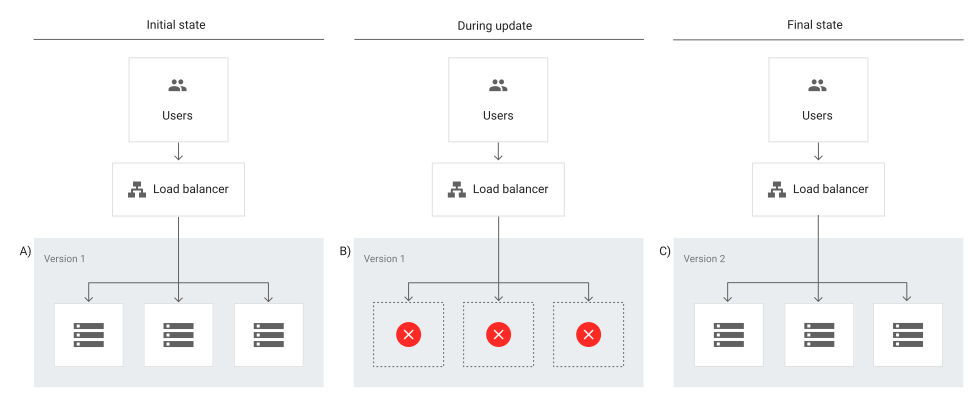
A recreate deployment strategy involves developers scaling down the previous version of the software to zero in order to be removed and to upload a new one. This requires a shutdown of the initial version of the application to replace it with the updated version.

This is considered to be a simple approach as developers only have to deal with one scaling process at a time without having to manage parallel application deployments. 

However, this strategy will require the application to be inaccessible for some time and could have significant consequences for users. This means it’s not suited for critical applications that always need to be available and works best for applications that have relatively low traffic where some downtime wouldn’t be a major issue.

Rolling deployment

Image

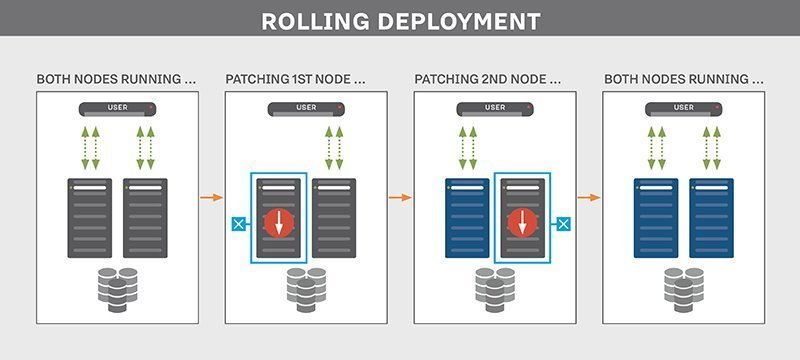
A rolling deployment strategy involves updating running instances of the software with the new release.

Rolling deployments offer more flexibility in scaling up to the new software version before scaling down the old version. In other words, updates are rolled out to subsets of instances one at a time; the window size refers to the number of instances updated at a time. Each subset is validated before the next update is deployed to ensure the system remains functioning and stable throughout the deployment process.

This type of deployment strategy prevents any disruptions in service as you would be updating incrementally- which means less users are affected by any faulty update- and you would then direct traffic to the updated deployment only after it’s ready to accept traffic. If any issue is detected during a subset deployment, it can be stopped while the issue is fixed. 

However, rollback may be slow as it also needs to be done gradually.

Blue-green deployment

Image


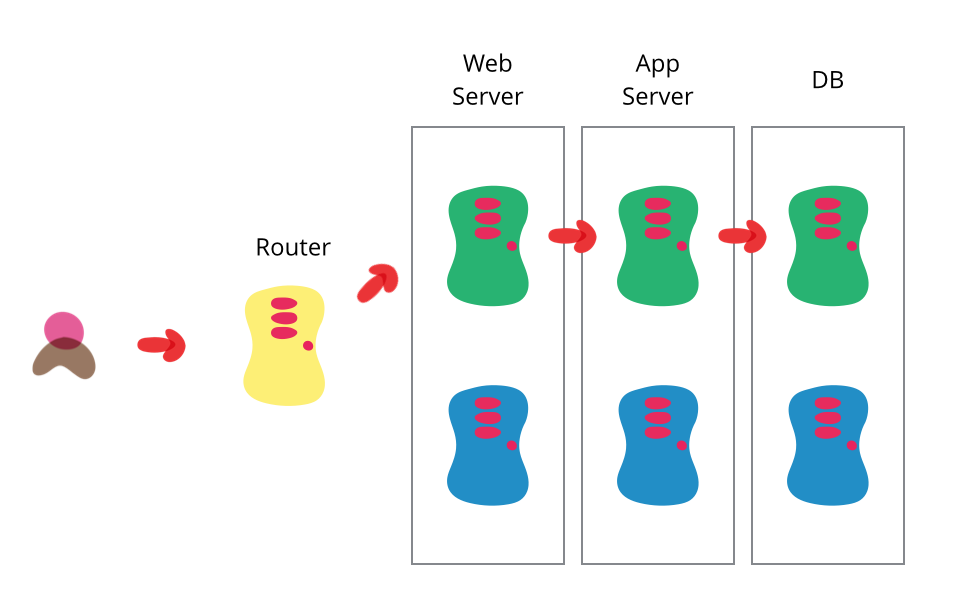
A blue/green deployment strategy consists of setting up two identical production environments nicknamed “blue” and “green” which run side-by-side, but only one is live, receiving user transactions. The other is up but idle.

Thus, at any given time, only one of them is the live environment receiving user transactions- the green environment that represents the new application version. Meanwhile, teams use the idle blue system as the test or staging environment to conduct the final round of testing when preparing to release a new feature.

Afterwards, once they’ve validated the new feature, the load balancer or traffic router switches all traffic from the blue to the green environment where users will be able to see the updated application.

The blue environment is maintained as a backup until you are able to verify that your new active environment is bug-free. If any issues are discovered, the router can switch back to the original environment, the blue one in this case, which has the previous version of the code.

This strategy has the advantage of easy rollbacks. Because you have two separate but identical production environments, you can easily make the shift between the two environments, switching all traffic immediately to the original (for example, blue) environment if issues arise.

Teams can also seamlessly switch between previous and updated versions and cutover occurs rapidly with no downtime. However, for that reason this strategy may be very costly as it requires a well-built infrastructure to maintain two identical environments and facilitate the switch between them.

Canary deployment

Image

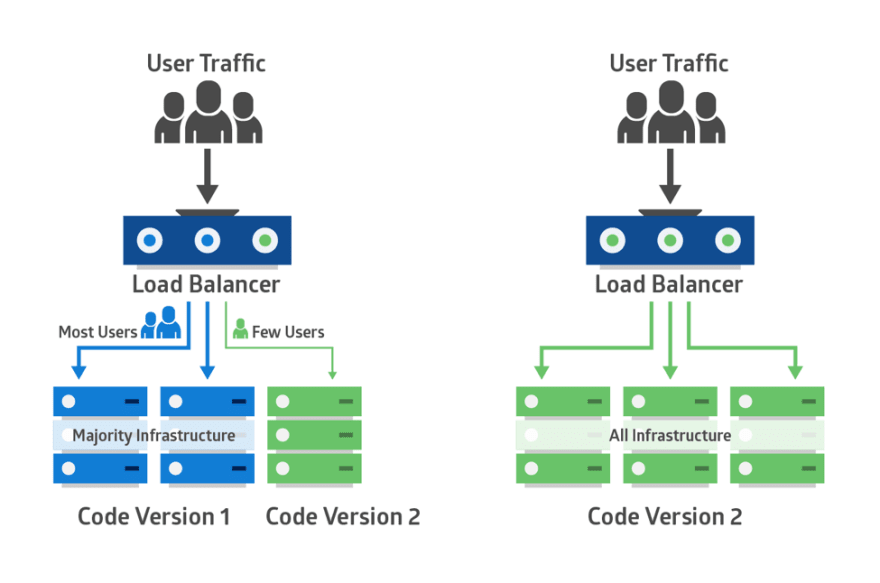
Canary deployments is a strategy that significantly reduces the risk of releasing new software by allowing you to release the software gradually to a small subset of users. Traffic is directed to the new version using a load balancer or feature flag while the rest of your users will see the current version 

This set of users identifies bugs, broken features, and unintuitive features before your software gets wider exposure. These users could be early adopters, a demographically targeted segment or a random sample.

Therefore, you start testing on this subset of users then as you gain more confidence in your release, you widen your release and direct more users to it. 

Canary deployments are less risky than blue-green deployments as you’re adopting a gradual approach to deployment instead of switching from one environment to the next. 

While blue/green deployments are ideal for minimizing downtime and when you have the resources available to support two separate environments, canary deployments are better suited for testing a new feature in a production environment with minimal risk and are much more targeted.

In that sense, canary deployments are a great way to test in production on live users but on a smaller scale to avoid the risks of a big bang release. It also has the advantage of a fast rollback should anything go wrong by redirecting users back to the older version.

However, deployment is done in increments, which is less risky but also requires monitoring for a considerable period of time which may delay the overall release.

A/B testing

Image

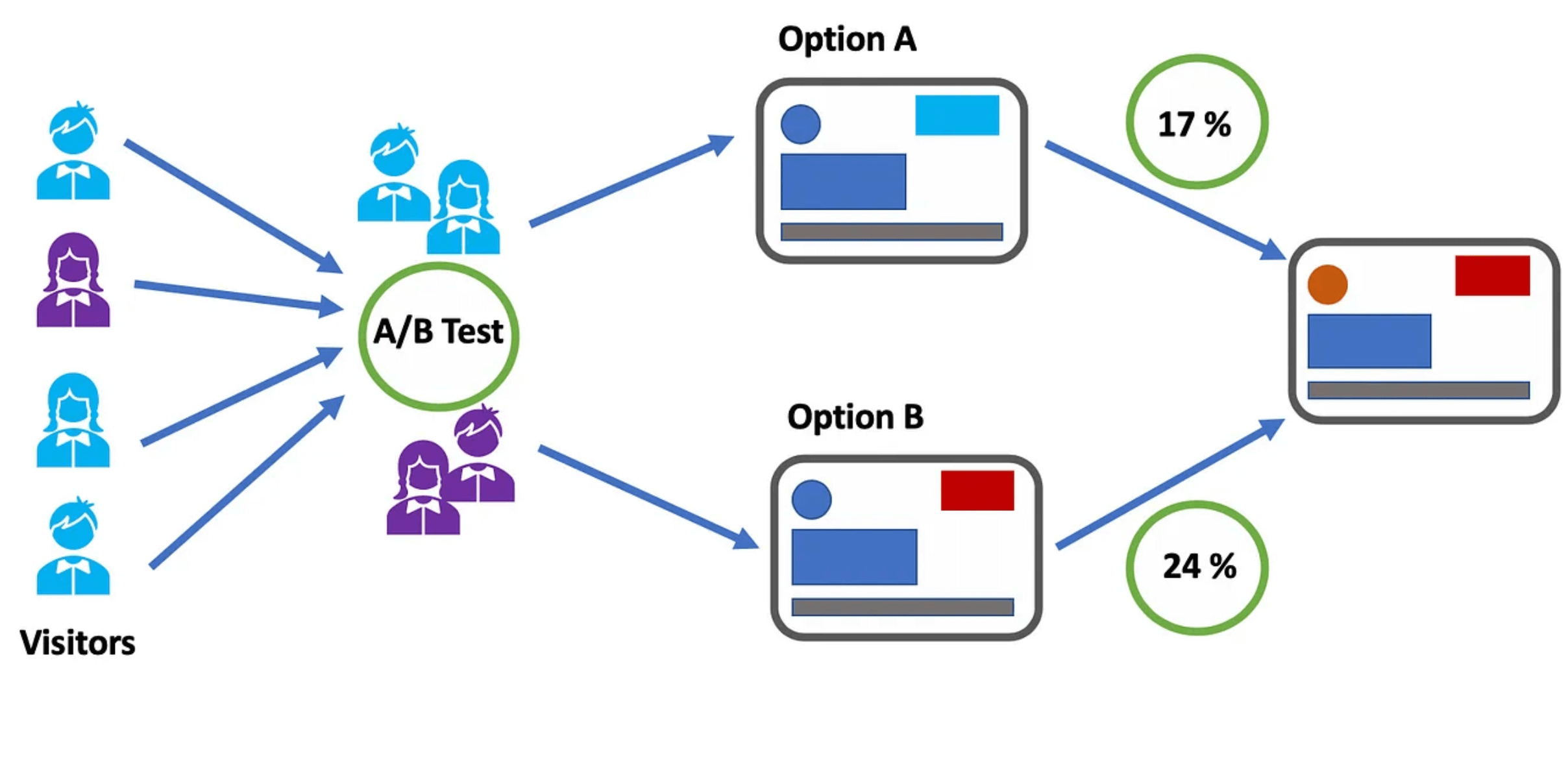
A/B testing, also known as split testing, involves comparing two versions of a web page or application to see which performs better, where variations A and B are presented randomly to users. In other words, users are divided into two groups with each group receiving a different variation of the software application. 

A statistical analysis of the results then determines which version, A or B, performed better, according to certain predefined indicators.

A/B testing enables teams to make data-driven decisions based on the performance of each variation and allows them to optimize the user experience to achieve better outcomes.

It also gives them more control over which users get access to the new feature while monitoring results in real-time so if results are not as expected, they can redirect visitors back to the original version.

However, A/B tests require a representative sample of your users and they also need to run for a significant period to gain statistically significant results. Moreover, determining the validity of the results without a knowledge database can be challenging as several factors may skew these results.

AB Tasty is an example of an A/B testing tool that allows you to quickly set up tests with low code implementation of front-end or UX changes on your web pages, gather insights via an ROI dashboard, and determine which route will increase your revenue.

Feature flags: The perfect companion for your deployment strategy

Whichever deployments you choose, feature flags can be easily implemented with each of these strategies to improve the speed and quality of the software delivery process while minimizing risk. 

By decoupling deployment from release, feature flags enable teams to choose which set of users get access to which features to gradually roll out new features.

For example, feature flags can help you manage traffic in blue-green deployments as they can work in conjunction with a load balancer to manage which users see which application updates and feature subsets. 

Instead of switching over entire applications to shift to the new environment all at once, you can cut over to the new application and then gradually turn individual features on and off on the live and idle systems until you’ve completely upgraded.

Feature flags also allow for control at the feature level. Instead of rolling back an entire release if one feature is broken, you can use feature flags to roll back and switch off only the faulty feature. The same applies for canary deployments, which operate on a larger scale. Feature flags can help prevent a full rollback of a deployment; if anything goes wrong, you only need to kill that one feature instead of the entire deployment. 

Feature flags also offer great value when it comes to running experiments and feature testing by setting up A/B tests by allowing for highly granular user targeting and control over individual features.

Put simply, feature flags are a powerful tool to enable the progressive rollout and deployment of new features, run A/B testing and test in production. 

What is the right deployment strategy?

Choosing the right deployment strategy is imperative to ensure efficient, safe and seamless delivery of features and updates of your application to end-users. 

There are plenty of strategies to choose from, and while there is no right or wrong choice, each comes with its own advantages and disadvantages. 

Whichever strategy you opt for will depend on several factors according to the needs and objectives of the business as well as the complexity of your application and the type of targeting you’re looking to implement i.e whether you want to test a new feature on a select group of users to validate it before a wider release.

No matter your deployment strategy, AB Tasty is your partner for easier and low risk deployments with Feature Experimentation and Rollouts. Sign up for a free trial to explore how AB Tasty can help you improve your software delivery processes.

Article

6min read

Put Data in the Driver’s Seat | Marianne Stjernvall

Marianne Stjernvall explains the evolution of CRO and the importance of centralizing your CRO Program to create a data-driven organization

Before becoming a leading specialist in CRO and A/B testing, Marianne Stjernvall was studying computer and systems science when a company reached out to her on LinkedIn for a position as a CRO specialist, which for her turned out to be the perfect mix of logic programming data and business and people. 

Since then she founded the Queen of CRO where Marianne acts as an independent CRO consultant helping many organizations with experimentation, CRO, personalization and creating a data-driven culture for growth. 

Previously, Marianne worked for companies such as iProspect, TUI and Coop Sverige where she spearheaded their CRO roadmap and developed a culture of experimentation. Additionally, she was awarded CRO Practitioner of the Year in 2020.

AB Tasty’s VP Marketing Marylin Montoya spoke with Marianne on the importance of contextualizing A/B test data to make better-informed decisions. Marianne also shared her own take on the much debated build vs buy topic and some wise advice from her years of experience with CRO and experimentation.

Here are some key takeaways from their conversation. 

The importance of contextualizing data

For Marianne, CRO is becoming a big part of product development and delivery. She highlights the importance of this methodology when it comes to collecting data and acting on it in order to drive decisions. 

Marianne stresses the importance of putting data into context and deriving insights from that data. This means companies need to be able to answer why they’re collecting certain information and what they plan to do with that information or data. 

CRO is the key to unlocking many of those insights from the vast amount of data organizations have at hand and to pinpoint exactly what they need to optimize. 

“What are you going to do with that information? You need context to provide insights and that, I think, is what CRO actually is about,” Marianne says. 

This is what makes CRO so powerful as it enables organizations to take more valuable actions based on the insights derived from data. 

When done right, testing within the spectrum of CRO can help move organizations into a completely different path that they were on before onto a more innovative and transformative journey.

Centralize and standard your experimentation processes first

When companies are just starting to create their experimentation or CRO program, Marianne recommends having parts of it centralized and to run tests within a framework or process to avoid teams running their own tests and executing these tests all over each other. 

Otherwise, you could have different teams, such as marketing, product development and CRO teams, executing tests with no set process in place which could potentially lead to chaos. 

“You will be taking decisions on A/B tests on basically three different data sets because you will be checking different kinds of data. So having an ownership of that to produce this framework and process, this is how the organization should work with these kinds of tests,” says Marianne. 

With established frameworks and processes in place, organizations can set rules on how to carry out tests to get better value out of them and create ownership for the entire organization. The trick is to start small with one team and build in these processes over time onto the next team and so on.

This is especially important as Marianne argues that many organizations cannot increase their test velocity because they don’t have set processes to act on the data they get from their A/B tests. This includes how they’re calculating the tests, how they’re determining the winning or losing variation and what kind of goals or KPIs they’ve set up.

In other words, experimentation needs to be democratized as a starting point to allow an organization to naturally evolve around CRO. 

Putting people at the center of your CRO program

When it comes to the build vs buy debate, Marianne argues that an A/B testing tool will not automatically solve everything. 

“A great A/B testing tool can make you comfortable in that we have all the grounds covered with that. Now we can actually execute on this, but the rest is people and the organization. That’s the big work.”

In fact, companies tend to blame the tech side of things when their A/B testing is not going as planned. For Marianne, that has nothing to do with the tool; the issue primarily lies with people and processes. 

As far as the build vs buy debate, before deciding to build a tool in-house, companies should first ask themselves why they want to build their own tool beyond the fact it’s more cost-efficient. This is because these tools need time to get set up and running. It may not be so cost-effective as many tend to think when choosing to build their own tool.  

Marianne believes that companies should focus their energy and time on building processes and educating teams on these processes instead. In other words, it’s about people first and foremost; that’s where the real investment lies. 

Nevertheless, before starting the journey of building their own tool, companies should evaluate themselves internally to understand how teams are utilizing and incorporating data obtained from tests into their feature releases. 

If you’re just starting on your CRO journey, it’s largely about organizing your teams and involving them in these processes you’re building. The idea is to build engagement across all teams so that this journey happens in the organization as a whole. (An opinion that was shared by 1,000 Experiments Club podcast guest Ben Labay). 

What else can you learn from our conversation with Marianne Stjernvall?

  • What to consider when choosing the right A/B testing tool 
  • Her own learnings from experiments she’s run
  • How to get HIPPOs more involved during A/B testing
  • How “failed” tests and experiments can be a learning experience


About Marianne Stjernvall

Having worked with CRO and experiments for a decade and executed more than 500 A/B tests, Marianne Stjernvall has helped over 30 organizations to help them grow their CRO programs. Today, Marianne has transformed her passion for creating experimental organisations with a data-driven culture to become a CRO consultant at her own company, the Queen of CRO. She also regularly teaches at schools to pass on her CRO knowledge and show the full kind of spectrum of what it takes to execute on CRO and A/B testing and experimentation.

About 1,000 Experiments Club

The 1,000 Experiments Club is an AB Tasty-produced podcast hosted by Marylin Montoya, VP of Marketing at AB Tasty. Join Marylin and the Marketing team as they sit down with the most knowledgeable experts in the world of experimentation to uncover their insights on what it takes to build and run successful experimentation programs.


Article

18min read

The Many Uses of Feature Flags to Control Your Releases

The use of feature flags has evolved and expanded as teams now recognize the value they can bring to their releases. 

First, let’s start with a simple definition of feature flags. A feature flag is a software development technique that lets you turn functionalities on and off to test new features in production without changing code.

This means that feature flags significantly accelerate software development processes while giving teams greater control and autonomy over releases.

Keep reading: Our complete guide to feature flagging

This is a technique that can be employed by all teams in an organization across a wide range of use cases, from the most simple to more advanced uses to improve their daily workflows. 

In this article, we will explore these different uses to illustrate what feature flags can do across different contexts depending on your pain points and objectives.

Feature flags examples and use cases

Many of the use cases outlined below allow teams to take back control of releases and enable them to deliver new features quickly and safely. There may be a bug in production and you want to turn it off without delaying the release or you have second thoughts about a feature and you’re not ready for all your users to see it so you’d rather test this feature on a subset of users. 

Feature flags also increase productivity and speed of teams. You’re no longer waiting to merge your code if other changes are incomplete; you just put it behind a flag until it’s ready. With this, you get more predictability to your releases. There’s no need to delay your release cycle for any last-minute bugs detected. 

Therefore, we will see how the use cases outlined below bring these benefits to your team.

  • Prepare for launch
  • Hassle-free deployments: Release anytime by decoupling release from deployment
  • Experience rollouts and progressive delivery
  • Time your launch
  • Running experiments and A/B testing
  • Continuous integration and continuous delivery
  • Managing access: User targeting
  • Risk mitigation
  • Test in production
  • Feature flags and mobile app deployment: Bypass app store validation
  • Kill Switch: Feature rollback
  • Sunsetting features
  • Managing migrations
  • Feature flags as circuit breakers
  • Bottomline: Use feature flags often but proceed with caution

Hassle-free deployments: Release anytime by decoupling release from deployment

Feature flags allow you to deploy whenever you and your team sees fit. You no longer need to delay your releases. Any changes to a feature that are not yet ready can be toggled off with a switch.

What feature flags do in this scenario is separate code deployment from release. This is done through a release toggle, which allows specific parts of a feature to be activated or deactivated so any unfinished features will remain invisible to users until they are ready to be released. 

Why is the distinction between deployment and release significant? To answer this question, it is worth noting the difference between the two terms:

  • Deployment is the process of putting code in its final destination on a server or any other place in your infrastructure where your code will run.
  • Release is exposing your code to your end-users and so it is the moment when they get access to your new features.

This difference is why we talk about decoupling deployment from release because once you do that, you can push code anywhere, anytime, without impacting your users. Then, you can release gradually and selectively whenever you’re ready through progressive and controlled rollouts as we will see below.

Experience rollouts and progressive delivery

With feature flags, you are in complete control. This means once you have a feature ready for release, you can control which subset of users will see this feature through phased rollout of releases. 

When we talk about experience rollouts, we’re referring to the risk-free deployment of  features that improve and optimize the customer experience.

This is usually achieved through progressive rollouts, which builds on continuous delivery to include the use of feature flags to gradually introduce features to your users.

Rather than releasing to all your users, which is often risky, you may want to release to just 5% or 10% of your users. These users should represent your overall users. Meanwhile, the team observes how these users respond to the new feature before rolling out to everyone else. 

One progressive rollout technique is known as canary deployment. This is where you test how good your feature is on a small group of users and if there’s any issue, you can immediately fix it before it’s exposed to a larger number of users. This sort of gradual rollout helps mitigate the risk of a so-called big bang release. It also helps ease the pressure on your server in case it cannot handle the load.

You may also carry out what is known as ‘ring deployments.’ This technique is used to limit the impact on end-users by gradually rolling out new features to different groups. These groups are represented by an expanding series of rings, hence the name, where you start with a small group and keep expanding this group to eventually encompass all users. 

In a ring deployment, you choose a group of users based on similar attributes and then make the features available to this group. 

Rings and feature flags work together where feature flags can help you hide certain parts of your feature if they’re not ready in any of the deployment rings.

The advantage of such controlled rollouts is the feedback you would generate from users, especially for releases you’re less than confident about and so with the feedback received, you can improve your product accordingly.

Time your launch

We know at this point that feature flags give you the control to release at any time you deem suitable. Feature flags, then, are important because you always decide the ‘when.’ As such, with feature flags, you can aim for a timed launch where you push your feature for people in your trusted circle, such as your QA team, to test in production. 

Afterwards, when it’s time to launch, you simply turn on the feature for everyone else without any fuss with the added advantage that you’re feeling much more confident when it comes to the actual release to everyone else.

This significantly reduces stress among your team because you’ve tested the feature before the official launch and you’ve made sure it’s working as it should before going ahead with a wider release.

Running experiments and A/B testing

Feature flags are great for A/B tests, where you can assign a subset of users to a feature variation and see which performs better.

This is a great use for product and marketing teams who can easily test new ideas and eliminate them if they don’t fulfil the hypothesis defined upon creation of the test.

For example, feature flags would allow your product and marketing teams to send 50% of users to the new variation of a feature and the other 50% to the original one to compare performance according to the goals set and see which variation runs better according to the KPIs set.

Using feature flags to run A/B tests is particularly useful when a feature receives enough traffic to generate efficient results. So, as a cautionary note, keep in mind that not everything can be an A/B test when it comes to feature flags.

In this sense, you can look at feature flags like a light switch. You decide when you want to turn on the feature, when to turn it off and which users have access to it. This allows you to continuously test in production until you’re satisfied with the end-result which you can then roll out to the rest of your users.

Continuous integration and continuous delivery

Feature flags means developers no longer need multiple long-lived feature branches which more often than not lead to merge conflicts.

Let’s imagine you are all set to release but then one developer’s changes have not yet been integrated into the main feature branch. Does this mean you need to wait especially when you know time is precious when it comes to releasing to impatient customers in this day and age?

With this method, developers can integrate their changes, or commit code in small increments, much more frequently, perhaps even several times a day. Through trunk-based development, a key enabler of continuous integration, developers can merge their changes directly into the master trunk helping them move faster to ensure that code is always in a ready-to-be-released state. 

Consequently, we can deduce that feature flags also facilitate the process of continuous delivery.

Feature flags are essential to maintain the momentum of CI/CD processes because as mentioned, feature flags decouple deployment from release so even unfinished features can be merged but can easily be hidden behind a flag so users don’t see it while other changes can still be delivered to users without waiting on those unfinished features.

In other words, feature flags will still allow you to still continuously deploy your code so even if there is an incomplete feature, users won’t be able to access the functionality as it would be hidden behind a flag.

Read more: Feature flags and CI/CD: Increased velocity and less risk

Managing access: User targeting

You don’t just choose the when, you also choose to whom.

Feature flags, as we’ve seen, gives you a lot of control over the release process by putting the power of when to release in your hands. 

It‘s worth mentioning yet another form of power feature flags can give you, which is the ability to choose which users can access the feature. When you are testing in production, having the option to choose who you want to test on is extremely valuable depending on the kind of feedback you’re seeking.

Giving early access

We’ve seen in canary deployment that sometimes the sample you pick can be completely random. Other times, however, you might decide to carefully handpick a select group of users to give them early access to your new feature.

Why is this important? Because these are the users that are considered to be ‘early adopters.’ They are users you trust and whose feedback is top priority and who are most interested in this particular feature. These users are also the most forgiving should anything go wrong with the release.

With feature flags, you can release the feature to these early adopters who are more than willing to provide the kind of feedback you need to improve your product. This technique works well if you have a very risky release that you’re hesitant to release to a wider audience.

Power to the users: beta testing

Beta testing is another side to early access where in this scenario users willingly opt-in to test out your new features before they are released to the rest of your users.

As a result, the customers who opt-in get to see and test the feature by turning it on in their accounts and should they wish to back out they can easily disable the feature, which makes these users more inclined to opt-in in the first place as it makes them feel more in control.

This is an important use-case because it shows your customers that you’re really listening to their feedback by asking them to test your release. 

The users who opt-in are those who you’re targeting with this feature so how they react to the feature will be of extreme use to you. Hence, you get to test out your new feature and you deliver value to your customers by responding to their feedback; it’s a win-win situation!

Dogfooding

This term refers to eating your own dog food, or in this case refers to an organization using its own product or service. You can, therefore, look at it as a way to test in production on internal teams. 

It’s a form of alpha testing that you can run on internal users (within the organization) to make sure that the software meets all expectations and is working as it should. Thus, it represents an opportunity to evaluate the performance and functionality of a product release as well as obtain feedback from technical users.

This is a great way of testing to obtain meaningful feedback especially when you’re introducing new features or major changes that you’re not fully confident about. 

This way, you are taking less risks because it’s only people within your organization who can see the releases as opposed to your actual, external users who may be more unforgiving in case things take a bad turn during a release.

No trespassing allowed: blocking users

Just as you can pick users who you want to access your feature, you can also block users from seeing it. For example, you can block certain users from a particular country or organization.

What feature flags would allow you to do is hide some features from users who might not give you the right sort of feedback while giving access to the relevant target consumers who would be most impacted by the new feature. You can also target certain features for a certain type of user to provide a more personalized experience for them.

Managing entitlements

With feature flags, you can manage which groups of users get access to different features. This is especially common in SaaS companies that offer various membership plans and so with entitlements, you can dictate which features each plan can access. This way, you would be offering different experiences to your users.

Let’s take the example of Spotify. Spotify offers free and paid plans. With the free membership, you can stream music but with advertisements while with the premium membership, you can stream unlimited music with no ads. You also get unlimited skips and you can download music to listen to offline. There are also different levels of premium to choose from including student and family plans. Consequently, with each plan, you are entitled to different content and features.

With feature flags, you can wrap a flag around a feature and release it to a particular customer depending on their subscription plan. These types of flags are usually referred to as permission toggles. They also allow you to move features easily between the different plans i.e. paid and free versions, for example.

Managing entitlements is considered to be an advanced use case as it requires careful coordination across teams and involves working with multiple flags to control permissions for the features. The person who manages entitlements is usually on the product team so careful planning and monitoring of each change performed by which person is required. 

There should also be a seamless process in place to move users from one plan to another. Thus, this use case requires vigilant implementation.

Product demos and free trials

On a similar note, product and sales teams may be looking for a way to offer prospective customers a demo or a free trial or specialized demo of a feature.

Feature flags are a great way to give prospects temporary access to certain features under various pricing plans to give them a taste of through a live demo of the features among the higher plans so they can decide if an upgrade is worth it by simply toggling these features on with a flag then turning it off once the demo is complete. 

Risk mitigation

Test in production

Through the use of Feature flags, teams can confidently ship their releases by testing code directly in production to validate new features on a subset of users.

Unlike testing in a staging environment, when you test in a production environment, you can collect real-world feedback from live users to ensure that teams are building a viable pipeline of products.

Testing in production also allows you to uncover any bugs that you may have missed in the development stages and discern whether your new feature can handle a high volume of real-world usage and then optimize your features accordingly.

Feature flags and mobile app deployment: Bypass app store validation

This is when we use A/B testing to test different experiences within mobile apps. Imagine you’ve just released a brand new app or introduced a new shiny update to your app.

How can you make sure your app or this update is running smoothly or that you haven’t unintentionally introduced an update full of bugs that crashes on your users? Anything that goes wrong will involve a lengthy review process that will setback your entire release as you attempt to locate and resolve the issue.

You no longer need to wait for app store approval, which could take some time and the changes are released to all users instead of smaller segments.

Instead, with remote config implemented through feature flags, any changes can be made instantly and remotely and then released to a small subset of users to get feedback before releasing it to everyone else. Therefore, you can upgrade your app continuously in real-time based on feedback from your users without waiting on app store approval.

It’s also a good way to personalize experiences for different types of users rather than creating a unified experience for all users depending on the demographics you set forth. 

As a result, with feature flags, you can roll out different versions of your mobile app to monitor their impact by releasing different features to different groups of users. Afterwards, you can decide on what features will be incorporated in the final release of your app.

Using feature flags to test out your mobile app is an excellent way to generate buzz around your release by giving exclusive access to a select number of users.

Kill Switch: Feature rollback

Using feature flags will allow you to disable a feature if it’s not working as it should. This is done by using a kill switch. Thus, whenever anything goes wrong in production, you can turn it off immediately while your team fixes the issue. This would prevent you from having to roll back the entire release so other changes can be deployed and released without worrying about delaying the whole release.

With a kill switch, you can switch off a specific, troublesome feature so you can decrease the number of users who can see it, including turning it off for all users if necessary until the issue is analyzed and resolved by your team. This way, you won’t have to go through the entire code review process to locate the issue.

Kill switches therefore give you even more control over the release process. This not only empowers your team of developers but also marketing and production teams with no software development experience who can now easily test in production and kill a feature without having to rely on engineering support.

AB Tasty offers an automatic rollback option that enables you to stop the deployment of a feature and to revert all the changes that have been made in order to ensure that your feature isn’t breaking your customer experience. This is done by defining the business KPI you want to track that would indicate the performance of your feature. If it reaches a certain value, the rollback is automatically triggered.  

Sunsetting features

Feature flags can also enable the ‘sunsetting’ of features. For example, with time, you might see your usage of feature flags increasing and widening to encompass a number of features. However, this accumulation of features may eventually turn into a heavy debt. 

This is why it is important to continuously keep track of which features you are using and which features have run their time and need to be retired from your system.

Sunsetting, then, enables you to kill off features that are no longer being used. Feature flags would give you an idea of the usage of certain features which would help you determine whether it’s time to kill it off, lest you end up with the dreaded technical debt.

Removing unused features and clearing up old flags is the best way to keep such hidden costs in check. Thus, you should have a careful plan in mind to remove some flags once they have served their purpose or otherwise you end up with the aforementioned technical debt. This will require you to have an efficient feature flag management system in place to track down ‘stale’ flags.

Managing migrations

Feature flags can be used to safely and effectively migrate to a new database as business requirements change and evolve. What organizations would normally do before feature flags is a one-time migration then hope for the best as rollbacks are usually a painful process.

Obviously, the biggest risk that comes with switching databases is loss of data. Therefore, developers need a way to test that the data will remain intact during the migration process. 

Enter feature flags. They allow you to facilitate migration and should something go wrong, you can disable the migration by simply toggling the flag off.

A percentage rollout can then be implemented using feature flags to validate the new database and any changes can be reversed by using feature flags as a kill switch.

Read more: How to migrate from monolith to microservices architecture using feature flags

Feature flags as circuit breakers

Feature flags are particularly useful when your system is experiencing heavy load during times of exceptionally high traffic. 

In particular, the on/off switch of feature flags (operational toggles) can be used as circuit breakers to disable non-critical features that add stress to the system to help your website run better and avoid any backlash from any potential downtime caused by a heavy load. 

For example, many e-commerce websites experience heavy traffic during Black Friday. To avoid a potential system outage or failure, development teams can use feature flags to turn on critical features and turn off the rest until this period of heavy traffic passes to shed some of the load from a system.

Bottomline: Use feature flags often but proceed with caution

As we’ve seen so far, many of the use cases can be easily implemented. However, others will require the ability to make detailed, complex and context-specific decisions so a more advanced feature flagging system that enables such functionalities would be needed.

Regardless of what you decide to use feature flags for, one thing is clear: feature flags put you in the driver seat when it comes to releases. You are in complete control of the when and to whom you release. It also allows you to experiment to your heart’s content but without the risks, especially when the release doesn’t go as expected. 

Working with feature flags also increases productivity among teams. As we’ve seen in the use cases outlined above, it’s not only developers who have complete control over and access to the release process but product and operations teams can also release and roll back as needed.

Read more: Feature flags use cases for product teams

You can use features for many things across different contexts. Some may remain for a long period of time while others need to be extracted as soon as possible so as not to accumulate technical debt

Thus, the general advice would be to use feature flags often but keep in mind that proactive flag management and implementation will be needed to maximize the benefits while minimizing the costs.

Don’t just take our word for it. Start your feature flag journey and see for yourself what  feature flags can do for you by signing up for a free trial at AB Tasty.

Article

1min read

Client-Side vs. Server-Side Experimentation [Infographic]

As you go further into your digital transformation journey, the more necessary it may become to expand your experimentation capabilities. Our server-side tool was created with the aim of enriching our conversion rate optimisation platform to enable you to carry out more sophisticated tests beyond the scope of UI or cosmetic changes.

But which solution is the right one for your team and use cases? This infographic serves as a way to answer this question by comparing client- vs server-side experimentation so you can come to a decision on which solution works for your individual case.