Article

13min read

How To Build A Customer Journey Map?

Understanding your customers’ paths? Not easy. Each person arrives with their own reason for visiting your site and takes their own route through your pages.

So how do you gain real insights to improve usability and spot buying trends?

Start with building a customer journey map.

In this blog, we’ll walk you through what a customer journey map is, how to build a customer journey map, which templates work best for your customer journey map, and how to put them into action. Let’s get started!

What is a customer journey map?

A customer journey map is a visual tool that shows how customers interact with your business or website—from start to finish.

It helps you spot where things aren’t working and improve the overall experience.

Think of it as a story told visually. It maps out:

  • What customers do
  • What they think
  • How they feel

At the heart of the map are touchpoints—specific moments where customers interact with your brand. Maybe they’re researching a product, making a purchase, waiting for delivery, or requesting a return.

Each touchpoint can be positive, neutral, or negative from the customer’s perspective. Your job? Make more of them positive.

Customer journey mapping requires a mix of hard data, customer feedback, and creative thinking. No two maps are the same—and that’s the point. Every business is different.

7 Reasons Why Use Customer Journey Maps

Customer journey mapping isn’t just a nice-to-have—it’s a strategic tool that drives real business results.

Here’s why it matters:

1. See Through Your Customers’ Eyes

Journey maps help you step into your customers’ shoes. You’ll understand their motivations, expectations, and frustrations at every stage—not just what they do, but why they do it.

That empathy translates into better decisions, smarter strategies, and experiences that actually resonate.

2. Spot and Fix Pain Points Fast

Every journey has friction. Your checkout process might be too complicated, your search function delivers the wrong results, or customers can’t find help when they need it.

Customer journey mapping reveals these bottlenecks so you can address them before they cost you customers.

3. Build Loyalty That Lasts

When customers feel understood and valued, they stick around. By removing barriers and meeting needs at every touchpoint, you strengthen the emotional connection between your brand and your audience. That connection drives repeat purchases and long-term loyalty.

In fact, a 5% increase in customer retention can lead to a 25% increase in profits.

4. Personalize at Scale

Not all customers are the same—and your experience shouldn’t treat them that way. Journey maps highlight individual preferences and behaviors, enabling you to tailor messaging, product recommendations, and support to each person.

Personalization increases purchase likelihood and makes customers feel like you actually get them.

5. Align Your Entire Team

Customer journey mapping breaks down silos. When marketing, product, sales, and support all work from the same map, everyone understands the customer’s perspective and how their work impacts the overall experience.

That shared understanding leads to better collaboration, faster problem-solving, and a more cohesive brand experience.

6. Make Smarter, Data-Driven Decisions

Journey maps aren’t just pretty visuals—they’re strategic tools backed by real data.

They guide decisions about where to invest, what to test, and which initiatives will have the biggest impact on customer satisfaction and business growth.

7. Drive Innovation and Stay Ahead

Customer needs evolve. Markets shift. New competitors emerge.

Regularly reviewing and updating your customer journey map helps you spot emerging trends, changing preferences, and new opportunities before your competitors do. It keeps your brand agile, innovative, and ready to adapt.

The Heart of Customer Journey Mapping: Buyer Personas

Buyer personas are fictional characters based on real customer data. They represent your audience in a way that’s relatable and actionable.

Most projects create between three and seven personas—and each one gets its own customer journey map. Why? Because different customers have different needs, goals, and pain points. A persona helps you walk in their shoes and design experiences that truly resonate.

Personas aren’t perfect replicas of real people. They’re broad representations that guide smarter decisions.

Who Benefits from a Customer Journey Map?

Short answer: everyone.

Customer satisfaction drives loyalty more than ever. People are more informed, more demanding, and more willing to shop around.

A well-designed customer journey map helps you:

  • Highlight problems customers face
  • Build stronger relationships with your brand
  • Keep customers at the center of every decision

Once your map is ready, your entire team—from marketing to product to support—can use it to stay aligned and customer-focused.

Bringing Your Whole Business Together

Customer journey mapping isn’t just for your customer-facing teams. It brings everyone together.

When you map out touchpoints, departments that don’t usually interact with customers start to see how their work affects the experience. That’s powerful.

For example:

  • How easy is it for someone to find return instructions on your site?
  • How fast do they get a response when they need help?
  • What happens after the purchase?

Traditional marketing often stops at checkout. But the customer journey doesn’t. Post-purchase experience matters just as much—and your map should reflect that.

How to Map the Customer Journey Visually?

A customer journey map gives you a clear picture of your customers’ experiences from their point of view.

To create one, focus on two things:

  1. Defining customer goals – What are they trying to accomplish?
  2. Understanding their nonlinear journey – Customers don’t move in straight lines

By mapping every interaction, you’re identifying opportunities to delight your customers and craft smarter engagement strategies.

According to Aberdeen Group, 89% of companies with multi-channel engagement strategies retained their customers—compared to just 33% of those without one.

You can build your map using:

  • Excel sheets
  • Infographics
  • Diagrams
  • Illustrations

Customer  journey maps also help with:

  • Retargeting with an inbound mindset
  • Reaching new customer segments
  • Building a customer-first culture

All of this leads to better experiences, more conversions, and stronger revenue.

Want to go deeper? Check out our digital customer journey resource kit →

Types of Customer Journey Map Templates

There are four main types of customer journey maps. Each highlights different behaviors and serves different goals.

1. Current State Template

Shows what customers currently do, think, and feel. Great for spotting pain points and making incremental improvements.

Current state template for building a customer journey map

2. Future State Template

Focuses on what customers will do, think, and feel. Useful for planning new products, services, or experiences.

Future state template for building a customer journey map

3. Day in the Life Template

Similar to the current state map, but broader. It looks at how customers behave with your brand and your competitors. Perfect for uncovering unmet needs.

Day in the life template for building a customer journey map

4. Service Blueprint Template

Starts with a simplified current or future state map, then adds the internal processes, people, and tech behind the experience. Helps you see the full picture—front and back.

Service blueprint template for building a customer journey map

How to Create a Customer Journey Map in 7 Steps ?

Creating customer experience journey maps takes time, but the payoff is worth it. Here’s how to do it.

Step 1: Create Buyer Personas

Start with a clear objective. Who is this map for? What are you trying to learn?

Building personas is the most time-consuming part—but also the most important. You’ll need:

  • Demographics: age, gender, occupation, income, location
  • Psychographics: preferences, motivations, pain points

The more detail, the better. Use surveys, interviews, analytics, and customer feedback to build realistic personas.

Collecting concrete data on your customers helps you serve them better and deliver a more personalized user experience.

Step 2: Select Your Target Customer

Pick one persona and go deep. Trace their first interaction with your brand and map their journey from there.

Ask:

  • What questions are they trying to answer?
  • What’s their biggest priority?

Step 3: List Customer Touchpoints

Touchpoints are every interaction someone has with your brand—your website, social media, ads, emails, reviews, and more.

List them all. Then ask:

  • Which touchpoints get the most engagement?
  • Which ones need work?

Remember: customer journey mapping is unique to your business. What works for one brand won’t work for another.

Step 4: Identify Customer Actions

Break the journey into individual actions. What do customers do at each step?

By zooming in on micro-engagements, you can:

  • Spot obstacles
  • Reduce friction
  • Move people forward faster

Use your personas to troubleshoot problem areas and predict what customers will do next.

Step 5: Understand Your Available Resources

Your map shows how every part of your business supports the customer experience.

Use it to assess:

  • Which touchpoints need more support
  • Whether your resources are enough
  • How new investments will impact ROI

Step 6: Analyze the Customer Journey

Now it’s time to put it all together. Look at your data, touchpoints, and goals.

Ask:

  • Where is the experience meeting expectations?
  • Where are the gaps?

Mapping what’s working well is just as important as spotting problems. Some elements can be applied to other areas.

Walk through the journey yourself—with each persona. Test it across social media, email, and your website. See where things break down.

One of the best ways to find issues? Customer feedback—through surveys, support transcripts, and reviews.

Watch our webinar  to learn how master the user journey through A/B testing → 

Step 7: Take Action

Your map is only valuable if you act on it.

Use it to:

  • Address pain points
  • Test new ideas
  • Continuously improve

A great way to validate changes? A/B testing.

AB Tasty is a best-in-class experimentation platform that helps you test variations, personalize experiences, and convert more customers—fast. With AI and automation built in, you can optimize the digital experience with confidence.

Once your map is live, review and update it regularly. Customer journeys evolve—and so should your map.

AB Tasty Get A Demo

How to Collect Journey Mapping Data?

Great customer experience journey maps are built on solid data—not assumptions. You’ll need a mix of qualitative insights (the “why” behind behavior) and quantitative metrics (the “what” you can measure).

Here’s how to gather both:

1. Qualitative Data: Understanding the “Why”

Qualitative research helps you uncover motivations, emotions, and pain points that numbers alone can’t reveal.

Customer Interviews

Have real conversations with your customers. Ask about their experiences, what frustrates them, and what they love. These in-depth discussions provide rich, nuanced insights.

Surveys

Use open-ended questions to gather feedback on specific parts of the journey. Keep them short and focused to get honest, actionable responses.

User Testing

Watch how people interact with your website or product in real time. Tools like usability tests reveal where users get stuck, confused, or frustrated.

Mystery Shopping

Experience your own customer journey firsthand. Walk through every step—from discovery to purchase to support—and see what works and what doesn’t.

Support Transcripts

Review customer service conversations to identify recurring issues and common questions. These transcripts are goldmines for understanding pain points.

2. Quantitative Data: Tracking the “What”

Quantitative data gives you measurable, trackable insights that help you validate assumptions and monitor progress over time.

Website Analytics

Tools like Google Analytics show you how customers navigate your site, where they drop off, and which pages drive the most engagement.

Session Recordings and Heatmaps

See exactly how users interact with your pages—where they click, how far they scroll, and where they hesitate. Tools like Hotjar and Contentsquare make this easy.

Conversion Funnels

Track how customers move through key stages of the journey and identify where they abandon the process.

Customer Satisfaction Scores

Metrics like Net Promoter Score (NPS) and Customer Satisfaction (CSAT) measure loyalty and satisfaction at different touchpoints.

CRM Data

Your CRM system (like Salesforce or HubSpot) holds valuable information about customer interactions, purchase history, and behavior patterns.

Social Media Listening

Monitor what customers say about your brand on social platforms. This reveals sentiment, trends, and unfiltered feedback.

Email Campaign Metrics

Analyze open rates, click-through rates, and conversion rates to understand how customers engage with your messaging.

Support Ticket Volume

Track common issues and complaints to identify systemic problems in the customer journey.

Best Practices for Journey Map Data Collection

Combine Both Types of Data

Qualitative insights explain why customers behave a certain way. Quantitative data shows you what they’re doing. Together, they give you the full picture.

Test Your Assumptions

Don’t rely on guesses. Validate your hypotheses about customer behavior through research and real data.

Involve Stakeholders

Gather input from marketing, sales, product, customer service, and leadership. Each team has unique insights that make your map more accurate and actionable.

Keep It Current

Customer behavior changes. Markets evolve. Your journey map should too. Update it regularly to stay relevant and effective.

Customer Journey Map Examples

Customer journey maps come in all shapes and sizes. Some look like works of art. Others are simple sketches. What matters is clarity.

Here are some real-world examples of customer journey mapping in action:

1. David Jones: Simplifying Account Access

David Jones, a major Australian retailer, mapped their customer journey to understand how shoppers interacted with their account features during the buying process.

Through testing and personalization, they made it easier for customers to access their accounts, track orders, and manage preferences.

Infographic showing the customer journey mapping David Jones implemented

Explore the David Jones strategy →

2. WWF: Making Donations Feel Natural

WWF used customer journey mapping to understand why desktop users weren’t completing donations.

By testing different layouts and messaging that made giving feel more intuitive and less transactional, they removed barriers in the donation flow.

Infographic showing the customer journey mapping WWF implemented

These examples show that even small changes—when guided by customer journey mapping—can drive meaningful results.

Read the full WWF report →

These examples show that even small changes—when guided by customer journey mapping—can drive meaningful results.

Get The Expert’s Personalization Playbook to learn how to tailor websites and apps to individual users → 

The Truth About Customer Journeys

Customer journeys are always changing.

Customer journey mapping helps you stay close to your customers, address their needs, and adapt as they evolve.

Maps give you a visual understanding of your audience. They help you stay customer-focused and make smarter decisions.

With regular updates and a commitment to removing roadblocks, your brand can:

  • Stand out
  • Deliver meaningful engagement
  • Drive real business growth

Try, learn, iterate—then go again.

Conclusion

Customer journey mapping isn’t a one-time project—it’s an ongoing practice that keeps you connected to your customers.

When you understand what people need, where they struggle, and what delights them, you can create experiences that truly resonate.

The best part? You don’t need to be perfect. Start small. Test often. Learn continuously.

With the right tools, a customer-first mindset, and a commitment to iteration, you’ll build journeys that drive engagement, loyalty, and growth.

Ready to go further? Let’s build better experiences together → 

Article

8min read

How Experimentation Can Help the Travel & Hospitality Industry Thrive

The travel and hospitality industry operates in one of the most competitive digital landscapes. 

With customers comparing prices, experiences, and options across multiple platforms in seconds, every element of your website can make or break a booking. That’s where feature experimentation, personalization, a/b tests, and rollouts come in—giving travel brands the power to test, learn, and optimize their digital experiences with confidence.

The Power of Experimentation

Experimentation isn’t just about testing button colors or headlines. It’s about de-risking innovation, understanding your guests, and optimizing every experience—from the first website visit to post-stay engagement. With AB Tasty, travel and hospitality brands can:

  • Validate ideas before full rollout
  • Personalize journeys for every traveler segment
  • React quickly to market changes and guest feedback
  • Drive measurable business impact—fast

Let’s look at how leading brands are using AB Tasty to solve real challenges and unlock growth. In this article, we’ll explore five travel and hospitality use cases that demonstrate how experimentation and personalization strategies are driving measurable results.

1. Creating Urgency with Countdown Timers

The Challenge:
A major theme park operator had been using countdown timers on their season pass pages during promotional periods, but they had never actually tested whether these timers were driving purchases—or just taking up space.

The Experiment:
The team ran an A/B test to measure the true impact of countdown timers on their season pass sales page. The timer was designed to create urgency and encourage faster purchasing decisions during limited-time offers.

The Results:
The test confirmed what many marketers assume but rarely prove: urgency works. The variation with the countdown timer delivered a +7.2% increase in transaction rate, with particularly strong performance on desktop, where the majority of purchases occurred.

Key Takeaway:
Don’t assume your tactics are working—test them. Even widely used conversion techniques like countdown timers deserve validation through experimentation.

2. Smarter Sorting with Algorithmic Recommendations

The Challenge:
A travel booking platform was sorting their listing pages by ascending price—a logical approach, but one that didn’t always surface the most relevant offers for customers. Lower prices don’t always mean better value, and the team suspected they were leaving revenue on the table.

The Experiment:
Using feature experimentation, the team tested a new “Recommended” sorting algorithm that factored in product relevance and historical performance data, rather than price alone.

The Results:
The smarter sorting approach delivered impressive gains:

  • +2.8% revenue uplift
  • +4.6% increase in average order value (AOV)

Key Takeaway:
How you present options matters as much as what options you present. Algorithmic sorting that considers relevance and performance can guide users toward better choices—and better business outcomes.

3. Turning Dead Ends into Opportunities with Personalized Alternatives

The Challenge:
When travelers searched for a route with no available flights, they hit a frustrating dead end: a cold “no flights available” message. This led to drop-offs, lost revenue, and a poor user experience.

The Experiment:
Instead of showing an error message, the team implemented a personalized experience that displayed smart alternatives—nearby airports, flexible date options, or connecting routes. 

The Results:
The personalized approach transformed a point of frustration into a conversion opportunity:

  • +35% increase in flight search modifications
  • +14% improvement in conversion rate

Key Takeaway:
Every dead end is an opportunity in disguise. Personalization can rescue frustrated users and turn potential abandonment into completed bookings.

4. Testing Discount Framing: Percentages vs. Monetary Values

The Challenge:
A travel company was presenting discounts as percentages (e.g., “Save 15%”), but they weren’t sure if this framing was maximizing customer response. Would travelers respond better to seeing the actual monetary savings?

The Experiment:
The team tested a variation that displayed monetary savings instead (e.g., “Save up to $1,500 per couple”) across all devices.

The Results:
The monetary framing significantly outperformed the percentage version:

  • +41% increase in revenue
  • +18% more clicks on the homepage promotional link

Key Takeaway:
How you frame value matters. For high-ticket travel purchases, concrete monetary savings can feel more tangible and compelling than abstract percentages.

5. Elevating Trust Signals for Higher Conversions

The Challenge:
A travel operator had key trust signals—their Price Promise guarantee and 24/7 customer support—displayed in a banner on their homepage. However, the banner was positioned too low on the page, limiting its visibility and impact on user confidence.

The Experiment:
The team tested moving the trust signal banner higher on the page to make these reassurances more prominent earlier in the customer journey.

The Results:
The simple repositioning delivered remarkable results:

  • +35% increase in transaction rate

Key Takeaway:
Trust is everything in travel. Make sure your credibility signals are visible early in the user journey—don’t bury them below the fold.

Why Experimentation Matters for Travel & Hospitality

These five use cases illustrate a fundamental truth: assumptions are expensive. Whether it’s the effectiveness of urgency tactics, the optimal way to sort listings, or how to frame a discount, the only way to know what works is to test it.

Experimentation gives travel and hospitality brands the ability to:

  • Validate ideas before full deployment – Reduce risk by testing changes with a subset of users first
  • Make data-driven decisions – Move beyond gut feelings to measurable results
  • Personalize at scale – Deliver the right experience to the right user at the right time
  • Iterate quickly – Learn fast, fail fast, and continuously improve

In an industry where margins are tight and competition is fierce, the brands that embrace experimentation will be the ones that thrive.

Ready to Start Experimenting?

The travel and hospitality industry is perfect for optimization. From booking flows to search results, from promotional messaging to trust signals, every touchpoint is an opportunity to improve the customer experience and drive business results.

At AB Tasty, we have dedicated CSMs specialized in travel and hospitality to help you on your experimentation journey. Looking to see which clients are already onboard? Check out our customers page

The question isn’t whether you should be experimenting—it’s how quickly you can start.

FAQs 

Why should travel and hospitality brands invest in an experimentation platform?

Travel and hospitality brands need to optimize complex journeys: search, comparison, booking, and post-booking. AB Tasty provides a unified experimentation and personalization platform that lets you: – Test changes to search, listing, and booking flows with A/B and multivariate testing 

– Roll out new features safely using feature flags and progressive rollouts

– Personalize experiences for different traveler segments (families, business, frequent flyers, etc.) 

How does AB Tasty help optimize booking funnels on travel websites and apps?

AB Tasty lets you experiment across every step of the funnel from homepage to booking flows. With client-side and server-side experimentation, you can optimize both front-end UX and back-end logic (like ranking algorithms or pricing rules) without compromising performance.

Can AB Tasty support feature experimentation, not just marketing A/B tests?

Yes. AB Tasty goes beyond traditional marketing tests with Feature Experimentation & Rollout. You can use feature flags to control who sees new features, run server-side experiments on your booking engine, search logic, and algorithms, and use progressive rollouts to launch features gradually, monitor impact, and roll back instantly if needed

How does AB Tasty help personalize experiences for travelers?

AB Tasty’s personalization capabilities enable you to tailor journeys based on behavior, context, and profile data. This includes showing different content or offers to first-time visitors vs. loyal customers, surfacing relevant destinations, hotels, or packages based on previous searches or bookings, and more!

Is AB Tasty suitable for high-traffic, seasonal travel campaigns?

Yes. AB Tasty is built to handle the seasonality and peaks that are typical in travel and hospitality. You can confidently test urgent campaigns—like flash sales or early-bird offers—during your busiest periods while keeping control over performance and user experience.

Can non-technical teams in travel and hospitality use AB Tasty?

Yes. AB Tasty is designed for marketing, product, and development teams:

  • Marketers can use the visual editor and ready-made widgets to launch tests and personalization without code
  • Product teams can design and analyze experiments on flows, features, and UX
  • Developers can implement feature flags, server-side tests, and complex rollouts

This collaborative approach helps travel brands move faster while keeping control and governance over what goes live.

Article

6min read

How to Prevent Knowledge Turnover in your Experimentation Program

The Problem: The High Cost of Experimentation Amnesia

In digital optimization, we often obsess over velocity—how fast can we test? But this focus masks a deeper, more expensive problem: Experimentation Amnesia.

At AB Tasty, an analysis of over 1.5 million campaigns revealed a startling trend. While thousands of tests are launched daily, the specific context—why a test won, what surprised us, and the strategic lesson learned—often evaporates the moment the campaign ends.

It vanishes into a 250-slide PowerPoint deck that no one opens again. It disappears into a Slack thread. Or, most painfully, it walks out the door when your CRO Manager or agency partner moves on to their next opportunity.

If you are running tests but not archiving the insights in a retrievable way, you aren’t building a program; you’re just running in circles. It’s time to shift your focus from Execution to Knowledge Management.

The Hidden Cost of “One-and-Done” Testing

The digital industry is notorious for its high turnover. On average, internal digital teams change every 18 months and agencies rotate every two years.

In traditional workflows, knowledge is tied to people, not platforms. When a key manager leaves, they take their “mental hard drive” with them.

This is the “Knowledge Drain.” It is the silent budget killer of CRO programs.

Every time you repeat a test because you couldn’t find the previous results, you are paying double for the same insight. Every time you lose the context of a winning test (i.e., you know that it won, but not why), you lose the ability to iterate and double your gains.

This is why the most mature experimentation teams are moving away from simple testing tools and adopting Program Management platforms that secure their knowledge.

The Solution? AB Tasty’s new Learnings Library.

We designed this feature to serve as a centralized, searchable repository that lives directly where your experiments do. It acts as the institutional memory of your digital team, ensuring that every test—whether a massive win or a “flat” result—contributes to a permanent asset library.

Context is King: Why AI Can’t Replace the Human “Why”

In an era where everyone is rushing to automate everything with AI, you might ask: â€œWhy can’t an AI just write my test conclusions?”

While AI is powerful for analyzing raw numbers, it lacks business context. An AI can tell you that “Variation B increased transactions by 12%.” But it cannot tell you why that matters to your strategy.

  • Was that 12% expected?
  • Was it a shocking surprise that disproved a long-held internal belief?
  • Did it cannibalize another product line?

AB Tasty’s Learnings Library is designed to capture Qualitative Intelligence. It prompts your team to manually qualify results with human tags like “Surprising” or “Expected.” It asks for the narrative behind the numbers.

This human layer is critical. A “failed” test (one that produced no uplift) is often more valuable than a win, provided you document the lesson. By recording, “We learned that our users do not care about social proof on the cart page,” you create a defensive asset. You prevent future teams from wasting budget on that specific hypothesis again.

Visual History: The Power of “Before and After”

One of the biggest friction points in reporting is visual documentation. How much time does your team spend taking screenshots, cropping them, pasting them into PowerPoint, and trying to align the “Control” vs. “Variation” images?

Our Learnings Library automates this friction. It should allow you to upload your screenshots and automatically generate a Comparison View—a visual “Before and After” slide that lives alongside the data.

This visual history is vital for continuity. Two years from now, a spreadsheet number won’t spark inspiration. But seeing the exact design that drove a 20% increase in conversions? That is instant clarity for a new Designer, Developer, or Strategist.

Conclusion: Stop Renting Your Insights

If your testing history lives in the heads of your employees or on a local hard drive, you are effectively “renting” your insights. The moment that employee leaves, the lease is up, and you are back to square one.

It is time to own your knowledge.

Don’t let your next great insight slip through the cracks. Start building your library today.

FAQs: Learnings Library

What is AB Tasty’s Learnings Library?

Our Learnings Library is a centralized digital repository that archives the results, visual history, and strategic insights of every A/B test run by an organization. Unlike static spreadsheets, it connects data (uplift/downlift) with qualitative context (hypotheses and observations), transforming individual test results into a permanent, searchable company asset

How does staff turnover impact A/B testing ROI?

Staff turnover creates a “Knowledge Drain.” When optimization managers leave without a centralized system of record, they take valuable historical context with them. This forces new hires to “restart” the learning curve, often leading to redundant testing (paying for the same insight twice) and a slower velocity of innovation.

Should I document “failed” or inconclusive A/B tests?

Yes. A “failed” test is only a failure if the lesson is lost. Documenting inconclusive or negative results creates “defensive knowledge,” which prevents future teams from wasting budget on the same disproven hypotheses. A robust Learning Library treats every result as a data point that refines the customer understanding.

How do I stop my team from re-running the same A/B tests?

The most effective way to prevent redundant testing is to implement a searchable timeline of experiments that includes visual evidence (screenshots of the original vs. variation). This allows any team member to instantly verify if an idea has been tested previously, under what conditions, and what the specific outcome was.

What is the best platform for scaling a CRO program?

Scaling a program isn’t just about running more tests; it’s about running smarter tests. Unlike competitors that focus on “gadget” features (like AI text generation), AB Tasty invests in Program Management infrastructure. By combining execution with a native Knowledge Management system, AB Tasty allows your program to compound its value over time, rather than resetting every year.

Article

4min read

Major Security Upgrade: Eliminating Unsafe Eval

No Compromise with Security: AB Tasty’s Commitment to Safe Experimentation

At AB Tasty, we believe security should never be an afterthought. That’s why we’ve taken a major step forward by removing the use of JavaScript’s eval() function from our platform.

While eval() was once a common way to execute dynamic code for A/B testing, it’s now widely recognized as a security risk—vulnerable to code injection attacks and often blocked by strict Content Security Policies (CSPs).

What does this mean for you?

  • Our platform is now fully compatible with even the strictest CSPs.
  • The risk of code injection and related vulnerabilities is dramatically reduced.
  • You get a safer, more robust experimentation environment—no exceptions or workarounds needed.

What Is eval() and Why Is It Considered Unsafe?

eval() is a native JavaScript function that takes a string of code and executes it as if it were written directly in the script. This flexibility makes it convenient for scenarios where dynamic execution is needed—such as A/B testing, where variations are generated on the fly. However, eval() is often considered a security risk because:

  • It executes code without validation, making it a potential gateway for malicious scripts.
  • It is vulnerable to code injection attacks, which can compromise a website’s security.
  • Many modern security policies, including Content Security Policies (CSPs), explicitly prohibit or restrict the use of eval().

Security at Every Level

Our commitment to security goes far beyond code execution. Here’s how we keep your data and your business safe:

  • Data Protection: All data is encrypted in transit and stored securely on Google Cloud infrastructure.
  • Access Management: Only a select, authorized team can access customer data, with all access logged and regularly reviewed.
  • Authentication & Permissions: We support strong password policies, multi-factor authentication, and role-based access control.
  • Continuous Monitoring: Regular security audits, penetration tests, and real-time monitoring ensure ongoing protection.
  • Incident Response: We have clear procedures for managing and communicating any security incidents.

Choosing AB Tasty: A Safer Choice in A/B Testing

Security-conscious businesses now have an additional reason to choose AB Tasty over other Customer Experience Optimization providers. While some major providers still rely on eval(), our eval()-free approach offers a safer alternative without compromising performance.

By proactively adapting to modern security standards, AB Tasty ensures that our clients can run experiments without worrying about security vulnerabilities or policy restrictions.

The Future of Secure A/B Testing

Security and performance go hand in hand. At AB Tasty, we continuously evolve to meet the highest standards of safety and efficiency. Removing eval() is just one of the many steps we take to provide a secure, high-performance CRO experience.

If you’re looking for a compliant, secure, and high-performing experimentation platform, AB Tasty is the solution. Contact us today to learn more about how we can help you optimize your website—safely and effectively.

FAQs about security and privacy at AB Tasty:

Why is the removal of eval() important for security?

eval() can execute any code, making it a target for code injection attacks. By removing it, AB Tasty eliminates a major security risk and ensures compatibility with strict Content Security Policies.

Will this change affect the performance or flexibility of my experiments?

No. The processing is fully optimized on AB Tasty’s side and completely transparent for you. Tests remain fast, lightweight, and without any impact on page performance.

Do we need to do anything on our IT side?

Nothing at all. No CSP rule to adjust. Integration is now simpler than ever.

What makes AB Tasty more secure than other A/B testing platforms?

AB Tasty has eliminated the use of JavaScript’s eval() function, reducing the risk of code injection and making our platform fully compatible with strict Content Security Policies (CSPs). We also use strong encryption, access controls, and regular security audits.

How does AB Tasty compare to other A/B testing tools like Optimizely or VWO in terms of security?

Unlike some competitors, AB Tasty does not require exceptions for unsafe code execution, making it easier to deploy in secure environments and reducing risk.

Article

3min read

AB Tasty Welcomes Wandz: Shaping the Future of Adaptive CX 

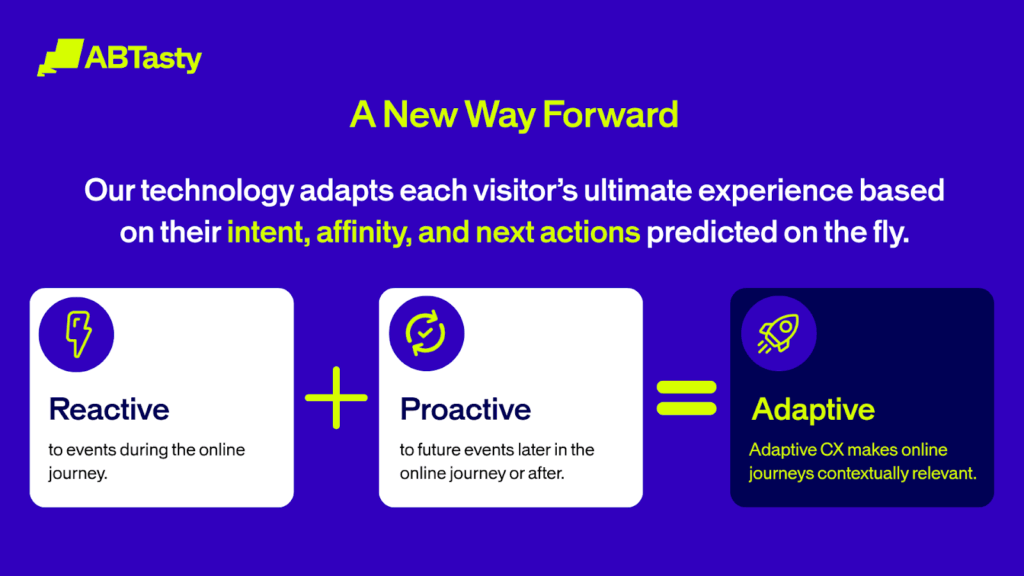
AB Tasty is thrilled to announce that Wandz.ai, the real-time adaptive customer experience platform, is officially joining our family. This partnership is more than just a handshake; it’s a leap forward for digital experience optimization everywhere, and it’s a game-changer for personalization.

Why Wandz? Because Digital Journeys Are Messy—and We’re Here for It

Everyone in the digital space knows that online journeys are rarely straightforward. 

Visitors pop in mid-funnel, juggle multiple tabs, bounce between devices, and most of them remain anonymous. In fact, 90% of your website visitors don’t log in or leave a data trail. But here’s the twist: when brands adapt to these unpredictable behaviors, conversion rates can skyrocket.

Wandz was built for this challenge. Wandz technology captures real-time intent signals—every click, scroll, and session pattern—and instantly adapts the experience for each visitor, even if they’re flying under the radar. Think of it as a digital guide that knows what your customers want before they do.  The key to personalizing for your visitors is also understanding your users’ intent. That’s how you’ll know what to offer them next.

What’s in It for You, Personally?

With Wandz joining AB Tasty, we’re not just adding new features—we’re unlocking a whole new level of personalization and engagement for your brand.

  • Real-Time, Adaptive Personalization: Wandz’s AI engine processes 3.7 trillion data points every month, serving 1.5 billion users worldwide, and generates predictions in just 20 milliseconds. That’s not just fast—it’s lightning fast.
  • Proven Results: Leading brands in the digital e-commerce space have already seen up to 15% revenue lift, 13.6% higher conversion rates, and 65% more content engagement thanks to Wandz’s adaptive approach.
  • Full Transparency: No black-box mysteries here. Every data point is transparent, accessible, and actionable—so your teams can make informed decisions with confidence.

The Power of Predictive and Generative AI—Now in Your Hands

By bringing Wandz’s AI into the AB Tasty platform, we’re giving you the tools to move from reactive to proactive. Imagine forecasting behaviors, segmenting intelligently, and building models tailored to your unique customer journeys—all while optimizing every touchpoint in real time.

With generative AI, you can create and refine personalized experiences at scale, ensuring every interaction feels relevant and unique. Predictive AI keeps fine-tuning performance and outcomes, so you’re always ahead of the curve.

What’s Next? Smarter, More Adaptive Experiences for All

This isn’t just an acquisition—it’s a partnership for the future. By combining Wandz’s talent and technology with AB Tasty’s global reach and culture of innovation, we’re setting a new standard for adaptive personalization and customer experience.

Soon we’ll be rolling out these new AI-powered capabilities across all our clients. Whether you’re in marketing, product, or development, you’ll have the tools to analyze, strategize, and optimize like never before—transforming simple interactions into adaptive experiences that drive real business results.

Welcome to the Next Chapter of Digital Experience

So, what’s new at AB Tasty? Only the most advanced, adaptive, and engaging digital experiences on the market. We can’t wait to see what you’ll create with the combined power of Wandz and AB Tasty.

Stay tuned—this is just the beginning. The future of customer experience is adaptive, and we’re excited to help you lead the way.

Article

4min read

Improved GA4 Connector Empowers Data-Driven Brands

At AB Tasty, we know that data is the foundation of every great digital experience.

Getting accurate analytics shouldn’t feel like a guessing game. But with privacy changes, ad blockers, and browser updates, even the best teams have struggled to get clean, reliable data from their websites. We’ve seen it firsthand, and we knew something had to change.

That’s why we revamped our Google Analytics 4 (GA4) connector. It’s designed to make your data more trustworthy—without adding complexity for your team.

Designed for Today’s Data Challenges

Modern websites face a host of obstacles when it comes to data collection: privacy settings, ad blockers, and evolving browser behaviors can all impact the reliability of analytics. Our new GA4 connector is built to address these realities head-on, ensuring your data remains consistent and actionable.

Server-to-Server Integration for Unmatched Reliability

By sending events directly from AB Tasty’s servers to Google Analytics, we bypass the common pitfalls of browser-based tracking. This means your analytics are less susceptible to blockers and delays, and you can trust the numbers you see.

What’s Different?

The real shift is under the hood. Instead of sending data from the browser (where it can get blocked or delayed), our connector sends events straight from AB Tasty’s servers to GA4. This cuts out the usual noise and means your numbers in AB Tasty and GA4 finally match up.

We’ve made a significant enhancement to how data flows between AB Tasty and GA4. Instead of sending two separate hits—one to AB Tasty and another to GA4— to each platform, we now collect events once in AB Tasty, enrich them, and seamlessly send that unified data to GA4. 

This streamlined process ensures that what you see in AB Tasty is exactly what appears in GA4—delivering near-instant updates and even greater accuracy across your reports.

Easy Set Up

You don’t need to be an engineer to get started. With our connector, setup is straightforward—just add your GA4 Measurement ID and API Secret in AB Tasty, and you’re good to go. No need for complex engineering or code changes, so your teams can focus on what matters: driving results.

Built for Scale, Backed by Experts

This connector is more than a technical upgrade—it’s a reflection of AB Tasty’s commitment to innovation and customer success. Our Data and DevOps teams have prioritized both reliability and scalability, with a target of less than 7% data discrepancy between AB Tasty and GA4. We’re setting a new benchmark for the industry.

Competitive Advantage: Why AB Tasty Leads the Way

AB Tasty is the first to address client-side tracking while following Google best practices with server-to-server hits sending.

AB Tasty’s early investment means clients benefit from a proven, reliable solution today. Whether you’re looking to solve existing analytics challenges or simply want the peace of mind that comes with trustworthy data, AB Tasty’s GA4 connector is here to help you succeed.

The Bottom Line

For brands that rely on data accuracy, the stakes are high. Data accuracy drives smarter decisions, better customer experiences, and stronger business outcomes.

FAQs

What is the new GA4 connector from AB Tasty?

The GA4 connector is an enhanced integration that allows you to send enriched event data directly from AB Tasty’s servers to Google Analytics 4, ensuring more reliable and accurate analytics.

How does the new connector improve data accuracy?

By sending a single, enriched event from AB Tasty to GA4, the connector eliminates discrepancies and delays that can occur with separate browser-based hits. This ensures that your data in both platforms matches and is updated in near real-time.

Why is server-to-server integration important?

Server-to-server integration bypasses common issues like ad blockers, privacy settings, and browser limitations that can interfere with client-side tracking. This means your analytics are more complete and trustworthy.

Is the connector difficult to set up ?

It’s very easy! Setting up the GA4 connector is straightforward. All you need to do is add your GA4 Measurement ID and API Secret in AB Tasty—no complex engineering or code changes required.

Article

5min read

RevenueIQ: The New Standard for Proving ROI in Digital Experimentation

Let’s be honest: proving ROI in digital experimentation has often felt like trying to solve a Rubik’s Cube, blindfolded.

For years, teams have been stuck in the same old debate: “This test boosted conversion rate, but AOV dropped!” or “AOV is up, but conversions are down!” Which is better? Who’s right? And most importantly, how do you convince your CFO that your work is actually making money?

The Problem: Conflicting Metrics and Stalled Decisions

Picture a scenario familiar to many: one campaign variation boosts conversion rate but lowers AOV, while another does the opposite. Which is the real winner? Without a unifying metric, teams get stuck in endless debates, unable to confidently declare a result or justify next steps. As a result, a significant share of tests end up in limbo, and existing ROI dashboards suffer from low trust and adoption.

In fact, last year, 8% of A/B test campaigns with a transaction goal ended up in the dreaded “no decision” zone.

The Solution: RevenueIQ

Now, imagine a world where you don’t have to choose between conversion rate and AOV. Where you don’t have to explain why one number went up while the other went down. Where you can walk into any meeting and say, “Here’s a monthly revenue projection of exactly how much revenue this campaign is generating.”

That’s the world RevenueIQ is building.

RevenueIQ is AB Tasty’s new, patented metric—a result of years of R&D and statistical expertise. It takes all the messy, contradictory data and boils it down to one simple, business-focused number: monthly revenue projection. No more “unclear winners.” No more “conversion vs. AOV” dilemmas; just a clear, actionable view of financial impact.

Key Benefits of RevenueIQ:

  • Always a Clear Revenue View: RevenueIQ provides a direct view of revenue per visitor and per month, making it easy to see the financial impact of every campaign.
  • Eliminates “Unclear Winners”: Even in complex scenarios, RevenueIQ provides a definitive view of which variation delivers the most revenue. This means no more inconclusive campaigns and a significant reduction in “undecidable” tests.
  • Delivers faster results: Combining the two key metrics into a single revenue metric gives actionable insights more quickly than analyzing them separately
  • ROI Projections Before Going Live: Teams can now project the revenue impact of a campaign before full rollout, complete with confidence intervals for best- and worst-case scenarios. This transparency helps avoid surprises and supports more strategic decision-making.
  • Strong Differentiation: RevenueIQ is powered by a unique, patented Bayesian engine, ensuring robust, trustworthy results. It’s not just another metric—it’s the business truth.

Revenue IQ is able to give a confidence interval around the revenue prediction, allowing for better business decisions. With a clear best-case and worst-case scenario, business decisions are easier than just having one number without knowing its accuracy.

The best thing? No competitor currently offers an equivalent.

How RevenueIQ Works

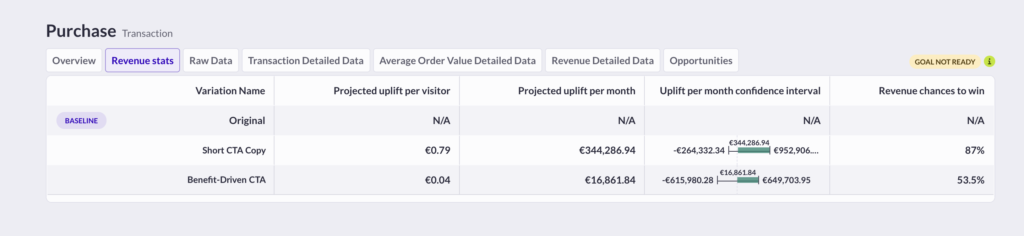
RevenueIQ is deeply integrated into the AB Tasty platform. When a campaign runs, users see not just conversion rates or AOV, but a clear revenue uplift per visitor and per month. The system visually identifies the winning variation, quantifies the potential monthly revenue gain, and provides confidence intervals to show the range of possible outcomes.

For example, if a variation is projected to generate an additional €4,000 per month, RevenueIQ will also display the probability of this outcome and the range (e.g., €2,700–€6,000). This approach is both rigorous and transparent, helping teams make decisions with confidence.

More RevenueIQ resources:

  • Curious to know more details? Please read our RevenueIQ Whitepaper for a full scientific explanation written by our Data Scientist, Hubert Wassner.
  • Not a data scientist, but still want to know more? Read our RevenueIQ article that goes into more detail about the practical use of RevenueIQ.

The Impact: Confidence, Adoption, and Differentiation

With RevenueIQ, AB Tasty is setting a new standard for ROI proof in digital experimentation. The result is a simple, credible, and actionable narrative for QBRs and renewal discussions—one that restores confidence, drives adoption, and differentiates AB Tasty in a crowded market.

Revenue IQ lowers the risk of making business mistakes by focusing on revenue.

For teams tired of inconclusive debates and complex metrics, RevenueIQ offers a new way forward: clear, credible, and actionable proof of business impact.

FAQs about RevenueIQ

What is RevenueIQ?

RevenueIQ is a proprietary, patented metric developed by AB Tasty that provides a clear, unified view of how much revenue your digital experiments generate—expressed as revenue per visitor, per month.

How trustworthy are RevenueIQ’s numbers?

RevenueIQ is powered by a patented Bayesian engine, ensuring robust, transparent, and reliable calculations. All projections include confidence intervals, so you always see the full picture.

How does RevenueIQ handle complex or ambiguous test results?

RevenueIQ always provides a clear winner based on revenue impact, even in cases where traditional metrics are inconclusive (due to their lack of integration). This means fewer “stuck” campaigns and more decisive action.

How is RevenueIQ different from what competitors offer?

No competitor currently offers a metric like RevenueIQ. While others may provide “all-purpose” statistics for each individual metric, only RevenueIQ gives you a patented, unified view of revenue per visitor, per month—making it a true differentiator.

Article

4min read

Progressive Rollout: The Safer, Smarter Way to Launch New Features

Let’s face it: launching a new feature can feel a bit like walking a tightrope. You want to wow your users with something fresh, but you also know that even the best-tested releases can have surprises lurking in the shadows.

What if you could take the nerves—and the guesswork—out of your next launch? That’s exactly what Progressive Rollout is here to do.

The Problem: Risky Feature Releases and Manual Workarounds

Picture this: your team has spent weeks (maybe months!) building a new payment system, a revamped booking flow, or a shiny loyalty program. You’re excited. But you’re also worried. What if something breaks? What if a bug slips through and impacts thousands of users at once?

This is the reality for most product and engineering teams. The stakes are high, and the pressure to “get it right” is real. That’s why so many teams look for ways to release new features gradually—starting with a small group, then expanding as confidence grows.

But here’s the catch: most teams don’t have a dedicated tool for this. Instead, they put together workarounds using feature toggles or A/B tests. These methods can work, but they’re clunky, manual, and often lack the visibility and reassurance everyone craves during a launch.

The Solution: Progressive Rollout

Progressive Rollout is our answer to this all-too-common problem. It’s a feature designed not just for the tech wizards, but for everyone involved in a product launch—product managers, developers, and even business stakeholders.

How does it work?
With Manual Progressive Delivery, you can schedule your feature release in stages. Maybe you want to start with 10% of your users, then move to 20%, 40%, and so on. You decide the pace and the audience.

Our platform handles the rest, automatically exposing more users to your new feature at each step. And at every stage, you get clear notifications and a visual overview, so you always know exactly what’s happening.

What Makes Progressive Rollout a Game-Changer?

1. It’s Actually Easy to Use
Let’s be honest: many “enterprise” tools are intimidating. Progressive Rollout is different. The interface is clean, intuitive, and designed so that anyone can set up a rollout in just a few clicks. No advanced segmentation or manual math required. Whether you’re a seasoned developer or a product manager new to experimentation, you’ll feel right at home.

2. Full Control, Full Reassurance
One of the biggest anxieties during a rollout is not knowing what’s happening. With Progressive Rollout, you get a crystal-clear view of your rollout plan: who’s getting the feature, when, and how much of your audience is included at each step. Email notifications keep you in the loop, so you’re never caught off guard. This transparency isn’t just a nice-to-have—it’s a must for teams who want to move fast and stay safe.

3. Flexible for Any Scenario
Want to give early access to your VIPs or most loyal users? Easy. Need to roll out to everyone, but in controlled increments? No problem. You can import user lists, target specific segments, or just roll out to “all users” in stages. Progressive Rollout adapts to your needs, not the other way around.

Fun Fact: Most Teams Aren’t Doing This—Yet

Here’s something surprising: despite the clear benefits, most teams aren’t using dedicated progressive rollout tools. They’re still relying on toggles and A/B tests, or even manual processes. Why? Because until now, the tools have been too complex or not user-friendly enough. Progressive Rollout changes that, making safe, staged launches accessible to everyone.

The Bottom Line: Launch With Confidence

Progressive Rollout isn’t just another feature—it’s peace of mind for your next big launch. By making gradual releases easy, transparent, and accessible, we help you reduce risk, improve user experience, and focus on what matters: delivering value to your customers.

Article

6min read

A New Era for Product Recommendations: AB Tasty’s Semantic Proximity Algorithm

Picture this: You’ve just launched a new product line, or maybe you’re gearing up for a themed campaign–think “Back to School” or a limited-edition collection. You want your customers to discover the right products, right away. But traditional recommendation engines are stuck waiting for data to trickle in, leaving you with generic suggestions and little control over what’s shown. For merchandisers, that’s not just frustrating – it’s a missed opportunity.

That’s exactly why we built AB Tasty’s Semantic Proximity Algorithm. Instead of relying on yesterday’s sales numbers, this new approach lets you craft relevant, business-driven product recommendations from day one. Whether you’re working with a fresh catalog or pivoting to a new campaign, you get the flexibility and control you need –  no waiting, no guesswork, just smarter recommendations tailored to your goals.

From Algorithm to Merchandiser Mindset

Most recommendation engines are just that – algorithms. But AB Tasty’s Semantic Proximity Algorithm is a paradigm shift: it allows your catalog to think like a merchandiser. Instead of passively waiting for data, it actively understands your products, your campaigns, and your business goals – giving your catalog a brain and putting you in the driver’s seat from day one.

Why Rethink Product Recommendations?

Traditional recommendation algorithms are built on analytics data – think Google Analytics or similar tools. These models can be effective, but only if you have enough historical data. What happens when you launch a new product line, a new brand, or want to activate a campaign around a specific theme (“Back to School,” “Harry Potter,” etc.)? Merchandisers are often left with little control, unable to quickly tailor recommendations to their business needs or campaign goals.

This is the challenge that inspired us to create the Semantic Proximity Algorithm: a tool that empowers merchandisers to launch relevant, business-driven recommendations instantly, even with zero historical data.

The Semantic Proximity Algorithm: A New Approach

AB Tasty’s Semantic Proximity Algorithm takes a fundamentally different approach. Instead of relying on analytics data, it leverages advanced Natural Language Processing (NLP) to analyze the attributes of your product catalog – such as product name, description, category, price, and even custom metafields. This allows the algorithm to identify products that are semantically related, regardless of whether they have ever been purchased together.

Key benefits include:

  • Fast ROI: Campaign launches, upsell, cross-sell
  • Instant setup: No need to wait for analytics data to accumulate. Recommendations are ready as soon as your catalog is integrated.
  • Total flexibility: Merchandisers can select and combine any catalog attributes to build strategies and adapt recommendations on the fly for seasonal events or business needs.
  • Full control and transparency: Preview and iterate on recommendations before going live, ensuring relevance and quality.
  • Adaptable for all expertise levels: The algorithm is as simple or as advanced as you need. SMBs can start with just product names, while advanced users can leverage dozens or even hundreds of attributes for highly customized strategies.

Previously, recommendation engines were blind – waiting for clicks, sales, and data to slowly trickle in before making generic suggestions.

AB Tasty’s Semantic Proximity Algorithm delivers instant, intelligent recommendations. As soon as your catalog is integrated, the algorithm “thinks” like a merchandiser – making smart, relevant suggestions based on product meaning, not just past behavior. No more waiting, no more guesswork -just instant, business-driven recommendations that adapt as quickly as you do

Unique on the Market

No direct competitor offers this level of semantic attribute selection and flexibility. While some platforms provide basic attribute filtering, none allow merchandisers to select and combine multiple catalog attributes to fine-tune recommendations. Most competitors still rely mainly on analytics and sales data, with only limited semantic analysis capabilities.

This is a true differentiator for AB Tasty, empowering clients to adapt their recommendation strategies to their unique business challenges – without being held back by data limitations.

How Does It Work in Practice?

The Semantic Proximity Algorithm is designed to be both powerful and user-friendly. Merchandisers can choose which attributes to use for each recommendation strategy  â€“ whether that’s product name, description, category, price, or even custom fields like Shopify metafields. This means you can tailor recommendations for specific campaigns, themes, or business objectives.

For example, during a seasonal campaign, you might want to recommend products that share a common theme in their description or category, even if they’ve never been purchased together before. Or, you might want to upsell higher-value editions of a product by prioritizing price as an attribute. The algorithm allows you to preview and iterate on these strategies instantly, making it easy to adapt to changing business needs.

Upsell, Cross-sell, and Beyond with Product Recommendations

The flexibility of the Semantic Proximity Algorithm opens up new possibilities for both upsell and cross-sell strategies. For upsell, you can recommend alternative products that are not only similar but also more profitable. For cross-sell, you can suggest complementary items that enhance the customer’s purchase – think of the classic “chewing gum at the checkout” scenario, but tailored to your specific catalog and business logic.

This approach is especially valuable for businesses with large or complex catalogs, or those looking to launch new products and campaigns quickly. It’s also ideal for expert merchandisers who want granular control over their recommendation logic, as well as for SMBs seeking a fast, easy-to-implement solution.

Fun Facts & Unique Highlights

  • Did you know? This is the first AB Tasty algorithm that works directly from your product catalog–no analytics setup required.
  • Unique on the market: No competitor allows merchandisers to select and combine multiple catalog attributes (including custom metafields) to fine-tune recommendations.
  • Instant preview: You can see and iterate on your recommendation strategies before going live – perfect for adapting to seasonal campaigns or special events.
  • Scalable: The algorithm can handle catalogs with hundreds or even thousands of attributes per product.

Conclusion

AB Tasty’s Semantic Proximity Algorithm ushers in a new era for product recommendations: faster, more flexible, and more intelligent. Whether you’re an SMB looking for simplicity or an enterprise seeking advanced personalization, this innovation lets you transform the customer experience and maximize revenue from day one.

FAQs

Is this just another “black box” AI?

No. You control which attributes are used, can preview results, and iterate. It’s transparent and customizable.

What if the recommendations don’t make sense?

You can filter and combine attributes, set thresholds, and preview results before going live. Early feedback has led to rapid improvements.

Does it work with custom fields?

Yes! Any attribute in your catalog, including custom metafields, can be used.

Article

5min read

Why AB Tasty is the Best Digital Optimization Partner for Your Team

When it comes to digital optimization, you need more than just another tool—you need a partner who understands that every test is a step toward something bigger.

Here’s why AB Tasty stands out as the best choice for teams ready to go further.

1. Built for Everyone: Usability That Empowers Your Whole Team

Your team shouldn’t need a developer for every test.

AB Tasty’s visual editor and theme builder work for everyone—whether you’re a marketer launching your first campaign or a developer building complex experiments. Our intuitive interface means less time wrestling with code and more time testing bold ideas.

Real autonomy, real speed. Teams choose AB Tasty because their previous platform kept them dependent on developers for basic changes. With AB Tasty, they launched campaigns faster and gave their marketing team the independence they needed to iterate quickly.

Widgets that work, right out of the box. Our widget library comes from 12+ years of real-world testing. These aren’t just features—they’re battle-tested components that help teams launch more campaigns with confidence. While newer platforms struggle with bugs and limitations, our widgets deliver reliability when you need it most.

The result? Teams report launching more experiments, faster, with fewer roadblocks.

2. Honest Pricing: What You See Is What You Get

No surprise costs. No hidden fees. Just transparent value.

What starts as your solution stays your complete solution—no extra charges for essential features down the line.

Predictable partnerships. Many platforms lure teams in with low initial costs, then surprise them with steep price increases or essential features locked behind add-ons. We believe in honest pricing from day one, so you can plan your growth without budget surprises.

Long-term value that makes sense. When you calculate total cost over time—including all the features you’ll actually need—AB Tasty delivers better value. We’re smarter for the long haul.

3. Support That Actually Supports You

Customer Success Managers focused on your success—not their sales quotas.

Our CSMs are dedicated to helping you win, not upselling you. They’re your advocates, your strategic partners, and your go-to team for navigating complex challenges. No conflicts of interest, no hidden agendas—just genuine support.

Local expertise when you need it. Whether you’re based in the UK, France, or anywhere else we serve, you get local support that understands your market, your timezone, and your specific needs. Responsive, knowledgeable, and always ready to help.

Technical reliability you can count on. We handle complex environments—React, SPAs, multi-brand setups—with confidence. Teams praise our ability to navigate technical challenges that trip up other platforms. When your setup is complicated, we make the solution simple.

4. Technical Excellence: Speed, AI, and Innovation That Works

The fastest tag performance in the industry. Speed matters. Our script loads at 482ms—significantly faster than major competitors. That means better user experience, higher conversion rates, and tests that don’t slow down your site.

AI that’s transparent and ready now. Our Engagement Level and EmotionsAI aren’t black boxes or future promises—they’re transparent, advanced tools you can use today. While others demo concepts, we deliver production-ready AI that helps you understand and optimize for real user behavior.

Built for modern web experiences. Single Page Applications and dynamic content work out-of-the-box with AB Tasty. No manual workarounds, no technical debt—just seamless experimentation on the modern web.

5. Proven Reliability: Trust Built Over Time

Platform stability when it matters most. Experimentation requires trust—in your data, your results, and your platform. We deliver consistent reliability while others struggle with bugs, lost test goals, and API limitations that disrupt your work.

Recognition from the experts. Industry analysts consistently recognize AB Tasty for experiment design, pricing flexibility, community support, and market presence. But the real validation comes from our customers—teams who’ve switched to us and never looked back.

Real client wins, real results. Multiple teams have moved from other platforms to AB Tasty for better usability, superior support, and genuine value. They stay because we help them accomplish more together.

The Best Choice for Teams Ready to Go Further

What makes AB Tasty the best digital optimization partner isn’t just one thing—it’s how everything works together. Intuitive tools that empower your whole team. Transparent pricing that respects your budget. Support that genuinely cares about your success. Technical excellence that delivers results. And proven reliability you can count on.

We’re not just another platform. We’re your collaborators, your advocates, and your partners in every bold test you want to try.

Other tools might promise quick wins or flashy features. We deliver something better: a partnership that grows with you, technology that works when you need it, and a team that believes in your potential.

Try, learn, iterate—then go again. That’s how teams grow, and that’s how we help you get there.

Ready to experience the difference? Let’s build something better—together.