
Article

8min read

How to Rebrand Your Site Using Experimentation in 5 Easy Steps


We invited Holly Ingram from our partner REO Digital, an agency dedicated to customer experience, to talk us through the practical ways you can use experimentation when doing a website redesign.


Testing entire site redesigns at once is a huge risk. You can throw away years of incremental gains in UX and site performance if executed incorrectly. Not only do they commonly fail to achieve their goals, but they even fail to achieve parity with the old design. That’s why an incremental approach, where you can isolate changes and accurately measure their impact, is most commonly recommended. That being said, some scenarios warrant an entire redesign, in which case, you need a robust evidence-driven process to reduce this risk. 

Step 1 – Generative research to inform your redesign 

With the level of collaboration involved in a redesign, changes must be based on evidence over opinion. There’s usually a range of stakeholders who all have their own ideas about how the website should be improved and despite their best intentions, this process often leads to prioritizing what they feel is important, which doesn’t always align with customers goals. The first step in this process is to carry out research to see your site as your customers do and identify areas of struggle. 

It’s important here to use a combination of quantitative research (to understand how your users behave) and qualitative research (to understand why). Start off broad using quantitative research to identify areas of the site that are performing the worst, looking for high drop-off rates and poor conversion. Now you have your areas of focus you can look at more granular metrics to gather more context on the points of friction. 

  • Scroll maps: Are users missing key information as it’s placed below the fold?  
  • Click maps: Where are people clicking? Where are they not clicking? 
  • Traffic analysis: What traffic source(s) are driving users to that page? What is the split between new and returning? 
  • Usability testing: What do users that fit your target audience think of these pages? What helps them? What doesn’t help? 
  • Competitor analysis: How do your competitors present themselves? How do they tackle the same issues you face?

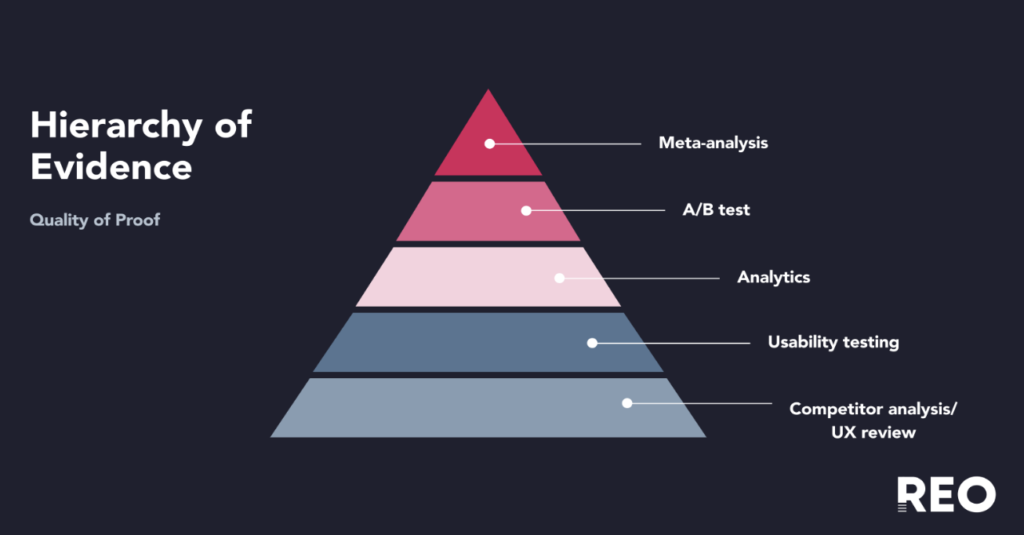
Each research method has its pros and cons. Keep in mind the hierarchy of evidence. The hierarchy is visually depicted as a pyramid, with the lowest-quality research methods (having the highest risk of bias) at the bottom of the pyramid and the highest-quality methods (with the lowest risk of bias) at the top. When reviewing your findings place more importance on findings that come from research methods at the top of the pyramid, e.g. previous A/B test findings, than research methods that come at the bottom (e.g. competitor analysis).
Step 2 – Prioritise areas that should be redesigned 

Once you have gathered your data and prioritised your findings based on quality of evidence you should be able to see which areas you should focus on first. You should also have an idea of how you might want to improve them. This is where the fun part comes in, and you can start brainstorming ideas. Collaboration is key here to ensure a range of potential solutions are considered. Try and get the perspective of designers, developers, and key stakeholders. Not only will you discover more ideas, but you will also save time as everyone will have context on the changes. 

 It’s not only about design. A common mistake people make when doing a redesign is purely focussing on design and making the page look ‘prettier’, and not changing the content. Through research, you should have identified content that performs well and content that could do with an update. Make sure you consider this when brainstorming.

Step 3 – Pilot your redesign through a prototype 

It can be tempting once you’ve come up with great ideas to go ahead and launch it. Even if you are certain this new page will perform miles better than the original, you’d be surprised how often you’re wrong. Before you go ahead and invest a lot of time and money into building your new page,  it’s a good idea to get some outside opinions from your target audience. The quickest way to do this is to build a prototype and get users to feedback on it through user testing. See what their attention is drawn to, if there’s anything on the page they don’t like or think is missing. It’s much quicker to make these changes before launching than after. 

Step 4 – A/B test your redesign to know with statistical certainty whether your redesign performs better

Now you have done all this work conducting research, defining problem statements, coming up with hypotheses, ideating solutions and getting feedback, you want to see if your solution actually works better!

However, do not make the mistake of jumping straight into launching on your website. Yes it will be quicker, but you will never be able to quantify the difference all of that work has made to your key metrics. You may see conversion rate increase, but how do you know that is due to the redesign and nothing else (e.g. a marketing campaign or special offer deployed around the same time)? Or worse, you see conversion rate decrease and automatically assume it must be down to the redesign when in fact it’s not.  

With an A/B test you can rule out outside noise. For simplicity, imagine the scenario where you have launched your redesign, in reality it made no difference, but due to a successful marketing campaign around the same time you saw an increase in conversion rate. If you had launched your redesign as an A/B test, you would see no difference between the control and the variant, as both would have been equally affected by the marketing campaign. 

This is why it is crucial you A/B test your redesign. Not only will you be able to quantify the difference your redesign has made, you will be able to tell whether that change is statistically significant. This means you will know the probability that the change you have seen is due to the test rather than random chance. This can help minimize the risk that redesigns often bring.  

Once you have your results you can then choose whether you want to launch the redesign to 100% of users, which you can do through the testing tool whilst you wait for the changes to be hardcoded. As the redesign has already been built for the A/B test, hardcoding it should be a lot quicker!

Step 5 – Evaluative research to validate how your redesign performs 

Research shouldn’t stop once the redesign has been launched. We recommend conducting post-launch analysis to evaluate how it performs over time. This especially helps measure metrics that have a longer lead time, such as returns or cancellations.

Redesigns are susceptible to visitor bias, as rolling out a completely different experience can be shocking and uncomfortable for your returning visitors. They are also susceptible to novelty effects, where users can react more positively just because something looks new and shiny. In either case, these effects will wear off with time. That’s why it’s important to monitor performance after it’s deployment.

Things to look out for: 

  • Bounce rate 
  • On-page metrics (scroll rate, click-throughs, heatmap, mouse tracking) 
  • Conversion rate 
  • Funnel progression 
  • Difference in performance for new vs. returning users 

Redesigns are all about preparation. It may seem thorough, but it should be with such a big change. If you follow the right process you could dramatically increase sales and conversions, but if done wrong you may have wasted some serious time, effort and money. Don’t skimp on the research and keep a user-centred approach and you could create a website your audience loves.

If you want to find out more about how a redesign worked with a real customer of AB Tasty’s and REO – take a look at this webinar where La Redoute details how they tested the new redesign of their site and sought continuous improvement.

Article

10min read

Overcoming the Challenges of Customer Experience Optimization (EXO): Strategies and Tips

The combination of intense competition and rapidly evolving technology requires businesses to prioritize customer experience optimization (EXO) to stay ahead.

The fact is, the cost of poor customer experience is high. According to a PWC survey, a third of consumers would stop using a brand they love after just one negative interaction.

In this article, we look at some common EXO challenges businesses face and strategies to overcome them, including practical insights for enhancing the digital customer experience. By implementing these strategies, you can ensure your business takes a customer-centric approach to optimizing the customer experience and building brand loyalty.

What is customer experience optimization?

Customer experience optimization refers to everything your business does to improve the customer’s experience at every touchpoint of their journey. It entails deeply understanding your customer’s needs and preferences and leveraging these insights to develop strategies to improve their interactions with your brand.

In today’s digital landscape, customers are flooded with choices across most categories of products and services. As a result, if you fail to deliver a positive experience, your customers will simply switch to a competing brand. EXO strategies are designed to keep customers satisfied and engaged, build brand loyalty, and reduce churn.

With EXO, it’s essential to deliver an experience that surpasses customers’ expectations and provides them with a seamless experience across all touchpoints and channels, including websites, mobile apps, social media accounts, and email.

Why customer experience optimization is important for business growth

First and foremost, EXO streamlines the customer’s path to purchase. Offering customers a frictionless, positive journey that makes it easy for them to get the information they need to make their purchase decision increases the likelihood of a successful transaction.

Customer EXO is also an ideal way to foster brand loyalty. Customers who have a superior experience with your brand are more likely to become repeat buyers. In fact, Deloitte research shows that a high-quality customer experience makes a customer 2.7 times more likely to keep buying from a business than a low-quality experience. Not only are customers likely to return, but they will also pay up to 16% more for an optimized experience, depending on the product category.

Positive experiences also trigger word-of-mouth recommendations, enhancing your brand’s reputation. Recommendations don’t entail the same acquisition costs as traditional marketing methods, making EXO a comparatively cost-effective way to boost sales and expand your customer base.

Challenges and solutions to customer experience optimization

We recognize there are challenges associated with EXO that may prevent you from delivering the best possible experience to your customers. Here are some strategies for tackling these challenges.

Compiling the right data for accurate measurements

Thanks to the various technologies available, we can now access a wealth of customer data. If interpreted and applied correctly, this data offers invaluable insights into the customer experience and ways of enhancing it. However, the sheer volume of these metrics can lead to information overload. It’s easy to get distracted or focus on the wrong metrics, including pitfall metrics that result in misinformed conclusions when considered in isolation. Some metrics, like cost of sale or cross-sell, don’t offer any meaningful insights into EXO.

The solution is to prioritize the metrics that matter. These include:

  • Customer satisfaction (CSAT)
  • Churn rates
  • Bounce rates
  • Customer retention rates
  • Trust ratings, conversion rates
  • Customer journey analytics
  • Repeat purchases
  • Customer segmentation
  • Buyer personas
  • Customer lifetime value (CLV)
  • Net Promoter Score (NPS)

Keep in mind that this data may reside in various departments across your organization, extending beyond sales, marketing and customer service teams. Consolidating this disparate data is essential to gaining a complete and accurate picture of customer experience in your organization.

Developing the right hypothesis

Experimentation is a powerful tool for delivering an optimal customer experience. However, randomly choosing hypotheses to test is a quick route to overlooking optimization opportunities. For example, simply changing the location of the checkout button in response to low conversion rates may not address the underlying issue.

Effective experimentation requires a considered approach to develop the correct hypothesis to test. The first step is identifying the genuine problem that needs addressing. You can then formulate a hypothesis to test to uncover the root cause of the issue and identify a concrete solution.

This second step requires a critical analysis of your current site and potential improvements from the customers’ perspective. Sourcing a range of data, including web analytics, user tests, and customer feedback, can help guide your analysis. You should also consider the psychology of the prospective customer. Getting in their mindset can guide you toward potential solutions.

If we continue with our checkout button example, the core issue may extend beyond conversion rates to a more specific concern: high cart abandonment rates. A hypothesis with a potential solution to this issue may be: “Many customers exit the checkout process at step 5. Reducing the number of steps in our checkout process will reduce cart abandonment rates.” Crafting the right hypothesis is a crucial step in optimizing customer experience.

Resource constraints

Ideally, businesses would have unlimited resources to optimize customer experiences. However, in reality, EXO usually competes with numerous other business priorities, all vying for time, human, and financial resources. Investing in the infrastructure and technology for EXO can be costly. Hiring and retaining people with the necessary skills to implement effective optimization strategies can also be challenging. Data availability is another common resource issue, especially for businesses with lower website traffic who feel they need more information for optimization.

The good news is you can tailor your approach to EXO to align with your business’s circumstances. This includes starting with smaller-scale initiatives and expanding your efforts as your optimization strategies gain traction or more resources become available. Another option is to outsource EXO by engaging the services of a specialist customer optimization agency.

It’s also important to note that high-volume website traffic isn’t a prerequisite for identifying and implementing effective EXO strategies. While a 95% confidence level is often cited as the magic number for drawing meaningful conclusions from your data, you can still optimize websites with less traffic by lowering the threshold. Focusing on optimizing the top of the funnel, where there may be greater opportunities for EXO, is another useful strategy for low-traffic websites.

Related: How to Deal with Low Traffic in CRO

ROI tunnel vision

When a company works on improving EXO, its main focus is often on immediate ROI in experimentation, sometimes at the expense of other important metrics. While the bottom line is relevant to any business strategy, focusing solely on the financial outcomes of EXO can lead to short-sighted decision-making, jeopardizing longer-term sustainability.

Prioritizing immediate revenue gain above all else can negatively impact the customer experience. It makes it almost impossible for an organization to adopt a customer-centric approach, a fundamental requirement for EXO.

Experimentation isn’t always neatly quantifiable. Experiments are typically run within complex contexts and are influenced by various factors. While measuring ROI may be a criterion when assessing the success of your EXO strategies, it should never be the primary or sole one. Instead, shift your focus to the broader impacts of experimentation, like its contribution to better, more informed decision-making.

Not knowing what your customers want

A customer-centric approach is vital to delivering an optimal customer experience. This requires an in-depth understanding of who your customers are, their needs and preferences, and precisely how they interact with your business. Without these insights, you’re in the dark about what your customers want and when they want it. Meeting—let alone exceeding—customers’ expectations is impossible.

Customer wants and needs are as diverse as your customer base. They may include a desire for higher levels of personalization, seamless online interactions, flexible payment methods, faster customer support, better pricing, transparency or increased mobile responsiveness. What customers want also evolves as their journey progresses. If your EXO strategies fail to align with your customers’ desires at the right time, they are unlikely to succeed.

While there are several ways to uncover customer needs and wants, one of the most effective methods is to go directly to the source. Collecting customer feedback at each stage of their journey—via surveys, feedback management systems, voice of customers, and user interviews—lets you tailor your EXO strategies and deliver the improvements your customers truly want.

Lack of customer experience optimization tools

Successful EXO relies on quality data for insights into your customers’ journeys, needs, and preferences. To achieve this, you need the right tools to capture and analyze accurate data in real-time across multiple channels.

These tools include:

  • CRM systems to track historical customer behavior and relationships
  • Customer feedback and survey software to collect individual feedback for deep insights into what your customers want
  • Behavior analytics tools to interpret your customers’ interactions and identify opportunities to improve their experience
  • Experience optimization platforms, like AB Tasty, to design and deliver digital omnichannel customer experiences via experimentation

It’s important to review the needs of your EXO strategy and the available tools to choose the ones that best align with your customers’ and business’s needs.

How to improve the digital customer experience

  • Observe user behavior patterns

A robust data foundation lets you observe and understand customer behavior individually and identify broader trends. This information serves as a compass, guiding your EXO efforts.

Customer insights may reveal common pain points. For example, a frequently searched term may highlight a topic customers want more information on. These insights also help you understand how users interact with your site, how that impacts their journey, and potential improvements. Is there a particular page where customers spend a lot of time? Do they have to navigate back and forth between pages to find the details they need?

Behavior patterns also reveal customer preferences, allowing you to personalize touchpoints within their journey and identify what triggers customers to complete their purchases. These insights serve as a powerful foundation for developing EXO strategies and hypotheses for A/B testing.

  • Create a journey map to understand the user flow

EXO involves optimizing every customer interaction with your business. A common pitfall to avoid when addressing EXO is approaching it narrowly from a specific touchpoint rather than considering the entire customer journey. A holistic approach delivers more impactful insights that help you manage the root causes of negative or neutral customer experiences.

A great way to understand your user flow and how it affects customer experience is to create a journey map, setting out every touchpoint during the buying process. Navigate your website like a potential customer, systematically stepping through the user journey and noting your findings.

Putting yourself in the customer’s shoes ensures you don’t overlook opportunities to optimize customer experience. This approach can also help you prioritize measures that make the user journey frictionless, improving customer experience and your site’s performance.

  • Develop a roadmap and set parameters to measure success

The list of available EXO measures is endless. Aligning your strategy with your business objectives requires a considered approach to implementation. To do this, develop a roadmap that outlines your goals, priorities and milestones.

A well-structured roadmap gives your team clear direction and deadlines while guiding decision-making to ensure the greatest impact on customer experience. Everyone understands their role, guaranteeing accountability in the execution of your EXO strategy. It also helps you prioritize initiatives and allocate the necessary resources, including EXO tools.

In your roadmap, you can list the specific metrics and KPIs to measure and track your progress. Doing this allows you to evaluate your EXO measures, readjust those not delivering results, and build on particularly effective ones.

  • Experiment and re-challenge your past experiments

You’re unlikely to unlock the secret to EXO in your organization on the first try. Instead, you’ll need to run continuous experiments using different hypotheses to find the right combination of strategies that work for your business.

The customer experience is dynamic and your EXO strategies should be equally adaptable. Continue to review your previous experiments to see what more you can learn from them, especially in terms of customer preferences. This process enables you to identify emerging opportunities for improvement and further refine the measures with the most impact to deliver an optimal customer experience.

Customer-centric EXO

Acknowledging that your business must prioritize customer EXO is just the beginning. By understanding the customer experience definition, common EXO challenges, and practical strategies to overcome them, you have the tools to deliver a consistently superior customer experience. By integrating a customer-centric ethos with your EXO strategies, you’ll not only strengthen current customer relationships but also cultivate enduring brand loyalty.

Article

10min read

Rollout and Deployment Strategies: Definition, Types and the Role of Feature Flags in Your Deployment Process

How teams decide to deploy software is an important consideration before starting the software development process.

This means long before the code is written and tested, teams need to carefully plan the deployment process of new features and/or updates to ensure it won’t negatively impact the user experience.

Having an efficient deployment strategy in place is crucial to ensure that high quality software is delivered in a quick, efficient, consistent and safe way to your intended users with minimal disruptions. 

In this article, we’ll go through what a deployment strategy is, the different types of strategies you can implement in your own processes and the role of feature flags in successful rollouts.

What is a deployment strategy?

A deployment strategy is a technique adopted by teams to successfully launch and deploy new application versions or features. It helps teams plan the processes and tools they will need to successfully deliver code changes to production environments.

It’s worth noting that there’s a difference between deployment and release though they may seem synonymous at first.

Deployment is the process of rolling out code to a test or live environment while release is the process of shipping a specific version of your code to end-users and the moment they get access to your new features. Thus, when you deploy software, you’re not necessarily exposing it to real-world users yet.

In that sense, a deployment strategy is the process by which code is pushed from one environment into another to test and validate the software and then eventually release it to end-users. It’s basically the steps involved in making your software available to its intended users.

This strategy is now more important than ever as modern standards for software development are demanding and require continuous deployment to keep up with customer demands and expectations.

Having the right strategy will help ensure minimal downtime and will reduce the risk of errors or bugs so users get the best experience possible. Otherwise, you may find yourself dealing with high costs due to the number of bugs that need to be fixed resulting in disgruntled customers which could severely damage your company’s reputation.

Types of deployment strategies

Teams have a number of deployment strategies to choose from, each with their own pros and cons depending on the team objectives. 

The deployment strategy an organization opts for will depend on various factors including team size, the resources available as well as how complex your software is and the frequency of your deployment and/or releases.

Below, we’ll highlight some of the most common deployment strategies that are often used by modern software development and DevOps teams.

Recreate deployment

Image 

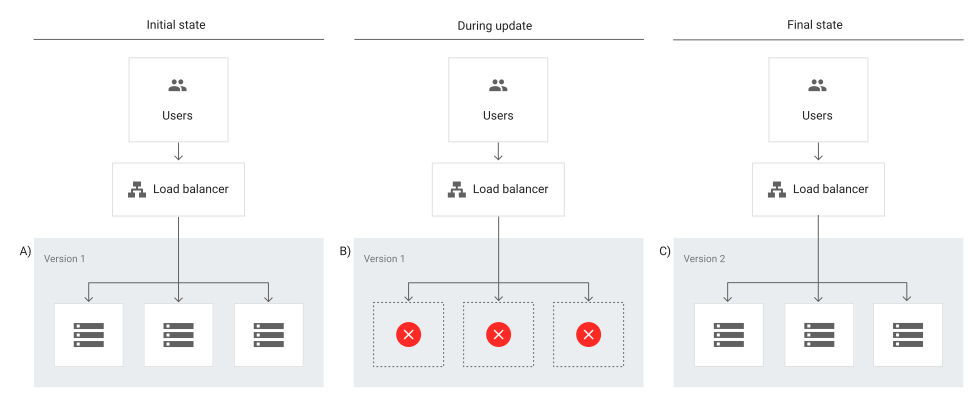
A recreate deployment strategy involves developers scaling down the previous version of the software to zero in order to be removed and to upload a new one. This requires a shutdown of the initial version of the application to replace it with the updated version.

This is considered to be a simple approach as developers only have to deal with one scaling process at a time without having to manage parallel application deployments. 

However, this strategy will require the application to be inaccessible for some time and could have significant consequences for users. This means it’s not suited for critical applications that always need to be available and works best for applications that have relatively low traffic where some downtime wouldn’t be a major issue.

Rolling deployment

Image

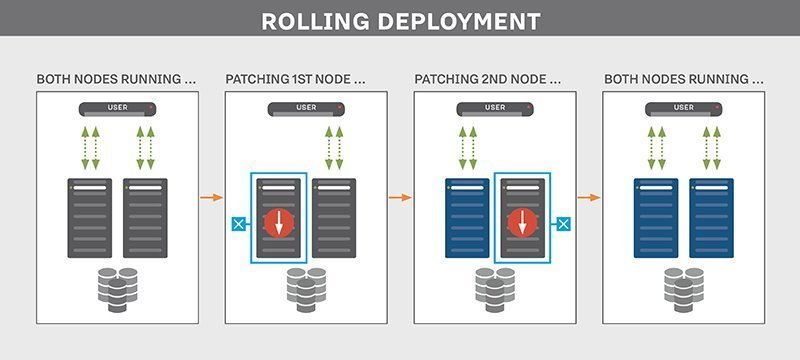
A rolling deployment strategy involves updating running instances of the software with the new release.

Rolling deployments offer more flexibility in scaling up to the new software version before scaling down the old version. In other words, updates are rolled out to subsets of instances one at a time; the window size refers to the number of instances updated at a time. Each subset is validated before the next update is deployed to ensure the system remains functioning and stable throughout the deployment process.

This type of deployment strategy prevents any disruptions in service as you would be updating incrementally- which means less users are affected by any faulty update- and you would then direct traffic to the updated deployment only after it’s ready to accept traffic. If any issue is detected during a subset deployment, it can be stopped while the issue is fixed. 

However, rollback may be slow as it also needs to be done gradually.

Blue-green deployment

Image


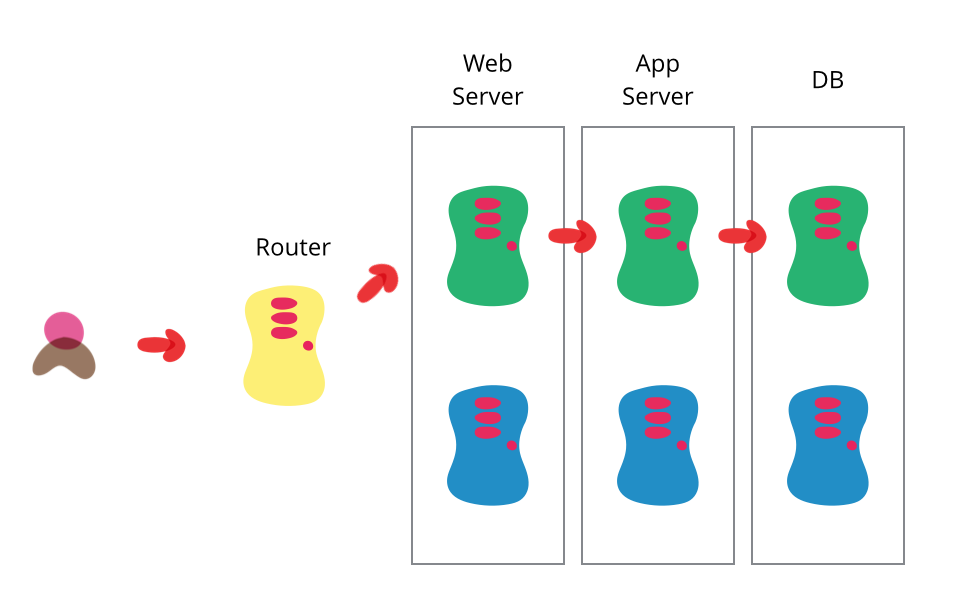
A blue/green deployment strategy consists of setting up two identical production environments nicknamed “blue” and “green” which run side-by-side, but only one is live, receiving user transactions. The other is up but idle.

Thus, at any given time, only one of them is the live environment receiving user transactions- the green environment that represents the new application version. Meanwhile, teams use the idle blue system as the test or staging environment to conduct the final round of testing when preparing to release a new feature.

Afterwards, once they’ve validated the new feature, the load balancer or traffic router switches all traffic from the blue to the green environment where users will be able to see the updated application.

The blue environment is maintained as a backup until you are able to verify that your new active environment is bug-free. If any issues are discovered, the router can switch back to the original environment, the blue one in this case, which has the previous version of the code.

This strategy has the advantage of easy rollbacks. Because you have two separate but identical production environments, you can easily make the shift between the two environments, switching all traffic immediately to the original (for example, blue) environment if issues arise.

Teams can also seamlessly switch between previous and updated versions and cutover occurs rapidly with no downtime. However, for that reason this strategy may be very costly as it requires a well-built infrastructure to maintain two identical environments and facilitate the switch between them.

Canary deployment

Image

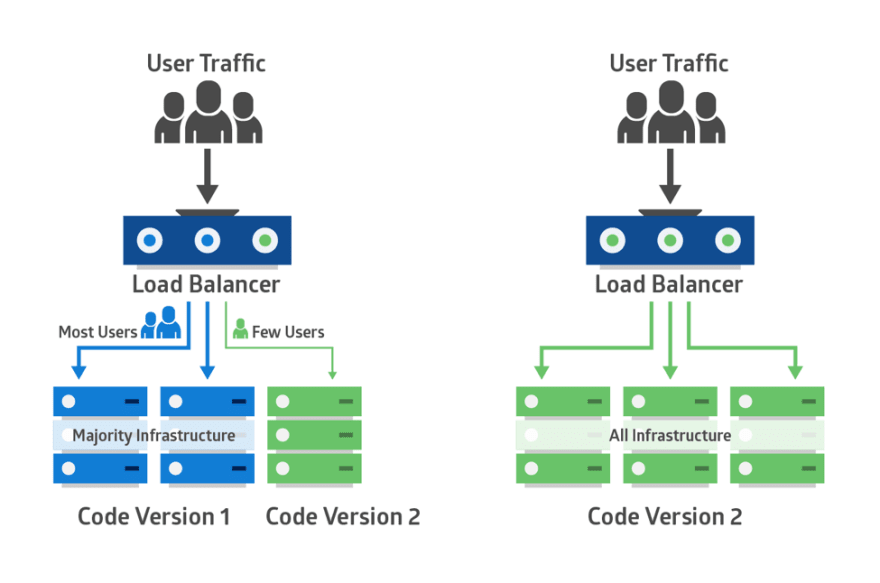
Canary deployments is a strategy that significantly reduces the risk of releasing new software by allowing you to release the software gradually to a small subset of users. Traffic is directed to the new version using a load balancer or feature flag while the rest of your users will see the current version 

This set of users identifies bugs, broken features, and unintuitive features before your software gets wider exposure. These users could be early adopters, a demographically targeted segment or a random sample.

Therefore, you start testing on this subset of users then as you gain more confidence in your release, you widen your release and direct more users to it. 

Canary deployments are less risky than blue-green deployments as you’re adopting a gradual approach to deployment instead of switching from one environment to the next. 

While blue/green deployments are ideal for minimizing downtime and when you have the resources available to support two separate environments, canary deployments are better suited for testing a new feature in a production environment with minimal risk and are much more targeted.

In that sense, canary deployments are a great way to test in production on live users but on a smaller scale to avoid the risks of a big bang release. It also has the advantage of a fast rollback should anything go wrong by redirecting users back to the older version.

However, deployment is done in increments, which is less risky but also requires monitoring for a considerable period of time which may delay the overall release.

A/B testing

Image

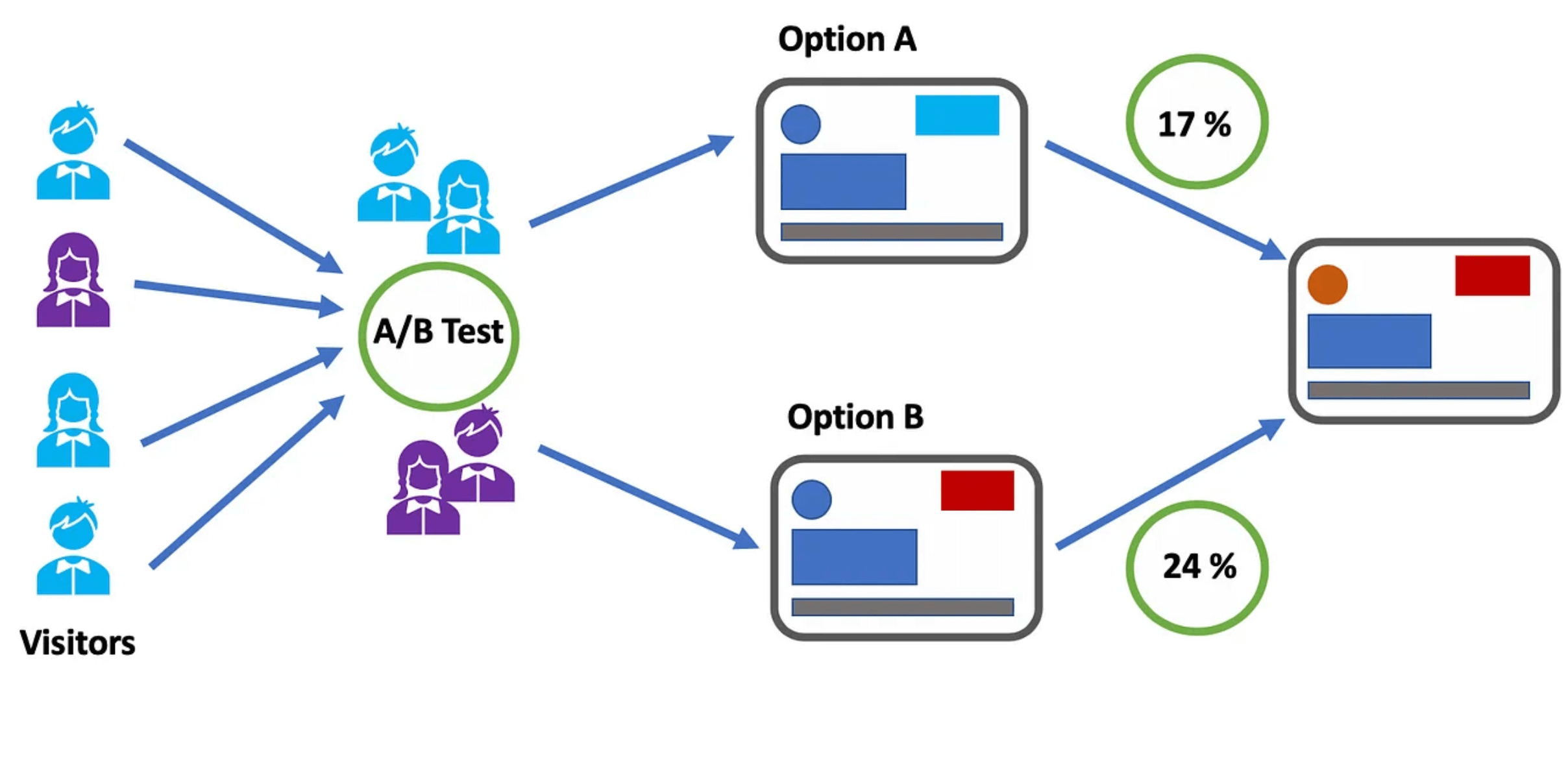
A/B testing, also known as split testing, involves comparing two versions of a web page or application to see which performs better, where variations A and B are presented randomly to users. In other words, users are divided into two groups with each group receiving a different variation of the software application. 

A statistical analysis of the results then determines which version, A or B, performed better, according to certain predefined indicators.

A/B testing enables teams to make data-driven decisions based on the performance of each variation and allows them to optimize the user experience to achieve better outcomes.

It also gives them more control over which users get access to the new feature while monitoring results in real-time so if results are not as expected, they can redirect visitors back to the original version.

However, A/B tests require a representative sample of your users and they also need to run for a significant period to gain statistically significant results. Moreover, determining the validity of the results without a knowledge database can be challenging as several factors may skew these results.

AB Tasty is an example of an A/B testing tool that allows you to quickly set up tests with low code implementation of front-end or UX changes on your web pages, gather insights via an ROI dashboard, and determine which route will increase your revenue.

Feature flags: The perfect companion for your deployment strategy

Whichever deployments you choose, feature flags can be easily implemented with each of these strategies to improve the speed and quality of the software delivery process while minimizing risk. 

By decoupling deployment from release, feature flags enable teams to choose which set of users get access to which features to gradually roll out new features.

For example, feature flags can help you manage traffic in blue-green deployments as they can work in conjunction with a load balancer to manage which users see which application updates and feature subsets. 

Instead of switching over entire applications to shift to the new environment all at once, you can cut over to the new application and then gradually turn individual features on and off on the live and idle systems until you’ve completely upgraded.

Feature flags also allow for control at the feature level. Instead of rolling back an entire release if one feature is broken, you can use feature flags to roll back and switch off only the faulty feature. The same applies for canary deployments, which operate on a larger scale. Feature flags can help prevent a full rollback of a deployment; if anything goes wrong, you only need to kill that one feature instead of the entire deployment. 

Feature flags also offer great value when it comes to running experiments and feature testing by setting up A/B tests by allowing for highly granular user targeting and control over individual features.

Put simply, feature flags are a powerful tool to enable the progressive rollout and deployment of new features, run A/B testing and test in production. 

What is the right deployment strategy?

Choosing the right deployment strategy is imperative to ensure efficient, safe and seamless delivery of features and updates of your application to end-users. 

There are plenty of strategies to choose from, and while there is no right or wrong choice, each comes with its own advantages and disadvantages. 

Whichever strategy you opt for will depend on several factors according to the needs and objectives of the business as well as the complexity of your application and the type of targeting you’re looking to implement i.e whether you want to test a new feature on a select group of users to validate it before a wider release.

No matter your deployment strategy, AB Tasty is your partner for easier and low risk deployments with Feature Experimentation and Rollouts. Sign up for a free trial to explore how AB Tasty can help you improve your software delivery processes.

Article

9min read

A/B, Split or Multivariate Test: How to Choose the Right One

In the fast-paced world of digital marketing, settling for anything less than the best user experience is simply not an option.

Every marketing strategy has room for improvement and unlocking more comes from recognizing hidden opportunities.

With analytics data and a little bit of creativity, you can uncover some valuable insights on how to optimize your conversion rate on your website or campaign landing pages. However, achieving structured and streamlined data from your assumptions requires diligent testing.

Marketing professionals have steadily used different testing methodologies such as A/B testing, split testing, multivariate testing and multipage testing to increase conversion rates and enhance digital performance.

Experimenting and testing are essential as they eliminate opinions and bias from the decision-making process, ensuring data-driven decisions.

With the availability of many diverse testing options, it can be challenging to find your starting point. In this article, we’ll dive into the specifics of different forms of testing to help you navigate this testing landscape.

What is A/B testing?

flowers-366155_1280

A/B testing is a method of website optimization where you are comparing two versions of the same page: variation A and variation B.  For the comparison, it’s common to look at the conversion rates and metrics that matter to your business (clicks, page views, purchases, etc) while using live traffic.

It’s also possible to do an A/B/C/D test when you need to test more than two content variations. The A/B/C/D method will allow you to test three or more variations of a page at once instead of testing only one variation against the control version of the page.

When to use A/B tests?

A/B tests are an excellent method to test radically different ideas for conversion rate optimization or small changes on a page.

A/B testing is the right method to choose if you don’t have a large amount of traffic to your site. Why is this? A/B tests can deliver reliable data very quickly, without a large amount of traffic. This is a great approach to experimentation to maximize test time to achieve fast results.

If you have a high-traffic website, you can evaluate the performance of a much broader set of variations. However, there is no need to test 20 different variations of the same element, even if you have adequate traffic. It’s important to have a strategy when approaching experimentation.

Want to start testing? AB Tasty is the best-in-class experience optimization platform that empowers you to create a richer digital experience – fast. From experimentation to personalization, this solution can help you activate and engage your audience to boost your conversions.

Split testing vs A/B testing

A/B tests and split tests are essentially the same concept.

“A/B” refers to the two variations of the same URL where changes are made “live” using Javascript on the original page. SaaS tools that provide you with a visual editor, like AB Tasty, allow you to create these changes quickly without technical knowledge.

Meanwhile, “split” refers to the traffic redirection towards one variation or another, each hosted on its own URL and fully redesigned in the code.

You can consider A/B tests to work the same as split tests.

The variation page may differ in many aspects depending on the testing hypothesis you put forth and your industry goals (layout, design, pictures, headlines, sub-headlines, calls to action, offers, button colors, etc.).

In any case, the number of conversions on each page’s variation is compared once each variation gets enough visitors.

In A/B tests, the impact of the design as a whole is tracked, not individual elements – even though many design elements might be changed on variations simultaneously.

TIP: Keep in mind that testing is all about comparing the performances of variations. It’s recommended not to make too many changes between the control and variation versions of the page at the same time. You should limit the number of changes to better understand the impact of the results. In the long term, a continuous improvement process will lead to better and lasting performance.

What is multivariate testing?

magic-cube-378543_1280

Multivariate tests or multi-variant tests are the same as A/B tests in their core mechanism and philosophy. The difference is that multivariate testing allows you to compare a higher number of variables and the interactions between each other. In other words, you can test and track changes to multiple sections on a single page.

For multivariate testing, you need to identify a few key page sections and then create variations for those sections specifically. You aren’t creating variations of a whole page as you do while A/B testing.

TIP: Use multivariate testing when several element combinations on your website or landing page are called into question.

Multivariate testing reveals more information about how these changes to multiple sections interact with one another. In multivariate tests, website traffic is split into each possible combination of a page – where the effectiveness of the changes is measured.

It’s very common to use multivariate testing to optimize an existing website or landing page without making a significant investment in redesign.

Although this type of testing can be perceived as an easier way of experimentation – keep in mind that multivariate testing is more complicated than traditional A/B testing.

Multivariate tests are best suited for more advanced testers because they give many more possibilities of combinations for visitors to experience on your website. Too many changes on a page at once can quickly add up. You don’t want to be left with a very large number of combinations that must be tested.

Multivariate test example

Let’s say that you’ve decided to run a multivariate test on one of your landing pages. You choose to change two elements on your landing page. On the first variation, you swap an image for a video, and on the second variation, you swap the image for a slider.

For each page variation, you add another version of the headline. This means that now you have three versions of the main content and two versions of the headline. This is equal to six different combinations of the landing page.

Image Video Slider
Headline 1 Combination 1 Combination 2 Combination 3
Headline 2 Combination 4 Combination 5 Combination 6

After only changing two sections, you quickly have six variations. This is where multivariate testing can get tricky.

When to use multivariate testing?

Multivariate tests are recommended for sites with a large amount of daily traffic. You will need a site with a high volume of traffic to test multiple combinations, and it will take a longer time to obtain meaningful data from the test.

mvt
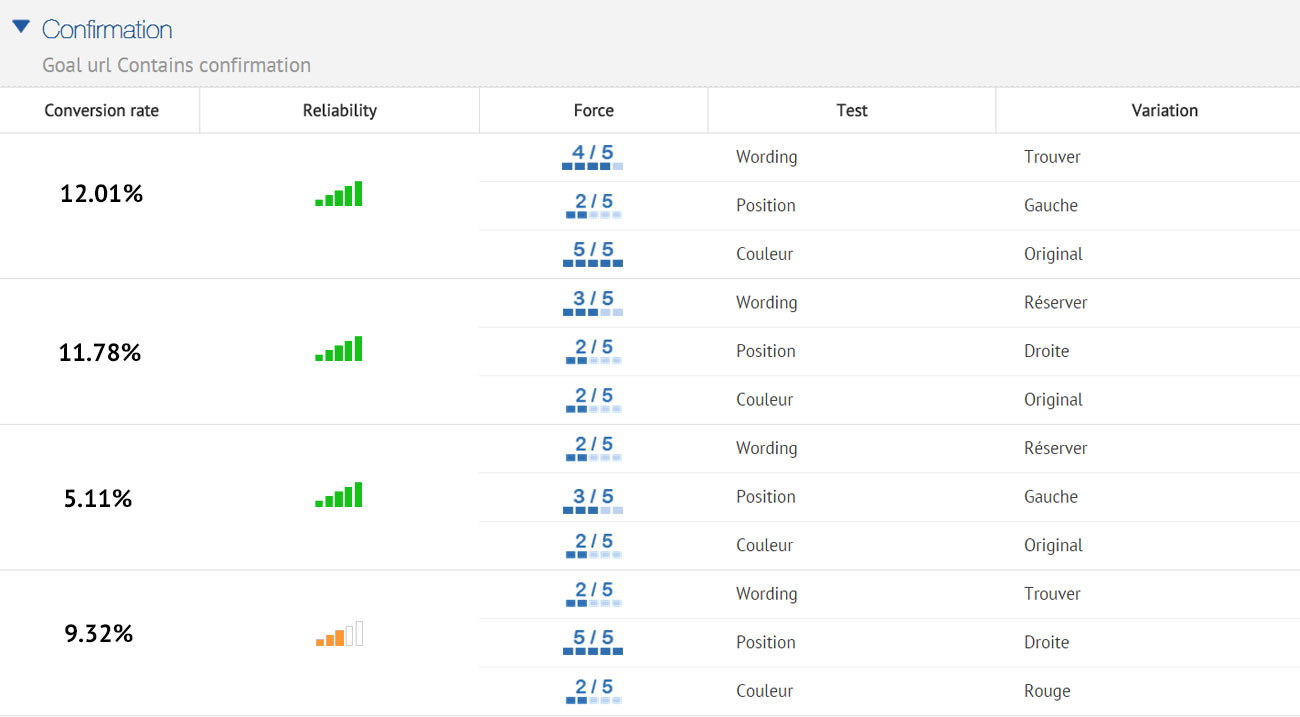
AB Tasty’s reporting allows you to weigh up each element’s impact on the conversion rate

The multivariate testing method will allow you to incrementally improve an existing design, while the test results can be used to apply to a larger website or landing page redesign.

What is multipage testing?

Multipage testing is an experimentation method similar to standard A/B testing. As we’ve discussed, in A/B testing, changes can be made to one specific page or to a group of pages.

If the changed element appears on several pages, you can choose whether or not to change it on each page. However, if the element is on several pages but it’s not identical, appears at a different place or has a different name, you’ll have to set up a multipage test.

Multipage tests allow you to implement changes consistently over several pages. 

This means that multipage tests allow you to link together variations of different pages and are especially useful when funnel testing.

In multipage tests, site visitors are funneled into one funnel version or the other. You need to track the way visitors interact with the different pages they are shown so you can determine which funnel variation is the most effective.

You must ensure that the users see a consistent variation of changes throughout a set of pages. This is key to getting usable data and allows one variation to be fairly tested against another.

Multipage test example

Let’s say you want to conduct a multipage test with a free shipping coupon displayed in the funnel at different places. You want to run the results of this test against the original purchase funnel without a coupon.

For example, you could offer visitors a free shipping coupon on a product category page – where they can see “Free shipping over €50” as a static banner on the page. Once the visitor adds a product to the shopping cart,  you can show them a new dynamic message according to the cart balance – “Add €X to your cart for free shipping”.

In this case, you can experiment with the location of the message (near the “Proceed to checkout” button, near the “Continue shopping” button, near the shipping cost for his order or somewhere else) and with the call-to-action variations of the message.

This kind of test will help you understand visitors’ purchase behavior better – i.e. how does the placement of a free shipping coupon reduce shopping cart abandonment and increase sales? After enough visitors come to the end of the purchase funnel through the different designs, you will be able to compare the effect of design styles easily and effectively.

How to test successfully?

Remember that the pages being tested need to receive substantial traffic so the tests will give you some relevant data to analyze.

Whether you use A/B testing, split testing, multivariate testing or multipage testing to increase your conversion rate or performance, remember to use them wisely.

Each type of test has its own requirements and is uniquely suited to specific situations, with advantages and disadvantages.

Using the proper test for the right situation will help you get the most out of your site and the best return on investment for your testing campaign. Even though testing follows a scientific method, there is no need for a degree in statistics when working with AB Tasty.

Related: How long you should run a test and how statistics calculation works with AB Tasty

Article

8min read

10 Generative AI Ideas for Your Experimentation Roadmap

Artificial intelligence has been a recurring theme for decades. However, it’s no longer science fiction – it’s a reality.

Since OpenAI launched its own form of generative AI, ChatGPT, in November 2022, the world has yet to stop talking about its striking capabilities. It’s particularly fascinating to see just how easy it is to get results after interacting with this bot which is comprised of deep-learning algorithms for natural language processing.

Even Google quickly followed by launching a new and experimental project, Gemini, to revolutionize its own Search. By harnessing the power of generative AI and the capacity of large language models, Google is seeking to take its search process to the next level.

Given the rapid growth of this technological advancement over the past few months, it’s time that we talk about generative AI in the context of A/B testing and experimentation.

Whether you’re curious about how AI can impact your experiments or are ready for inspiration we’ll discuss some of our ideas around using AI for A/B testing, personalization, and conversion rate optimization.

What is generative AI?

Generative AI is a type of artificial intelligence that doesn’t have programming limitations, which allows it to generate new content (think ChatGPT). Instead of following a specific, pre-existing dataset, generative AI learns from indexing extensive data, focusing on patterns and using deep learning techniques and neural networks to create human-like content based on its learnings.

The way algorithms capture ideas is similar to how humans gather inspiration from previous experiences to create something unique. Based on the large amounts of data used to craft generative AI’s learning abilities, it’s capable of outputting high-quality responses that are similar to what a human would create.

However, some concerns need to be addressed:

  • Biased information: Artificial intelligence is only as good as the datasets used to train it. Therefore if the data used to train it has biases, it may create “ideas” that are equally biased or flawed.
  • Spreading misinformation: There are many concerns about the ethics of generative AI and sharing information directly from it. It’s best practice to fact-check any content written by AI to avoid putting out false or misleading information.
  • Content ownership: Since content generated with AI is not generated by a human, can you ethically can claim it as your own idea? In a similar sense, the same idea could potentially be generated elsewhere by using a similar prompt. Copywriting and ownership are then called into question here.
  • Data and privacy: Data privacy is always a top-of-mind concern. With the new capabilities of artificial intelligence, data handling becomes even more challenging. It’s always best practice to avoid using sensitive information with any form of generative AI.

By keeping these limitations in mind, generative AI has the potential to streamline processes and revolutionize the way we work – just as technology has always done in the past.

10 generative AI uses for A/B testing

In the A/B testing world, we are very interested in how one can harness these technological breakthroughs for experimentation. We are brainstorming a few approaches to re-imagine the process of revolutionizing digital customer experiences to ultimately save time and resources.

Just like everyone else, we started to wonder how generative AI could impact the world of experimentation and our customers. Here are some ideas, some of them concrete and some more abstract, as to how artificial intelligence could help our industry:

DISCLAIMER: Before uploading information into any AI platform, ensure that you understand their privacy and security practices. While AI models strive to maintain a privacy standard, there’s always the risk of data breaches. Always protect your confidential information. 

1. Homepage optimization

Your homepage is likely the first thing your visitors will see so optimization is key to staying ahead of your competitors. If you want a quick comparison of content on your homepage versus your competitors, you can feed this information into generative AI to give it a basis for understanding. Once your AI is loaded with information about your competitors, you can ask for a list of best practices to employ to make new tests for your own website.

2.  Analyze experimentation results

Reporting and analyzing are crucial to progressing on your experimentation roadmap, but it’s also time-consuming. By collecting a summary of testing logs, generative AI can help highlight important findings, summarize your results, and potentially even suggest future steps. Ideally, you can feed your A/B test hypothesis as well as the results to show your thought process and organization. After it recognizes this specific thought process and desired results, it could aid in generating new test hypotheses or suggestions.

3. Recommend optimization barriers

Generative AI can help you prioritize your efforts and identify the most impactful barriers to your conversion rate. Uploading your nonsensitive website performance data gathered from your analytics platforms can give AI the insight it needs into your performance. Whether it suggests that you update your title tags or compress images on your homepage, AI can quickly spot where you have the biggest drop-offs to suggest areas for optimization.

4. Client reviews

User feedback is your own treasure trove of information for optimization. One of the great benefits of AI that we already see is that it can understand large amounts of data quickly and summarize it. By uploading client reviews, surveys and other consumer feedback into the database, generative AI can assist you in creating detailed summaries of your users’ pain points, preferences and levels of satisfaction. The more detailed your reviews – the better the analysis will be.

5. Chatbots

Chatbots are a popular way to communicate with website visitors. As generative AI is a large language model, it can quickly generate conversational scripts, prompts and responses to reduce your brainstorming time. You can also use AI to filter and analyze conversations that your chatbot is already having to determine if there are gaps in the conversation or ways to enhance its interaction with customers.

6. Translation

Language barriers can limit a brand that has a presence in multiple regions. Whether you need translations for your chatbot conversations, CTAs or longer form copy, generative AI can provide you with translations in real time to save you time and make your content accessible to all zones touched by your brand.

7. Google Adwords

Speed up brainstorming sessions by using generative AI to experiment with different copy variations. Based on the prompts you provide, AI can provide you with a series of ideas for targeting keywords and creating copy with a particular tone of voice to use with Google Adwords. Caution: be sure to double-check all keywords proposed to verify their intent. 

8. Personalization

Personalized content can be scaled at speed by leveraging artificial intelligence to produce variations of the same messages. By customizing your copy, recommendations, product suggestions and other messages based on past user interactions and consumer demographics, you can significantly boost your digital consumer engagement.

9. Product Descriptions

Finding the best wording to describe why your product is worth purchasing may be a challenge. With generative AI, you can get more ambitious with your product descriptions by testing out different variations of copy to see which version is the most promising for your visitors.

10. Predict User Behavior

Based on historical data from your user behavior, generative AI can predict behavior that can help you to anticipate your next A/B test. Tailoring your tests according to patterns and trends in user interaction can help you conduct better experiments. It’s important to note that predictions will be limited to patterns interpreted by past customer data collected and uploaded. Using generative AI is better when it’s used as a tool to guide you in your decision-making process rather than to be the deciding force alone.

The extensive use of artificial intelligence is a new and fast-evolving subject in the tech world. If you want to leverage it in the future, you need to start familiarizing yourself with its capabilities.

Keep in mind that it’s important to verify the facts and information AI generates just as you carefully verify data before you upload. Using generative AI in conjunction with your internal experts and team resources can assist in improving ideation and efficiency. However, the quality of the output from generative AI is only as good as what you put in.

Is generative AI a source of competitive advantage in A/B testing?

The great news is that this technology is accessible to everyone – from big industry leaders like Google to start-ups with a limited budget. However, the not-so-great news is that this is available to everyone. In other words, generative AI is not necessarily a source of competitive advantage.

Technology existing by itself does not create more value for a business. Rather, it’s the people driving the technology who are creating value by leveraging it in combination with their own industry-specific knowledge, past experiences, data collection and interpretation capabilities and understanding of customer needs and pain points.

While we aren’t here to say that generative AI is a replacement for human-generated ideas, this technology can definitely be used to complement and amplify your already-existing skills.

Leveraging generative AI in A/B testing

From education to copywriting or coding – all industries are starting to see the impact that these new software developments will have. Leveraging “large language models” is becoming increasingly popular as these algorithms can generate ideas, summarize long forms of text, provide insights and even translate in real-time.

Proper experimentation and A/B testing are at the core of engaging your audience, however, these practices can take a lot of time and resources to accomplish successfully. If generative AI can offer you ways to save time and streamline your processes, it might be time to use it as your not-so-secret weapon. In today’s competitive digital environment, continually enhancing your online presence should be at the top of your mind.

Want to start optimizing your website? AB Tasty is the best-in-class experience optimization platform that empowers you to create a richer digital experience – fast. From experimentation to personalization, this solution can help you activate and engage your audience to boost your conversions.

Article

10min read

How Long Should You Run an A/B Test?

One of the most popular questions when starting with experimentation is: How long should an A/B test run before you can draw conclusions from it?

Determining the ideal A/B test duration can be a challenge for most businesses. You have to factor in your business cycles, traffic flow, the sample size needed and be aware of other business campaigns.

Even if you reach your sample size in a few days… is it okay to end your test then? How long should you really wait?

In this article, we will discuss potential mishaps if your testing cycle is too short, give insights into which factors you need to consider and share advice on finding the best duration for your A/B tests.

Looking for fast statistical reliability? At AB Tasty, we provide a free A/B test duration calculator, which also has capabilities for a sample size calculator.

What happens if you end an A/B test too soon?

The underlying question is a crucial one and can be summed up as follows: At what point can you end a test that appears to be yielding results?

The answer depends on the relevance of the analysis and on the actual benefits of the test.

In fact, it’s not all that unusual to see tests yield good results during the trial phase and no longer see those results once the modifications are introduced.

In most cases, a disappointing observation of this nature comes down to an error during the trial phase: the test was ended too soon and the results at that point were misleading.

Let’s look at an example that illustrates the nature of the problem.

How long to run an A/B test

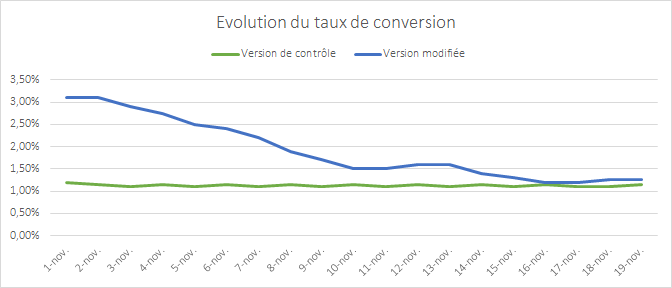
The graph above shows the change in the conversion rate of two versions of a page that were the subject of a test. The first version appears to break away and perform extremely well. The discrepancy between the two versions is gradually eroded as time goes by – two weeks after the starting point there’s hardly any observable difference at all.

This phenomenon where the results converge is a typical situation: the modification made does not have a real impact on conversion.

There is a simple explanation for the apparent outperformance at the start of the test:  it’s unusual for the samples to be representative of your audience when the test starts. You need time for your samples to incorporate all internet user profiles, and therefore, all of their behaviors.

If you end the test too soon and allow your premature data to be the deciding factor, your results will quickly show discrepancies.

How to determine the duration of your A/B test

Now that the problem has been aired let’s have a look at how you can avoid falling into this trap.

The average recommended A/B testing time is 2 weeks, but you should always identify key factors relevant to your own conversion goals to determine the best length for a test that will meet your goals.

Let’s discuss several criteria you should use as a foundation to determine when you can trust the results you see in your A/B testing:

  • The statistical confidence level
  • The size of the sample
  • The representativeness of your sample
  • The test period and the device being tested

1.  The statistical confidence level

All A/B testing solutions show a statistical reliability indicator that measures the probability of the difference in the results observed between each sample not being a matter of chance.

This indicator, which is calculated using the Chi-squared test, is the first indicator that should be used as a basis. It is used by statisticians to assert that a test is deemed reliable when the rate is 95% or higher.  So, it is acceptable to make a mistake in 5% of cases and for the results of the two versions to be identical.

Yet, it would be a mistake to use this indicator alone as a basis for assessing the appropriate time to end a test.

For the purposes of devising the conditions necessary to assess the reliability of a test, this is not sufficient. In other words, if you have not reached this threshold then you cannot make the decision. Additionally, once this threshold has been reached, you still need to take certain precautions.

It’s also important to understand what the Chi-squared test actually is: a way of rejecting or not rejecting what is referred to as the null hypothesis.

This, when applied to A/B testing, is when you say that two versions produce identical results (therefore, there’s no difference between them).

If the conclusion of the test leads you to reject the null hypothesis then it means that there is a difference between the results.

However, the test is in no way an indication of the extent of this difference.

Related: A/B Test Hypothesis Definition, Tips and Best Practices

2. The size of the sample

There are lots of online tools that you can use to calculate the value of Chi-squared by giving, as the input parameters, the four elements necessary for its calculation (within the confines of a test with two versions).

AB Tasty can provide you with our own sample size calculator for you to find the value of Chi-squared.

By using this tool, we have taken an extreme example in order to illustrate this exact problem.

Sample size required for A/B testing

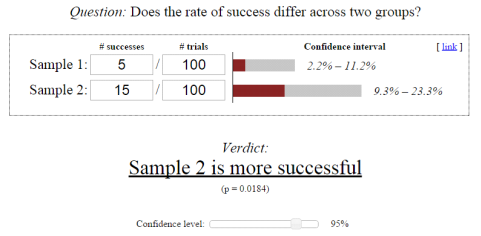
In this diagram, the Chi-squared calculation suggests that sample 2 converts better than sample 1 with a 95% confidence level. Having said that, the input values are very low indeed and there is no guarantee that if 1,000 people were tested, rather than 100, you would still have the same 1 to 3 ratio between the conversion rates.

It’s like flipping a coin. If there is a 50% probability that the coin will land heads-up or tails-up, then it’s possible to get a 70 / 30 distribution by flipping it just 10 times. It’s only when you flip the coin a very large number of times that you get close to the expected ratio of 50 / 50.

So, in order to have faith in the Chi-squared test, you are advised to use a significant sample size.

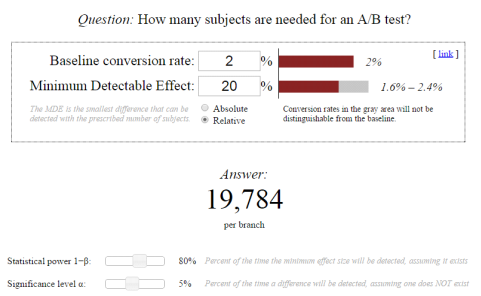
You can calculate the size of this sample before beginning the test to get an indication of the point at which it would be appropriate to look at the statistical reliability indicator. There are several tools online that you could use to calculate this sample size.

In practice, this can turn out to be difficult, as one of the parameters to be given is the % improvement expected (which is not easy to evaluate). But, it can be a good exercise to assess the pertinence of the modifications being envisaged.

Pro Tip: The lower the expected improvement rate, the greater the sample size needed to be able to detect a real difference.  

If your modifications have a very low impact, then a lot of visitors will need to be tested. This serves as an argument in favor of introducing radical or disruptive modifications that would probably have a greater impact on the conversion.

img_548ab40f4fb20

3. The representativeness of your sample

If you have a lot of traffic, then getting a sufficiently large sample size is not a problem and you will be able to get a statistical reliability rate in just a few days, sometimes just two or three.

Related: How to Deal with Low Traffic in CRO

Having said that, ending a test as soon as the sample size and statistical reliability conditions have been met is no guarantee that results in a real-life situation are being reproduced.

The key point is to test for as long as you need to in order for all of your audience segments to be included.

Actually, the statistical tests operate on the premise that your samples are distributed in an identical fashion. In other words, the conversion probability is the same for all internet users.

But this is not the case: the probability varies in accordance with different factors such as the weather, the geographical location and also user preferences.

There are two very important factors that must be taken into account here: your business cycles and traffic sources.

Your business cycles 

Internet users do not make a purchase as soon as they come across your site. They learn more, they compare, and their thoughts take shape.  One, two or even three weeks might elapse between the time they are the subject of one of your tests and the point at which they convert.

If your purchasing cycle is three weeks long and you have only run the test for one week, then your sample will not be representative. As the tool records visits from all internet users, they may not record the conversions of those that are impacted by your test.

Therefore, you’re advised to test over at least one business cycle and ideally two.

Your traffic sources 

Your sample must incorporate all of your traffic sources including emails, sponsored links and social networks. You need to make sure that no single source is over-represented in your sample.

Let’s take a concrete situation:  if the email channel is a weak source of traffic but significant in terms of revenue and you carry out a test during an email campaign, then you are going to include internet users who have a stronger tendency to make a purchase in your sample.

This would no longer be a representative sample. It’s also crucial to know about major acquisition projects and, if possible, not to test during these periods.

The same goes for tests during sales or other significant promotional periods that attract atypical internet users. You will often see less marked differences in the results if you re-do the tests outside these periods.

It turns out that it’s quite difficult to make sure that your sample is representative, as you have little control over the kind of internet users who take part in your test.

Thankfully, there are two ways of overcoming this problem.

  • The first is to extend the duration of your test more than is necessary in order to get closer to the normal spread of your internet users.
  • The second is to target your tests so that you only include a specific population group in your sample. For example, you could exclude all internet users who have come to you as a result of your email campaigns from your samples, if you know that this will distort your results. You could also target only new visitors so that you do not include visitors who have reached an advanced stage in their purchasing process (AKA visitors who are likely to convert regardless of which variation they see).

4. Other elements to keep in mind

There are other elements to bear in mind in order to be confident that your trial conditions are as close as they can be to a real-life situation: timing and the device.

Conversion rates can vary massively on different days of the week and even at different times of the day. Therefore, you’re advised to run the test over complete periods.

In other words, if you launch the test on a Monday morning then it should be stopped on a Sunday evening so that a normal range of conversions is respected.

In the same way, conversion rates can vary enormously between mobiles, tablets and desktop computers. So with devices, you’re advised to test your sites or pages specifically for each device. This is easy to accomplish by using the targeting features to include or exclude the devices if your users show very different browsing and purchasing behavior patterns.

These elements should be taken into account so that you do not end your tests too soon and get led astray by a faulty analysis of the results.

They also explain why certain A/A tests carried out over a period of time that is too short, or during a period of unusual activity, can present differences in results and also differences in statistical reliability, even when you may not have made any modifications at all.

The ideal A/B test duration

Running and A/B testing requires a thorough consideration of various factors such as your personal conversion goals, statistical significance, sample size, seasonality, campaigns, traffic sources, etc. All factors deserve equal attention when determining the best practices for your business.

Just remember to be patient, even if you reach your sample size early. You may be surprised by the ending results.

As A/B testing is an iterative process,  continuous experimentation and conversion rate optimization will lead to better results over time.

Article

10min read

When to Make the Leap from Client- to Server-Side Testing

As companies start out their experimentation journey, they may find themselves experimenting with small changes on their website such as the design of a CTA and other small changes to explore how they perform and their impact on key KPIs such as conversion rate and transaction.

However, as an experimentation program matures, companies are more likely to want to delve deeper into more sophisticated types of testing which require more expertise and a more advanced tool.

This is the point when many companies are ready to take the plunge from client- to server-side experimentation.

In this article, we will explore when is the right time to make the shift to server-side testing and discuss the importance of running these types of tests by outlining the various scenarios where server-side experiments are more appropriate. 

Client-  vs server-side testing

Before we go deeper into server-side testing, we will quickly point out the differences between client- and server-side tests to understand why you need both types of testing as your experimentation and optimization program evolves.

In client-side testing is where experimentation occurs on the client side through Javascript that runs in the browser. Therefore, client-side tools enable you to create variations of your pages by changing the content sent by your server to users in the web browser. The user then gets one variation of your altered content based on your targeting rules.

Put simply, all the work happens at the level of the browser thanks to Javascript. Because of this, client-side testing is usually best for surface-level changes such as layout, design and colors to measure their performance and impact on key KPIs.

Meanwhile, all the work in server-side testing happens at the server level rather than the browser. In other words, it’s your server that randomly sends a user the modified variation. As a result, the experimentation tool works on the server instead of inside your users’ browsers. 

Perhaps one of the biggest benefits of client-side tests is that it’s easy to implement and no special expertise is required to run these tests on the front-end of the website.

However, because of its advanced capabilities, server-side tests require technical expertise  and coding skills and so developers are usually the ones running these tests on the back-end.  

What are the benefits of server-side testing?

Before we go into when you should be using server-side tests, we will outline some of their benefits in order to better understand their use cases.

Omnichannel experimentation

Client-side solutions are usually limited to devices with web browsers, whether that’s on desktop, mobile or tablet. This means you cannot run experiments on mobile apps or connected devices.

Server-side solutions, for their part, allow you to experiment across multiple channels including mobile apps which significantly widens your playing field and opens up numerous opportunities to A/B test beyond web browsers so you can cover all your bases.

Enhanced performance

Perhaps one of the biggest advantages of server-side tests is the absence of the flicker effect, which is often a major downside associated with client-side solutions.  

The flicker effect occurs when the original page loads and is replaced by the test variation and is usually seen by the user.

Unlike client-side tools that require adding a Javascript tag to your pages, you don’t need to add this tag in server-side tools. That’s because experiments are rendered on the server before being pushed to the client and so all the major work occurs at the server level- it’s not noticeable on the client side. 

In other words, during a server-side test, the variation is retrieved from the server and delivered to the user’s browser. As a result, no modifications take place on the front-end or browser, so there’s no flickering effect

Endless testing opportunities

Your teams have a lot more options to work with when it comes to server-side testing as it enables you to modify all aspects of your site.

As server-side tests are rendered from the back-end server, you can test more complex dynamic content unlike with client-side tests where it’s not easy to test such content and may damage the user experience if done on the client-side. 

In other words, you can build tests that are much more complex that go deeper within your tech stack beyond the scope of UI or cosmetic changes to unlock a whole new world of experimentation. 

With such deep experimentation capabilities, teams can thoroughly test all facets of a product to validate its functionality such as evaluating its underlying features, algorithms and back-end logic. 

The next section will go over these various use cases where you should consider running server-side testing instead.

When does it make sense to move to server-side testing?

As we’ve mentioned, server-side tests are usually used to run more advanced types of tests and experiment deeply within your tech stack to thoroughly explore how a product works.

Put simply, server-side experimentation solutions allow teams to conduct more robust and secure experiments that are focused on modifying a product’s functions. 

Here are some use cases where server side testing is recommended over client-side testing:

  • Run experiments on your mobile app

As already mentioned, one of the key advantages of server-side testing is enabling omnichannel and cross-platform experimentation.

As client-side solutions rely on Javascript and cookies, it’s not possible to use them to test on native mobile apps and you’re limited to devices that have a default web browser.

This means to run experiments on your mobile app, you will need a more advanced server-side testing solution to handle mobile app technologies, which are more complex and vastly different from web technologies. 

Moreover, because server-side testing works on both web applications and mobile apps, you can run the same test serving the same variations irrespective of which channel they’re using. This allows you to compare data from each channel and optimize the user experience across all the different touch points accordingly. 

Finally, if you use feature flags to conduct server-side testing on mobile apps, you can bypass the tedious and time-consuming app store approval. Put simply, feature flags enable you to turn functionality on or off remotely without redeploying code to app stores and waiting for its approval or having to wait for all changes to be ready at the same time to release your own changes.

  • Test your search algorithms

Server-side A/B tests are efficient for testing deeper level modifications related to the backend and the architecture of your website.

This is the case with search algorithms which require modification to your existing code. E-commerce websites usually turn to server-side testing to ensure that customers can easily browse through their website and find the product they’re looking for. 

Thus, search algorithms are key in getting customers to find the product they’re looking for by providing a seamless search experience that eventually gets them to purchase.

For example, you can test what is displayed to customers in their search results, whether this should be based on pricing, popularity or reviews or whether you need to prioritize products based on what customers purchased/liked/viewed in the past. 

Server-side testing allows you to create such complex scenarios and rules to provide customers with more personalized reocmmendations and optimize their search experience on your site. These are more difficult to test through client-side solutions as search pages are based on the search query and so they are rendered dynamically.

Thus, server-side testing offers more comprehensive testing and allows you to experiment with multiple algorithms by modifying the existing code.

  • Optimize your product recommendations

Similarly, with server-side tools, you can test multiple product recommendation algorithms typically found at the bottom of product pages to measure which types of layouts generate the most sales or increase average order value. For example, is it better to promote similar products, the most popular products or those that were recently viewed?

Such recommendations are based on a variety of criteria, like browsing history and on your own PIM (Product Information Management) system and other data sources. Server-side testing will allow you to test these multiple algorithms to uncover the best performing selection of recommended products.

  • Test data-sensitive pages

Server-side testing is great for testing on pages where data security is vital as it ensures that the data remains safe internally within the server without worrying about a security threat.

This is ideal to test on e-commerce payment pages or for banking applications, for example, or any other web pages or apps that contain sensitive data.

You can also use feature flags to test out a new payment method on a subset of users and see how they adapt before rolling it out to everyone else.

  • Determine the ideal form length

This is especially important for SaaS businesses that rely on free trial and request demo forms to gather information from their visitors. Thus, they need to determine the best length for such forms without risking drop-offs but still being able to gather all the necessary information about a prospect. 

Server-side testing is the way to go in this scenario as your forms are directly linked to how your database is structured. If a field is obligatory, you will not be able to hide it using JavaScript because the form’s validation will fail server-side.

As a result, testing the length and complexity of a form that has the highest positive impact on conversion rates should be done on the server-side.

This also applies to other websites that utilize such forms from visitors such as hotel reservation or insurance sites. Note that different sectors will require different and more or less information depending on the type and purpose of the information being gathered. 

  • Test the limit for free shipping

E-commerce businesses should be able to determine the order value over which free shipping is possible. This is important as shipping costs are one of the major causes for cart abandonment.

Therefore, since shipping cost is one of the determining factors in a customer’s purchase decision, companies should test out various cart value thresholds to find out the optimal limit for free shipping to improve transaction rates.  

Since shipping costs are usually rendered dynamically from the back-end server, you will need to test them on the server-side. Any modifications made should have an impact on all of the following steps, and should be managed server-side. 

  • Validate your features

Server-side tests allow you to conduct feature testing to validate your product features by rolling out variations of your feature to different groups of users to evaluate its performance before going for a general release. 

With the help of feature flags, you can run server-side A/B tests and segment your users by directing them to one variation or the other. If anything goes wrong with a variation, you can easily roll it back by disabling the flag before it further impacts the user experience. 

Finally, according to the feedback generated from these users, you can then optimize your features and release them to all your users with the confidence that it matches customers requirements. 

Server-side tests and feature flags

The best way to run server-side tests is through feature flags. By decoupling deployment from release, you can conduct server-side A/B tests by rolling out new features to a small group of users. You can then measure their performance on this group of users before rolling out to everyone else.

While server-side testing requires technical expertise and coding skills, it’s not only relevant to tech teams. Often, non-technical staff team up with product teams to define experiments, which are then executed by the engineers. Once implemented, an experiment can usually be controlled, monitored, and analyzed via a dashboard.

With the right feature management solution, all teams across an organization can run server-side tests with the help of an easy-to-use dashboard without facing any technical hassles. 

Client- vs server-side testing: Context matters

In the end, it’s important to note that it’s not a question of whether server-side is better than client-side. They’re both complementary approaches and whichever one a company chooses depends on which is better suited for its optimization and larger business goals.

In other words, one type of testing doesn’t replace the other. It’s a matter of looking at the type of experiment you want to run and which type is more suited in that particular context and which teams are looking to run the experiment- marketers tend to favor and use client-side testing more often while product managers and developers usually opt for server-side testing for their experimentation needs. It also depends on the resources businesses have at hand and the maturity of their optimization programs.

To ensure your website is optimized and provides a seamless user experience, having both testing techniques at hand is key to surviving in a competitive digital world. 

Both types of testing are indispensable to help you build great products that will bring in maximum revenue. The key is to use both together to heighten productivity and achieve maximum impact.

Article

7min read

A/B Test Hypothesis Definition, Tips and Best Practices

Incomplete, irrelevant or poorly formulated A/B test hypotheses are at the root of many neutral or negative tests.

Often we imagine that doing A/B tests to improve your e-commerce site’s performance means quickly changing the color of the “add to cart” button will lead to a drastic increase in your conversion rate, for example. However, A/B testing is not always so simple.

Unfortunately, implementing random changes to your pages won’t always significantly improve your results – there should be a reason behind your web experiments.

This brings us to the following question: how do you know which elements to experiment with and how can you create an effective AB test hypothesis?

Determine the problem and the hypothesis

Far too few people question the true origins of the success (or failure) of the changes they put in place to improve their conversion rate.

However, it’s important to know how to determine both the problem and the hypothesis that will allow you to obtain the best results.

Instead of searching for a quick “DIY” solution, it’s often more valuable in the long term to take a step back and do two things:

  1. Identify the real problem – What is the source of your poor performance? Is it a high bounce rate on your order confirmation page, too many single-page sessions,  a low-performing checkout CTA or something more complex?
  2. Establish a hypothesis – This could show the root of the problem. For example, a great hypothesis for A/B testing could be: “Our customers do not immediately understand the characteristics of our products when they read the pages on our e-commerce site. Making the information more visible will increase the clicks on the “add-to-cart” button.”

The second step may seem very difficult because it requires a capacity for introspection and a critical look at the existing site. Nevertheless, it’s crucial for anyone who wants to see their KPIs improve drastically.

If you’re feeling a bit uncomfortable with this type of uncertainty around creating an effective hypothesis, know that you’ve come to the right place.

What is an A/B test hypothesis?

Technically speaking, the word hypothesis has a very simple definition:

“A proposal that seeks to provide a plausible explanation of a set of facts and which must be controlled against experience or verified in its consequences.”

The first interesting point to notice in this definition is “the set of facts to be explained.” In A/B testing, a hypothesis must always start with a clearly identified problem.

A/B tests should not be done randomly, or you risk wasting time.

Let’s talk about how to identify the problem:

  • Web analytics data – While this data does not explain digital consumers’ behavior exactly, it can highlight conversion problems (identifying abandoned carts, for example) and help prioritize the pages in need of testing.
  • Heuristic evaluation and ergonomic audit – These analyses allow you to assess the site’s user experience at a lower cost using an analysis grid.
  • User tests – This qualitative data is limited by the sample size but can be very rich in information that would not have been detected with quantitative methods. They often reveal problems understanding the site’s ergonomics. Even if the experience can be painful given the potential for negative remarks, it will allow you to gather qualified data with precise insights.
  • Eye tracking or heatmaps – These methods provide visibility into how people interact with items within a page – not between pages.
  • Customer feedback – As well as analyzing feedback, you can implement tools such as customer surveys or live chats to collect more information.

The tactics above will help you highlight the real problems that impact your site’s performance and save you time and money in the long run.

A/B test hypothesis formula

Initially, making an A/B test hypothesis may seem too simple. At the start, you mainly focus on one change and the effect it produces. You should always respect the following format: If I change this, it will cause that effect. For example:

Changing (the element being tested) from ___________ to ___________ will increase/decrease (the defined measurement).

At this stage, this formula is only a theoretical assumption that will need to be proven or disproven, but it will guide you in solving the problem.

An important point, however, is that the impact of the change you want to bring must always be measurable in quantifiable terms (conversion rate, bounce rate, abandonment rate, etc.).

Here are two examples of hypotheses phrased according to the formula explained above and that can apply to e-commerce:

  1. Changing our CTA from “BUY YOUR TICKETS NOW” to “TICKETS ARE SELLING FAST – ONLY 50 LEFT!” will improve our sales on our e-commerce site.
  2. Shortening the sign-up form by deleting optional fields such as phone and mailing address will increase the number of contacts collected.

In addition, when you think about the solution you want to implement, include the psychology of the prospect by asking yourself the following:

What psychological impact could the problem cause in the digital consumer’s mind?

For example, if your problem is a lack of clarity in the registration process which impacts the purchases, then the psychological impact could be that your prospect is confused when reading information.

With this in mind, you can begin to think concretely about the solution to correct this feeling on the client side. In this case, we can imagine that one fix could be including a progress bar that shows the different stages of registration.

Be aware: the psychological aspect should not be included when formulating your test hypothesis.

Once you have gotten the results, you should then be able to say whether it is true or false. Therefore, we can only rely on concrete and tangible assumptions.

Best practice for e-commerce optimization based on A/B hypotheses

There are many testable elements on your website. Looking into these elements and their metrics can help you create an effective test hypothesis.

We are going to give you some concrete examples of common areas to test to inspire you on your optimization journey:

HOMEPAGE

  • The header/main banner explaining the products/services that your site offers can increase customers’ curiosity and extend their time on the site.
  • A visible call-to-action appearing upon arrival will increase the chance visitors will click.
  • A very visible “about” section will build prospects’ trust in the brand when they arrive on the site.

PRODUCT SECTIONS

  • Filters save customers a lot of time by quickly showing them what they are looking for.
  • Highlighting a selection of the most popular products at the top of the sections is an excellent starting point for generating sales.
  • A “find out more” button or link under each product will encourage users to investigate.

PRODUCT PAGES

  • Product recommendations create a more personal experience for the user and help increase their average shopping cart
  • A visible “add to cart” button will catch the prospect’s attention and increase the click rate.
  • An “add to cart and pay” button saves the customer time, as many customers have an average of one transaction at a time.
  • Adding social sharing buttons is an effective way of turning the product listing into viral content.

Want to start A/B testing elements on your website? AB Tasty is the best-in-class experience optimization platform to help you convert more customers by leveraging intelligent search and recommendations to create a richer digital experience – fast. From experimentation to personalization, this solution can help you achieve the perfect digital experience with ease.

CART PAGE

  • The presence of logos such as “Visa certified” enhances customer confidence in the site.
  • A very visible button/link to “proceed to payment” greatly encourages users to click.

PAYMENT

  • A single page for payment reduces the exit rate.
  • Paying for an order without registration is very much appreciated by new prospects, who are not necessarily inclined to share their personal information when first visiting the site.
  • Having visibility over the entire payment process reassures consumers and will nudge them to finalize their purchase.

These best practices allow you to build your A/B test hypotheses by comparing your current site with the suggestions above and see what directly impacts conversion performance.

The goal of creating an A/B test hypothesis

The end goal of creating an A/B test hypothesis is to identify quickly what will help guarantee you the best results. Whether you have a “winning” hypothesis or not, it will still serve as a learning experience.

While defining your hypotheses can seem complex and methodical, it’s one of the most important ways for you to understand your pages’ performance and analyze the potential benefits of change.

Article

7min read

Google Optimize is Shutting Down: Don’t Wait to Migrate

With Google Optimize’s retirement on the horizon, companies are now faced with the daunting task of finding an alternative tool to carry out their tests and experiments after Google’s announcement that it will be sunsetting its web testing and personalization tool on September 30.  

If you haven’t already, it’s time to start your research for a new tool as soon as possible to stay on track with your testing and CRO strategies. September will be here faster than you think, so you need to act soon for a smooth migration post-sunset.

Why the time to find a Google Optimize alternative is now

With roughly 6 months left, teams should already be thinking about the best way for them to carry out their experiments.

You may have to anticipate that some features on Google Optimize will no longer work properly. Not to mention that migrating from one tool to another — and the transferring of all the data — can be a complicated process. 

Making an informed decision requires extensive research. Finding a platform that suits your experimentation needs is only the first step. You also need to factor in how long it will take the migration processes to be successfully completed and the learning curve of your new tool. In other words, time is of the essence if you want to make a smooth migration to a new platform. 

Therefore, teams need to make sure that they have fully migrated onto their new tool well before the sunset date of September 30.  

What’s next? The current and future state of your optimization journey

As a free or low-cost solution, Google Optimize is a great starting point for those at the beginning of their optimization journey.

However, in light of the sunset announcement, organizations should start rethinking their website optimization and experimentation strategies and looking ahead to anticipate their CRO needs.

This should start with evaluating your current and future CRO goals. In other words, you may look into the possibility of investing more resources to optimize your website that will enable you to turn your passive users into active ones by providing a more personalized customer journey. 

Consequently, your team may want to delve into other features beyond A/B testing capabilities offered by more advanced solutions. This will enable them to better optimize the website. For example, you may consider venturing beyond surface-level modifications and running more sophisticated tests tied to back-end architecture.

This will ultimately allow teams to provide the best customer experience possible so visitors can turn into customers with the click of a button. 

Put simply, engaging your visitors along the entire customer journey up until the point of purchase or conversion should be a central part of your CRO strategy. 

Taking into account all these factors will help you understand the current state of your CRO and whether it’s time to take your optimization roadmap to the next level. 

How to prepare for a successful migration post-sunset

Selecting the right tool will take considerable time in terms of research and set-up. Therefore, early on, teams will need to follow some crucial steps to take them on the right track to a seamless transition from Google Optimize and to ensure successful implementation of the new tool. 

Here’s a checklist for a successful migration: 

    • Evaluating your experimentation program: Analyzing your CRO strategy and results is important to help you set the requirements for your next testing tool.
    • Considering your CRO strategy and budget: This will help you determine what kind of features you need and how scalable it is and the kind of budget you need to execute it. 
    • Selecting the tool: Evaluating alternative testing tools to suit your budget and needs (you may consider looking into Google-preferred partners for a smoother transition). 
    • Setting up and installing the tool on your website: This will include migrating all your data and tests from Google Optimize. You should consider if you will need coding experience and if you have sufficient developer resources for that. Otherwise, you should consider opting for low-code/no-code solutions instead. Additionally, you will need to run A/A tests to get acquainted with the new platform and ensure that it’s working as expected when it comes to data accuracy and level of significance.  
    • Integrating the tool with your stack: Take into account the tools you’re currently using and how they will fit together with the new tool.
    • Offering internal training for the new tool: Depending on the kind of support you’ll be receiving from your new tool, you need to make sure that your teams can easily and efficiently use the tool.

Evaluating your experimentation program means taking stock of all the tests you’ve run on Google Optimize to understand what went well with the tool and where it fell short. This will give you an indication of your current situation and how you’d like to evolve when it comes to your testing strategy so you can pick your new tool accordingly.

Each step can take a considerable amount of time to complete so we recommend starting as early as possible. 

How AB Tasty fits into your post-Optimize world

As a Google-preferred partner, AB Tasty provides you with best-in-class experience optimization tools to continue optimizing your digital experiences.

While Google Optimize also offered a 360 version with more advanced features, it had its limitations, especially for companies further along their CRO journey and looking for deeper experimentation capabilities. 

Here are a few reasons why AB Tasty is the right choice post-Google Optimize to empower you to animate the entire digital consumer journey and take your testing to the next level:

    • AB Tasty offers a variety of integrations that will fit seamlessly into your existing tech stack including seamless integrations with Google Analytics and other analytics providers to help you stay on top of your data.
    • Explore endless possibilities with a library of widgets to optimize the customer journey. Activate your audience and engage users with banners and pop-ups among other flexible, visually appealing and impactful components.
    • Worried about support during your switch? AB Tasty has dedicated CSMs and account managers to provide you with 1:1 support throughout the contract, including transferring your test history and data over from Google Optimize. 

Take the next big step with AB Tasty

Are you still on the fence on whether AB Tasty is the right pick for you? Below you will find the answers to all your burning questions about our platform to help make your decision easier:

We’re here to answer your questions
What is AB Tasty’s take on privacy and security?

AB Tasty is GDPR compliant and committed to respecting the principles of this legislation, which consists of regulating data collection.

Can I use AB Tasty to target Google ads campaigns?

Yes, campaigns from Google ads can be easily triggered. With AB Tasty’s granular targeting capabilities, customers can target their visitors based on the campaign source in conjunction with any other events or metrics they see fit to provide the most personalized end-user experience possible.

What type of support do you offer in setting up and migrating to your tool?

Our in-house Customer Success team is on hand to support new and existing clients. If you need assistance setting up new campaigns or transferring existing ones then we can take on the heavy lifting for you to ensure a smooth transition.

Can you link Google Analytics with AB Tasty?

Yes, you can link Google Analytics with AB Tasty to be able to analyze your campaigns or you can have them sent to an in-house tool. You can find more information about our Google Analytics integration here.

How can we set up segmentation and personalization campaigns?

AB Tasty has a wide range of extremely granular targeting capabilities. This allows customers to target their visitors based on any other criteria/events/metrics of their choice to provide a more personalized user experience. This can all be set up in a matter of seconds with no code required.

How does AB Tasty differ from Google Optimize in terms of speed and performance?

AB Tasty has the lightest tag on the market available today that still offers complete functionality. Alongside our detailed performance centre which highlights where improvements can be made, customers can expect greater performance from AB Tasty than they ever had with Google Optimize. Find out more about how we compare here.

How many tests can I run and can they be run concurrently?

With our user-friendly experimentation suite, you can create an unlimited number of A/B tests and you can also run multiple tests simultaneously if needed.

Are you ready to make the move?

The post-Google Optimize world doesn’t have to be bleak. 

As one of Google’s top picks as your new A/B testing platform, AB Tasty is a best-in-class A/B testing tool that helps you convert more customers by leveraging experimentation to create a richer digital experience – fast. This experience optimization platform embedded with AI and automation can help you achieve the perfect digital experience with ease.

Article

5min read

Test More, Risk Less: A/B Testing as a Risk Mitigation Tool

Imagine this: You see a continual drop in conversions on your e-commerce website. In particular, customers are abandoning their carts and not completing their purchases.

Based on previous experience, you decide to take action by switching up a few elements on the checkout page.

But it’s still not getting you the results you’ve hoped for; instead, you see your conversions going even further down. What went wrong?

How experiments can come to the rescue

There’s always a certain degree of risk in business and any wrong move can be a potential loss in profit. How can you test your ideas without breaking your website and negatively impacting your business?

Thanks to A/B, A/B/C and multivariate testing, you can manage and even reduce that risk before making a big decision that could hurt your bottom line.

Before we go any further, let’s look at a simple definition of A/B testing.

A/B testing is a marketing technique that involves comparing two variations or versions of a web page or application, randomly presented to users, to see which performs better by evaluating how they impact your KPIs.

The results of such tests will help you assess the risk of your business decision as it presents an opportunity to gather feedback from the people with the most valuable opinions — your customers. Otherwise, you’d make the decision based on personal opinions rather than customer preferences, eventually leading you down the wrong path.

A/B testing helps steer you in the right direction by enabling you to test and learn quickly if something works or not before embedding it into the back-end or permanent coding.

If you don’t take steps to manage risks, you’d never be able to tell if your new ideas will resonate with your customers or if they’re worth the investment. However, when you run A/B tests, you can minimize the risk of any drastic business impact.

For example, you can make a pretty website by changing colors but if this change drives down conversions then you’ll have a nice looking but poor performing website. Thus, A/B testing gives you the green light to go through with an idea by monitoring how it’s affecting your KPIs.

Experimentation is the most efficient way to eliminate rolling out a bad idea for your website or prove the value of a change before investing time and resources. It’s a golden opportunity to learn what really drives conversions so you can use the data extracted to fully commit to any changes in UX.

Even if an experiment doesn’t turn out the way you planned, you can still use it as a learning experience on what your customers don’t want so that you stay on the right track.

To get the most out of your A/B tests, you need to leverage both quantitative and qualitative data when it comes to effective decision-making. In other words, running these experiments is important, but it’s the quick steps you take after based on the results that will make all the difference.

AB Tasty is a great example of an A/B testing tool that allows you to quickly set up tests and gather results to help you mitigate risk with ease. With low code implementation of front-end or UX changes on your web pages, you can gather insights via an ROI dashboard, determine which route will increase your revenue, and achieve the perfect digital experience for your customers.

In summary, always make sure you test new features or changes prior to release to make sure they take your business metrics in the right direction. Even if it seems like it’s a very minor change, it could still have a significant impact on your conversions and revenue.

Steer your A/B test in the right direction

While you’re running an experimentation campaign, there’s also another layer of risk when randomly allocating users to your variations as so often happens to be the case during an A/B test. What if there’s a variation that you notice is performing poorly? How can you quickly turn this off before more traffic is exposed to the variation?

Luckily, there’s a way to further minimize risk during an A/B test and that’s through dynamic allocation, a capability offered by advanced A/B testing solutions such as AB Tasty. 

Dynamic allocation seeks to limit loss due to the lowest performing variations so that fewer visitors are sent to the “bad” variations to maximize outcome, as can be seen in the image below.

For example, if you run an A/B test with two variations with the goal to increase conversions on the checkout page and variation B is performing well and has a high conversion rate, then the traffic to that variation is adjusted (and increased) accordingly.

One of the advantages of dynamic allocation is risk mitigation. This will enable you to confidently and safely test new elements. If they don’t work out as predicted, then the traffic allocated will be gradually reduced so fewer users will access it. 

Make risk-free and data-driven decisions with A/B testing

Any new changes or releases you have in the works shouldn’t be driven by your gut feeling but rather from a combination of quantitative and qualitative data, the kind of data and insights that you can only obtain from running tests and experiments. This enables you to optimize your website accordingly rather than speed up losses from a misguided UX change based solely on personal opinion.

A/B testing doesn’t have to be a risky endeavor. Features such as dynamic allocation can make all the difference when running A/B tests to avoid any significant loss in conversions from a poorly performing variation.

In the end, it’s a win-win situation: you get valuable insights while managing risk and your customers receive higher-quality products they actually want resulting in enhanced customer satisfaction.

With AB Tasty, you never have to lose a single conversion. Get started building your A/B tests today with our best-in-class software solution to explore how you can get maximum results with minimal effort thanks to our dynamic allocation capability.