
Article

3min read

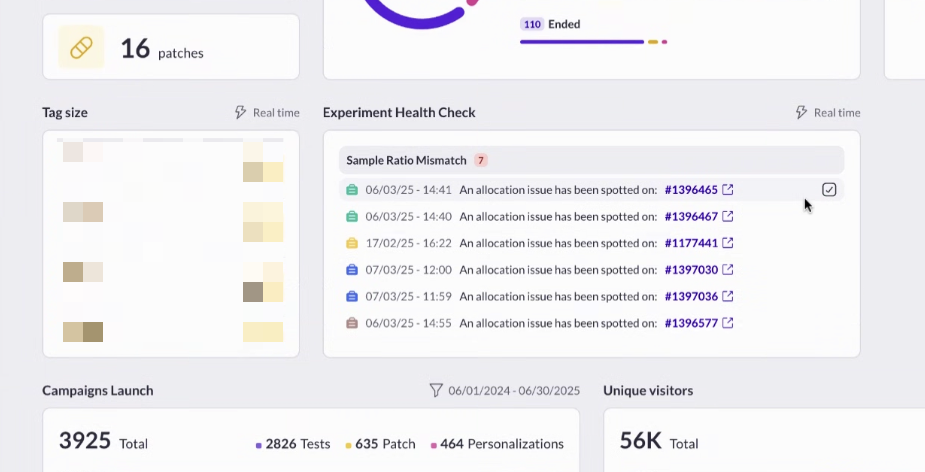
Experiment Health Check: Proactive Monitoring for Reliable Experimentation

Introduction

Running hundreds of experiments each year is a sign of a mature, data-driven organization – but it also comes with challenges.

How do you ensure that every test is running smoothly, and that critical issues don’t slip through the cracks?

At AB Tasty, we’ve listened to our clients’ pain points and are excited to announce the launch of Experiment Health Check: a new feature designed to make experimentation safer, smarter, and more efficient.

The Challenge: Keeping Experiments Healthy at Scale

For leading brands running over 100 campaigns a year, experimentation is at the heart of digital optimization.

But with so many campaigns running simultaneously, manually checking reports every day to spot issues is time-consuming and inefficient. Worse, problems like underperforming variations or sample ratio mismatches (SRM) can go unnoticed, leading to lost revenue or inconclusive results.

Our Solution: Experiment Health Check

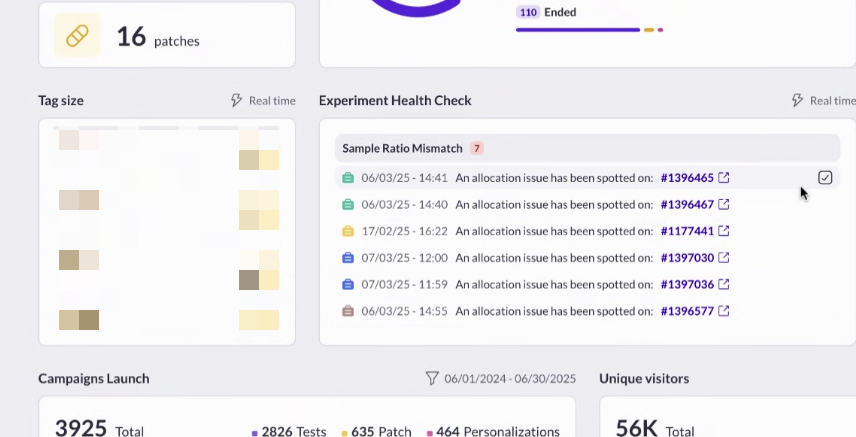
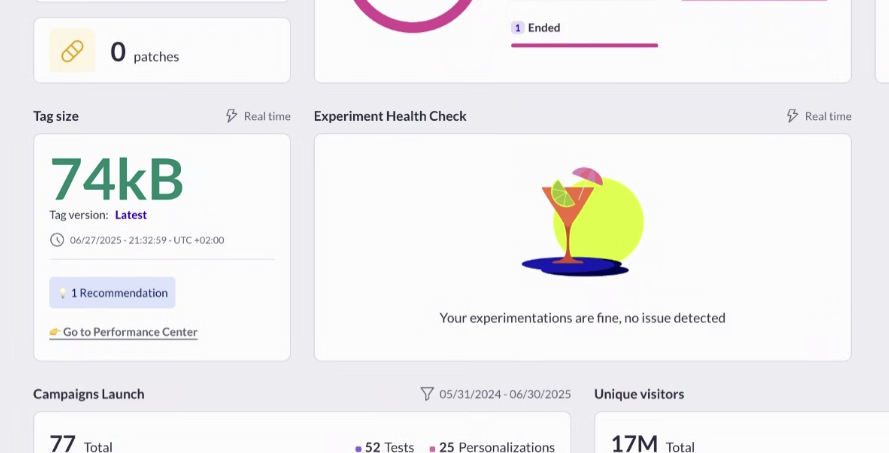
Experiment Health Check is an automated monitoring system built directly into AB Tasty. It proactively alerts you to issues in your experiments, so you can act fast and keep your testing program on track.

Key Features:

  • Automated Alerts: Get notified in-product (and by email, if you choose) when an experiment encounters a critical issue, such as:
    • Underperforming variations (sequential testing alert)
    • SRM (Sample Ratio Mismatch) problems
  • Centralized Dashboard: Super-admins can view all alerts across accounts for a global overview.
  • Customizable Notifications: Choose which alerts to display and how you want to receive them.

Why It Matters

  • Proactive, Not Reactive: No more waiting until the end of a test or sifting through reports to find problems. Experiment Health Check surfaces issues as soon as they’re detected.
  • Saves Time: Focus on insights and strategy, not manual monitoring.
  • Peace of Mind: Most clients will rarely see alerts – only about 2% of campaigns encounter SRM issues – so you can be confident your experiments are running smoothly.

What’s Next?

Experiment Health Check is available to all AB Tasty clients as of June 2025.

Simply activate it in your dashboard to start benefiting from automated experiment monitoring. We’re committed to evolving this feature with more alert types and integrations based on your feedback.

Article

6min read

9 AI Features that Transform How Digital Teams Test, Learn, and Grow

Testing doesn’t have to feel like guesswork.

What if you could describe your vision and watch it come to life? What if understanding your visitors’ emotions was as simple as a 30-second scan? What if your reports could tell you not just what happened, but why it mattered?

That’s where AI steps in – not to replace your creativity, but to amplify it.

At AB Tasty, we’ve built AI tools that work the way teams actually think: curious, collaborative, and always moving forward. Here are nine features that help you test bolder, learn faster, and connect deeper with the people who matter most.

Insight: If you’re already an AB Tasty customer, you’ve already got access to some of our most popular AI features! But don’t stop scrolling yet, there’s more to discover.

1. Visual Editor Copilot: Your vision, our AI’s creation

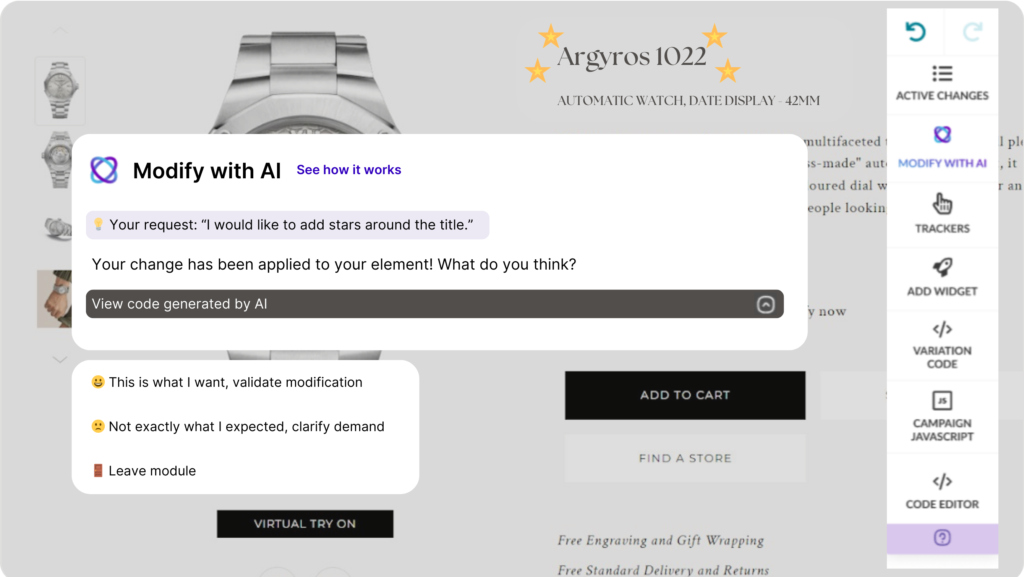
Visual editor copilot AB Tasty

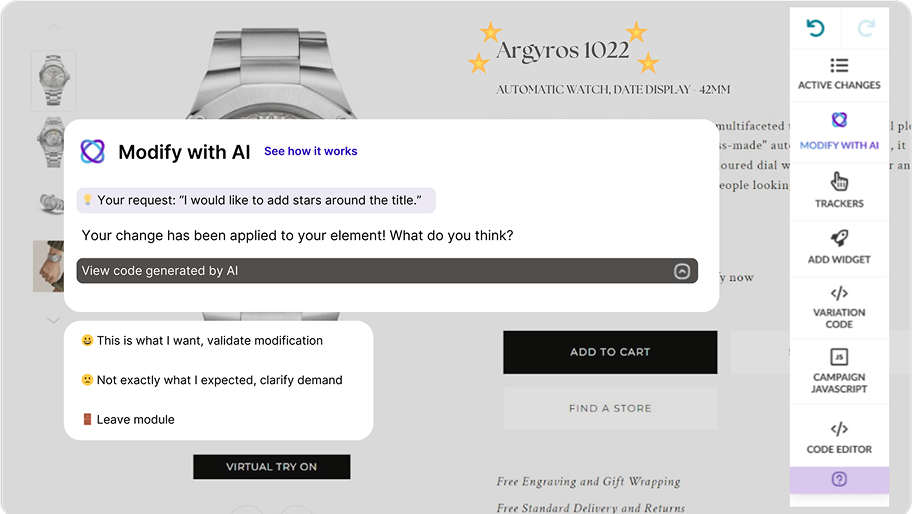
Visual Editor Copilot turns your ideas into reality without the endless clicking. Just describe what you want – “make that button green,” “add a fade-in animation,” or “move the CTA above the fold” – and watch our AI bring your vision to life.

No more wrestling with code or hunting through menus. Your creativity leads. Our AI follows.

2. EmotionsAI Insight: Explore 10 emotional profiles

10 emotional profiles with AB Tasty's EmotionsAI

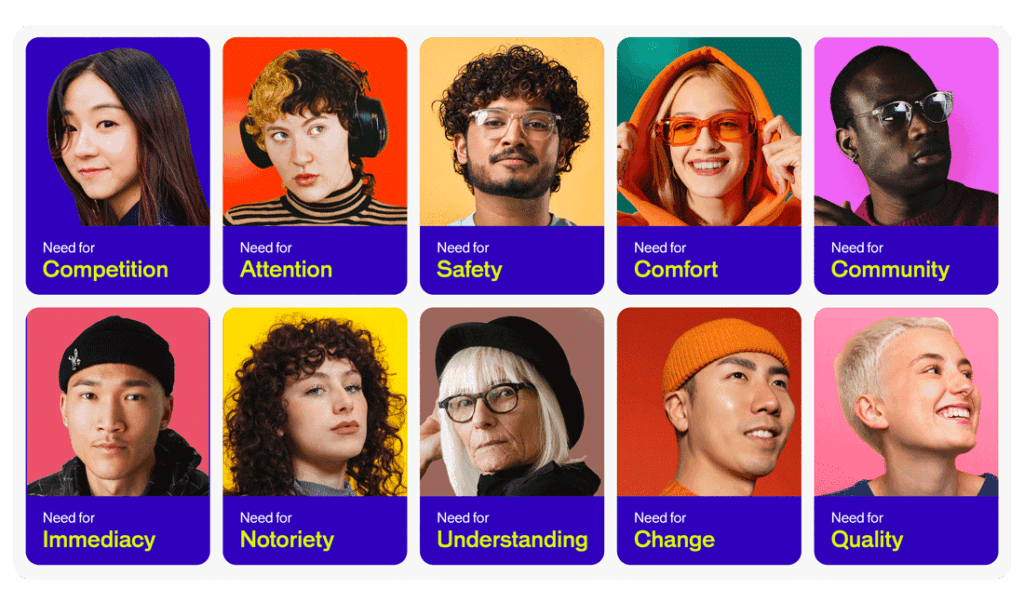
EmotionsAI Insights gives you a free peek into 10 emotional profiles that reveal what your visitors actually feel. Not just what they click – what moves them.

See the missed opportunities hiding in plain sight. Understand the emotional drivers that turn browsers into buyers. It’s personalization that goes beyond demographics to tap into what people really want.

3. Engagement Levels: Segment traffic for affinity and engagement

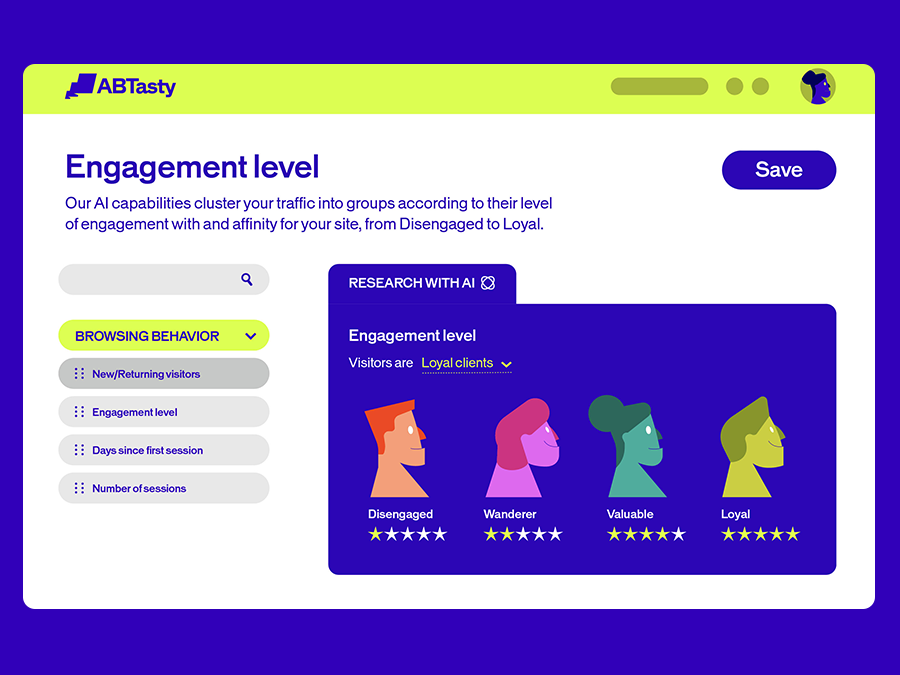
Engagement level segmentation

Our engagement-level segmentation uses AI to cluster visitors based on how they connect with your site. New visitors get the welcome they deserve. Returning customers get the recognition they’ve earned.

It’s traffic segmentation that makes sense – grouping people by affinity, not just attributes.

4. EmotionsAI: The future of personalization

EmotionsAI by AB Tasty

EmotionsAI is personalization with emotional clarity. In just 30 seconds, see what drives your visitors at a deeper level. Turn those insights into targeted audiences and data-driven sales.

Your visitors have unique needs and expectations. Now you can meet them where they are – emotionally and practically.

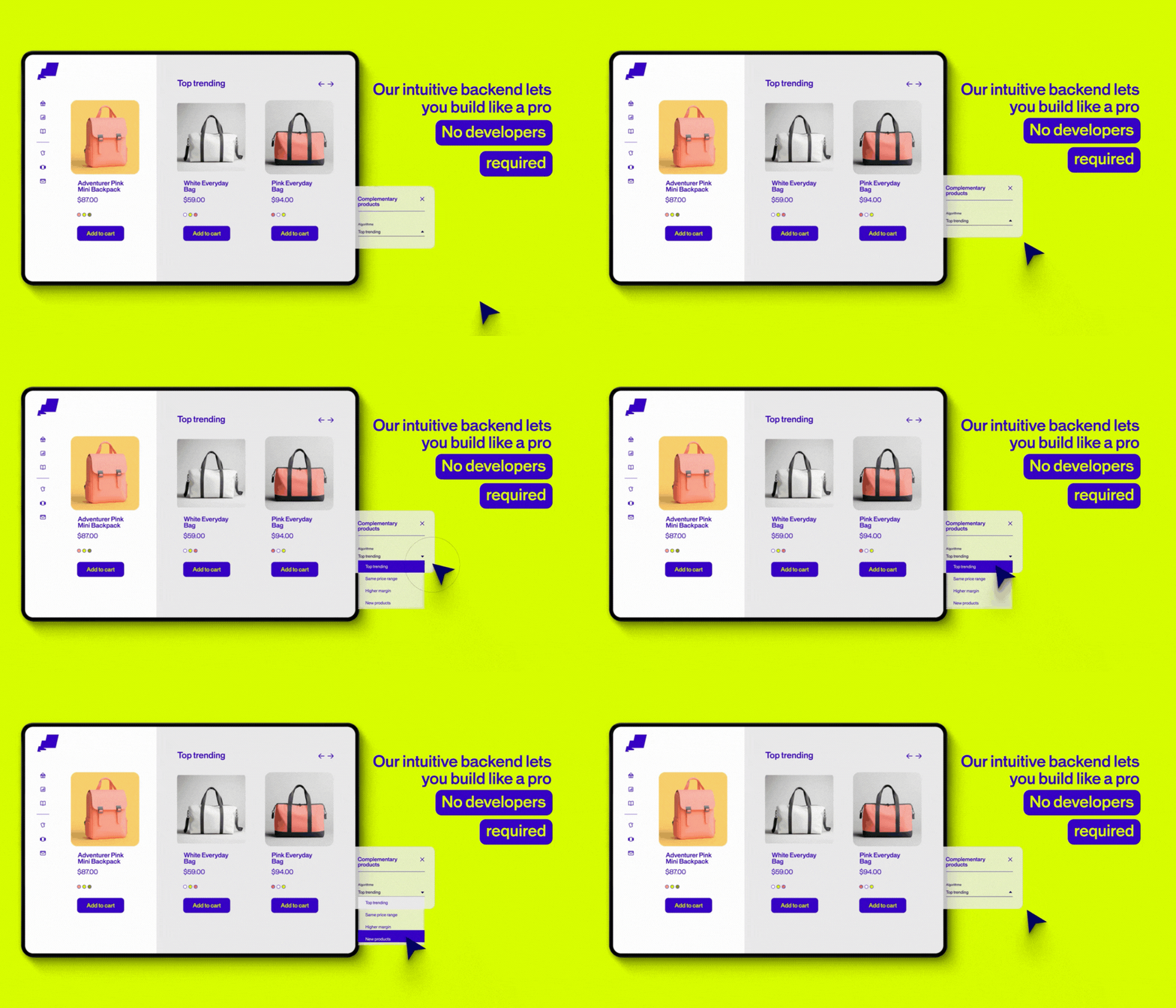
5. Recommendations and merchandising

Recommendation solution backend

Recommendations and Merchandising turns the right moment into new revenue. Our AI finds those perfect opportunities to inspire visitors – whether it’s a complementary product or an upgrade that makes sense.

You stay in control of your strategy. AI accelerates the performance. The result? A delightful experience that drives higher average order value.

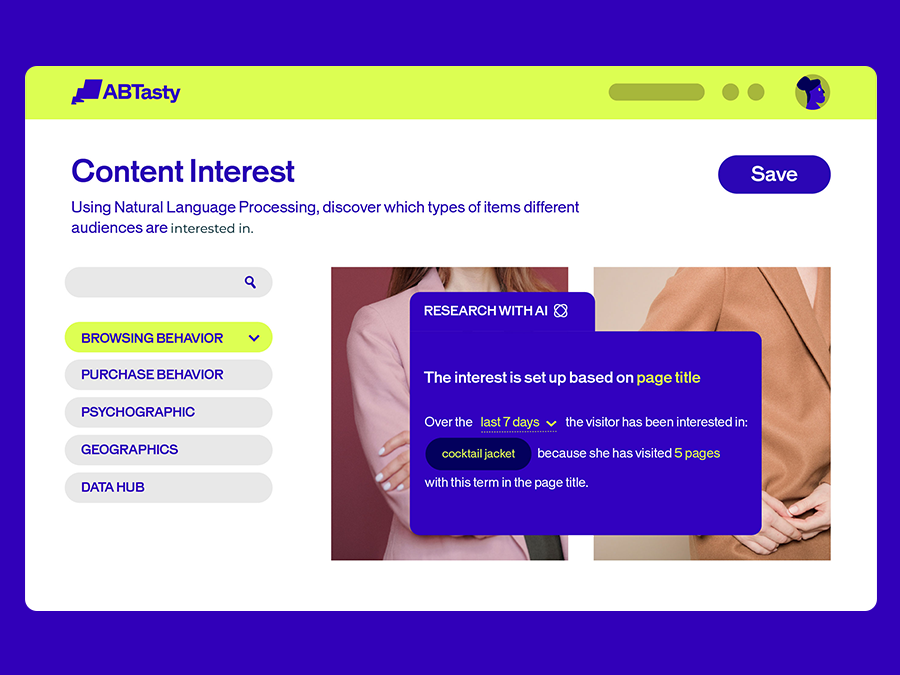
6. Content Interest: No more struggling to connect

Content interest personalization

Content engagement AI identifies common interests among your visitors based on their browsing patterns – keywords, content, products. Build experiences that feel personal because they actually are.

It’s not about pushing content. It’s about finding the connections that already exist and making them stronger.

7. Report Copilot: Meet your personal assistant for reporting

Report copilot by AB Tasty

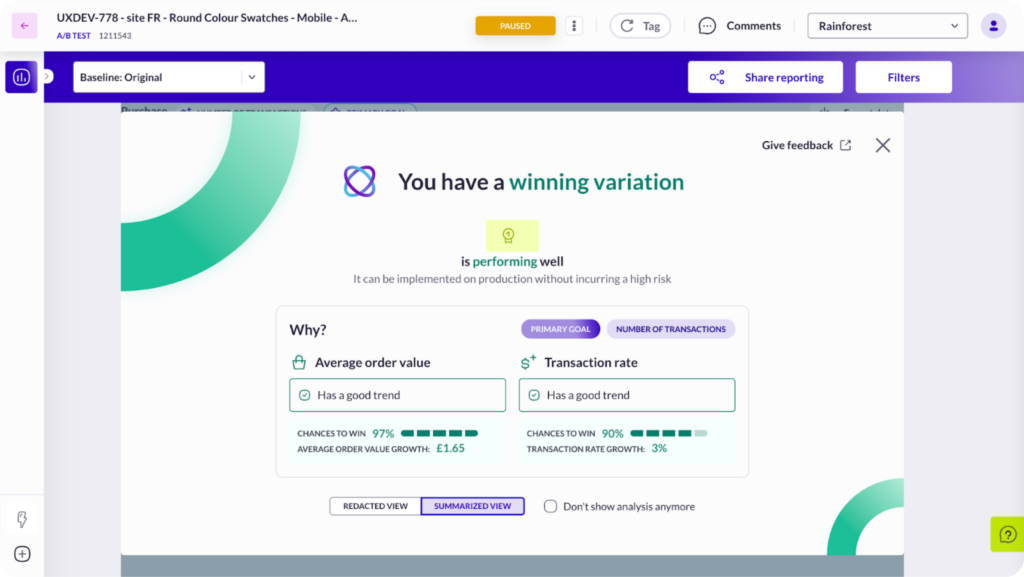
Report Copilot is your personal assistant for making sense of data. It highlights winning variations and breaks down why they drove transactions – so you can feel confident in your next move.

No more staring at charts wondering what they mean. Get clear insights that move you forward.

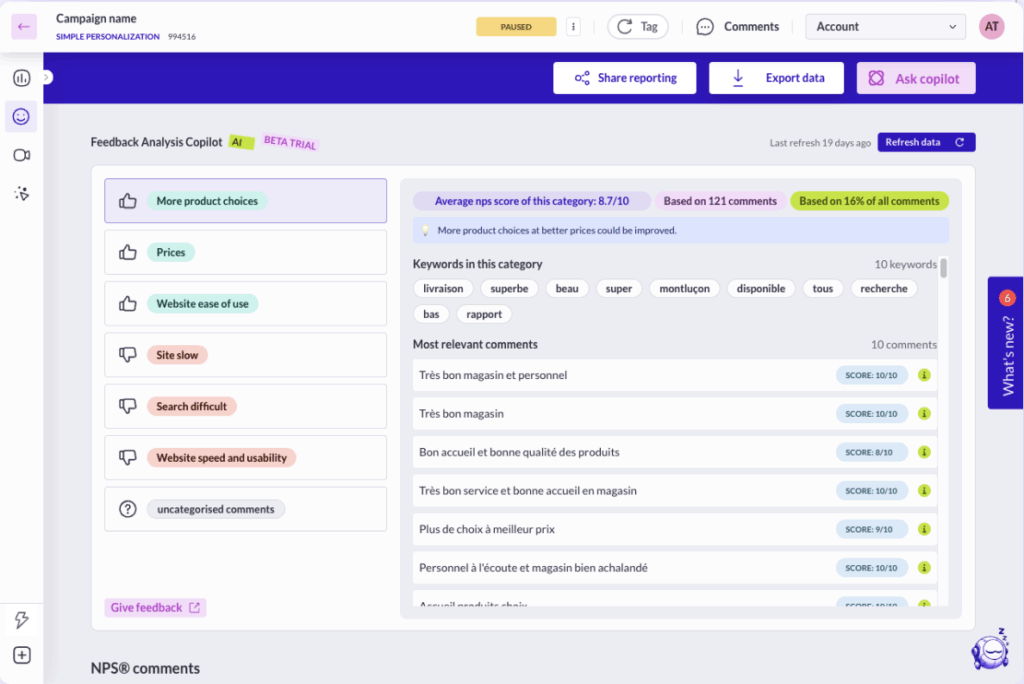
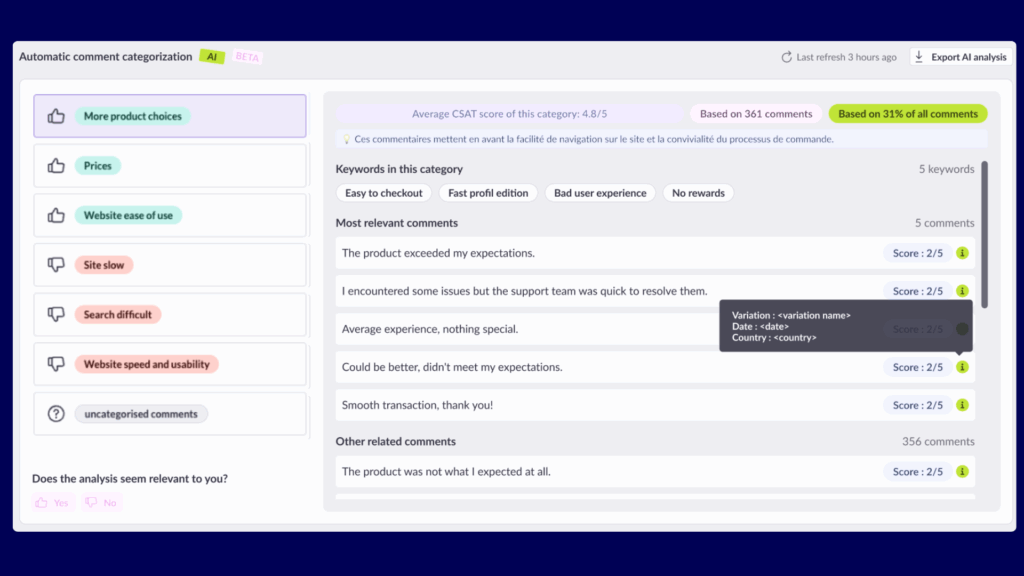
8. Drowning in feedback? Feedback Analysis Copilot saves you time

Feedback Analysis Copilot by AB Tasty

Feedback Analysis Copilot takes the heavy lifting out of NPS and CSAT campaigns. Our AI analyzes responses right within your reports, identifying key themes and sentiment trends instantly.

High volumes of feedback? No problem. Get the insights you need without the manual work that slows you down.

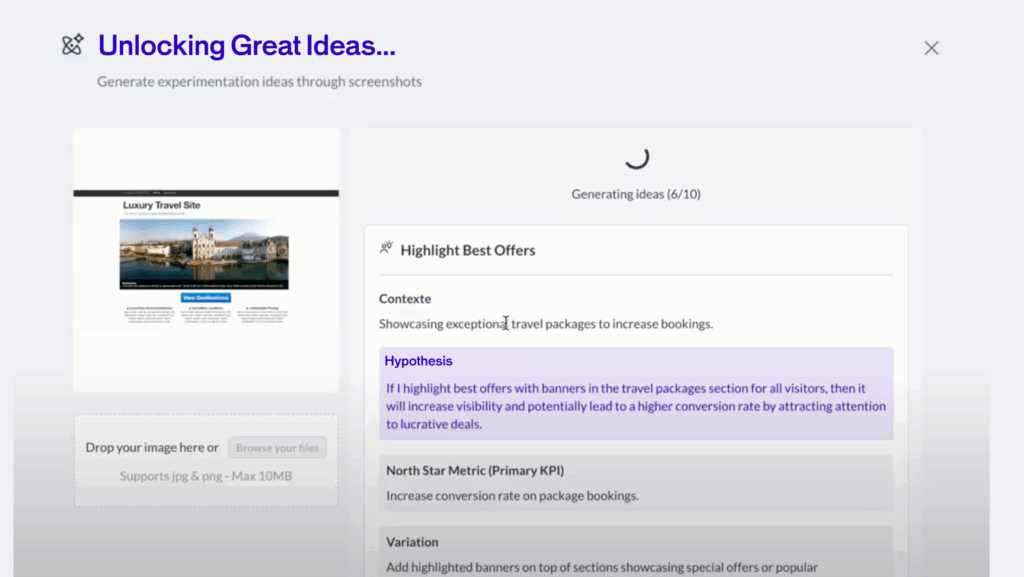
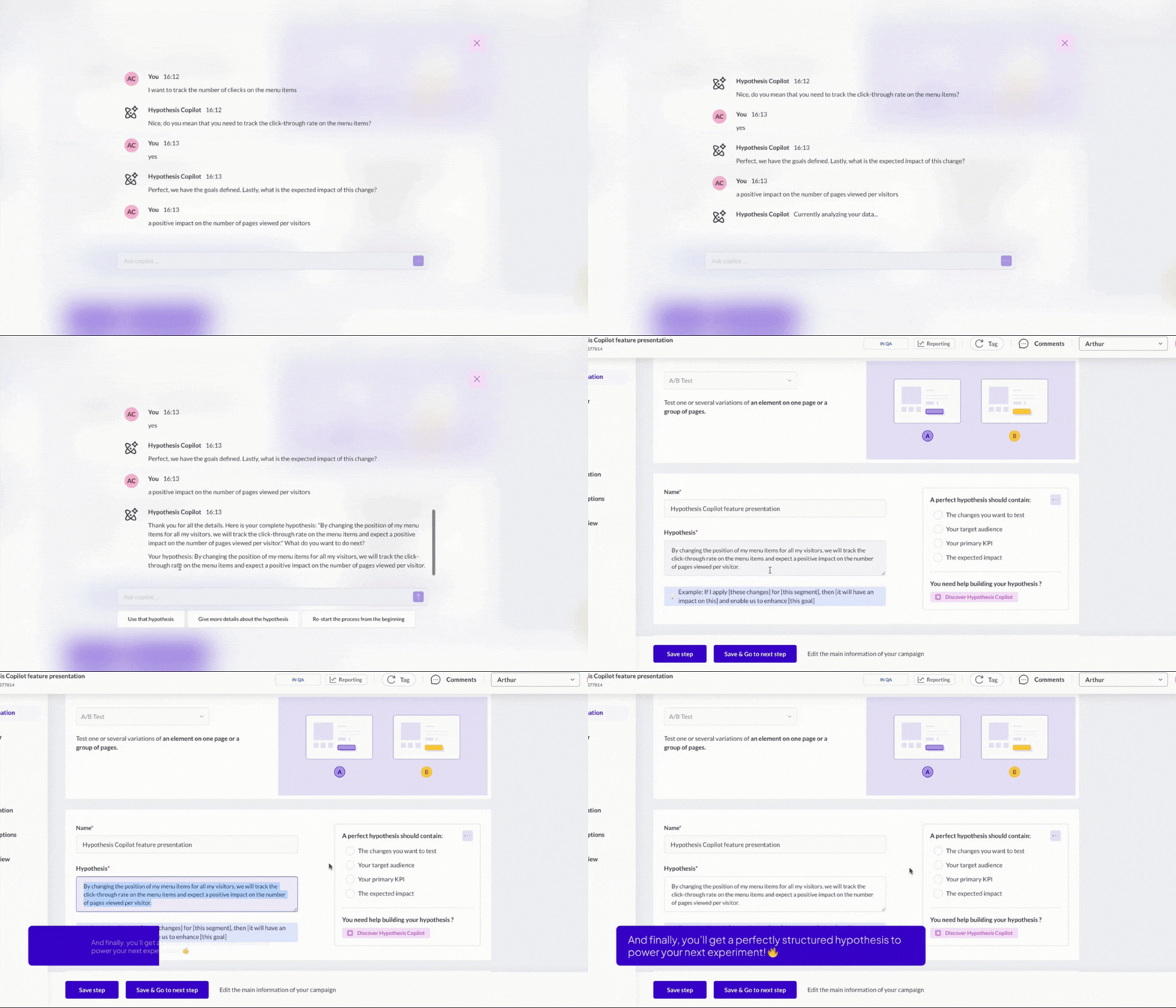
9. Struggling to craft the perfect hypothesis for your experiments?

Hypothesis Copilot by AB Tasty

Hypothesis Copilot helps you craft experiments that start strong. Clear objectives, richer insights, better structure – because every great test begins with a rock-solid hypothesis.

No more struggling with the “what if” – start testing with confidence.

AI That Amplifies Human Creativity

These aren’t just features – they’re your teammates. AI that understands how teams really work: with curiosity, collaboration, and the courage to try something new.

Every tool we build asks the same question: How can we help you go further?

Whether you’re crafting your first experiment or your thousandth, these AI features meet you where you are and help you get where you’re going. Because the best optimization happens when human insight meets intelligent tools.

Ready to see what AI-powered experimentation feels like? Let’s test something bold together.

FAQs about AI in digital experimentation

How is AI used in digital experimentation and A/B testing?

AB Tasty offers clients multiple AI features to enhance A/B testing by automating test setup, analyzing emotional responses, segmenting audiences, and generating data-driven recommendations—all aimed at faster insights and better personalization.

What are the benefits of using AI in website optimization?

AI reduces guesswork, accelerates testing, improves personalization, and turns raw data into actionable insights. It empowers teams to learn faster and create better digital experiences.

How does AI help marketing and product teams test and learn faster?

AB Tasty empowers marketing and product teams with AI tools like Report Copilot and Hypothesis Copilot to streamline data analysis and test planning, helping teams move from idea to iteration quickly and confidently.

What AI features does AB Tasty offer for experimentation and personalization?

AB Tasty offers features like Visual Editor Copilot, EmotionsAI, Content Interest segmentation, and Report Copilot to streamline testing, personalization, and reporting.

Article

2min read

Your Domain, Your Rules: Domain Delegation by AB Tasty

In an era where privacy regulations tighten, browser restrictions escalate, and trust is hard-won, brands need more than great ideas to drive their digital experiments — they need full control over how their technologies behave.

 That’s why AB Tasty is proud to introduce Domain Delegation, a groundbreaking feature designed to place independence, performance, and compliance at the heart of your experimentation strategy.

Why Domain Delegation changes the game

The digital landscape is constantly shifting at a fast pace. With evolving browser privacy policies (like ITP and ETP), widespread ad blockers, and stricter data regulations, third-party scripts are increasingly vulnerable — slowing down your site, triggering blockers, or worse, being outright rejected.

For enterprises operating under rigorous security standards, these challenges can make it nearly impossible to deploy tools like AB Tasty efficiently.

That’s where Domain Delegation steps in.

This powerful new feature allows you to serve the AB Tasty tag from a custom subdomain you control (e.g., abt.yourdomain.com), while AB Tasty takes care of the heavy lifting behind the scenes.

What you can do with Domain Delegation

  • Host the AB Tasty tag on your own subdomain (e.g., abt.brand.com)
  • Easily delegate DNS management to AB Tasty through an intuitive guided setup
  • Bypass blockers, improve load speed, and boost reliability
  • Deliver the tag under your own brand, reinforcing trust and compliance
  • Minimal technical effort, fully managed from the AB Tasty interface

What’s in It for You

✅ Higher tag reliability
⚡ Better site performance & Core Web Vitals
? Stronger data governance & security posture
? More brand trust with white-labeled tag delivery

Who benefits the most?

  • Highly regulated industries: Finance, healthcare, government
  • Privacy-first brands: Total data flow ownership
  • Tech teams optimizing performance and autonomy
  • Any organization battling browser or ad blockers

Why Now?

Privacy restrictions aren’t going away. Ad blockers aren’t easing up.
With Domain Delegation, AB Tasty empowers you to take back control over your experimentation stack — ensuring you stay compliant, performant, and trusted.

This isn’t just a technical feature.
It’s a strategic foundation for the next era of digital experimentation.

How It Works

  1. Define your subdomain (e.g., abt.mybrand.com)
  2. Follow the easy delegation flow in AB Tasty’s interface
  3. Let us handle the rest (provisioning, certificates, delivery)

Your tag. Your domain. All powered by AB Tasty.

Domain Delegation Availability

Interested in Domain Delegation? Contact your AB Tasty Customer Success Manager to get started.

Article

3min read

Evi Feedback (Copilot): Turn The Customer Voice Into Action in Seconds with AI

Every insight starts with a story, and every story deserves to be heard. But when your NPS® or CSAT campaigns generate thousands of responses, how do you turn all that feedback into real action, fast?

That’s why we created Evi Feedback (formerly known as Feedback Copilot), the AI-powered assistant that transforms your NPS® or CSAT campaigns into actionable intelligence – instantly.

The problem collecting feedback: Too many voices, not enough time

Let’s face it: analyzing feedback is a nightmare. Even when users leave valuable insights in NPS campaigns, the manual work required to analyze hundreds (or thousands) of verbatim responses can paralyze teams. One client told us:

“We received 5,000 verbatim responses. That’s two weeks of manual work.”

And because it’s so time-consuming, teams either:

  • Underutilize feedback tools like NPS/CSAT
  • Or don’t act on the insights at all

The solution to overwhelming feedback? Evi Feedback

Evi Feedback was born from this pain point – combining the best of AI with our all-in-one experimentation platform. It’s available for free within AB Tasty, and automatically activated for NPS/CSAT campaigns with over 100 responses.

What Evi Feedback does:

  • Segments feedback by sentiment: Instantly separates positive and negative comments based on campaign scores.
  • Clusters similar comments into key themes: Groups feedback into topics like “price,” “delivery,” or “UX.”
  • Summarizes each theme: Provides a short description, confidence score, and sample comments for every theme.
  • Highlights what matters most: Surfaces the top 3 positive and top 3 negative drivers of satisfaction.
  • Exports labeled feedback: Download results for use in Excel, PowerPoint, and more.

And it does all this while respecting data privacy, using a self-hosted model (Hugging Face) instead of sending sensitive content to third-party LLMs.

What makes our Feedback Copilot unique?

  • Instant categorization of massive feedback volumes
  • Quantification of qualitative input – finally, your verbatim responses have numbers to back them
  • Integrated NPS/CSAT in your test workflows – measure why something works, not just if it does
  • Enterprise-grade privacy: Comments stay on AB Tasty’s infrastructure

Who benefits from Evi Feedback?

  • CROs & Product Managers: Prioritize optimizations based on real user pain points.
  • UX & Research Teams: Detect trends and go beyond basic survey stats.
  • Marketing & Customer Success: Understand friction points before and after launches.

What’s next?

Early adopters already report major productivity gains – and they’re asking for more:

  • Direct A/B test ideas from negative themes
  • Verbatim-based segmentation for campaign targeting
  • Improved theme granularity for enterprise-scale campaigns

We’re just getting started. Evi Feedback is not just a feature – it’s your co-pilot in delivering better, faster, and more human-centered product decisions.

Article

7min read

Online Merchandising: Mastering Best Practices

Online merchandising is more than just showcasing products; it’s capturing your audience’s attention, keeping them engaged, and guiding them smoothly toward a purchase. Let’s explore the essentials of online merchandising, breaking down actionable tips and strategies to elevate your e-commerce storefront.

What is Online Merchandising?

Online merchandising is the art of strategically organizing, showcasing, and promoting products on your e-commerce site to maximize engagement and conversions. Think of it as combining the precision of data analytics with the creativity of visual storytelling. Whether it’s through well-optimized product pages, eye-catching images, or personalized recommendations, the goal is the same: making shopping intuitive and enjoyable

The Rise of Mobile-First Merchandising 

Mobile is king in e-commerce. Have you ever noticed that smartphones seem to be glued to our hands? You’re not alone. According to Statista, over 54% of global website traffic now comes from mobile devices. For e-commerce, this means a mobile-first approach is non-negotiable.
How to master mobile merchandising:

  1. Responsive Design: Online shopping is no longer linear. You have to ensure that your site is responsive across devices for a smoother shopping experience. This means making sure your design is responsive on desktop, mobile, and tablets. 
  2. More speed = more spending: According to Deloitte, a mere 0.1s change in loading time can improve the customer journey and improve conversion rates. It’s time to start minimizing code, optimizing images, and reducing redirects to speed up your mobile performance. 
  3. Streamlined Filters: Simplify searches with easy-to-use filters that don’t feel overwhelming on a smaller screen. 
  4. Mobile-Friendly CTAs and Buttons: On desktops, consumers click. On mobile, visitors tap with their fingers. A CTA (or any button) that’s too small can lead visitors to click on the wrong icon and derail their user journey. The CTA should be an optimal size (around 44×44 pixels) to avoid frustration. 
  5. Make your words worth it: With the constraints of a smaller screen, you may need to adapt your copy. Something as simple as changing your CTA button from “Contact Customer Service” to “Contact Us” can have a big impact.
mobile friendly buttons a/b test

Pro Tip: Dive further into mobile-first merchandising with our Smartphone Survival Guide to see how mobile impacts consumer behavior and how you can optimize your user experience to boost conversions.

Merchandising During Sales Periods

Sales periods like Black Friday, Cyber Monday, Singles Day, Valentine’s Day, or other seasonal events are more than just discounts galore – they’re an opportunity to drive traffic to your website, clear inventory, and welcome new visitors. 

How to maximize impact during sales

  • Curate Themed Landing Pages: Think “Gifts Under $25” or “Holiday Must-Haves.” Tailored pages simplify the shopping journey and give customers exactly what they’re looking for while saving them time browsing. 
  • Urgency Tactics: Phrases like “Limited Stock” or “24-Hour Sale” pressure visitors to buy quicker by creating a sense of FOMO (fear of missing out).
  • Bundle Deals: Push more products in your inventory by highlighting bundles. Grouping products into bundles with a “frequently bought together” algorithm increases the average order value while offering perceived savings.
Frequently bought together - recommendations example

These strategies not only boost sales but also make your customers feel like they’ve struck gold on your website by finding just what they’re looking for.

The Power of Personalized Product Recommendations

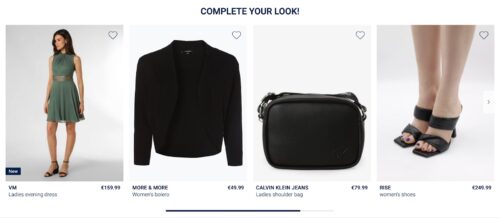
Ever added a pair of shoes to your cart and instantly been tempted by a matching belt? That’s cross-selling at work. Personalized recommendations, when done right, are like having a helpful salesperson who’s available 24/7 to help you find what you need. So, how do you implement recommendations? 

Implementing Recommendations:

  • Use AI to Analyze Behavior: With experience optimization platforms like AB Tasty, you can implement personalized recommendations by using their AI-powered recommendation engine to predict and personalize what visitors might like based on past activity. 
  • Offer Related Products: When visitors start browsing different products, you can show complementary items to help your customers have the most complete purchase. Selling skincare? Why not recommend helpful products to help your visitors “complete their nighttime routine.”
  • Personalize Email Follow-ups: Abandoned carts? Send a friendly nudge with personalized email recommendations to remind your customers what’s waiting in their basket.
email recommendations example on mobile. product recommendation email and promotion.

Want to see the results of recommendations in action? Check out Alltricks’s success story where they saw a +5% in average order value or Jacadi earning +13% more revenue per user with AB Tasty’s recommendations and merchandising solution.

Optimizing Product Pages for Search Engines

Your product pages are like magnets for customers – if they’re SEO-optimized. According to AB Tasty’s E-commerce Consumer Trends Report, nearly half of online experiences begin with a search engine. By improving your SEO and therefore visibility, you’ll make it easier for shoppers to find you. 

Must-Have SEO Features: 

  1. Targeted Keywords: The more details – the better. It’s always best to use longer, search-friendly terms like “women’s waterproof hiking boots” rather than generic ones like “boots.” 
  2. Enticing Meta Descriptions: In addition to a descriptive title, the meta description is your one opportunity to communicate key information about your product with a short, clickable summary to draw in potential buyers.
  3. Alt text for images: Not only does alt text help you meet accessibility standards, but it also improves your chances of showing up in Google Image results.
  4. Detailed Product Descriptions: write descriptions that are informative and keyword-rich while avoiding keyword stuffing.
seo friendly search on website

Leveraging Customer Reviews and Returns Data

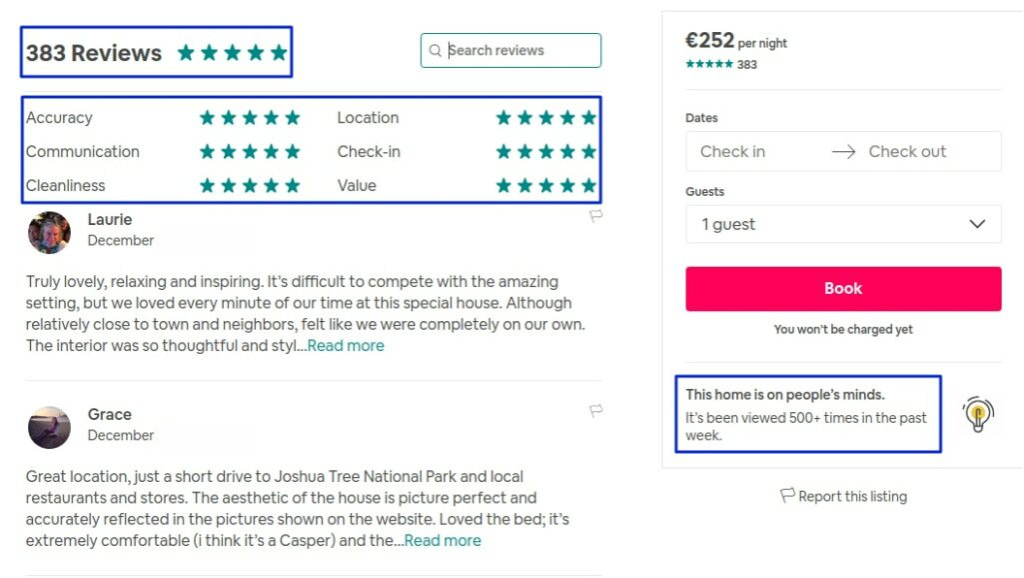
Did you know that the majority of consumers read reviews before buying? In fact, Gen Z considers reviews to be the most important thing to consider before making a purchase (source). Reviews help build trust and provide social proof which helps undecided shoppers feel more confident in their purchases.

Ways to Leverage Reviews:

  • Spotlight success stories: We all love a zero-to-hero story! Highlight top-rated reviews directly on product pages to give confidence to your potential buyers.
  • Encourage feedback: Be proactive in building reviews for your e-commerce site by sending a post-purchase email asking for reviews (bonus tip: offer a small discount or loyalty points as an incentive).
  • Feature photos: Take your reviews a step further by encouraging your buyers to upload user-generated images of your products in real life to help build trust.
highlight and display reviews on airbnb

Turn returns into opportunities

Returns aren’t the end of the world, they’re learning opportunities. Analyze return trends to identify products, flaws, sizing issues, or misleading descriptions. Then, tweak your strategy accordingly to reduce future returns. 

Conclusion:

Online merchandising is where creativity meets strategy. By embracing mobile-first designs, leveraging AI, optimizing for SEO, and personalizing the shopping experience, you can turn casual browsers into loyal customers. In today’s competitive e-commerce world, standing out isn’t optional – it’s essential. 

With these best practices, you’re not just selling products, you’re creating an experience worth remembering.

FAQs: Online Merchandising

  1. What is online merchandising, and why is it important?

Online merchandising is the process of strategically presenting products on your website to boost sales and engagement. It’s vital because it directly impacts the customer experience and your bottom line.

2. How does mobile-first design impact online merchandising?

A mobile-friendly site ensures a seamless experience for the majority of shoppers, who browse and buy via smartphones. This boosts conversions and reduces bounce rates.

3. How can I optimize my product pages for better visibility?

Use targeted keywords, detailed descriptions, high-quality images, and SEO-friendly meta tags to improve both search rankings and user engagement.

4. Why are customer reviews crucial for online sales?

Reviews provide social proof, build trust, and influence purchasing decisions. Highlighting reviews can significantly boost conversions.

5. What tools can help with AI-driven merchandising? 

Platforms like AB Tasty offer advanced AI features to personalize recommendations and enhance the overall online shopping experience.

Article

1min read

5 Ecommerce Merchandising Strategies with Examples

In the vast and competitive world of e-commerce, simply having great products isn’t enough. Your online store is like a stage, and how you present your products can make or break the show. Enter e-merchandising—the art and science of guiding your customers through a shopping journey that’s as smooth as silk and as engaging as a blockbuster movie.

Whether you’re looking to captivate first-time visitors or inspire returning customers, the right merchandising strategies can transform your site from a digital storefront into an experience that keeps customers coming back for more.

Ready to dive in? Here are five e-commerce merchandising strategies, with real-world examples, to help you create a shopping experience that truly shines.

1. Branding and Homepage Messaging: Your Digital First Impression

“Don’t judge a book by its cover” is a great mantra to apply to our personal lives, however, this proverb doesn’t apply to the e-commerce world.

Your homepage is more than just a landing page—it’s the welcome mat to your online store, and it needs to speak volumes. From the moment someone lands on your site, they should know who you are, what you stand for, and how you can make their life better.

Why it matters:

  • First impressions count. A compelling homepage can turn curious browsers into engaged shoppers.
  • Returning visitors want to see something fresh and relevant, not the same old same old.

Pro tips:

  • Tell your story boldly: Your brand story should be front and center. Use a powerful tagline or headline that captures your essence.
  • Test, test, test: Use A/B testing to find out what messaging resonates most with your audience.
  • Show, don’t tell: Include social proof like testimonials and customer reviews to build instant credibility.

Real-world example: Homepage

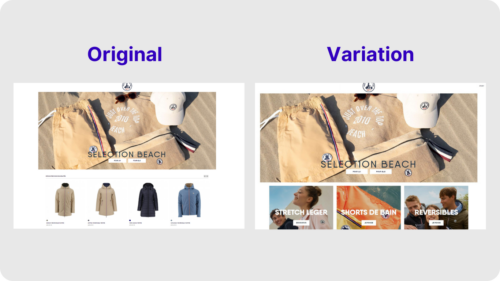
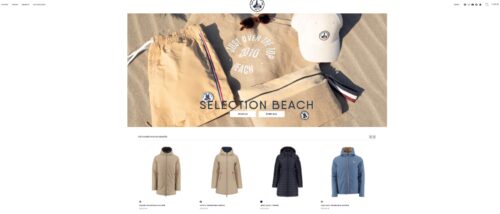
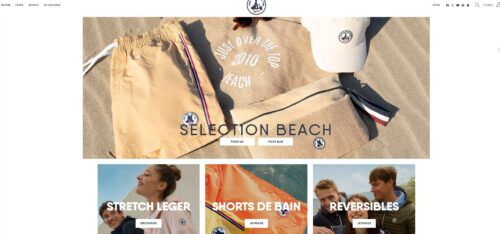
JOTT, a French clothing retailer, noticed that their homepage was experiencing a higher bounce rate than expected. Realizing that first impressions were crucial, they ran a no-code A/B test using AB Tasty’s experience platform to see if rearranging the homepage layout would improve engagement.

By moving product categories to the above-the-fold section and pushing individual product displays lower down, they achieved a 17.5% increase in clicks on the product category blocks. This optimization reduced bounce rates and guided more users deeper into their shopping journey, enhancing overall engagement.

2. Group Merchandise into Collections: Curate Like a Pro

Ever walked into a store and felt overwhelmed by choice? The same thing can happen online. Grouping your products into well-thought-out collections can turn chaos into clarity, making it easier for customers to find what they’re looking for—and maybe even discover something they didn’t know they needed.

Why it matters:

  • Curated collections simplify the shopping experience, helping customers quickly find what they’re after.
  • They also encourage customers to explore more, potentially increasing their basket size.

Pro tips:

  • Get creative with collections: Don’t just stick to the basics. Think outside the box—consider seasonal themes, trending items, or even influencer picks.
  • Use data wisely: Analyze purchase patterns to create collections that reflect what customers are actually buying.
  • Spotlight special collections: Use banners or pop-ups to draw attention to limited-time offers or new arrivals.

Real-world example: Collections

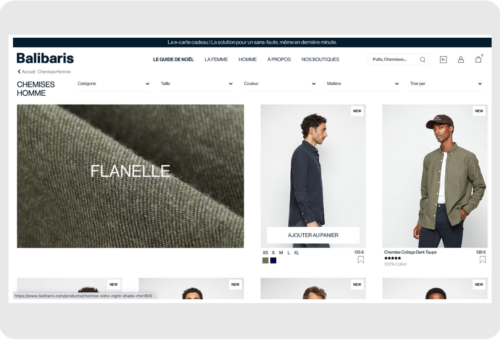
Balibaris, a leading French men’s fashion brand, revamped its e-commerce strategy by intelligently reorganizing its product displays to better match customer preferences and behavior. By dynamically sorting products and emphasizing best-sellers and seasonal items, Balibaris saw a significant increase in conversion rates compared to the previous year, even without special promotions. This strategic move not only enhanced the online shopping experience but also boosted overall sales while freeing up the digital team to focus on more impactful projects.

3. Showcase Products with Visual Merchandising: Let Your Images Do the Talking

In the world of e-commerce, a picture is worth a thousand clicks. Visual merchandising isn’t just about slapping up a few product photos; it’s about creating an emotional connection that makes customers want to reach through the screen and grab that item. High-quality images, videos, and even virtual try-ons can bring your products to life and help customers see how they’ll fit into their lives.

Why it matters:

  • Stunning visuals can make or break a sale. They help customers imagine the product in their own lives.
  • Lifestyle images and videos build an emotional connection, making customers more likely to hit “Add to Cart.”

Pro tips:

  • Go high-def: Invest in top-notch photography that shows your products from every angle.
  • Tell a story: Use lifestyle images or videos to show how your products can be used in real life.
  • Mix it up: Consider adding videos or 360-degree views to give customers a more immersive experience.

Real-world example: Visual Merchandising

Galeries Lafayette, one of France’s most iconic department stores, sought to enhance the online shopping experience by testing the impact of different product image styles. They compared standard packshot images to premium images featuring models wearing the products.

The results were striking: the premium images not only increased clicks by 49% but also boosted the average order value (AOV) by €5.76, adding a potential €114,000 in profit. This shift towards higher-quality visuals resonated with customers, leading Galeries Lafayette to prioritize premium images across their site, significantly improving user engagement and sales.

4. Implement Effective Site Search: Help Shoppers Find Their Perfect Match

When a customer knows what they want, nothing should stand in their way—especially not a clunky search function. A well-oiled site search is like a personal shopper, helping customers find exactly what they’re looking for, faster.

Why it matters:

  • Customers who use search are often more ready to buy, so it’s crucial that they find what they’re looking for quickly and easily.
  • An effective search can turn casual browsers into buyers by surfacing relevant products.

Pro tips:

  • Optimize filters & facets: Let customers narrow down their search results with relevant filters like size, color, and price.
  • Smart error detection: Make sure your search can handle typos and synonyms—because we all make mistakes.
  • Autocomplete magic: Help customers out by suggesting popular search terms as they type.
  • Never show a dead end: Avoid zero-results pages by offering suggestions or related products instead.

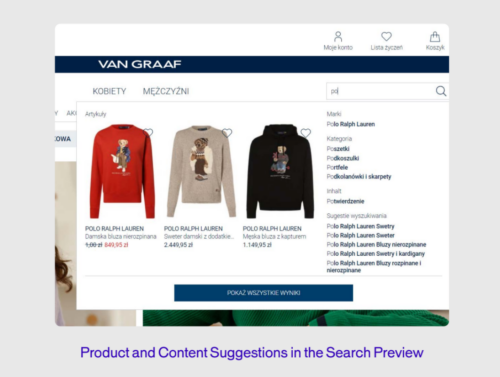
VAN GRAAF, an international fashion retailer, recognized the need to elevate their online search functionality to meet the high standards of their physical stores. By integrating AB Tasty, VAN GRAAF significantly improved the customer journey on their e-commerce site. The results were impressive: online orders from search increased by 30%, conversion rates rose by 16%, and the average order value (AOV) saw a 5% boost. Additionally, the share of sales from search grew by 4.3%. This transformation not only enhanced the shopping experience but also reduced the time the team spent managing search functionalities, allowing them to focus on other critical optimizations.

5. Cross-Sell and Up-Sell Products in Your Shopping Cart: The Power of Suggestion

You’ve done the hard work of getting a product into a customer’s cart—now’s your chance to suggest a few more. Cross-selling and up-selling are subtle yet powerful ways to increase the value of each sale by offering customers items that complement what they’ve already chosen.

Why it matters:

  • Personalized recommendations can boost your average order value and make customers feel like you really “get” them.
  • It’s a win-win—customers discover more great products, and you see a bump in sales.

Pro tips:

  • Personalize everything: Use AI to suggest products based on what’s already in the cart or what similar customers have bought.
  • Bundle it up: Show products that are frequently bought together as a bundle to encourage more sales.
  • Test placement: Experiment with where you place these suggestions—product pages, the shopping cart, or even during checkout.

Real-world example: Cross-sell and Up-sell

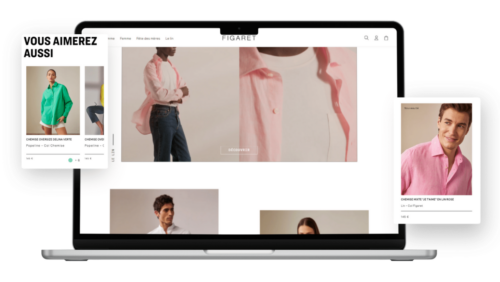
Figaret, a high-end French shirtmaker, significantly boosted its online sales by integrating personalized product recommendations. By strategically placing recommendation blocks on product pages and in the shopping cart, Figaret achieved remarkable results: 6% of visitors used these recommendations, contributing to 10% of the site’s total revenue. Additionally, these users spent on average 1.8 times more than those who didn’t engage with the recommendations. This approach not only enhanced customer engagement but also drove substantial revenue growth.

Measuring Success in E-merchandising: Are You Hitting the Mark?

You’ve put in the work, but how do you know if your e-merchandising strategies are actually working? Measuring success isn’t just about looking at sales numbers; it’s about understanding how each element of your strategy contributes to the bigger picture.

Key Metrics to Watch:

  • Website traffic: Keep an eye on where your visitors are coming from and what they’re doing on your site.
  • Conversion rate: This is the percentage of visitors who actually make a purchase—one of your most important metrics.
  • Sales data: Analyze overall sales, average order value, and revenue from specific merchandising strategies.
  • Average basket size: Track how many items customers are purchasing per transaction to gauge the effectiveness of your cross-selling and up-selling efforts.

Pro tips:

  • Set benchmarks: Compare your metrics against industry standards to see where you stand.
  • Use analytics tools: Platforms like Google Analytics or Matomo can give you insights into how visitors interact with your site.
  • Keep iterating: Don’t settle for good—strive for better. Regularly review your data and tweak your strategies to keep improving.

Conclusion: Trial and Better—The Heart of E-Merchandising Strategies

E-commerce merchandising isn’t a “set it and forget it” task—it’s a continuous journey of trial, error, and improvement. The best strategies evolve over time as you learn more about your customers and the market. So don’t be afraid to experiment, take risks, and, most importantly, keep pushing for better. Every tweak, test, and change you make is a step towards creating an online store that not only meets but exceeds customer expectations.

Ready to take your e-commerce merchandising to the next level?
Download our comprehensive guide on e-merchandising best practices or schedule a free demo with AB Tasty today. Your journey to better starts now.

Article

11min read

Understanding the Digital Customer Journey

In a highly competitive digital marketplace, optimizing your website for a unique and seamless digital customer journey is no longer just a competitive advantage — it’s a necessity.

It’s important to remember that the digital customer journey does not begin and end with a purchase – it’s a web of all customer interactions and touchpoints with your brand.

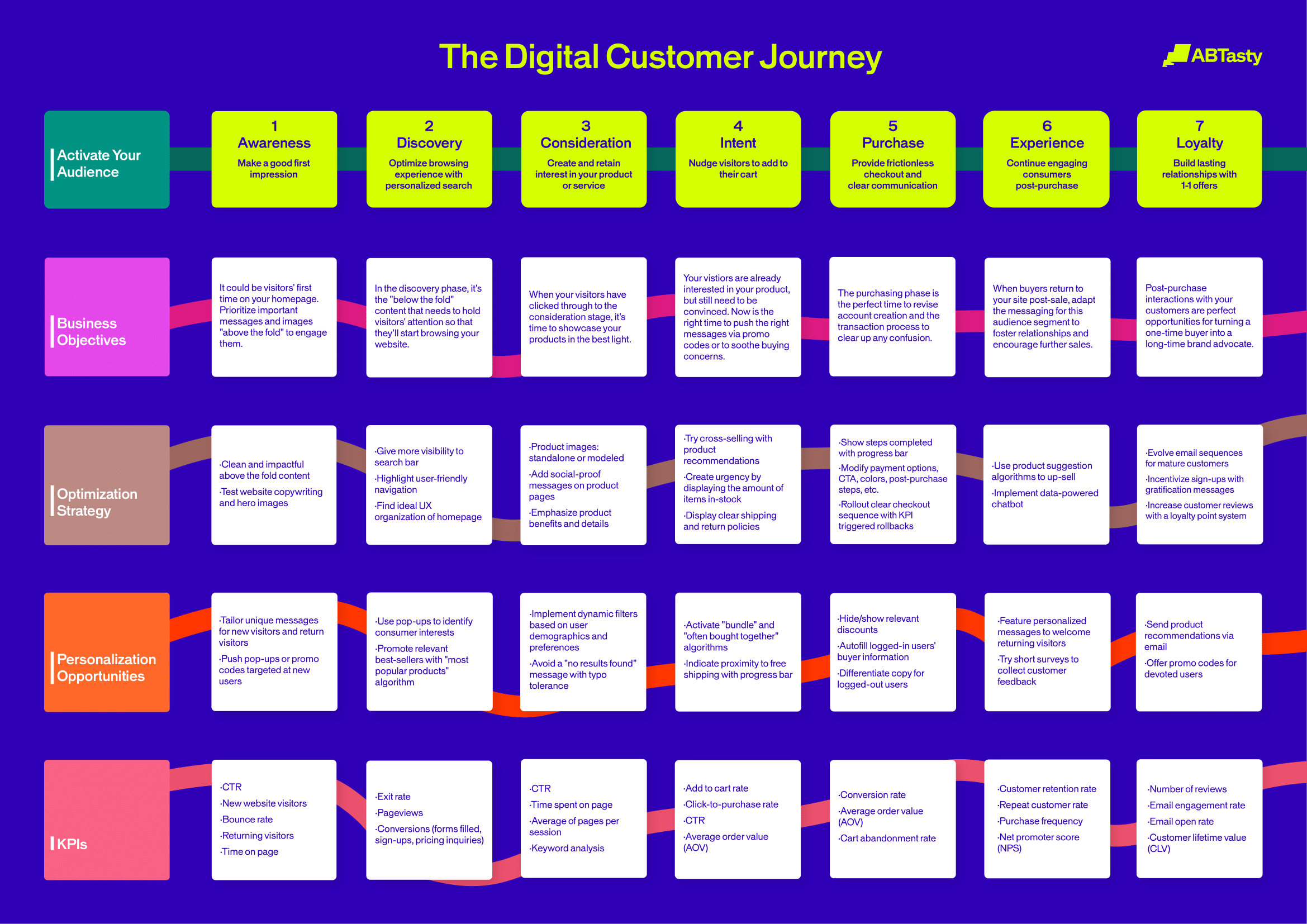
AB Tasty has mapped out seven customer phases that we consider crucial in the journey. To craft unique experiences, you’ll need to differentiate these seven phases customers pass through and understand how to animate their digital journey.

Once you have a better understanding of these phases, you will be better equipped to set your business goals and properly optimize your website for growth and impact.

Click to view the full-sized infographic in a new tab

How exactly can you optimize each phase of the digital customer journey? Let’s dive right in and take a look at some examples.

Phase 1: Awareness

When visitors land on your website for the first time, a great first impression is crucial. Your page needs to be both visually appealing and intuitive. A dynamic above the fold design is a great place to start.

In this first phase, it’s important to let your best ideas shine to capture and keep your visitors’ attention. You can accomplish this by creating personalized welcome messages for first-time visitors, displaying your value proposition and organizing high-impact elements for better visibility.

Let’s take a look at Just Over The Top’s experiment to modify the layout of their homepage. They used AB Tasty’s experience optimization platform to test if their users responded better seeing a layout with product categories rather than individual products.

Original:

Variation:

After creating a test variation to run against the original layout, they saw a 17.5% click increase on the three blocks below the hero image. This brought many more users into the second phase of their customer journey.

Phase 2: Discovery

When consumers reach the second phase, they’ve already discovered your brand and they’re getting curious.

To accommodate visitors during this phase, your website should be optimized for an excellent browsing experience. Whether this means making your search bar more visible, creating dynamic filters while searching, or using a virtual assistant to get to know your visitors’ interests with a series of questions, an easy browsing experience with intelligent search is key.

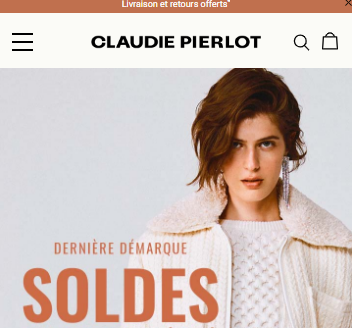
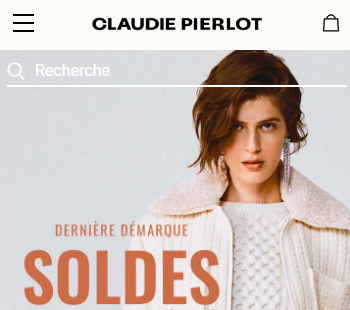
In this example, Claudie Pierlot focused on optimizing the customer browsing experience by testing the search bar visibility. In their variation, the small search icon was made more visible by adding the word “recherche” (or search in English) in the top right-hand corner.

Original:

Variation:

This clear above the fold design made it easier for visitors to identify the search bar to begin their browsing experience. With this simple A/B test, they saw a 47% increase in search bar clicks and a 7% increase in conversion rates coming directly from the search bar.

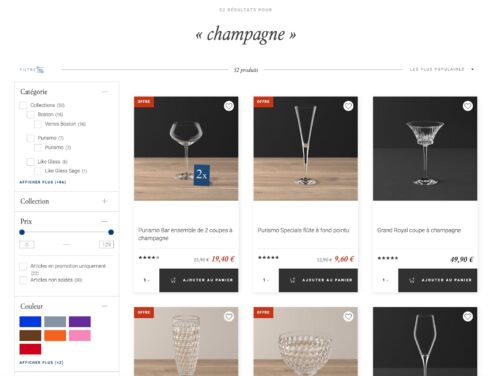
In another example, Villeroy & Boch, a ceramic manufacturing company, wanted to leverage intelligent search on their website. With the help of AB Tasty, they implemented an AI search algorithm to navigate online shoppers.

With our solution, they designed a new and intuitive navigation complete with filters and a comprehensive autosuggestion feature.

By changing their search functions, Villeroy & Boch saw a 33% increase in search results clicks and a 20% increase in sales through the search function.

Phase 3: Consideration

Now is the time when your visitors are considering your brand and which products they are interested in. Showcasing your product pages in their best light during the consideration phase might be exactly what your visitor needs to continue moving down the funnel.

Let’s look at how Hanna Anderson optimized their product pages during this phase.

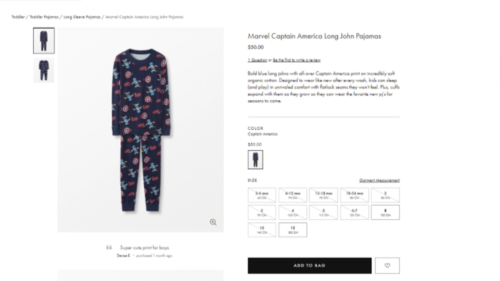
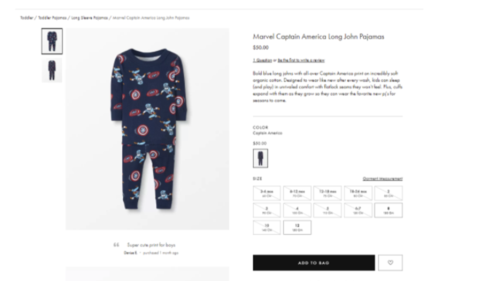
The clothing retail company wanted to experiment with the images on their product listing pages. Previously, their toddler line had only images of clothing sizes for an older child. They were convinced there was room for improvement and decided to run a test by changing their images to include toddler sizes.

Original:

Variation:

After implementing age-appropriate clothing images, the results were clear. During this test, the clicks on PLPs increased by almost 8% and the purchase rate on those items skyrocketed by 22%.

Phase 4: Intent

During the intent phase, your visitors are on the verge of becoming customers but need to be convinced to make a purchase.

Social proof, urgency messaging, and bundling algorithms are a few ideas to lightly nudge visitors to add to cart or add more to cart.

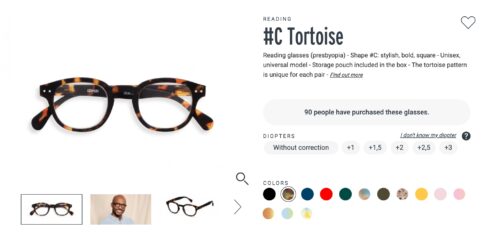
Let’s take a look at the impact that urgency messaging can have: IZIPIZI, an eyewear retailer, decided to add a special message flag next to their product description to show viewers how many people have purchased this product. The idea of this message is to show viewers that this product is popular and to encourage them to take action.

With this simple sentence of social proof to validate a product’s desirability, they saw a 36% increase in add-to-basket rate.

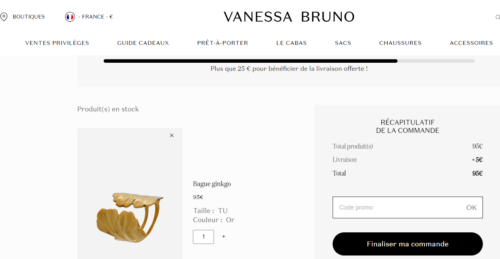
In another scenario, you can see that adding a progress bar is a simple way to upsell. With a progress par, you are showing your customer how close they are to earning free shipping, which entices them to add more to their cart.

Vanessa Bruno experimented with this additive with the help of AB Tasty and saw a 3.15% increase in transactions and a €6 AOV uplift.

Phase 5: Purchase

Purchase frustration is real. If customers experience friction during checkout, you risk losing money.

Friction refers to any issues the visitors may encounter such as unclear messaging during the payment (did the payment actually go through?), confusing or expensive shipping options, discounts not working, double authentication check-in delays, difficult sign-in, and more.

Optimizing your checkout sequence for your audience with rollouts and KPI-triggered rollbacks can help you find a seamless fit for your website.

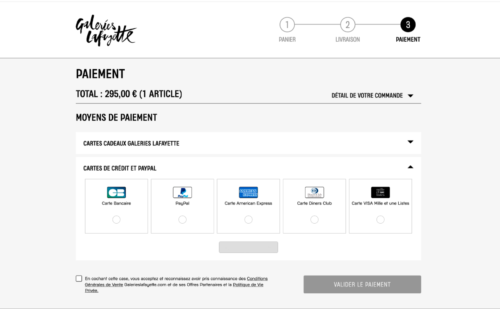
Let’s look at an example for this phase: Galeries Lafayette, the French luxury department store, saw an opportunity to optimize their checkout by displaying default payment methods that do not require double authentication.

During this test, they saw a €113,661 increase in profit, a €5 uplift in average order value, and a 38% increase in the conversion rate by adding the CB (bank card) option for a quicker checkout.

Phase 6: Experience

Optimizing the buyer experience doesn’t end after the purchase. Now is the time to grow your customer base and stop churn in its tracks. So, how do you keep your customers interested? By maintaining the same level of quality in your messages and personalization.

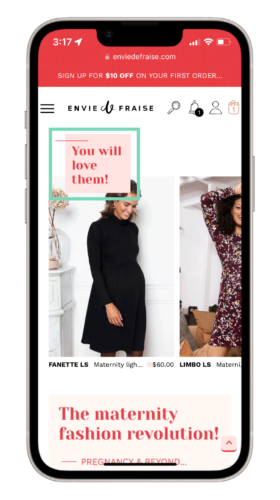
Let’s look at how Envie de Fraise, a French boutique, leveraged their user information to transform a normal post-purchase encounter into a personalized experience.

One of their customers had just purchased a maternity dress and had been browsing multiple maternity dresses prior to their purchase. By knowing this information, they experimented with using the “you will love these products” algorithm to gently nudge their customer to continue shopping.

With a customized recommendation like this, Envie de Fraise saw a €127K increase in their potential profit. As your customer spends more time with your brand, you will learn more about their habits and interests. The more time they spend with you, the more personalized you can make their experience.

Phase 7: Loyalty

In the final step of your customer’s journey, they move into the loyalty phase. To turn customers into champions of your brand, it’s important to remind them that you value their loyalty.

This can be done by sending emails with individual offers, social proof, product suggestions, or incentives for joining a loyalty program to earn rewards or complete product reviews.

Another example of this is sending a personalized email displaying items that are frequently bought together that align with their purchase. This will remind the customer about your brand and give them recommendations for future purchases.

Why Optimizing the Digital Customer Journey is Essential to Boost Conversions

The fierce competition in the e-commerce marketplace is undeniable. In order to attract and retain customers, you have to focus on crafting personalized user experiences to turn passive visitors into active buyers.

Understanding their needs in each phase and optimizing your digital space is your best solution to nudge visitors down the purchasing funnel.

By personalizing the experience of your customers during each phase of the digital customer journey, you can ensure an optimal shopping experience, boost purchases, increase customer satisfaction, and see more repeat customers.

AB Tasty is the best-in-class experience optimization platform that empowers you to create a richer digital experience – fast. From experimentation to personalization, this solution can help you activate and engage your audience to boost your conversions.

Using personalization to enhance your customer journey

With the vast array of products and brands to choose from, customer loyalty has become more important than ever. By focusing on personalizing the digital customer journey, you can reduce the chances of your customer abandoning their purchase or opting for another brand.

An individualized customer journey is beneficial for the following reasons:

  • Option overload: As online brands fight for the attention of consumers, it’s important to set your brand apart from the rest, with a customer journey that is tailored to their needs.
  • Analysis paralysis: With a plethora of information now readily available to customers who are researching and comparing potential purchases, your digital customer journey can help to deliver the information they need with ease and offer them the best shopping experience, thereby tipping the scale in your favor.
  • Lack of loyalty: The ease with which a customer can change service providers has increased the pressure and importance of meeting their needs during the entirety of the digital customer journey. Every interaction matters.

Offering a personalized experience elevates the customer journey and helps to ensure customer satisfaction. By leveraging the power of personalization, you can adapt the individual phases of the customer journey to each customer’s needs for an optimal e-commerce experience.

Personalization is the key to customer satisfaction

There is no way to deny the intense competition in the e-commerce space. Attracting and retaining customers is more difficult now than it has ever been. To advance ahead of the competition, you must understand customer needs and personalize each user journey with the help of a customer journey model.

By personalizing each experience your customers have with your brand, you can be sure to give your customers an optimal shopping experience, guarantee customer satisfaction, and encourage customer loyalty.

Article

8min read

Can AI Improve the Digital Customer Experience? [+5 Examples]

The future of digital experience optimization has arrived and it’s driven by AI.

Are you ready for it?

AI can often be a sensitive subject, as loud voices in the room will boast how AI can replace people, careers, or even entire sectors of society. We’re scaling back the dystopian imagery and instead finding ways where AI can be your sidekick, not a supervillain.

There are two sides to the coin with AI: it can help optimize your time and boost conversions, but it can also be risky if not used properly. We’ll dig into the ways AI can be a helpful tool, as well as some considerations to take.

The positive impact of AI on your customer experience roadmap

In one of our last pieces about AI in the CRO world, we discussed 10 generative AI ideas for your experimentation roadmap. Since the publication of this article, we’re back with even more ideas and concrete examples of successful campaigns.

1. Display reassurance messages to visitors who value it

Some shoppers value their privacy and data safety above all else. How can you comfort these visitors while they’re shopping on your website without interfering with other visitors’ journeys? While salespeople can easily gauge these preferences in face-to-face interactions, online shoppers deserve the same personalized experience when they shop independently.

Let’s see an example below of how you can enhance the digital customer experience for different shoppers at the same time:

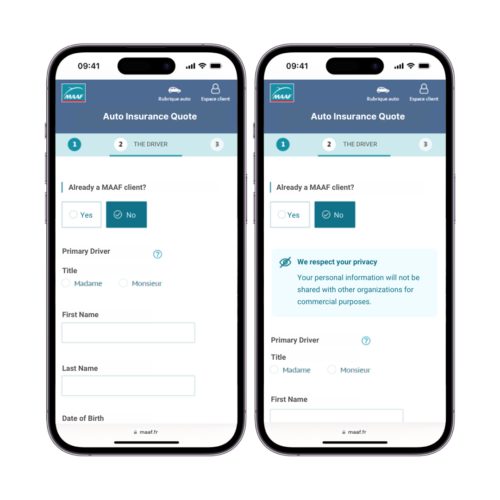
MAAF, a French insurance provider, knows just how complex buying auto insurance can be for visitors. Some shoppers prioritize safety and reassurance messages, while others don’t. With AI systems that segment visitors based on emotional buying preferences, you can detect and cater to this type of profile without deferring to other shoppers. “Intuitive” profiles are receptive to reassurance messages, while “rational” profiles tend to see these extra messages as a distraction.

Emotional segmentation - Improve the digital customer experience with AI

The team at MAAF used advanced AI technology to overcome this exact challenge. Once the “intuitive profiles” were identified, they were able to implement personalized messages ensuring their commitment to their customers’ data protection. As a result, they saw an increase of 4% in quote rates for those directed to the intuitive segmentation, and other profiles continued on their journey without extra messaging.

2. Segment your audience based on their shopping behavior

With so many online shoppers, how can you possibly personalize your website to give each shopper the best user experience? With AI-powered personalization software.

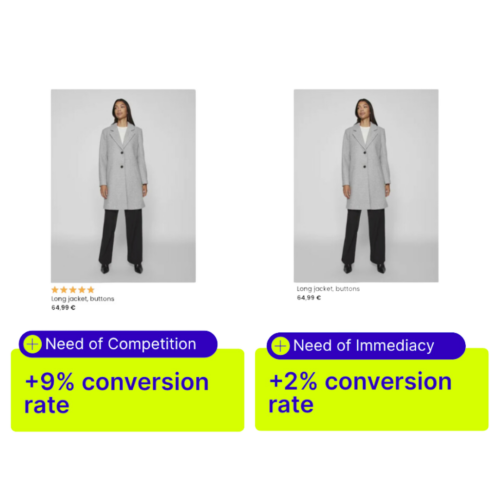
Some online shoppers have a need for competition. Don’t we all know someone who loves to turn everything into a competition? These “competitive” shoppers are susceptible to social-proof messaging and are influenced by the opinions of other customers while searching for the best product. One of the best ways to personalize a listing page for competitive shoppers is to show ratings from their peers. 

Meanwhile, what works for competitive shoppers, will not work effectively for speedy shoppers. Shoppers with a need for immediacy will appreciate a clear, no-frills browsing experience. In other words, they don’t want to get distracted. Let’s look at the example below.

Competition vs immediacy EmotionsAI

This website implemented two different segments targeting online shoppers with a need for “competition” and “immediacy.” These two segments brought in a 9% increase in conversion rates and a 2% increase respectively. The campaign was a success, but how did it work? 

Using AB Tasty’s AI personalization engine, EmotionsAI, this online shop identified its visitors’ main emotional needs and directed them toward a product listing page best suited for them. EmotionsAI turns buyer emotions into data-driven sales with actionable insights and targeted audiences.

Want to learn more about EmotionsAI? Get a demo to see how AI can impact your roadmap for the better!

AB Tasty Demo Banner

3. Automate and personalize your product recommendations 

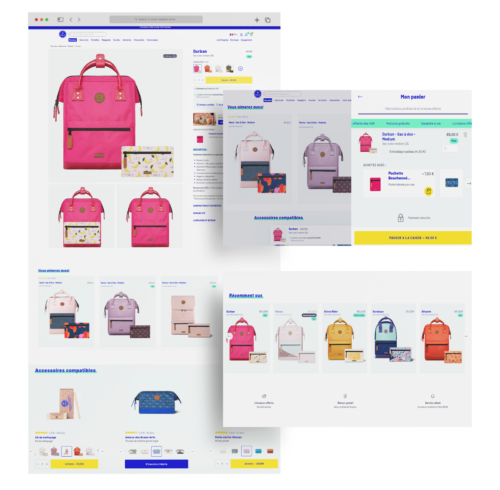
European backpack designer, Cabaïa, used an AI-powered recommendation engine to generate personalized recommendations for their website visitors based on user data collected. The team at Cabaïa previously managed product recommendations manually but wanted to shift their focus to improving the digital customer experience. 

AI recommendation tools put the right product in front of the right person, helping boost conversions with a more tailored experience. Since implementing this AI-powered recommendation engine, they’ve had +13% revenue per visitor, increased conversions by 15%, and raised their visitor’s average cart size by 2.4%.

Cabaia recommendations test

4. Innovate your testing strategy with emotional targeting

According to an online shopper study (2024), traditional personalization is no longer enough. Personalizing based on age, location, and demographics just isn’t as precise anymore.

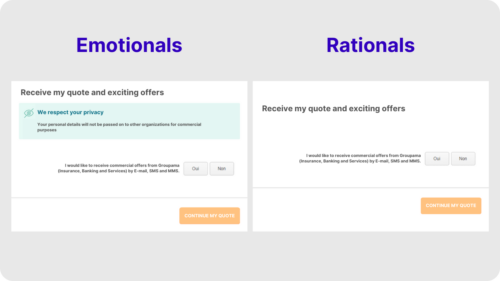
The team at Groupama, a multinational insurance group, wanted to take A/B testing a step further and better adapt their approach to fit their customers’ unique emotional needs. By using an AI-powered emotional personalization engine, they were able to identify two large groups of website visitors: emotionals and rationals. 

They created an A/B test based on these customer profiles. One variation catered to the “emotional” buyers by showing reassuring messaging on the insurance quote to protect their data, and the other catered to “rationals” that displayed the insurance quote without any extra messaging that allowed them to have a distraction-free buyer journey. Within 2 weeks, Groupama saw an instant win with a 10% increase in quote submissions.

Insurance quote segmentation test: emotionals vs rationals

5. Simplify the customer journey and build buyer confidence

Like many financial services, purchasing insurance is inherently complex. Consumer behaviors and expectations in insurance are quickly changing.

As a leading insurer in Singapore, DirectAsia has embraced innovative technologies to better serve their customers. By pioneering new technology, Direct Asia was able to segment their visitors based on emotional needs.

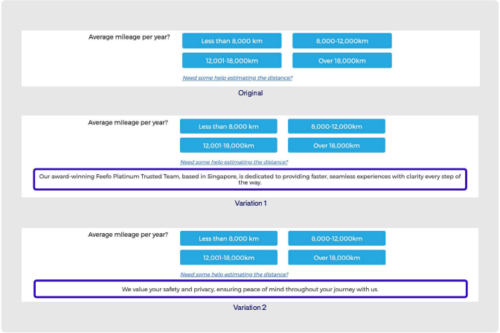
The team at DirectAsia identified that the ‘safety’ segment (buyers needing reassurance) was the top unsatisfied emotional need for visitors on both desktop and mobile devices. With these insights, DirectAsia ran an experiment on ‘safety’ visitors, displaying two banners to reassure them and move them further down the form to the quote page.

DirectAsia A/B Test Copy - Simply the customer journey

The banners led to + 10.9% in access to the quote page for one, and +15% in access to the quote page for the other.

The potential risks of AI on your customer experience roadmap

Artificial intelligence has been evolving (very quickly!) over the past few years and it can be tempting to run full speed ahead. However, it’s important to find the right AI that works for you and helps you achieve your goals. Is AI powering something you need, impacting your business, or is it just there to impress? 

With that in mind, let’s consider some precautions to take while using AI:

  • Unfactual or biased information on data reports, website copy, etc. 

When researching or asking for data sources, it’s important to keep in mind that artificial intelligence can get it wrong. Just as humans can make mistakes and have biased opinions, AI can do the same. Since AI systems are trained to produce information following patterns, AI can unintentionally amplify bias or discrimination.

  • Lack of creativity, dependence, and over-reliance

Excessive reliance on AI can reduce decision-making skills, creativity, and proactive thinking. In competitive industries, you need creativity to stand out in the market to capture your audience’s attention. Your roadmap could suffer if you put too much faith in your tool. After all, you are the expert in your own field.

  • Data and privacy risks 

Protecting your data should always be a top concern, especially in the digital experience world. You will want a trusted partner who uses AI with safeguards in place and a good history of data privacy. With the fast-developing capabilities of AI, handling your data correctly and safely becomes a hurdle. As a general best practice, it’s best not to upload any sensitive data into any AI system – even if it seems trustworthy. As these systems often require larger quantities of data to generate results, this can lead to privacy concerns if your data is misused or stored inappropriately.

  • Hallucinations 

According to IBM, AI hallucinations happen when a large language model (LLM) thinks it recognizes patterns that aren’t really there, leading to random or inaccurate results. AI models are incapable of knowing that their response can be hallucinogenic since they lack understanding of the world around us. It’s important to be aware of this possibility because these systems are trained to present their conclusions as factual.

Conclusion: Using AI in the Digital Customer Experience

As with any tool or software, AI is a powerful tool that can enhance your team – not attempt to replace it. Embracing the use of AI in your digital customer experience can lead to incredible results. The key is to be aware of risks and limitations, and understand how to use it effectively to achieve your business goals.

Article

13min read

What is One-to-One Personalization in Marketing? (With 8 Examples)

It’s no secret that today’s digital marketplace is highly competitive. Consumers are exposed to an increasingly high number of messages each day. How can you make your message relevant to your consumers and break through the noise?

To capture consumers’ attention, brands need to focus their attention on crafting unique user experiences to deliver 1:1 personalization based on data.

One of the most important focal points to convert visitors into customers and build customer loyalty is 1:1 personalization. More and more customers feel less motivated to complete a transaction when they’re online shopping if their experience is impersonal. Let’s take a look at some data from Forbes:

  • 80% of consumers are more likely to complete an online purchase with brands that offer personalized customer experiences.
  • 72% of consumers explain that they only interact with personalized messaging.
  • 66% of consumers share that coming across content that isn’t personalized would deter them from purchasing.

Customers want personalization. Think about when you walk into a physical store and an employee really listens to your needs, helps you find exactly what you’re looking for, or goes above and beyond your expectations to help you. That is exactly what customers want in the digital marketplace.

A unique, digital one-to-one personalization experience strategy gives companies the potential to customize messages, offers, and other experiences to each website visitor based on data collected about each user.

Digital one-to-one personalization starts with concrete data. Are you leveraging data to better serve and convert your visitors?

To help you answer “yes” to this question, we’ll take a deeper look at:

one to one personalization in marketing

What is one-to-one personalization in marketing?

Delivering a unique (or one-to-one) experience to each online consumer is a technique known as one-to-one personalization in marketing.

By mastering the technique of 1:1 personalization, brands can deliver an exceptional level of customer service by providing personalized messages, product recommendations, offers, and specialized content at the right time based on the user’s needs and expectations.

This type of unique user experience is only made possible thanks to the availability of extensive customer data. If you don’t get to know your customers based on their interactions with your brand and user behavior, you’re missing an opportunity to meet your customers’ expectations.

One goal of personalization is to create a “wow” effect. This means you should be making the customer think, “wow, they really know me.” The more information that a company knows about a certain customer, the more personalized the user experience will be.

Without extensive, personalized data, one-to-one personalization isn’t achievable.

What data to collect to improve your customer experience with personalization?

On a wider scale, it’s important to understand the location of your customer, their demographic information (age, gender, education level), purchasing habits, and website browsing information. However, in the hypercompetitive world of personalization, this surface-level data is not enough.

Brands need to move beyond knowing who the customer is and understand how the customer behaves.

Knowing that your customer is a recent college graduate who lives in New York City and spends a lot of time making Pinterest boards will not be enough information to create a strong buyer persona to achieve a unique and pleasant user experience.

1-1 personalization customer segmentation

Enhancing your customer’s profile will require you to collect relevant data about how your customer interacts with your brand on all channels, what motivates them to purchase, and what makes them tick on top of knowing who they are.

More specifically, robust personalized data will help you better understand:

  • Location and demographics
  • Interests and hobbies
  • Shopping and purchasing habits
  • Device and channel frequency
  • Where and how they prefer to shop and purchase
  • Satisfaction level
  • Likes and dislikes

All of this information will allow you to create a sophisticated customer profile. Understanding their motivations, preferences, and expectations helps you characterize users into intricate market segmentations to give them the best possible experience imaginable.

Ideally, the customer will have a positive experience and feel unique based on the information derived from the robust data collection.

How do you find user data?

Extensive data can be found and refined by cross-indexing information stored on separate databases.

For example, you can harvest personalized data from a customer’s interactions with your business by analyzing and storing comments on social media sites, ratings on review sites, mobile app usage vs. desktop usage, customer service interactions, download requests, and more.

How to leverage one-to-one personalization with personalized data

As you can see, personalization cannot exist without data. To achieve one-to-one personalization on your digital channels, your brand must have the ability to transform the collected data into action.

After monitoring and gathering rich data on your customer’s interactions, history, and behavior on your site, it’s time to convert this personalized data into a refined customer buyer persona to serve your customers better.

By segmenting your profiles, you will be able to better understand your customer’s preferences and pain points, which will help you craft these personalized messages and display them at the right time.

How to personalize interactions with customers:

Once you have substantial personalized data collected about your visitors, you can determine the best way to interact with them. There is a fine line between being helpful by displaying personalized messages and being invasive.

The difference in these two feelings will depend on the amount of prior engagement that the customer has with you. For example, a customer who is subscribed to every newsletter has a company discount card and frequently completes transactions on your website will expect you to know their preferences fairly well, like a regular coming into a coffee shop. On the other hand, a first-time visitor will not expect you to know much about them, but they will expect to be welcomed.

The best way to understand how to serve your customers is by asking yourself how you would want to be interacted with at their level of engagement with your brand. What would make you feel welcomed and what would make you feel overwhelmed or uneasy?

What messages should you personalize?

The possibilities for personalized messages can stretch as far as your mind (or your software capabilities) will allow.

Think about personalization in a broad sense. Let’s say a company wants to put its logo onto personalized gifts for its employees. The company’s logo can be put onto t-shirts, pens, stickers, coffee mugs, phone cases, backpacks, sunglasses, golf balls, holiday baskets– the possibilities are nearly endless. The same goes for personalized messages for your own customers.

In marketing communication, some of the most common outlets for 1:1 personalization are:

  • Product recommendations
  • Emails (subject lines and content)
  • Intro and exit banners
  • Pop-up messages
  • Conversational marketing (chat boxes)
  • Offers and discounts
  • Language
  • Landing pages
  • Pricing
  • Greetings

To attract and retain your customer’s attention in a market filled with saturated messages, your brand should focus on personalization as much as possible and in as many channels as you can.

What platform to use for one-to-one personalization in marketing?

The journey to a seamless one-to-one personalization, or one-to-one marketing, experience for your customers starts with sophisticated and intuitive software to help transform your ideas into reality.

AB Tasty is the complete platform for experimentation and personalization equipped with the tools you need to create a richer digital experience for your customers — fast. With embedded AI and automation, this platform can help you achieve omnichannel personalization and revolutionize your brand and product experiences.

AB Tasty Demo Banner

What is omnichannel personalization?

In marketing, employing one-to-one personalization across multiple channels, platforms, and touchpoints is commonly referred to as omnichannel personalization.

Customers crave personalization wherever they are – on a mobile device, desktop, social media platform, mobile app, or email. When customers receive a personalized experience, they expect this standard of communication across all channels or platforms that they are interacting with.

Achieving omnichannel personalization requires a seamless flow of customer data from one platform or channel to the next. By gathering information on user preferences, behavior, and interests from all virtual touchpoints, your customer’s profile strengthens.

By receiving this consistent level of personalization across all channels, consumers will be inclined to purchase more and to purchase again from the same brand that made them feel seen and heard.

What are the advantages of omnichannel personalization?

  1. Higher conversion rates
  2. Increased average order value (AOV)
  3. Reduced cart abandonment
  4. Improved brand value and customer loyalty
  5. Higher customer lifetime value
  6. Delivering messages at the right time and place

8 Examples of 1-1 Personalization strategies from retail brands

1. ASOS’s Social Connection

ASOS - social platforms for account creation

Online retailer ASOS prides itself on offering both new and existing customers a range of personalized discounts and deals, which vary depending on if:

  • It’s a new customer 
  • It’s a returning customer that’s demonstrated a particular interest (e.g. shoes)
  • A regular customer (who could then be offered premium next-day delivery, for example)

But how does ASOS get this information? One method they might use is encouraging customers to log in to the site using social media platforms, which would allow ASOS to access further details such as age, gender, and location—which can then be used to tailor even more personalized messages.

Why it works: The ability to use a social platform for account creation makes the process simple for shoppers, while giving ASOS more insight into what deals or promotions would be of the most interest to them.

2. Nordstrom Remembers Your Size

Nordstrom gave its online shopping cart a simple yet effective personal touch: remembering returning customers’ clothing sizes. This may not seem like a massive approach to deliver a personal experience, but it creates a more seamless checkout for the user and brings them one step closer to the purchase. It’s a rather clever move from Nordstrom that hasn’t gone unnoticed.

Why it works: Remembering the customers’ preferred size (based on previous purchases) instantly shows the brand’s attentiveness while making checkout even more simple.

3. Clarins personalization and gamification

Before the booming holiday season, Clarins, a multinational cosmetics company, saw an 89% increase in their conversion rate and a 145% increase in the add-to-basket metric by implementing 1:1 personalization and gamification with AB Tasty.

On Single’s Day, a few weeks before Black Friday, Clarins saw a perfect opportunity to experiment and learn culture by implementing a “Wheel of Fortune” concept in certain countries. The gamification gifts were personalized according to each country’s local culture. Any visitor arriving at their website would play the digital game, spin the wheel, and receive a gift automatically in their inbox. This ease of automatic implementation was a great user experience, especially for mobile visitors.

Read the full story here: How Clarins Uses AB Tasty for Personalization and Retention

4. Amazon’s ‘Recommended For You’ Approach

Amazon's recommended for you

Amazon is no stranger to personalization marketing. In fact, it could be argued they were the first major e-commerce retailer to really put personalization into action. The company has become known for its product recommendation emails and personalized homepages for logged-in customers. Using their own algorithm, A9, Amazon goes above and beyond to first understand customers’ buying habits and then deliver an experience that’s been deliberately designed for relevance. 

Why it works: Customers feel valued and understood by the retailer when seeing emails and recommended “picks” that are tailored to their interests. Consistency also plays a part in Amazon’s approach, as they continue to deliver an even more granular personalized approach for customers.

5. Nike and Their Customized Approach

Nike'a customizable shoe

Nike always goes the extra mile to personalize the shopping experience, as we’ve seen with their SNKRs app that allows premium (loyalty, Nike+ shoppers) access to a large catalog of products that they can then customize. It’s the perfect way to cement customer loyalty by offering them the unique opportunity to tailor items to their exact liking.

Why it works: By giving customers a certain degree of autonomy with design, Nike is giving customers the freedom to express their individuality, even while the company continues to produce the same style of shoe around the world. Despite being a huge brand, Nike has created a great loyalty program that engages customers and stokes their excitement about buying Nike products.

6. Net-A-Porter’s Personalized Touch

Luxury online retailer Net-A-Porter has adopted the ‘recommended for you’ approach but with a unique twist to appeal to its high-end customers who want a more premium service when they shop. The company gives away freebie products to customers based on previous purchases, adding a personal touch to an otherwise standard online shopping experience. This is not unlike Amazon’s recommended emails, except Net-A-Porter customers receive a physical product — and who doesn’t like a gift!

Why it works: These gifts show the appreciation Net-A-Porter has for its customers and help to bring the luxury shopping experience online.

7. Coca-Cola’s Name Campaign

In 2011, Coca-Cola launched its Share a Coke campaign in Australia, printing thousands of names on their diet and original soft drinks. This simple yet effective campaign made sales skyrocket, supporting the notion that consumers engage with brands that address them by their first name (albeit in a rather broad sense!) Personalized bottles became all the rage, with people trying to find their own names along with those of their friends and family members. The campaign was globally recognized and started the ball rolling for other brands such as Marmite, which also saw great success with a naming campaign.

Why it works: Is it the simple notion of vanity that makes these name campaigns so popular? Consumers love to see their own names on popular products, making them almost ‘gimmicky’ with a collectible edge that makes people feel special!

8. Target’s Guest ID

The US retail giant Target decided to up its personalized campaign game by assigning each customer a guest identification number on their first interaction with the brand. Target then used the data to obtain customer details like buying behavior and even job history! Target used personalized data to understand the consumer habits of its customers and to create a view of their individual lifestyles. Target focused particularly on customers who also had a baby registry with them and even used their marketing data to make ‘pregnancy predictability scores’ for customers who were browsing particular items!

Why it works: Arguably, delivering a personalized experience for every customer visiting a physical store is a tough job for any retailer. By assigning a ‘guest ID’, Target was able to understand buying behaviors and patterns from their customers in-store and use the information to make suggestions on products they may be interested in.

Everyone wins with one-to-one personalization

The data you collect equally benefits your brand and your customers. By understanding what your customers are looking for, you save them time by providing them with informed recommendations, personalized messages, and unique experiences to solve their pain points.

Without proper data collection or genuine segmentation, it’s nearly impossible to provide users with a 1:1 personalized experience. Loyal customers want to feel like their brand really knows them and what they’re looking for. Achieve one-to-one personalized experiences by correctly analyzing and leveraging personalized data. If you’re looking to serve your customers, increase sales, and build brand loyalty at the same time, you’ve found your blueprint with personalization.

Article

18min read

Your Guide to Product Listing Pages and How to Optimize Them (+ Examples)

If you ask most e-commerce marketers how to optimize your website to generate more conversions, they’ll tell you to focus on your homepage or product detail pages. While that answer is technically correct, there is a potential goldmine for clicks that even the most seasoned marketers overlook: product listing pages

While these pages are often used as a catalog for your products and services, they can offer much more than an opportunity to optimize the customer experience. Since visitors browsing your product listing pages are already engaged with your online store, they just need one final push to convert.

In this article, we’ll show you everything you need to know about product listing pages, how to optimize your PLPs, and some examples of great product listing pages.

What are product listing pages?

Product listing pages (sometimes called PLPs or category landing pages) are pages on a website that display products based on a selected category; they may also be based on applied search filters. Product landing pages lead visitors to product detail pages where they can find more information on the items they’re interested in or even add said items to their cart.

One of the main drivers for optimizing your product listing pages is the opportunity they present for optimizing your user experience, as they can be tailored to shoppers with different user intent. On the one hand, we have buyers who visit a website knowing exactly what they are looking for. These potential buyers want to view the items that are most relevant to their search or intent (e.g. a user looking for a mountain bike doesn’t want to view road bikes). On the other hand, other visitors simply love browsing and use your PLPs to sift through the list of products that suit their preferences.

Of course, your product listing pages are not only about navigation and UX. They do much more. With a well-optimized PLP, you’ll be able to boost your SEO, increase user engagement, and improve your conversion rate!

Key elements of a product listing page and how to design your PLPs for better conversions

Creating an effective product listing page starts with the basics. Designing your product listing pages in an optimal way, with all the relevant elements, will increase the odds of shoppers finding the products they are looking for and making a purchase. Here’s what you should make sure to include in your product listing pages:

1. PLP page name: Descriptive title

Remember that Google will only display the first 25, 50, or 64 characters of your title, so make sure your PLP title is optimized accordingly. For example, if you are selling cell phones, you might want to structure your titles according to make, model, memory size, and color so that shoppers can see the most important information upfront.

2. Description: Keyword-rich

The product description and title have a big impact on your PLP’s SEO and product discoverability. Make sure that your descriptions are thorough and contain all the relevant keywords that will help you rank higher. Remember: the more specific, the better. 

3. Breadcrumbs: Proper category name 

Make sure that each product is placed in the most relevant category to both orient your shoppers and help them discover similar products. Breadcrumbs can display the parent category/subcategories so that users can jump back and forth between product listing pages with ease.

4. Imagery: Thumbnail

People process visual information faster than anything else, and your product images will be the first thing a customer sees. Use high-quality photos and be consistent (for example, use the same color background for every image). If you use various backgrounds, colors, and sizes, your customers will be distracted. Want proof? Read our case study on  Hanna Andersson where they have proven that keeping all images simple, clear, and harmonized will work wonders for results.

5. Price

Make sure that your pricing is competitive. Do your research and benchmark your prices against your competitors and make amendments. Highlight any other elements that make your pricing more competitive, like free shipping, or buy-one-get-one-free offers.

6. CTAs

Call to action buttons (also known as CTAs) are items that use imperative wording to nudge your users towards the action you want them to take, like “Add to cart now!” or “Save to Wishlist” if a product is unavailable. It’s important to create an effective CTA by following design best practices and carefully testing different variations of your call to action’s copy, location and colors.

Make sure that your button is visible against the background and all the other elements on the page. This not only draws the visitor’s eye to the call to action but shows them that the button is clickable. It’s important that your button looks like a button, even if you want to adopt a more minimalistic design for your website.

Next, make sure that your call to action conveys urgency. Using phrases like “Sign up now,”  “Hurry” or “Don’t delay” encourages your users to not only act, but to act fast. It’s also a good idea to utilize first-person copy so that the visitor feels more connected to the CTA.

7. Filter menu

This menu displays the filtering options available to refine searches by attributes, like pricing, color, style, availability, size, and more. This will help your customers find what they are looking for easily.

8. Sorting menu

The sorting menu presents different options for organizing products using a dropdown menu, including “Price: Low to High,” “Newest,” or “Rating: High to Low.”

Sorting options have a sole purpose: narrowing down the number of products in order to increase conversion. Your sorting options should be based on your audience’s needs and expectations regarding your products. Thinking in the minds of your customers is crucial for optimization at this point in the digital customer journey.

Let’s take WatchShop as an example.

How to sort products in e-commerce listing page

WatchShop knows that watches come in all sorts of shapes and colors, so they created various sorting options to match visitors’ requests. This includes water resistance, strap type, case color, movement type, and so on.

It’s all tailored to match customers’ expectations – and it delivers. 

10 best practices for creating and optimizing product listing pages

Now that you know how to design your product listing pages, let’s get into how to optimize them for the best results:

1. Optimize headers or banners

Headers play the “title” role of each category and listing page design.

They’re the main indication of the page’s content and should be treated as the most important thing. If the header does not properly describe the page or the category, visitors will not be able to find what they are looking for.

Headers can reinforce your branding, so use the space on the top of your page to create a great-looking banner that engages and informs without adding clutter. In addition, never forget to include your keywords inside your <h1> tags. Not only will this make them more visible on the page, but they’re also a bit part of your on-page SEO efforts that will help you appear higher in search results.

In the image below, beauty specialist Ulta bets on shiny visuals to increase its headers’ visibility. It’s a good solution to avoid “all text” headers that can seem dull at first glance.

Take care of the headers of your product page

Note: headers can also be used as promotional spaces to display featured products, special offers, and discounts.

2. Experiment with multiple layouts on your product listing display

Your product listing display has a significant impact on the way your customers interact with the products. Unfortunately, there’s no easy answer when it comes to choosing between list and grid views. In fact, it all depends on what type of products you’re selling and what experience you want to provide. The most common choices are list view or grid view:

List view

List views require a little more scrolling but can display more product information than a grid. This makes it easy for shoppers to compare product attributes, like dimensions or features. Some sites let customers toggle between a list or grid view, depending on their preferences.

The list view is better suited for products that require extensive information and specifications in order to help customers compare aspects of similar products.

It’s a great fit for technical products like TVs, computers, electronics, DVDs, hardware, etc. However, this isn’t the only time to use list view for your product pages.

If we take a look at the image below, Wine.com sells luxury wines and champagnes. In this case, it’s important that visitors take their time benchmarking the brands and “grands crus” before making a purchase decision.

Notice how they capitalize on the extra horizontal space to display ratings.

Pros of list view for listing product page

Grid view

Grid views allow customers to browse and compare products next to each other. This is a good option if your site is picture-heavy and doesn’t require a lot of description outside the product titles.

Grid view is mostly used for products that rely a lot on pictures and can be compared quickly without paying much attention to the specifications. It also allows for more visual experiences.

Amazon uses grid view to display products inside its “gift ideas” category. They also use tags to rank the bestsellers and lure visitors into clicking on the products based on their popularity.

Grid view pros for listing page

3. Add persuasion triggers

Persuasion triggers create a sense of urgency or scarcity. You most often see this on hotel booking sites or the sales section of a fashion store (“Only 1 item left at this price!” or “Selling out fast!”). These labels trigger visitors’ fear of missing out and push them to take action, so be sure to add them to your images to nudge them into making a purchase.

Create a sense of urgency

4. Personalize the shopping experience

Personalization can dramatically increase conversions, boost engagement, and help shoppers discover relevant products by sorting them according to their individual preferences. Personalization has also been known to reduce bounce rates by 20-30% and increase customer loyalty.

One thing you can do to personalize the experience for your visitors is to display complementary products that they might be interested in. For example, customers shopping for a new bedspread might also be interested in buying pillowcases or sheets, so steer them in that direction.

5. Use recommendations

If someone is already browsing your product listing page, the chances are that they already have the intent of making a purchase. This is the best time to make suggestions and cross-sell or upsell your products:

  • Some customers suffer from decision fatigue when they are presented with too many options. Gently recommend popular products, others within the same category and with the same tags, or similar (but slightly pricier) alternatives.
  • Show customers recommended products that might be relevant to the one they are viewing. For example, clients who are interested in a technical product would appreciate a “People who purchased this product also purchased” section that shows the accessories that go along with it.
  • Present seasonal bestsellers to add specificity and relevance, which could lead to more clicks and conversions. We tend to think that other people’s actions are the correct ones, so if a product is tagged as “trending,” it gains additional legitimacy that could push a customer to make a decision.

Want more information about buyer behaviors in e-commerce? Check out our 2024 consumer study report!

6. Implement intuitive navigation

Your navigation has to be tailored to help prospective customers find what they are looking for as easily as possible with as little friction as possible. There are a few tips and tricks you can try, including:

  • Put your best-selling items front and center: We’ve already touched on the fact that customers like knowing what items others are buying. The most popular options are often seen as the safest ones to buy. Throw in some social proof messages like user ratings to really drive the point home.
  • Site speed is a crucial factor for UX: Make sure that your site loads quickly on both desktop and mobile devices to ensure that customers have an enjoyable experience.
  • Ensure that your navigation bar is fixed to the top of the page and organizes your products in a logical fashion.

No matter the level of page depth, navigation always plays a crucial role in the user’s experience – and your product listing page should not be different. Because some products have complex specifications and require extensive sorting options, pay attention to your website’s performance when it comes to sorting products and helping customers find their perfect product.

In the image below, RevZilla does a great job of guiding customers through the endless journey of finding the right motorcycle helmet.

Faceted search for easy to navigate product catalogue

They use their left column to help customers sort and rank products according to several criteria (faceted search):

  • Color
  • Type
  • Shape
  • Category
  • Size
  • Gender
  • Bonus point: RevZilla provides visitors the opportunity to only display products that have a video review. This is a huge value proposition compared to their competitors.

7. What information to display on your PLPs?

There are tons of options regarding which information you can display on your product listing pages and category pages. Simply put, you need to display information that will effectively help and convince consumers to move down the funnel and make a purchase.

In order to help you choose, here’s a list of information that may be displayed on your product listing page:

  • Star ratings
  • Discounts
  • Color options
  • Stock availability
  • Best-sellers
  • Add to cart
  • New / Used
  • Short descriptions

As an example in the image below, BestBuy does a great job of providing useful information on its product listing page. Besides the pictures and the price, they also added: star ratings, discounts, and an add to cart button with a smart color hierarchy.What information to display on a product listing page

8. Optimize SEO for product listing pages

SEO is a big deal for most e-commerce players. In fact, search engine traffic accounts for around 50% of all e-commerce traffic according to a 2023 study led by SmartInsights.

There are two main reasons that justify the dominance of product listing pages regarding SEO:

A. Product listing pages are keyword-rich

Because they contain the names, brands, prices, specifications, and descriptions of products, category pages tend to be keyword-rich. This means that they naturally rank for a lot of keywords in search engines.

B. Product listing pages are the most heavily linked to

Product listing pages are typically where you want your customers to start their journey (or alternatively on the product page itself), which is why SEO pros tend to focus their efforts on these pages. Besides this, all products within a category generally link back to that category, which is a strong internal link-building pattern.

Tips for optimizing SEO on your product listing pages:

  • Optimizing your title tags
  • Using unique and original product and meta descriptions
  • Linking to internal pages
  • Using image alt attributes and rich snippets

9. Should you use Quick View or add-to-cart buttons?

Quick View is an e-commerce function that allows visitors to generate a miniature version of the desired product page. In other words, it’s a mini product page that generally embeds a direct “add to cart” button.

Not all products require lengthy deliberation and consideration before making a purchase, especially for returning customers or others purchasing fast-moving goods like groceries. Creating add-to-cart buttons makes it easier to speed through the checkout process. You can also implement add-to-wishlist buttons for more complex or expensive items to maximize conversions.ㅤ

10. Use clear and concise CTAs

Call to action buttons can have a massive impact on your conversions. When Dutch watch brand Cluse noticed that their product listing pages had high bounce rates (and that clicks to the product display pages were low), they turned to AB Tasty to find a solution.

Cluse set up a simple test to see whether changing their CTA’s location and color would improve the results. The team’s hypothesis was correct, and the site saw a 2.39% increase in the click-through rate to the product display page and a 1.12% uplift in transactions during the three-week test.

CLUSE User generated content

Examples of effective product listing pages

ASOS

ASOS uses short but descriptive copy on their product listing pages. 

ASOS store image

The clothing retailer’s product listing pages are categorized by trends and style. They use extremely simple copy and appealing photographs to convince shoppers to make a purchase. Users can add items to their wishlist or cart directly from the product listing page and check out using the simple navigation banner.

Everlane

Everlane uses quick add-to-cart buttons to optimize their product listing pages

Everlane page image

Everlane uses a number of features from the best practice guidebook, including adding product size options as an overlay in the image, easy navigation using the grid view and sidebar, and quick add-to-cart buttons.

Walmart

Walmart uses compelling headers and content on their product listing page.

Walmart page image

Walmart puts bestsellers on top of their product listing pages, Walmart puts bestsellers on top of their product listing pages, along with engaging headers that feature collections by influencers like Sofia Vergara and Kim Kardashian. They also use quick add-to-cart buttons to make it easier to shop. The copy is clear and concise, and users are able to comfortably scroll through galleries of attractive images. Returning users are greeted with a warm, personalized message.

How many products per page and per row to display on your PLP?

If you opt for a grid view template, there’s no doubt that you’ll eventually come to the question, how many products per row?

As for choosing between list view and grid view, there’s no single answer that will fit everyone’s needs. In fact, the number of products displayed per row depends on 3 main factors:

  1. Image size – If you choose to display big, high-resolution images; there’s no doubt that you will have a hard time squeezing more than 4-5 products in a row.
  2. Number of products – The number of products listed per row also depends on your total number of products for a given category. If you only have 12 products to display, it’s a lot more coherent to opt for a 4X3 grid structure rather than 2X6. You need to fill the page visually.
  3. Volume of information – Not all products are considered equal when it comes to their product description. Some products natively require more information than others. The more space they need, the fewer products you will display.

In the image below, Canada Goose, a high-quality outerwear provider, relies on a 2-products-per-row structure. This strategy highlights the visuals and delivers a more premium feeling to the user’s experience. 

Ideal number of products to display on a e-commerce listing page

How to find what works best on your product listing pages?

A/B test your product listing pages.

There is no secret when it comes to Conversion Rate Optimization (CRO) – testing is what makes it work. The recipe for success doesn’t change for your product listing pages, you just have to A/B test them.

Now the question is, how can you do that? We have great news for you: we’re A/B testing specialists.

Making a good product listing page isn’t easy. You will have to identify elements that work and elements that don’t to gradually increase your conversions and offer an overall better user experience to your customers.

Want to start optimizing your product listing pages? AB Tasty is the best-in-class experience optimization platform that empowers you to create a richer digital experience – fast. From experimentation to personalization to smart search and recommendations, our solution can help you activate and engage your audience to boost your conversions.

Conclusion: The ultimate product listing page

Product listing pages can be conversion machines. When they’re properly optimized, they’re key for delivering an exceptional customer experience, helping you rise to the top of search engine results, and increasing basket size.

Whether you’re a seasoned seller or are venturing into the world of e-commerce for the first time, it may seem overwhelming to hit all the right notes – and find the best ideas to take your product listing pages to the next level!

Creating product listing pages will look a bit different depending on your market sector. However, for maximum performance, keep these best practices in mind for your e-commerce brand.